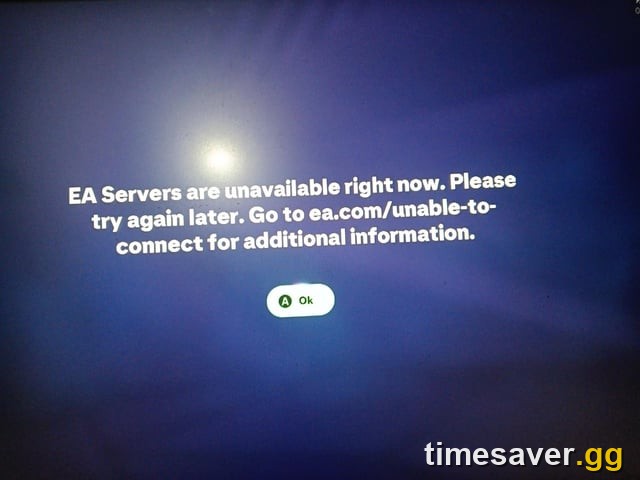
Quick answer (TL;DR): If EA FC 26 is showing "Unable to connect to the EA servers" or "EA servers are unavailable right now," the first thing to do is check whether it's EA's problem or yours. EA FC 26 had a confirmed global server outage on Friday, August 7, 2026 — EA Sports later posted that "the issue has been resolved." So step one is always help.ea.com/en/server-status/ and the EAFCDirect / EA_FC_Direct status posts: if EA lists an outage, it's server-side and no amount of restarting fixes it — you wait. If EA shows everything green but you still can't connect, it's your side, and the fix order is: restart the game → power-cycle console/router → toggle Cross-play OFF then ON → change your DNS → disable VPN/antivirus/firewall filtering → test a second EA account. Full steps for PC, PS5, and Xbox below.
Short on funds for the market? You can buy EA FC 26 coins from Timesaver with Comfort Trade delivery on PS5, Xbox and PC.
EA Sports FC 26 - Coins
Get up to 1M Coins in 10 minutes
Key Takeaways
- First move is diagnosis, not troubleshooting. Check help.ea.com/en/server-status and Downdetector before you touch a single setting — a global outage can't be fixed from your couch.
- August 7, 2026 was a real EA-side outage. UK national outlets (Mirror, Express) covered EA FC 26 going offline across PC, PS5 and Xbox; Downdetector logged a report spike, and EA confirmed the issue was resolved the same afternoon.
- If EA status is green, it's your connection. The fastest self-fixes are a full game restart, a power-cycle of console + router, and a Cross-play OFF→ON toggle inside FC 26's online settings.
- DNS is the most under-used fix. Switching to Google (8.8.8.8 / 8.8.4.4) or Cloudflare (1.1.1.1) DNS resolves a large share of "unable to connect" cases caused by ISP routing to EA's servers.
- Common error codes with this message include 100, 721, 918 and 524 — they all point to the same "can't reach EA services" root cause, not four different problems.
- If nothing works after a global outage clears, it's almost always your EA account or region routing — that's an EA Support ticket, not more reinstalling.
Is EA FC 26 down right now, or is it just me?
Before changing anything, confirm where the problem lives. There are only two possibilities: EA's servers are down for everyone, or something on your connection is blocking the path to EA. They have completely different fixes, so guessing wastes time.
Do these three checks first:
- EA's official server status: open help.ea.com/en/server-status/ and look for EA SPORTS FC 26. If it says anything other than "no issues," it's a server-side outage.
- Downdetector: downdetector.com/status/ea shows a live report graph. A sudden spike into the hundreds means it's a widespread outage, not you.
- EA's social status feed: EA posts confirmed outages and "resolved" updates to its help and FC channels — that's where the official all-clear lands.
This exact situation played out on Friday, August 7, 2026. EA FC 26 went offline across platforms, players were locked out of Ultimate Team, and the outage was significant enough that UK outlets ran live coverage. As Express reported at the time, reports "drastically" climbed with dozens logged in a short window before EA responded. EA Sports then confirmed, in its own words, that "the issue has been resolved." The lesson: on a day like that, the "fix" is patience plus the status page — anyone who reformatted their PC that afternoon wasted their time.
"It's not just you — FC26 servers are down following the release of the FC27 beta." — r/EASportsFC report, August 7, 2026, one of dozens confirming the outage was global rather than account-specific.
If the status page is green and Downdetector is quiet, skip ahead — the rest of this guide is your fix list.
The fix, step by step (EA status is green but you still can't connect)
Work through these in order. Roughly 80% of "unable to connect to the EA servers" cases that are not a global outage clear within the first four steps.
1. Fully restart EA FC 26 (not just back out to the menu)
Close the game completely — quit the application, don't just return to the main menu. On console, close the game from the dashboard so it isn't suspended in the background. Relaunch. A stale session token after a brief EA hiccup is the single most common cause, and a clean relaunch reissues it.
2. Power-cycle your console/PC and your router
- Turn off the console or PC.
- Unplug the router at the wall for 60 seconds (this clears the modem's connection table, not just a soft reboot).
- Power the router back on, wait for a full connection, then boot the game.
An EA Forums advisor's standard first instruction for this error is blunt: "Try power cycling your console and router, clearing the game's saved online profile data (if available), and checking whether the issue occurs on another EA account." Do the power-cycle properly — a real 60-second unplug, not a quick off/on.
3. Toggle Cross-play OFF, then ON
This is the FC-specific trick most players miss. Inside FC 26, go to your online settings, turn Cross-play OFF, enter an online mode, then turn Cross-play back ON and re-queue. This forces the game to renegotiate its connection to EA's matchmaking layer and clears a surprising number of stuck-connection states.
4. Change your DNS
ISP DNS routing to EA is a frequent culprit, especially in regions with poor peering to EA's data centres. Switch to a public DNS:
- Google DNS: `8.8.8.8` and `8.8.4.4`
- Cloudflare DNS: `1.1.1.1` and `1.0.0.1`
Set it on your console's network settings (PS5/Xbox both allow manual DNS) or on your PC/router, then restart the game. This alone resolves a large share of persistent "unable to connect" cases that survive a restart.
5. Remove anything filtering the connection
Temporarily disable anything sitting between you and EA:
- Turn off any VPN — VPNs frequently route you through a region EA rate-limits or blocks.
- Disable antivirus web-shield / firewall rules for the game (re-enable them after testing).
- On PC, allow EA FC 26 and the EA app through Windows Firewall.
6. Test a second EA account
If you can, sign in with a different EA account on the same console. If the second account connects fine, the problem is tied to your account or region routing — that's an EA Support case, not a hardware fix. If the second account also fails, the issue is your network or a lingering outage.
Platform-specific fixes
PC (Steam / EA app)
- Run Repair on EA FC 26 in the EA app (Menu → Repair) to fix a corrupted install or anti-cheat.
- Clear the EA app cache (EA app → Help → App Recovery → Clear Cache).
- Confirm EA FC 26 and the EA app are allowed through Windows Firewall and not blocked by antivirus.
- If you're on Wi-Fi, test on a wired Ethernet connection — packet loss triggers this error too.
PlayStation 5
- Close the game from the dashboard, then rebuild the PS5 database in Safe Mode (hold power until the second beep → "Rebuild Database").
- Set a manual DNS (8.8.8.8 / 8.8.4.4) in Settings → Network → Set Up Internet Connection.
- Run the PS5 connection test and confirm PSN itself is online.
Xbox Series X|S
- Fully close FC 26 (menu button → Quit), then restart the console.
- Power-cycle: hold the Xbox button 10 seconds until it fully shuts down, unplug for 30 seconds, restart.
- Clear the alternate MAC address (Settings → Network → Advanced → Alternate MAC → Clear), then restart.
- Set a manual DNS in the advanced network settings.
EA Sports FC 26 - FUT Champions Boost
Get FUT Champions wins in 10 minutes
What do the FC 26 connection error codes mean?
You'll often see a code alongside the message. The important thing to know: these are not four separate problems — they all mean "the game couldn't complete a handshake with EA's services."
- Error 100 / 721 / 918 / 524 — generic "failed to connect to EA servers." Most often server-side (outage/maintenance) or a DNS/routing issue on your end.
- "EA servers are unavailable right now" — usually a live outage or maintenance window; check the status page first.
- "Disconnected: Unable to connect to the EA servers. Please check your internet connection and try again." — the in-match drop version; the Cross-play toggle and DNS fixes target this one specifically.
Because the codes share a root cause, the fix order above works for all of them. Don't chase a specific number — chase the status page, then your connection.
Still can't connect after the outage cleared?
If EA has confirmed the outage is resolved and you're still stuck, you're in the small minority whose issue is account- or region-specific. At that point:
- Open an EA Support case at help.ea.com — they can inspect your account and region routing, which you can't.
- Post your platform, region, ISP and error code on the EA FC 26 Technical Issues forum — EA advisors and other players there have flagged regional routing/peering issues (e.g. specific ISPs) that only EA can fix at the network level.
- Don't reinstall repeatedly. One clean reinstall is worth trying; five is not — a reinstall doesn't touch account or routing problems.
Get back to competing without losing your week
Server outages don't just cost you playtime — they cost you Rivals wins, Champions qualification, and the objectives on a deadline. If a downtime day set you back in Ultimate Team and you want to make up ground fast once the servers are stable, that's exactly where a coin top-up or a Weekend League boost turns lost time into a stronger squad:
Recover from downtime and hit your targets faster:
- EA FC 26 Coins — rebuild or upgrade your squad instantly once servers are back.
- EA FC 26 FUT Champions Boost — protect your rank and rewards when a bad connection day threatens your run.
Every service is handled by experienced players on timesaver.gg, so a server hiccup doesn't have to wreck your season.
Frequently Asked Questions
Is EA FC 26 down right now? Check help.ea.com/en/server-status and downdetector.com/status/ea for the live picture. EA FC 26 had a confirmed global outage on August 7, 2026 that EA said was later resolved; outages recur, so the status page and Downdetector spike are always the fastest way to know whether it's EA or you.
What does "Unable to connect to the EA servers" mean in FC 26? It means the game couldn't complete a connection to EA's online services. It's caused either by an EA-side outage/maintenance, or by something on your side — most commonly DNS/ISP routing, a VPN, a firewall, or a stale session. Check EA's status first; if it's green, run the restart → power-cycle → Cross-play toggle → DNS steps.
How do I fix the FC 26 connection error on PS5? Close the game from the dashboard, power-cycle the console and router (unplug the router 60 seconds), set a manual DNS (8.8.8.8 / 8.8.4.4), rebuild the PS5 database in Safe Mode, and toggle Cross-play OFF then ON inside FC 26. If a second EA account connects fine, contact EA Support — it's account-specific.
Will changing my DNS really help? Often, yes. A significant share of persistent "unable to connect" cases come from your ISP's DNS routing poorly to EA's servers. Switching to Google (8.8.8.8 / 8.8.4.4) or Cloudflare (1.1.1.1) DNS bypasses that and is one of the most reliable self-fixes when EA's status page shows no outage.
Do error codes 100, 721, 918 and 524 mean different things? No. They're all variations of "failed to connect to EA servers." Rather than troubleshooting each code separately, follow the same order: confirm EA's server status, then work through the connection fixes. The root cause is shared.
I reinstalled and it still won't connect — what now? Stop reinstalling; it doesn't fix account or region routing. Open an EA Support ticket at help.ea.com and post your platform, region, ISP and error code on the EA FC 26 Technical Issues forum. If a global outage just cleared and only you are affected, it's an account/network case only EA can resolve.