If Fortnite is not working, crashing to desktop, or closing as soon as you press Play, start with one question: is it Epic's servers or your machine? Answer that in 30 seconds and you skip most of the wasted effort. This guide covers both sides for Chapter 7 Season 4 "Override" on the current v42.40 update (live since 15 October 2026). You get the server check, the Easy Anti-Cheat errors that cause most PC launch failures, the crash fixes that actually work, and the console steps for PS5, Xbox and Switch.
Quick answer: First check status.epicgames.com and @FortniteStatus on X. If Fortnite shows as Operational there, the problem is most likely on your side. On PC, most "Fortnite won't launch" and "keeps crashing" cases are fixed by these steps, in order: restart the PC, verify the game files in the Epic Games Launcher (Library → Fortnite → ⋯ → Manage → Verify), repair Easy Anti-Cheat (Epic's method uses a shortcut with a `repair` argument), then update your GPU driver. Epic's own Easy Anti-Cheat help page lists closing background programs and verifying files as core steps. The v42.40 update (15 October 2026) also fixed "launch crashes that could occur on certain AMD video cards," so make sure you're fully patched. Epic's developer forum targets the next big update, v43.00, for 1 November 2026, and launch problems often spike on patch days.
Is Fortnite down right now, or is it just me?
Check this before you change any setting. A real outage can't be fixed on your end. A local problem won't get fixed by waiting.
- Epic Games Public Status — status.epicgames.com. This is the only official status page. It lists Fortnite, Login, Matchmaking, Fortnite Crew, and Parties, Friends and Messaging as separate components. When we checked at 03:20 UTC on 18 October 2026, every Fortnite component was Operational, with no open incidents.
- @FortniteStatus on X. Epic posts downtime start times, hotfixes and "we're investigating" messages here first.
- Scheduled maintenance. The status page has an Epic Online Services maintenance window booked for 10 November 2026 at 6:00 AM UTC, lasting up to 90 minutes. During it, Sessions and Lobbies may be degraded and "existing player sessions will time out and clients will be disconnected." If you get disconnected from a session during that window, the maintenance is a likely cause.
If status is green and your friends can play, the problem is most likely on your side. Keep reading.
Patch days are the exception. When v42.40 rolled out on 15 October, Downdetector-based figures reported by Sunday Guardian Live showed game launch problems at 43% of submitted reports, server connection at 25% and gameplay at 16%. A lot of "Fortnite not working" on update day is just the patch still rolling out. Close the game, let the update finish, and relaunch.
Why does Fortnite say "Servers are not responding"?
You see this message for one of three reasons:
- Scheduled downtime. Epic takes servers offline for updates, usually starting at 4 AM ET, and matchmaking stops shortly before that. The status page and @FortniteStatus will show it.
- You're on an old build. If an update has gone live and your client hasn't downloaded it, you can't connect. Restart the launcher or console so the update starts.
- Your network path. The status page is green but you still can't connect. Restart your router, switch to a wired connection if you can, and turn off any VPN. A VPN that routes you through a distant region is a common cause of login and matchmaking failures.
Don't pay for "ping reducer" apps to fix this. If Epic's servers are down, nothing you install will get you in.
How do I fix Fortnite not launching on PC?
Most PC launch failures come from three things: corrupted game files, a broken Easy Anti-Cheat service, or another program interfering with startup. Do these fixes in order and test the game after each one.
1. Do a real restart, not a sleep/wake
Restart Windows fully. A lot of anti-cheat failures happen because an earlier Fortnite or EAC process is still running in the background. Epic's Easy Anti-Cheat support page says it directly: "Close all programs. Some programs will interfere with Easy Anti-Cheat." The same page links to Epic's cold-reboot guide for this step.
2. Verify your Fortnite files

This is the fix that solves the most problems. Open the Epic Games Launcher → Library → click the three dots (⋯) on Fortnite → Manage → Verify Files → Verify. The launcher compares your install with Epic's current build and re-downloads anything missing or damaged. Your saved data, locker and progress aren't affected, because they're stored on your Epic account and not in these files.
Verification can take several minutes on a large install. Let it finish before you relaunch.
3. Run Windows' own file repair
Epic's EAC troubleshooting article also tells you to run Microsoft's System File Checker. Open Command Prompt as administrator, run `sfc /scannow`, and reboot when it's done. This repairs Windows system files that the anti-cheat driver depends on.
4. Update your GPU driver, especially on AMD
The official v42.40 update notes (15 October 2026) list a PC fix: "Fixed launch crashes that could occur on certain AMD video cards." If you were crashing on launch with an AMD card before that patch, update Fortnite first, then get the current driver from AMD (Adrenalin) or NVIDIA (the NVIDIA app). The same notes mention "additional stability improvements" on PC and a fix for "an issue where some players would receive hotfixes with a delay." A client that was missing a hotfix can behave like a broken install, so a fully updated client is part of the fix.
5. Note the exact error, then contact Epic
If the game still won't launch, write down or screenshot the exact error text and code. Searching that exact message gets you a far more specific fix than "Fortnite not working," and Epic Player Support will ask for it if you open a ticket at epicgames.com/help.
6. Reinstall as the last resort
If none of the steps above work, uninstall Fortnite from the launcher (Manage → Uninstall), restart, and reinstall. It's slow, but it's the only thing that clears every file in the install.
How do I fix Easy Anti-Cheat errors in Fortnite?

Easy Anti-Cheat (EAC) is the anti-cheat that Fortnite runs alongside the game. When EAC fails, Fortnite either won't launch or kicks you mid-match with a "There was an error" screen. The fix depends on which message you see.
"Easy Anti-Cheat is not installed"
The EAC service is missing or damaged. Repair it:
- Close Fortnite and the Epic Games Launcher.
- Go to the Fortnite install folder. On a default install that's `C:\Program Files\Epic Games\Fortnite\FortniteGame\Binaries\Win64\EasyAntiCheat`.
- Follow Epic's own repair method: right-click the EasyAntiCheat setup file in that folder and choose Create Shortcut. Right-click the shortcut, open Properties, and add a space plus the word repair to the end of the Target field. Then run the shortcut.
- Restart the PC, then verify files again (step 2 above) so the launcher puts back anything that's still missing.
Error 30005 — "CreateFile failed with 32"
In Windows, error 32 means another process is already using the file. EAC is trying to load a file that something else has locked, which is often a leftover Fortnite process. A full restart (not sleep) usually fixes it. If it doesn't, temporarily turn off third-party antivirus or "game booster" software, or add the Fortnite folder to its exclusions, then try again.
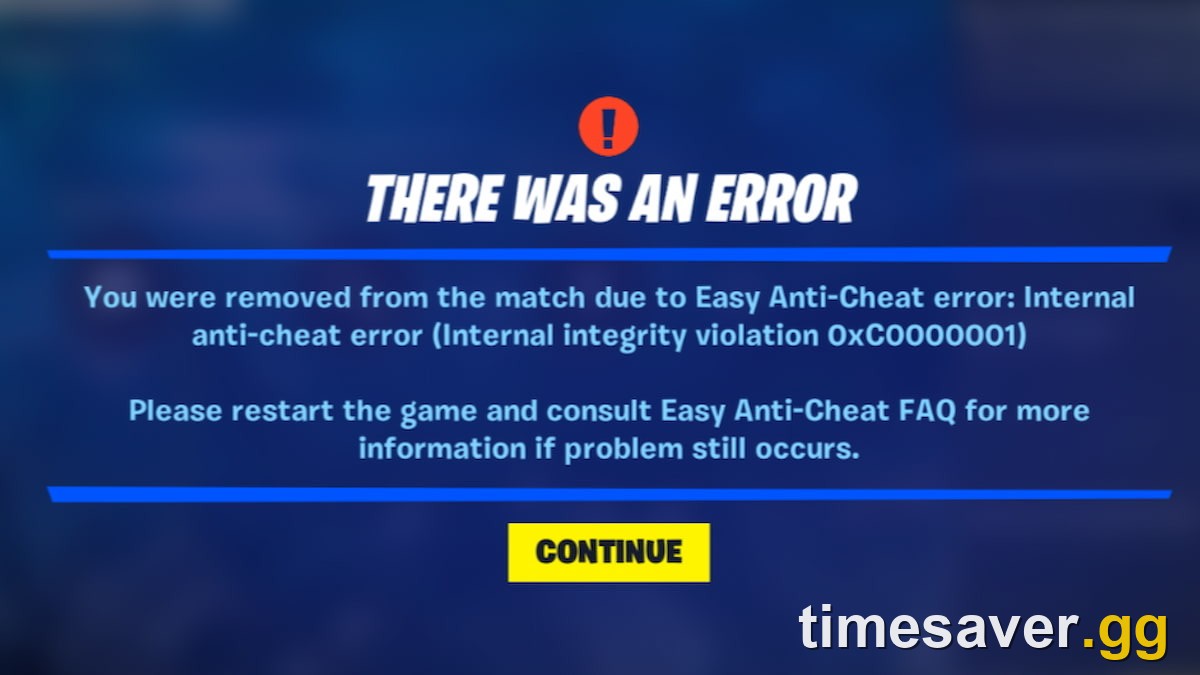
"Internal anti-cheat error (Internal integrity violation)"
This one shows up as a red "There was an error" screen that kicks you from a match. The fix is the same as above: verify files, repair EAC, and close overlays, RGB utilities and other background programs before you launch. Epic's EAC page lists background programs as a known cause.
"Easy Anti-Cheat closes Fortnite right after launch"
A thread on r/FortNiteBR on 18 October described exactly this. Fortnite starts, EAC loads, and then everything closes. That pattern often points to a damaged EAC install or a program blocking it. Work through restart → verify → repair EAC → run SFC, in that order.
Secure Boot / TPM errors (tournaments only)
If you get "Boot validation failed: PCR mismatch" or a Secure Boot validation error when you join a tournament, the cause is different. Epic's TPM and Secure Boot support page says that since 27 February 2025, Windows players "must enable TPM 2.0 and Secure Boot to be eligible for tournaments that require an Account Level of 350 or higher." Epic's fix is to update your BIOS and turn on TPM and Secure Boot in it. Epic ties this rule to tournament eligibility, so these errors usually appear when you try to enter a tournament.
Why does Fortnite keep crashing mid-match?
Crashes during a match (as opposed to at launch) usually come down to one of these:
- Out-of-date client or driver. Update both first. The v42.40 AMD fix only helps if you're on v42.40.
- Overheating or unstable overclocks. Reset any GPU or CPU overclock to stock and see if the crashes stop.
- Too much running in the background. Browser tabs, recorders and overlays all use memory that Fortnite needs.
- Rendering mode. If DirectX 12 crashes on your hardware, switch to Performance Mode under Settings → Video → Rendering Mode. (DirectX 11 is no longer an option there: Epic removed it in v40.10, April 2026.) Our Fortnite stuttering and FPS drops fix guide covers what each mode is good for.
If the game freezes instead of crashing, and stays open but stops responding to input, that's a different bug. On 18 October, r/FortNiteBR players reported that loading into a match while the Item Shop was still loading could stop the game taking any input from controller, mouse or keyboard. Another player said the selection wheel had stopped working: "I can't use any vending machines, console overrides, talk to npcs, or anything with that wheel." These are player-reported symptoms, not issues Epic has confirmed. Restarting the game is the first thing to try. If your controller isn't detected at all, see our Fortnite controller not working on PC fix. Also note that v42.40 fixed a bug where the Lock Input Method as Mouse setting stopped controller and mouse from working together.
How do I fix Fortnite not working on PS5, Xbox or Switch?
Consoles don't use the PC anti-cheat steps, but corrupted data and stuck updates happen there too. Before anything else, check the status page, then try these:
- PS5: Fully close Fortnite, check for an update (Options → Check for Update), and restart the console. If it still crashes, boot into Safe Mode, choose Clear Cache and Rebuild Database, and pick Clear System Software Cache first. Rebuilding the database is the next step if that doesn't help. Neither option deletes your games or saves.
- PS4: Check for an update, then fully power-cycle the console: shut it down, unplug it for a minute, and turn it back on. If the game is still corrupted, delete and reinstall it. Your progress is stored on your Epic account.
- Xbox Series X/S / Xbox One: Hold the power button for about 10 seconds to fully shut down. For a deeper reset, unplug the power cable for a minute before turning it back on. Then check for updates under Manage game and add-ons.
- Nintendo Switch / Switch 2: Update the system first. Then go to System Settings → Data Management → Manage Software → Fortnite and run Nintendo's corrupt-data scan (Check for Corrupt Data on Switch; Scan for Corrupted Data on Switch 2). If it finds a problem, redownload, then relaunch.
Your skins, V-Bucks and progress are tied to your Epic account on every platform, so reinstalling never deletes them.
What should you NOT do when Fortnite isn't working?
- Don't download "Fortnite fixer" tools or patched game files from unofficial sites. Third-party files can trigger an anti-cheat ban, and some are malware.
- Don't trust "free V-Bucks" or "free skin" offers that show up in fix-it videos and comment sections. Epic has never given out V-Bucks through public codes. Those offers are built to steal Epic logins.
- Don't keep reinstalling during a confirmed outage. If status.epicgames.com shows a problem, wait for it to clear.
Will the season change break Fortnite again?
It might, for a few hours. Epic's Override Battle Pass page says Chapter 7 Season 4 "Override" ends November 1, 2026 Eastern Time. Epic's own v42.40 known-issues post on the developer forums names the next update: a known issue has its "Fix targeted for v43.00 (November 1)." Season-launch updates are large, so expect long downloads and a downtime window. Some players may also see launch issues while the new build settles and shader caches rebuild. If Fortnite isn't working on 1 November, check the status page first. Our guides to the Chapter 7 Season 4 end time and what comes next season cover the timing.
FAQ
Why is Fortnite not working today? First check status.epicgames.com and @FortniteStatus. If they show an outage or downtime, wait it out. If everything is Operational, the problem is most likely local: restart, verify your files in the Epic Games Launcher, repair Easy Anti-Cheat and update your GPU driver. On 18 October 2026 all Fortnite services were Operational.
Why does Fortnite keep crashing on startup? On PC, the usual causes are corrupted game files, a broken Easy Anti-Cheat install, an outdated GPU driver, or a background program blocking EAC. Verify your files, repair EAC as administrator, and update your driver. The v42.40 update (15 October 2026) specifically fixed launch crashes on certain AMD video cards.
How do I fix "Easy Anti-Cheat is not installed" in Fortnite? Close the game and the launcher. Open the EasyAntiCheat folder inside `FortniteGame\Binaries\Win64` in your Fortnite install, create a shortcut to the EasyAntiCheat setup file, add a space and the word repair to the end of the shortcut's Target field, and run it. Then restart and verify your files in the Epic Games Launcher.
Will verifying files delete my skins or progress? No. Verifying only checks the files installed on your device against Epic's build. Your locker, V-Bucks and progress are stored on your Epic account and aren't touched.
Do I need TPM and Secure Boot to play Fortnite? Epic's requirement covers tournaments: since 27 February 2025, Windows players need TPM 2.0 and Secure Boot to be eligible for tournaments that require Account Level 350 or higher. Secure Boot validation errors come up when joining those tournaments.
When is the next Fortnite update? Epic's developer forum post for v42.40 targets v43.00 for 1 November 2026, the same day Epic's Battle Pass page lists as the end of Chapter 7 Season 4 "Override" (Eastern Time). Expect downtime that day.
More Fortnite guides: once you're back in, check out the rest of our Fortnite coverage for season timing, level-up methods and event guides.
Applies to Fortnite Chapter 7 Season 4 "Override," update v42.40. Last checked 18 October 2026 against status.epicgames.com, Epic's v42.40 update notes and Epic Developer Community known-issues post, and Epic Player Support.