The single biggest mistake new NBA 2K27 builders make is spreading attributes thin — an 80 in everything looks balanced and plays like mush. Attributes in 2K27 aren't just stat bars; each point is bought with VC, and the numbers that actually matter are the breakpoints that unlock a badge tier or an animation. Hit the threshold and you get the reward; land one point short and that VC did nothing. This guide covers how attributes unlock badges in 2K27, the key rating breakpoints worth planning around, how Badge Tokens change the math, and what shifted with Update 2.0 heading into Season 2 (live October 16, 2026).
Quick answer (TLDR): In NBA 2K27, attributes unlock badge eligibility at fixed thresholds (badges run from Bronze up through Silver, Gold and Hall of Fame to Legend), but you still have to spend a Badge Token to equip the badge — 20 slots to start. Plan your build around 2–3 badges you want at Gold or Legend and stop a rating the moment it clears that badge's number; don't chase an even 90 for its own sake. Height is checked before attributes, so a badge can be locked no matter how high your rating. 2K does not publish an official requirement table — the Builder shows you in real time which badges you qualify for and the token cost as you move each slider, so verify every number in-game before you commit VC.
How do attributes unlock badges in NBA 2K27?
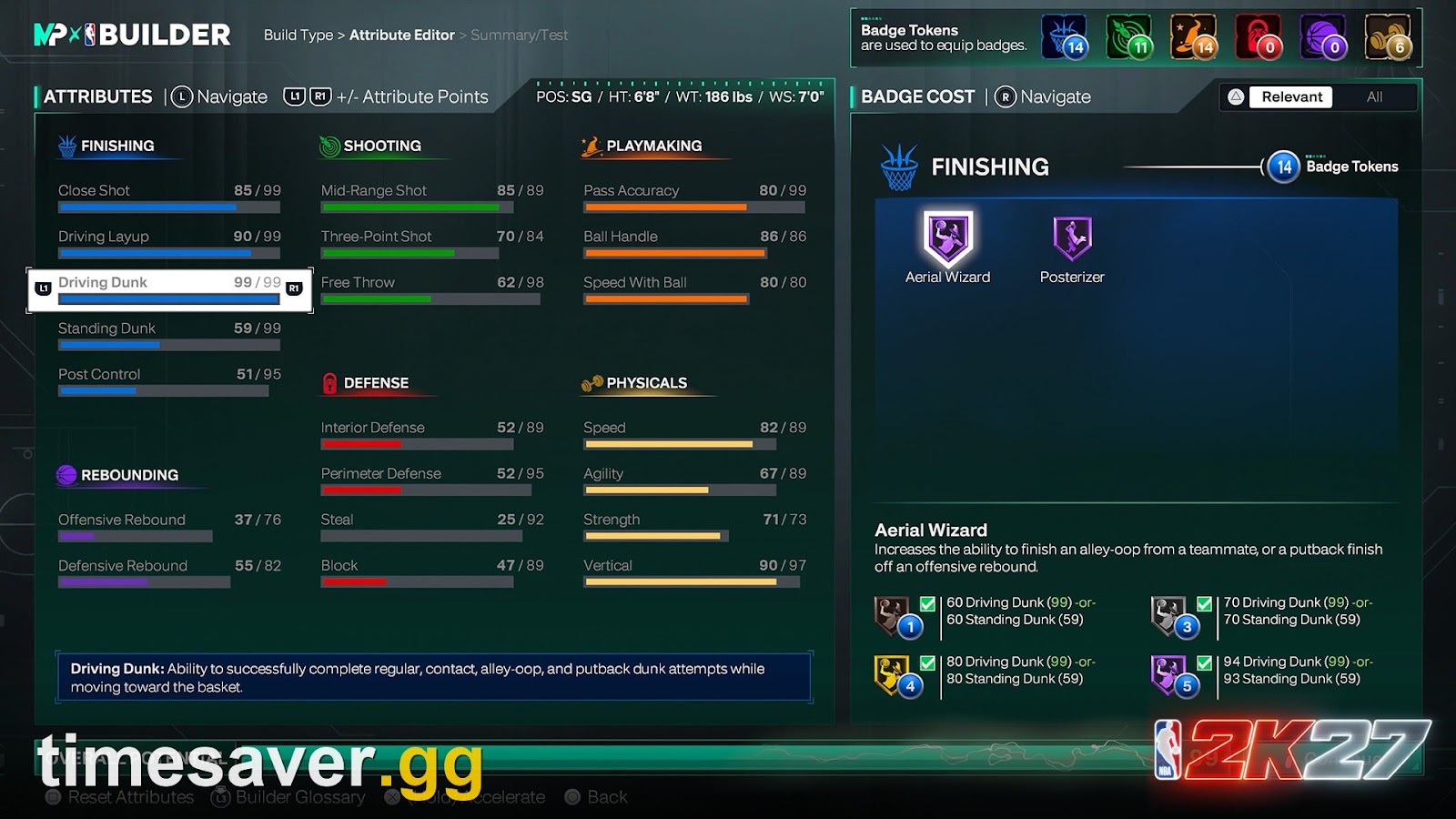
In 2K27 an attribute does two jobs. It drives the obvious on-court stuff — a higher Three-Point Shot widens your green window, a higher Driving Dunk unlocks better finishes — and it gates which badges you can equip. Badges run from Bronze up through Silver, Gold and Hall of Fame to Legend, and each tier has its own attribute threshold. Clear the Bronze number and the badge becomes eligible at Bronze; push the rating higher and higher tiers open up.
Two rules decide whether a threshold counts:
- AND — both listed attributes must reach the number. Posterizer's Gold tier, for instance, is community-tracked at roughly 93 Driving Dunk and 80 Vertical; miss either and you don't get Gold.
- OR — either attribute alone qualifies the badge.
And the one that trips people up most: height is checked before attributes, and it cannot be bypassed. If a badge caps at 6'10" and your build is 6'11", no rating in the world unlocks it. That's why a 7-foot center can't equip the tightest ball-handling badges regardless of a maxed Ball Handle. Plan height and position first, then chase thresholds inside what your frame allows.
Crucially, meeting a threshold is only step one. As one longtime builder put it on r/NBA2k this week, "You want to reach badge thresholds. If you want to be fine with something, silver badge thresholds is usually the starting point and if you want to be good at something gold to legend." Hitting the number makes the badge eligible — it does not put it on your player. That second step is Badge Tokens.
Badge Tokens: why a "90" doesn't automatically equip the badge
This is the structural change that breaks every old 2K habit. In NBA 2K27 you no longer simply "have" a badge once you hit the rating — you spend a token to equip it. 2K's PlayStation.Blog reveal called it the headline Builder change: "The biggest game-changer is the introduction of Badge Tokens, which you'll use to equip Badges. In the Builder, you can see in real time how your selected size and position affect which Badges you qualify for and how many tokens each Badge will cost" (PlayStation.Blog, Aug 18 2026).
Three things follow from that:
- Your build starts with 20 badge slots. Tokens fill them, drawn from six discipline buckets that grow as you play, with bonus slots and tokens earned from Season rewards, Build Specialization and Crew play (community-tracked; verify your own totals in the Builder).
- Taller players can pay more. 2K's own Builder page notes that the number of tokens a given badge costs can differ by size — the same badge may not cost a 6'3" guard and a 6'10" forward the same.
- If a badge "unlocks" but won't equip, it's almost always one of two things: you're out of spare tokens in that discipline, or your height sits outside the badge's allowed range.
Because of this, the smart way to read a threshold table is backwards: decide the 2–3 badges you actually want at Gold or higher, hit exactly those thresholds, and leave everything else at the minimum your playstyle needs. The community consensus in this week's build threads is the same — "find at least 1-2 badges that you want on Gold and then work from there," and don't try to be good at everything.
NBA 2K27 key attribute breakpoints (community-tracked)
2K does not publish an official badge-requirement table, and the exact numbers shift with roster and patch tuning — so treat the figures below as community-tracked reference points, not gospel, and confirm each one against the in-game Builder before you spend VC. They're useful for planning a build, not for locking in a decision.
| Badge | Attribute(s) | Silver | Gold | Hall of Fame |
|---|---|---|---|---|
| Limitless Range | 3PT | 89 | 93 | 99 |
| Set and Fire | 3PT | 78 | 89 | 97 |
| Static Middy | Mid-Range | 75 | 85 | 95 |
| Posterizer | Driving Dunk and Vertical | 87 / 75 | 93 / 80 | 99 / 90 |
| Handles for Days | Ball Handle | 81 | 90 | 95 |
| Ankle Assassin | Ball Handle | 86 | 93 | 96 |
| Strong Handle | Ball Handle and Strength | 67 / 82 | 73 / 89 | 78 / 95 |
| Glove | Steal | 83 | 93 | 99 |
| Challenger | Perimeter D | 82 | 92 | 98 |
_Source: community builder listings (allthings.how, nba2klab), cross-checked Oct 2026. Numbers are approximate and change with patches — the Builder is the source of truth._
A few planning notes that come straight out of those breakpoints:
- Shooting is a cliff, not a ramp. Jumping from 89 to 93 Three-Point Shot moves Limitless Range from Silver to Gold — a real, feelable bump. But going 93 → 94 does nothing until you can afford the run to 99. Stop at the breakpoint.
- A "starting build" baseline that the community keeps recommending for a two-way guard is roughly 85+ Three-Point Shot and 87 Driving Dunk with 75 Vertical (that 75 Vertical clears Silver Posterizer). It's a sane floor to plan around before you specialize.
- Don't buy an 80 just to have an 80. If none of the badges you want sit between 80 and 85 in that attribute, those five points are dead VC.
The strength question: how much do you actually need?
"Is strength worth it?" is one of the most-asked build questions right now, so it's worth its own breakdown. Strength feeds two things: the Strong Handle badge (which, when it's working, lets you drive through contact without getting bumped off your move) and raw animation bumps that help you absorb body-ups on the way to the rim.
The community-tracked Strong Handle thresholds above put Gold at roughly 73 Ball Handle and 89 Strength — a steep ask for a guard. In this week's r/NBA2k strength thread, players reported real disagreement: some swear by it ("strong handles unlocks some nasty blowbys that just don't happen otherwise"), while others running 89 Strength on a forward said they "don't notice much of a difference." The honest read: strength helps slashing-heavy builds that live in contact, but it's a secondary investment — hit your shooting and ball-handle breakpoints first, then top up Strength only if you're building a downhill driver who needs the bump animations.
One mechanic players consistently miss, flagged repeatedly in those threads: on a drive, releasing the right trigger as a defender steps up can trigger a favorable bump animation, because holding it works against the contact. Strength raises your ceiling, but input timing is what cashes it in.
What Update 2.0 changed before Season 2
| Update 2.0 (the patch on top of the launch build) shipped on PS5 and Xbox Series X | S, with PC and Nintendo Switch 2 scheduled to receive it shortly before Season 2 begins on October 16, 2026 (Operation Sports patch notes, Oct 8 2026). It didn't republish attribute numbers, but it did change how some badges behave, which affects how you should plan thresholds: |
|---|
- Shooting badges activate more accurately. 2K's notes state they "improved how shot range is determined for several shooting badges, resulting in more accurate badge activation" — so a shooting badge is likelier to actually fire at the range it should.
- Mid-range got a boost in competitive modes and three-point percentages were slightly rebalanced, which nudges the value of chasing a high Mid-Range rating for a Static Middy build.
- "Ghost contests" were fixed — defenders who weren't truly in front no longer tank your shot, so clean looks from a quality shooter pay off more. That rewards hitting a true shooting breakpoint over faking it with badges alone.
- Contact dunks succeed more often at every level of Rise Up, and missed dunks with Dunk Timing off were reduced — a small quality-of-life win for finishing builds.
None of this changes the thresholds — but it changes which breakpoints are worth paying for. With shooting more honest and mid-range buffed, a build that cleanly clears a shooting badge's Gold tier is in a better spot than one that spread VC trying to do everything.
How to plan your build around breakpoints (step by step)
- Lock height and position first. They gate badges before any attribute does. A 6'10" build and a 6'3" build chasing "the same" badge list are not playing the same game.
- Pick your 2–3 signature badges — the ones you want at Gold or Legend. For a shooting guard that might be Limitless Range + Ankle Assassin; for a slasher, Posterizer + Strong Handle.
- In the Builder, drag each attribute to the exact breakpoint for those badges and watch the live token-cost readout. Stop the instant the tier flips. Don't overshoot.
- Spend what's left on secondary needs your playstyle actually uses — a 70-something somewhere is fine if no badge you want sits above it.
- Re-check after you Rebirth or after a patch. Rebirth hands you a chunk of tokens on day one, and patches retune badge behavior; your old plan may no longer be optimal.
The golden rule stays the same across every position: specialize, hit breakpoints, and let the Builder's live readout — not a third-party table — make the final call.
FAQ
Does hitting an attribute threshold automatically equip the badge in NBA 2K27? No. The threshold only makes the badge eligible. You still have to spend a Badge Token in that discipline to equip it, and your build starts with 20 slots. If a badge looks unlocked but won't equip, you're either out of tokens in that discipline or your height is outside the badge's range.
Does 2K publish an official attribute-breakpoint table? No. 2K has not released an official badge-requirement chart for NBA 2K27. The Builder shows you in real time which badges you qualify for and how many tokens each costs as you move the sliders, which is the only authoritative source. Any threshold table you see online — including this one — is community-tracked and should be verified in-game before you spend VC.
Does height affect which badges I can equip? Yes, and it's checked before attributes, so it can't be bypassed. Many ball-handling and perimeter-defense badges cap around 6'9" to 6'11", while some interior badges require a minimum height. A maxed rating won't unlock a badge your build is too tall or too short for.
How much Strength do I need in NBA 2K27? Enough to clear whatever Strength-gated badges you actually want (community-tracked Strong Handle Gold sits around 89 Strength). For most guards, Strength is a secondary buy — hit your shooting and ball-handle breakpoints first. It helps downhill, contact-heavy slashers more than spot-up or finesse builds, and players report mixed results on pure-rating investment without the matching badges.
Did Update 2.0 change attribute requirements? It didn't republish attribute numbers, but it improved how shot range is determined for several shooting badges (more accurate activation), boosted mid-range in competitive modes, rebalanced three-point percentages, and fixed "ghost contests." Those changes affect which breakpoints are worth paying for, not the threshold numbers themselves. PC and Switch 2 get the update shortly before Season 2 on October 16, 2026.
Should I put every attribute at 80? No — this is the most common VC waste. An even 80 across the board rarely clears the Gold or Hall of Fame tier of the badges that win games. Specialize: max the 2–3 attributes your signature badges need, and leave the rest at the minimum your playstyle requires.
_Want more NBA 2K27 build help? See our best builds hub, the MyPLAYER Builder and Badge Tokens guide, where to put Cap Breakers, the new badges explained, and the ball-handle dribbling breakpoints. For more NBA 2K27 guides, browse the full NBA 2K27 blog._