In Arena Breakout: Infinite, hearing an enemy's footstep before they hear yours decides most fights. ABI is a slow, sound-driven extraction shooter — a single creaking floorboard or a muffled reload three rooms away is often the only warning you get. Yet the first page of search results for "best ABI audio settings" is a wall of top-up shops and EQ products quoting numbers that nobody can verify and that change every season.
This guide fixes that. It covers the in-game audio settings that actually matter, how ABI's Spatial Audio works, the one setup mistake that ruins positional sound for most players, and what to ignore. Everything is specific to Arena Breakout: Infinite on PC (Steam appid 2073620) during Season 7: Utopia (live since September 16, 2026) — not the separate mobile game, and not a stale pre-1.0 build.
Quick answer: Set Sound Effects high, turn music down or off, and turn in-game Spatial Audio ON — then turn off any Windows or headset-software virtual surround so you only run one spatial layer. Pair it with accurate closed-back headphones and walk instead of sprint. That combination beats chasing an expensive gaming headset or a "magic" EQ preset every time.
What are the best Arena Breakout: Infinite audio settings?
There is no secret slider, but there is a correct baseline. The goal is simple: make footsteps and gunfire loud and clear, push everything else out of the way, and keep the game's directional (positional) information intact so your ears can tell where a sound came from.
ABI's Sound menu (Settings → Sound) does not give you a separate "footsteps" slider. It splits audio into four volume channels — Master Volume, SFX Volume, BGM Volume, UI Volume — plus the Spatial Audio toggle and Team Voice controls. So "footsteps up" really means "push SFX up and get everything that competes with SFX out of the way." A reliable starting point:
- SFX Volume: high. This is the channel that carries footsteps, gunfire, reloads, and door and loot interactions — the entire tactical soundscape. You want it dominant. (Beware the content-farm advice that quotes exact "100%" numbers for a footsteps slider that does not exist; push SFX up until cues are clear without clipping, by ear.)
- BGM Volume: low or off. Background music adds nothing tactical and only masks faint movement. Pull it right down.
- UI Volume: lower it if menu and interface beeps are drowning out movement.
- Master Volume: comfortable, not maxed. A level where quiet cues are audible but a close gunfight does not blow your ears out keeps your hearing consistent across a long session.
- Spatial Audio: On. This is the single most important toggle for hearing direction — more on it below. The menu's own description confirms it "makes it easier to distinguish the direction of incoming sounds."
- Team Voice (Mic/Voice Volume, Voice Mode): set Voice Mode to Press to Talk so you are not broadcasting your own room noise, and balance Voice Volume so a callout does not bury footsteps. ABI added 3D Proximity Chat in Season 5, so nearby enemy voices are a real positional cue too.
On the Windows side, the common community baseline is to keep the signal path clean: Windows spatial audio OFF, audio enhancements OFF, exclusive mode OFF, sample rate at 16-bit/48,000 Hz, with ABI's own Spatial Audio ON. That way the game's engine is the only thing shaping direction.
Treat those as a base and nudge from there. The exact labels can shift slightly with balance passes, so match the intent — footsteps and gunfire up, ambient and music down, direction preserved — rather than copying a screenshot from an old patch.

The audio controls live under the Sound tab of the same Settings screen shown above; tab over from Game to Sound to reach the volume channels and the Spatial Audio toggle.
What does Spatial Audio actually do in ABI?
Spatial Audio is ABI's positional-sound processing: it is what lets a stereo headset place a footstep behind and to your left instead of just "somewhere." With it on, the game does the 3D work for you.
The critical rule — and the mistake most players make — is this: run exactly one layer of spatial processing. If in-game Spatial Audio is on, turn off Windows Sonic / Dolby Atmos in Windows and any virtual 7.1 surround mode in your headset's companion app (Razer Synapse, Logitech G Hub, SteelSeries Sonar, and similar). Stacking two spatial engines on top of each other smears direction and makes close sounds feel like they are everywhere at once.
ABI players have run into exactly this. In a community poll on r/ArenaBreakoutInfinite about what audio setup actually helps, one player warned that piling on virtual surround backfires:
"7.1 surround sound is too much on this game, it gives you paranoia, it just boosts the audio which results a confusing sound, also captures the static noise in the background... I prefer it off and I can just pinpoint exactly the [direction]." — u/kilzack, r/ArenaBreakoutInfinite
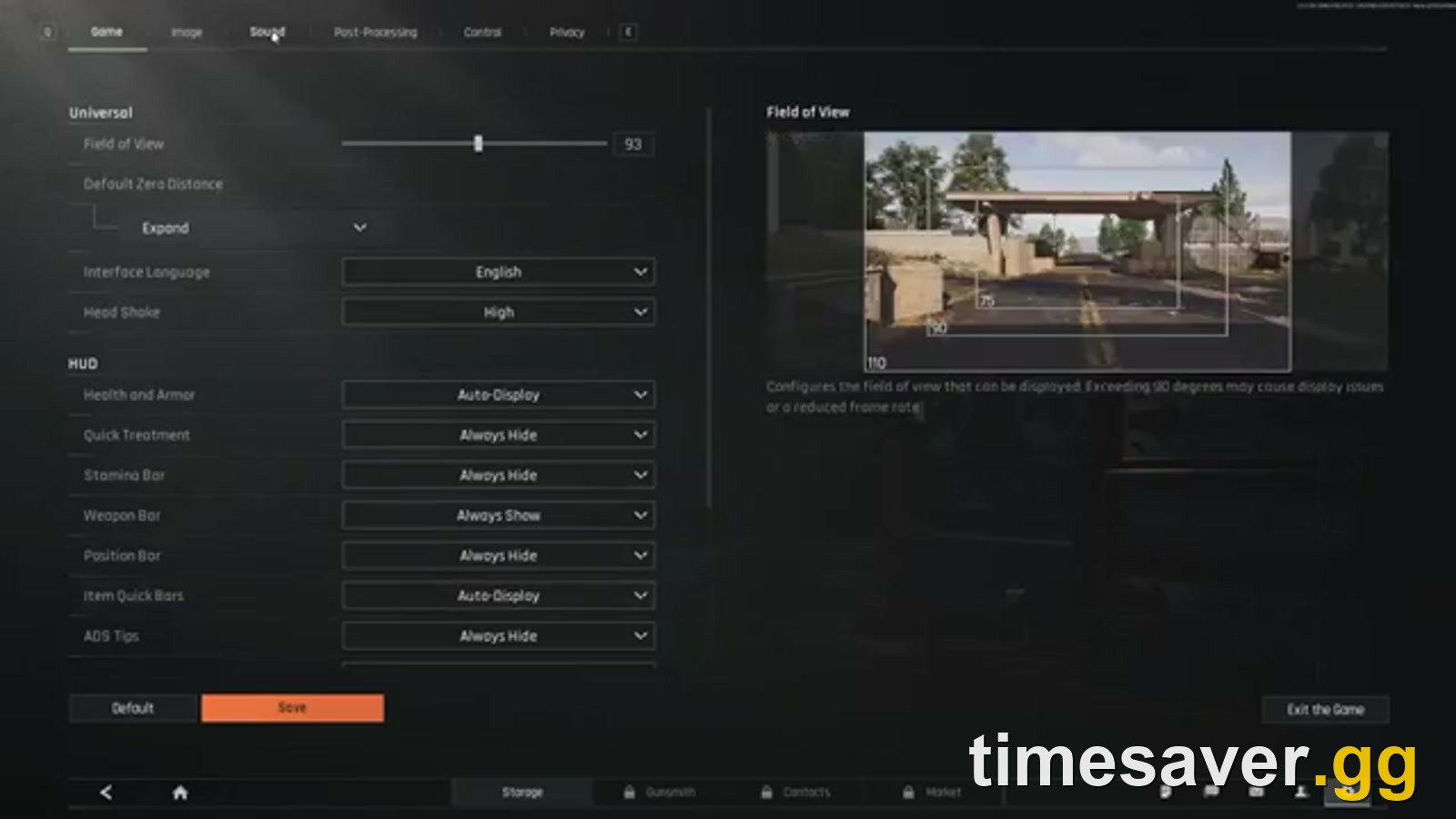
This is the toggle that matters: leave the game's own Spatial Audio On (the right-hand panel even reminds you it "makes it easier to distinguish the direction of incoming sounds"), and move the extra surround layer — Windows and headset software — to Off instead.
Others in the same thread reported the opposite problem solved itself the moment they stopped double-processing. One player found footsteps only lined up with the correct direction after switching the Windows output device to plain stereo ("Speakers") so the game's own spatial engine is the only thing shaping direction — "any other setting and footsteps do not match where the person is" (u/Ancient_Object8853). The lesson is consistent: one spatial layer, clean stereo underneath it.
Does a looted in-game headset or my real headphones matter more?
Both matter, but not equally, and this is where the content farms mislead people because the honest answer does not sell you anything.
Your real, physical headphones and your settings decide more of your hearing advantage than the in-game headset you loot. ABI's in-game tactical headsets do change the mix — the commonly looted mid-tier options sharpen pickup and dampen the loudness of nearby gunfire so a firefight does not deafen you to a flanker — and the community consensus setup is a solid looted headset plus Spatial Audio on. But a free pair of accurate closed-back headphones running the right settings will out-hear an expensive gaming headset left on default audio.
That is also why in-game headsets are worth weighing against the four head-gear slots they occupy, which we break down in the dedicated Arena Breakout: Infinite headsets guide. The short version: the headset helps, but it is the last 10% — settings and real hardware are the first 90%.
Note on headphones vs. headsets for ABI specifically: footstep information lives in the low-mids and the presence region, so a headphone with a huge, boomy bass hump actually hurts — the rumble masks the subtle cues. A flatter, more neutral closed-back pair gives you cleaner directional detail than a bass-cannon "gaming" can.
The free setting that beats every piece of gear: move quietly
You can buy the best headphones on the market and still get third-partied constantly if you sprint everywhere. ABI ties how far your footsteps travel to how you move — sprinting is loud and carries, walking is quieter, and crouch-walking is quieter still. Hard surfaces (metal stairs, tile, the Airport's terminal floors) broadcast; soft ground and careful footing do not.
Players who rarely get heard say the same thing over and over. As one put it bluntly in the audio poll:
"If people hear you alot youre doing something wrong. Find out what that is. Walk more, sprint less." — u/BaronVonGoon, r/ArenaBreakoutInfinite
Practical movement discipline:
- Walk or crouch-walk when you are pushing, holding, or near a loot room. Save sprint for open ground you have already cleared.
- Stop to listen. Standing still for two seconds in a doorway tells you more than ten seconds of sprinting ever will. The "safe-opening" and loot-interaction sounds carry — if you hear a safe being worked, someone is pinned in place and distracted.
- Account for durability and gear noise. Heavier rigs and movement generate more sound; a quiet approach plus a quiet kit is how the "silent" players you keep dying to actually operate.
Open ground is where this matters most. Sprinting across a road or a field broadcasts your position to everyone within earshot; walking the same stretch keeps you quiet enough to hear them first. Movement is a 100%-free setting, and it outperforms any hardware upgrade.
Should I use an external EQ like Equalizer APO?
This is the big question the EQ-selling sites are built around, so here is the straight version.
Yes, a parametric EQ (Equalizer APO is the common free tool) can make footsteps cut through gunfire — the general approach players share is to pull down the deep sub-bass, cap or tame the gunfire-heavy low end, and add modest presence in the upper-mids where footstep detail sits. Many ABI players run something like it and report cleaner separation.
But be realistic about three things:
- It is the last few percent, not a cheat code. No EQ curve turns a default-settings player into a predator. Correct in-game settings, one spatial layer, good headphones, and movement discipline do the heavy lifting. EQ polishes an already-good setup.
- The exact dB numbers you see everywhere are unverified and headphone-dependent. A preset tuned for one person's headphones can sound worse on yours. Treat any posted curve as a starting point to tweak by ear, never as gospel — and never pay for a "secret" preset.
- Mind the line. Simple system EQ that shapes your own output is one thing. Any tool or hardware that strips the game's audio or feeds you information the game does not intend crosses into the territory Morefun's anti-cheat punishes hard — ABI runs a real-time, "0% tolerance" banning policy and hands out ten-year bans in bulk every two weeks. The official Bans Notice dated October 14, 2026 logged 10,848 cheating bans, 3,706 ten-year bans, 1,744 device/IP bans, and 6,505 Koen confiscations for the September 28–October 11 period alone. Keep it to honest output shaping.
If you are new, skip external EQ entirely until your in-game settings and movement are dialed. It is an optimization, not a foundation.
Why can some players hear me before I hear them?
If an opponent clearly knew your position before you knew theirs, it is almost always one of these — in order of likelihood:
- You were sprinting or on a loud surface and broadcast your approach. (Most common. Fixable for free.)
- They had a better setup: solid in-game headset, Spatial Audio on a single layer, and accurate headphones, while you were on laptop speakers or doubled-up surround.
- Positional smear on your end from stacked spatial processing, so you heard the step but misjudged the direction.
- A genuine cheater. ABI's community is openly frustrated about audio/ESP cheats at higher tiers, and Morefun confiscates gains and bans aggressively — but assume the first three before blaming the fourth, because the first three are the ones you control.
Dial your settings, fix your movement, and the gap closes for the vast majority of fights.
FAQ
What are the best audio settings for Arena Breakout: Infinite? Set Sound Effects high, music low or off, and in-game Spatial Audio ON, then disable Windows and headset virtual surround so only one spatial layer is active. Keep master volume comfortable rather than maxed, and lower interface/voice audio if it covers movement. This baseline is current for Season 7: Utopia (October 2026).
Should Spatial Audio be on or off in ABI? On. It gives your stereo headphones the positional information that lets you tell which direction a footstep came from. The catch is to run only that one layer — turn off Windows Sonic/Dolby and any 7.1 virtual surround in your headset software, because two spatial engines stacked together blur direction.
Do I need an expensive headset to hear footsteps in Arena Breakout: Infinite? No. Accurate closed-back headphones (even inexpensive ones) with the right settings beat a pricey gaming headset on default audio. Avoid heavily bass-boosted headphones — the rumble masks the low-mid and presence cues that footsteps live in.
Why do some players make no noise at all? Usually movement discipline, not gear — walking and crouch-walking instead of sprinting, and avoiding loud surfaces. Their in-game headset and settings help, but moving quietly is free and the single biggest factor. A smaller share is EQ tuning, and at high tiers a minority is genuine cheating.
Is using an EQ to hear footsteps bannable in ABI? Shaping your own audio output with a system EQ like Equalizer APO is a common community practice and is a minor optimization, not a foundation. But anything that extracts hidden game information or crosses into third-party audio cheats is punished under Morefun's real-time, zero-tolerance ban policy, which issues thousands of bans per fortnightly cycle. Keep it to honest output tuning.
Does ABI have 3D proximity chat? Yes — 3D Proximity Chat was added in Season 5, so nearby players' voices are positional and can give away (or reveal) locations. Keep voice/interface audio balanced so it is a cue, not a distraction from footsteps.
More Arena Breakout: Infinite guides
Want the full hearing-advantage stack? Pair this with our gear and mechanics guides:
- Arena Breakout: Infinite headsets guide
- Best attachments in Arena Breakout: Infinite
- Best guns in Arena Breakout: Infinite (Season 7)
- Arena Breakout: Infinite solo survival guide
Settings and systems verified against Arena Breakout: Infinite's official Steam channels for Season 7: Utopia (live September 16, 2026). In-game menu labels can change with balance passes — match the intent described above.