The Supercell Store is the single most misunderstood part of Clash Royale's economy. It is where free store codes get redeemed, where the best-value bundles live, and where a rotating free emote sits waiting most weeks — yet most players either never open it or try to redeem codes in the wrong place and give up when nothing happens. Get the mechanic right once and it pays you back in free cosmetics for as long as you play.
This guide covers exactly what the Supercell Store is, the correct step-by-step way to redeem a store code, what codes really give you (and what they never will), and how to spot a legitimate offer from a scam. Everything below was checked against Supercell's official store flow and current player reports as of September 6, 2026 — the last day of Season 86 "K.H.A.O.S" before Season 87 goes live on September 7.
Quick answer: how to redeem a Clash Royale store code
- Codes are redeemed on the Supercell Store website — `store.supercell.com` — not inside the game. This is the number-one thing people get wrong.
- Go to the store, pick Clash Royale, and log in with the same Supercell ID you use in-game. The reward lands on whichever account is logged in.
- Scroll to the very bottom of the page to the "Redeem a Store Code" box.
- Type or paste the code exactly — codes are case-sensitive and some contain punctuation (`FIREANDICE!!`, `WHENHOGSFLY!`). Then hit Submit and confirm.
- Reopen Clash Royale and the reward — almost always an emote or banner cosmetic — appears in your collection.
- Store codes never give Gems, Gold, or cards. Anything promising free Gems is a scam. Only some official QR codes grant Gold or chests.
What is the Supercell Store?
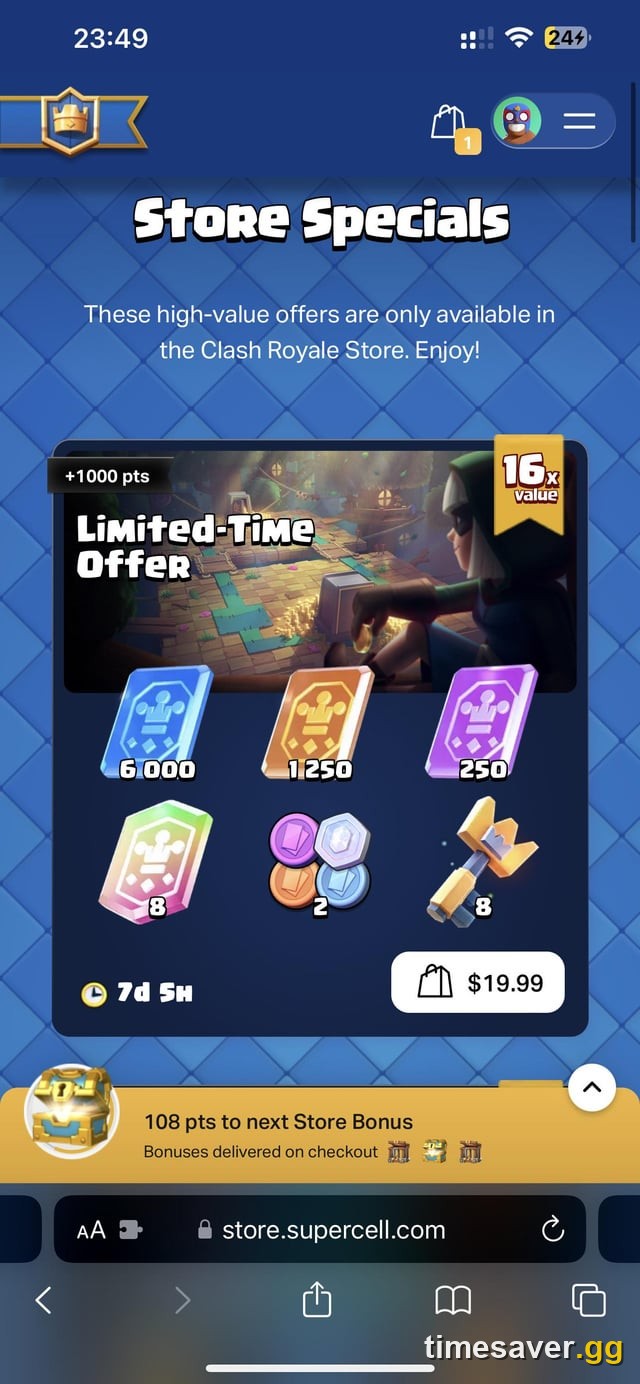
The Supercell Store is Supercell's own web storefront at `store.supercell.com`, separate from the in-app shop you see on the Shop tab. It serves all of Supercell's live games — Clash Royale, Clash of Clans, Brawl Stars, Hay Day and Boom Beach — and you pick your game from the landing page.
It does three jobs:
- Sells bundles and offers, frequently at better value than the identical in-app purchase, because Supercell skips the 30% Apple/Google platform cut when you buy on the web. Web offers often stack Store Points and a Store Bonus on top.
- Hosts the "Redeem a Store Code" box, the official home for the promo codes creators and Supercell hand out.
- Runs a free reward most months — a rotating free emote or banner you can claim just for logging in, no purchase required.
Store Points vs. real value: the Supercell Store awards Store Points on purchases, which convert into store credit over time. They are a loyalty perk, not a currency you can buy directly, and they only matter if you were already going to spend. Never buy a bundle for the points.
Because balances are tied to your Supercell ID, and a single Supercell ID logs you into every Supercell game, the one detail that actually matters at redemption time is simple: be logged into the right account. Log in with a fresh or wrong ID and the reward goes to an empty account you'll never use.
How to redeem a store code, step by step
Here is the full flow, in the exact order that works:
- Make sure you have a Supercell ID connected in-game. Open Clash Royale, tap the menu (three lines, top-right), and confirm Supercell ID shows as connected. If it isn't, connect it first — a code redeemed to a disconnected guest account is effectively lost.
- Open a browser and go to `store.supercell.com`. Do this in a normal web browser (phone or desktop), not inside the game.
- Select Clash Royale on the game-select screen.
- Log in with the same Supercell ID. You'll get a verification code by email — enter it to finish signing in.
- Scroll all the way to the bottom of the store page. Per Supercell's store-code support flow, the "Redeem a Store Code" field sits below the offers and bundles — and it's typically login-gated and below the fold, which is exactly why so many players miss it. If you don't see it, make sure you're fully signed in and scroll to the very end of the page.
- Enter the code exactly as written, including capital letters and any punctuation, then press Submit.
- Confirm, then switch back to Clash Royale (fully reopen it if needed). The reward appears in your Emote Collection or banner collection.

That's it. There is no in-game "enter code" box on the Shop tab — a claim you'll see repeated on low-quality sites is simply wrong. Redemption happens on the website.
What do Clash Royale store codes actually give you?
Cosmetics — full stop. Store codes reward emotes, banner decorations, and banner frames. They are fun and collectible, but they change nothing about your deck's strength or your ladder climb.
Recent examples that circulated in the Season 86 window included codes for a free emote (HEROVALKYRIE), a Royale Affair Goblin emote (ROYALEAFFAIR), and banner sets like the Ember Escape decoration and Firestorm frame (FIREANDICE!!). We're listing these to show the shape of what codes give — treat every specific string as expiring, and confirm it live before you rely on it. Codes are handed out by eligible content creators, official Supercell channels and esports events, they expire, and they can fail if your account inventory is full.
There is a second, separate mechanic worth knowing: QR codes. Supercell periodically posts scannable QR codes (often on the official @ClashRoyale account on X) that can grant Gold, Lucky Chests or emotes. Those are the only "codes" that ever give more than a cosmetic — and even then, in small amounts.
Finally, Creator Codes are a completely different thing. Attaching a creator's code to a purchase routes a share of Supercell's revenue to that creator at no extra cost to you — you, the player, get nothing from entering one. Don't confuse a creator code with a reward code.
Three hard rules that keep you safe
Because "clash royale free gems" is one of the most-searched — and most-scammed — queries in this game, keep these straight:
- No store code, QR code, or offer ever gives free Gems. Gems are the only currency you buy with real money, and Supercell does not hand them out through the redeem box. Any site, app, or "generator" promising free or unlimited Gems is a phishing or account-theft scam. Full stop.
- Never enter your login on a third-party "top-up" or "cheap Gems" site. Off-store Gem sellers put both your account and your payment details at risk, and Supercell can ban accounts linked to unauthorized purchases. Buy only through the official in-app shop or `store.supercell.com`.
- There is no account trading, card selling, or cash-out in Clash Royale. The only trading that ever existed was clan-only, card-for-card, and gated behind Trade Tokens — and Supercell quietly stopped handing those tokens out around October 2025, so trading is effectively dead now. Anyone selling "maxed accounts" is offering a ToS-banned transaction that gets accounts locked.
Is buying from the Supercell Store actually worth it?
If you were already going to spend, the web store is usually the better deal. Because Supercell avoids the platform fee on web purchases, the same Pass Royale or bundle frequently comes with extra Store Points and a Store Bonus you don't get buying in-app. The store also surfaces limited Store Specials — time-boxed bundles priced against their in-game value.
The honest read on value, though, is the same one we gave for Pass Royale: a bundle is only "worth it" if it advances cards you actually play. A discounted pile of Gold or Wild Cards that levels a card you'll never run is not a deal. Judge every store offer by what it does to your main deck, not by the size of the discount banner.
What's free in the store right now?
Most months the Supercell Store carries at least one free claim — commonly a rotating free emote, sometimes a banner or a tower skin promotion — that you get simply by logging in and clicking claim. As of the Season 86 → 87 changeover, trackers pointed to a free emote and a claimable tower-skin promotion in the web store. Because these rotate on Supercell's schedule, the reliable move is to open `store.supercell.com`, log in, and scroll — if there's a free item live, it's near the top. It costs nothing to check, and checking once a month is how the free cosmetics add up.
This is also the smart habit to build around the monthly season cadence. Clash Royale flips to a new season on the first Monday-ish of each month — Season 87 (Minion Giant, Hero Ice Wizard) starts September 7, 2026 — and new store offers, a new Pass Royale and often a fresh free claim land alongside it. Checking the store at each season flip catches the best of it.
Frequently Asked Questions
Where do I redeem Clash Royale codes — in the game or on a website? On the website. Go to `store.supercell.com`, choose Clash Royale, log in with your Supercell ID, and scroll to the "Redeem a Store Code" box at the bottom of the page. There is no code-entry box inside the game's Shop tab, despite what some guides claim.
My code says "invalid" or "not valid" — what's wrong? Three usual causes. First, the code is expired — most store codes are live for only a few weeks. Second, you typed it wrong: codes are case-sensitive and some include punctuation, so `FIREANDICE!!` and `WHENHOGSFLY!` must be entered exactly, with no added spaces. Third, you already redeemed it — each code is one-time per account. Copy-paste the code rather than typing it, and double-check it hasn't expired on a current tracker.
Why can't I log into the Supercell Store to redeem? The most common blocker is not receiving the email verification code Supercell sends when you sign in on the web. Check spam, make sure you're using the email tied to your Supercell ID, wait a minute and request it again. If it still won't send, the account-recovery flow on Supercell's support site is the next step — the same one you'd use for any Supercell ID login problem.
Do store codes give free Gems, Gold, or cards? No. Store codes give cosmetics only — emotes and banners. Only some official QR codes grant small amounts of Gold or a Lucky Chest. Nothing in the redeem box gives Gems or cards, and any site claiming otherwise is a scam.
What's the difference between a store code and a creator code? A store code is redeemed in the "Redeem a Store Code" box and gives you a reward. A creator code is entered at checkout on a purchase and sends a cut of Supercell's revenue to that creator — you get nothing extra for using one. They are not interchangeable.
Is it safe to buy Gems from the Supercell Store? Yes — `store.supercell.com` is Supercell's official storefront, and buying there is as safe as the in-app shop (often better value on web). What is not safe is any third-party site offering "cheap" or "discounted" Gems; those risk your account and your payment details, and can trigger a ban.
The bottom line
The Supercell Store is worth ten minutes of your attention: it's the only place store codes redeem, it's usually the better-value place to spend if you spend at all, and it hands out a free cosmetic most months. Remember the two rules that cover 90% of the confusion — redeem on the website, not in-game, and log into the right Supercell ID first — and keep a simple habit of scrolling the store at each season flip. The free emotes are small, but they're free, and they only reach the account that shows up to claim them.
For more Clash Royale explainers that separate the real mechanics from the myths, see our guides on how Evolutions work, how to unlock Ranked, and whether Pass Royale is worth it.