Quick answer
In NBA 2K27, every dunk now runs through the new dynamic Dunk Meter: you hold the Right Stick up while driving to the rim, a timing bar fills, and you release inside the green window to finish the slam. The catch is that the green window is no longer fixed — 2K's own gameplay reveal describes "a new, fully dynamic Dunk Meter" that "continuously evaluates defensive positioning from the moment players take off all the way through the finish, expanding the green window for wide-open lanes and shrinking it for late defensive closeouts." So a wide-open lane gives you a fat, forgiving window, and a help defender rotating in can shrink that same window while you're already in the air. On top of timing, your ability to dunk at all is gated by four ratings — Driving Dunk, Standing Dunk, Vertical and Height — and by the dunk packages you've unlocked and equipped in the Builder.
| This guide applies to **NBA 2K27 on PS5, Xbox Series X | S, PC and Nintendo Switch 2, which launched worldwide on September 4, 2026 (after Deluxe/Ultra early access from August 26**). The game is live, so everything below reflects how dunking actually works in the retail build. Here's the full breakdown: the controls, the meter, the ratings you need, how to equip dunk packages, and the launch-week mistakes killing your finishes. |
|---|
How does the Dunk Meter work in NBA 2K27?
The single biggest change to finishing this year is that dunking is a timed, manual mechanic. In previous 2K games you could largely let the animation play out; in 2K27, holding the Right Stick up brings up a Dunk Meter that fills as you rise toward the rim, and you release to lock in the finish. Green it and you get the clean, powerful slam. Miss the timing and you get a weaker finish, a blocked attempt, or a bricked layup.
What makes it "dynamic" is the part 2K stressed at reveal: the meter reacts to defense in real time. Per the official 2K gameplay breakdown, the Dunk Meter "continuously evaluates defensive positioning from the moment players take off all the way through the finish, expanding the green window for wide-open lanes and shrinking it for late defensive closeouts." Practically, that means:
- Wide-open, no help defender near the rim → large green window, easy to time, safe to go up strong.
- A defender in position or help rotating late → the window tightens, sometimes after you've already jumped.
As NerdsChalk put it in their launch-week timing breakdown, "the size of the green window can therefore change while the dunk animation is already underway... Treat the window shown at launch as the opening read, not a guarantee." That's the mental adjustment veterans are making right now: the window you see the instant you take off is the best case, not a promise. If a rotating big steps into the paint mid-jump, your window shrinks, which is exactly why forced contact dunks into traffic are getting stuffed this year.
There's also a Standing Dunk Meter for power finishes right under the basket. The 2K news account @2KDispatch reports that in the paint you can trigger a standing-dunk meter with the dunk button (not only the Right Stick) — hold it under the rim and you'll get a meter for a standing slam. Treat that as a community/creator report and confirm it feels right in your own game, but it lines up with how standing dunks behave in the live build.
NBA 2K27 dunk controls (PS5 & Xbox)
Dunking is driven off the Pro Stick (Right Stick) while you're attacking the rim with a driving move. The core inputs on current-gen, per current dunk-control breakdowns (nba2klab, lockercodes):
- Two-hand dunk: PS5 → hold R2 + hold Right Stick up. Xbox → hold RT + hold Right Stick up.
- One-hand dunk: PS5 → R2 + hold Right Stick left or right (you dunk with that hand). Xbox → RT + hold Right Stick left/right.
- Meter timing: move the Right Stick straight in your chosen direction and hold to fill the Dunk Meter, then release inside the green window to finish.
A few control notes that matter in practice:
- You need a running start / driving lane for the flashy, high-flying dunks. From a standstill under the rim you'll get standing dunks and power layups, not posterizers.
- Holding the stick longer commits you to the dunk animation; tapping/flicking layup inputs instead will give you a layup, which is what you want against a set defender who'd stuff a forced dunk.
- The exact set of flashy/skill-dunk stick motions varies by the packages you have equipped, so don't assume a fixed "flick for flashy" input — what you can do depends on your unlocked Dunk Style, covered below.
What ratings do you need to dunk in NBA 2K27?
Timing gets you the green; ratings decide which dunks are even available to you. Four attributes gate dunking:
- Driving Dunk — the primary gate for moving/driving dunks and the big contact finishes.
- Vertical — how high you get up; unlocks the flashier, higher-flying dunks and alley-oops.
- Standing Dunk — power finishes from a standstill under the basket.
- Height — taller builds open some packages and lock others (guard-height signature dunks cap out at a certain height).

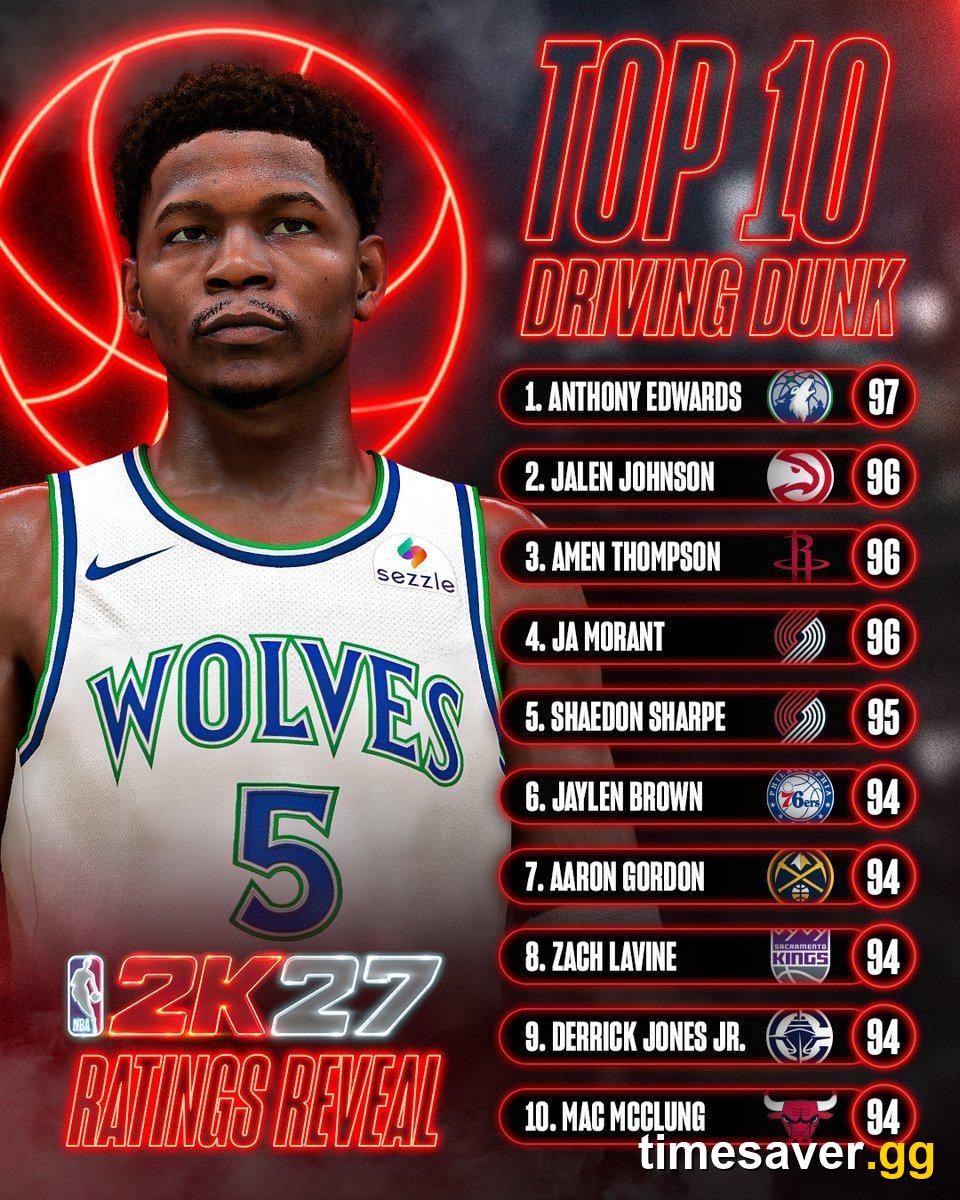
For reference, 2K's own Top 10 Driving Dunk ratings reveal is led by Anthony Edwards at 97, with Ja Morant, Amen Thompson and Jalen Johnson at 96 — that's the ceiling real NBA athletes hit, and a useful gut-check for how high you're trying to push your own build.
NerdsChalk's 2K27 dunk-package breakdown reports the following build targets (attribute thresholds it read from the in-game Builder — treat these as outlet-reported, since 2K hasn't published an official chart, and note 2K can patch requirements):
| Dunk tier | Reported requirement |
|---|---|
| Rim grazer (base/free finishes) | ~36 Driving Dunk |
| Flashy packages | ~70 Driving Dunk / ~50 Vertical |
| Elite / pro contact packages | Driving Dunk in the 90s |
| Signature Ja Morant | 89 Driving Dunk, 68 Vertical, height under 6'10" |
| Signature Zion Williamson | 86 Driving Dunk, 60 Vertical / 60 Standing |
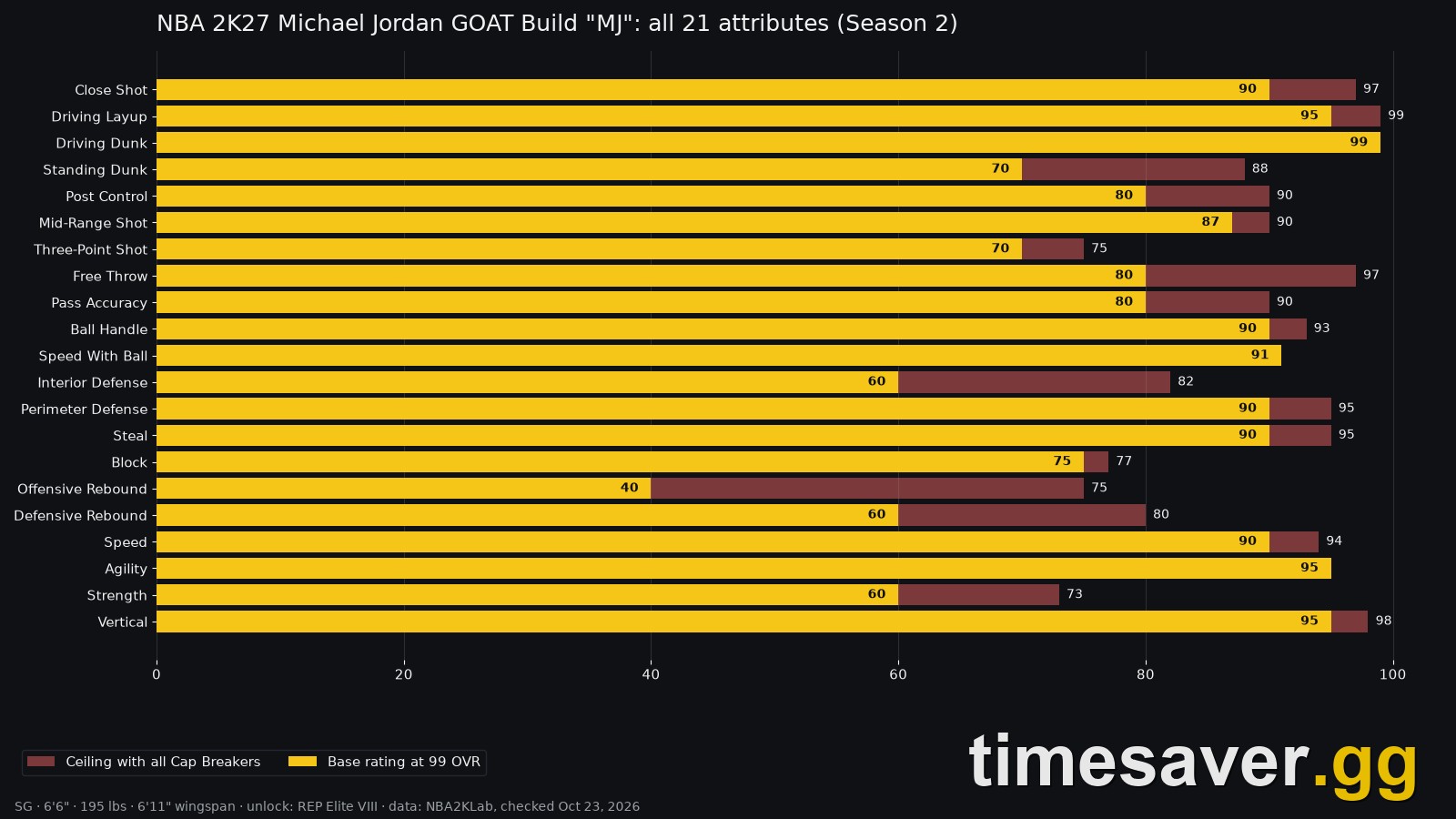
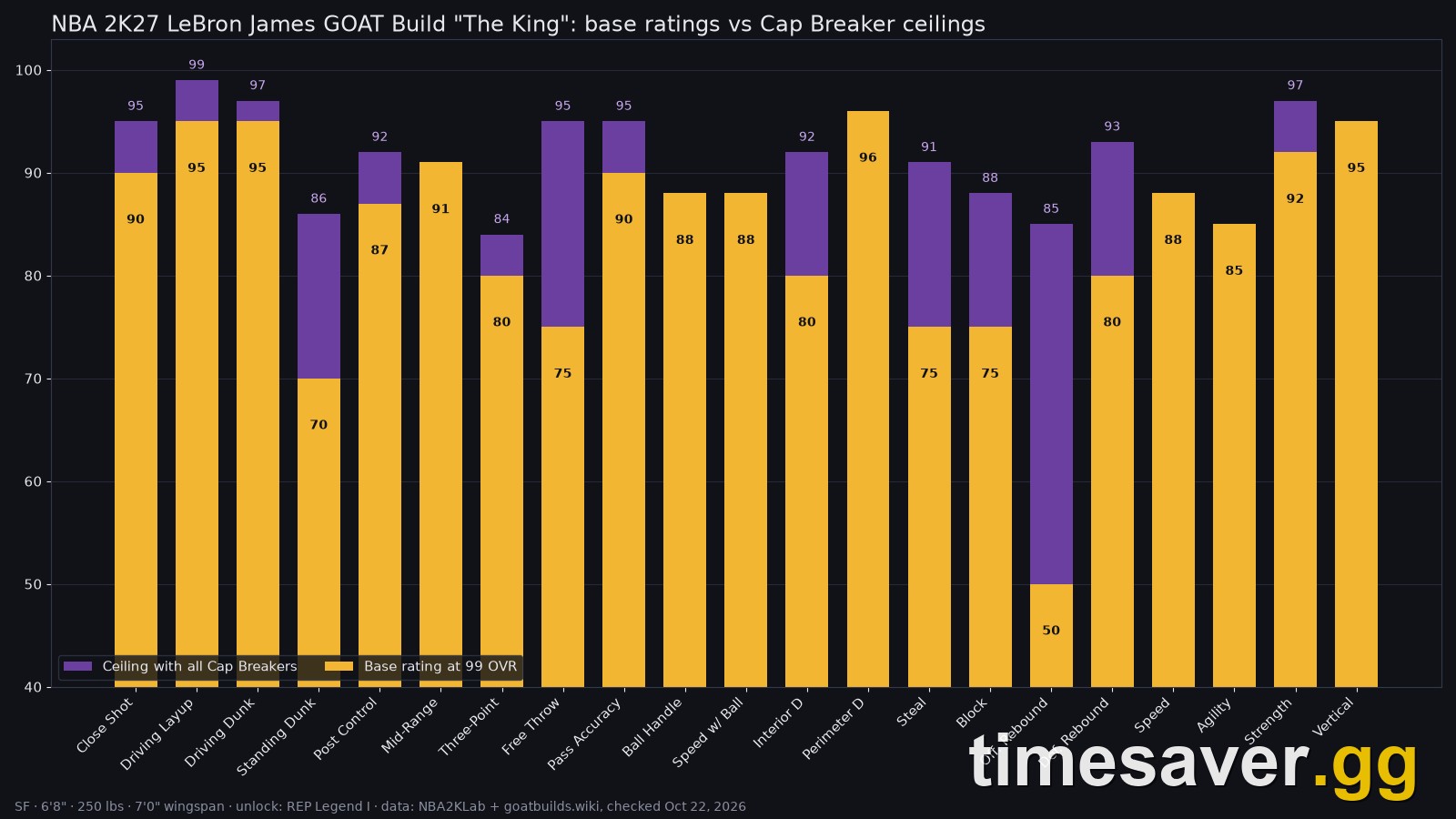
The takeaway for build planning: if you want reliable contact dunks and posterizers, you're budgeting for a Driving Dunk in the 90s, which is expensive on a guard and usually means leaning on your build's attribute caps. This is where Cap Breakers come in — they let you push a rating like Driving Dunk past its starting ceiling, and r/NBA2k finishers are already reporting 6'5"–6'6" builds hitting 99 Driving Dunk with five caps stacked onto a high starting value. If dunking is your identity, plan the Driving Dunk cap before you spend a dime of VC.
How to unlock and equip dunk packages in NBA 2K27
Meeting the rating is only half of it — you still have to unlock and equip the dunk animations, or you'll qualify for a contact dunk and never see it trigger. Here's the flow, per games.gg's 2K27 dunk-package guide:
- Go to your MyPLAYER hub → Animations → Gameplay Moves → Dunk Style Creator.
- Browse the categories: moving, standing, contact, alley-oop and signature dunks. Anything above your attribute or height thresholds stays locked no matter how much VC you have.
- Purchase the packages you qualify for with VC, then build them into a named custom Dunk Style.
The mistake burning people in launch week: after you buy and build a style, you have to go back into Animations and manually re-select your named custom style. The game defaults to the first package you bought, not your full custom set — so players think their contact dunks aren't working when the real issue is the wrong style is equipped. Re-select your style, and confirm it's active before you hit The City.
If you're planning to buy several packages, understand how VC works and how much each edition gives you first, because a full dunk kit plus attribute upgrades adds up fast.
When should you dunk vs. lay it up?
The dynamic meter has quietly changed shot selection at the rim. Because the green window shrinks against late help, forcing a dunk into traffic is a great way to get blocked or stripped this year. The read:
- Dunk when you have a clear lane, the defender is out of position, or you've beaten your man off the dribble with a real driving move and nobody's rotating.
- Lay it up (with a gather that avoids the shot-blocker) when a rim protector is set — a well-timed layup beats a stuffed contact dunk every time.
This mirrors how greening jump shots works in 2K27: the game is rewarding good timing on good shots, not brute-forcing hero finishes. If Finishing is your build's focus, the Build Specialization system and its Finishing badges reward exactly this — clean, well-selected dunks over reckless ones.
Why do my dunks keep getting blocked or missing in NBA 2K27?
If your finishes aren't landing, it's almost always one of these five:
- You're mistiming the meter. Release inside the green window. If it feels tight, you're probably attacking into help defense that's shrinking the window mid-air — pick better lanes.
- Your Driving Dunk is too low for the dunk you're attempting. Base builds get rim grazers, not posterizers. Check the ratings table above.
- You've got the wrong Dunk Style equipped. Re-select your named custom style in Animations (the default-package trap).
- You're forcing dunks into set rim protectors. Lay it up instead when a shot-blocker is planted.
- No driving lane. Flashy dunks need momentum; from a standstill you'll only get standing finishes.
FAQ
How do you dunk in NBA 2K27? Drive to the rim, then hold R2 (PS5) / RT (Xbox) and hold the Right Stick up for a two-hand dunk, or hold the Right Stick left/right for a one-hand dunk. A Dunk Meter fills as you rise — release it inside the green window to finish. You need a driving lane and a high enough Driving Dunk rating for the bigger dunks.
What is the Dunk Meter in NBA 2K27? It's the new timing mechanic for dunks. 2K describes it as "a new, fully dynamic Dunk Meter" that evaluates defensive positioning from takeoff to finish, expanding the green window for wide-open lanes and shrinking it for late defensive closeouts. In other words, your timing window changes based on the defense, and can even tighten while you're already in the air.
What Driving Dunk do you need for contact dunks in NBA 2K27? Reporting from NerdsChalk (reading the in-game Builder) puts elite/pro contact dunk packages at a Driving Dunk in the 90s, with flashy packages around 70 Driving Dunk / 50 Vertical and base rim grazers around 36 Driving Dunk. These are outlet-reported thresholds, not an official 2K chart, and 2K can adjust them via patch.
How do you equip dunk packages in NBA 2K27? Go to MyPLAYER → Animations → Gameplay Moves → Dunk Style Creator, buy the packages you qualify for with VC, then build a custom Dunk Style. Crucially, go back into Animations and manually re-select your named custom style — the game defaults to the first package you bought, which is why people think their dunks "aren't working."
Can you turn off the Dunk Meter in NBA 2K27? The shot meter can be customized and toggled in the HUD settings, but a clean, verified on/off toggle specifically for the dunk meter has not been confirmed on an official page as of launch week — check your Customize HUD options in-game rather than assuming it mirrors the shot-meter toggle. For most players, learning the meter timing is more reliable than trying to remove it.
Why do my contact dunks keep getting blocked in NBA 2K27? Usually because you're forcing them into set help defense — the dynamic meter shrinks your green window against late closeouts, so a rotating rim protector can stuff a dunk that looked open at takeoff. Attack clear lanes, and lay it up when a shot-blocker is planted.