Quick Answer (TL;DR)
To sell items in Path of Exile 2 you price-check first, then list — and 90% of "my item won't sell" problems are just overpricing. The fast method:
- Price-check the item: hover it in a town or your hideout and press Shift + Alt + Click — PoE2's built-in checker (added in the 0.5.0 Return of the Ancients update) instantly shows what comparable items are selling for. For anything valuable, double-check on the official trade site at pathofexile.com/trade2.
- Price to the market, not your hopes: set your buyout at or just under the cheapest real listings for a near-identical item. The lowest few asking prices are the market — everything above them doesn't sell.
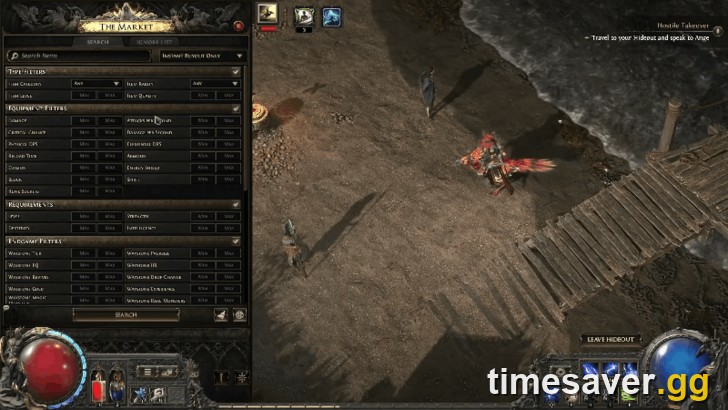
- List it: put the item in a public premium/merchant stash tab (or use the in-game Market panel), set a buyout price, and it appears on the trade site for buyers.
- Bulk currency and stackables go in the Currency Exchange, not the item trade — it fills automatically from an order book, no whispering.
Currency values float daily. As of July 20, 2026 in the Runes of Aldur league, 1 Divine Orb ≈ 426 Exalted Orbs (verify live on our PoE2 price checker or poe.ninja before a big deal). If you'd rather skip the grind entirely, you can buy PoE2 currency or a boss/leveling boost directly.

PoE2 - Divine & Exalted Orbs
Skip the grind — get Divine & Exalted Orbs
How does selling work in PoE2?
Path of Exile 2 has no auction house. Grinding Gear Games deliberately keeps trade a manual, friction-bearing system — the orb in your stash is the money, and there's no "sell to the game for gold" button that matters. There are exactly two channels, and picking the right one is most of the skill:
| Channel | Sell it for | Speed | Other player needed? |
|---|---|---|---|
| Currency Exchange | Orbs, runes, fragments, catalysts — anything stackable | Instant / automatic | No |
| Trade site (Direct Whisper) | Rare/unique items, gear, jewels, gems | Minutes (live trade) | Yes |
Most new players try to run everything through the slow item-trade flow — including dumping a stack of Chaos for Divines — then wonder why selling feels miserable. Stackable currency belongs in the Currency Exchange; only gear needs the whisper-and-hideout dance. Get that split right and half your "trading is painful" complaints disappear.
The single most important mindset shift: you are not selling to the game, you are undercutting other sellers. A buyer opens the trade site, sorts by price, and buys from the cheapest listing that looks legit. If you're not near the bottom of that list, you're invisible.
How do I price-check an item in PoE2?
There are three tiers of price-checking, fastest to most precise.
1. The built-in checker (Shift + Alt + Click)
Since the 0.5.0 Return of the Ancients update, PoE2 has a native price-check tool. Hover an item while you're in a town or your hideout and press Shift + Alt + Click — the game queries live trade listings and shows you a price range for comparable items in seconds. This is your first pass for everything. It's not perfect on heavily-rolled rares (it can't always match your exact mod combination), but it instantly tells you whether an item is a 1-Exalt vendor-tier drop or something worth a real listing.
2. The official trade site (pathofexile.com/trade2)
For anything the built-in tool flags as valuable, verify manually. Open pathofexile.com/trade2 (or press `/` in-game to open the identical Market panel), and:
- Enter the item's key modifiers — the ones a buyer would actually search for (e.g. spell skill levels, added damage, crit chance, life, resistances). Don't add every mod; add the 2–3 that carry the value.
- Set those mods' minimum values to roughly what your item rolls.
- Sort by price and read the lowest 5–10 online listings. That band is the real market price. Ignore the wildly overpriced outliers at the top — those are exactly the items that never sell.
3. Third-party overlays (Exiled Exchange 2)
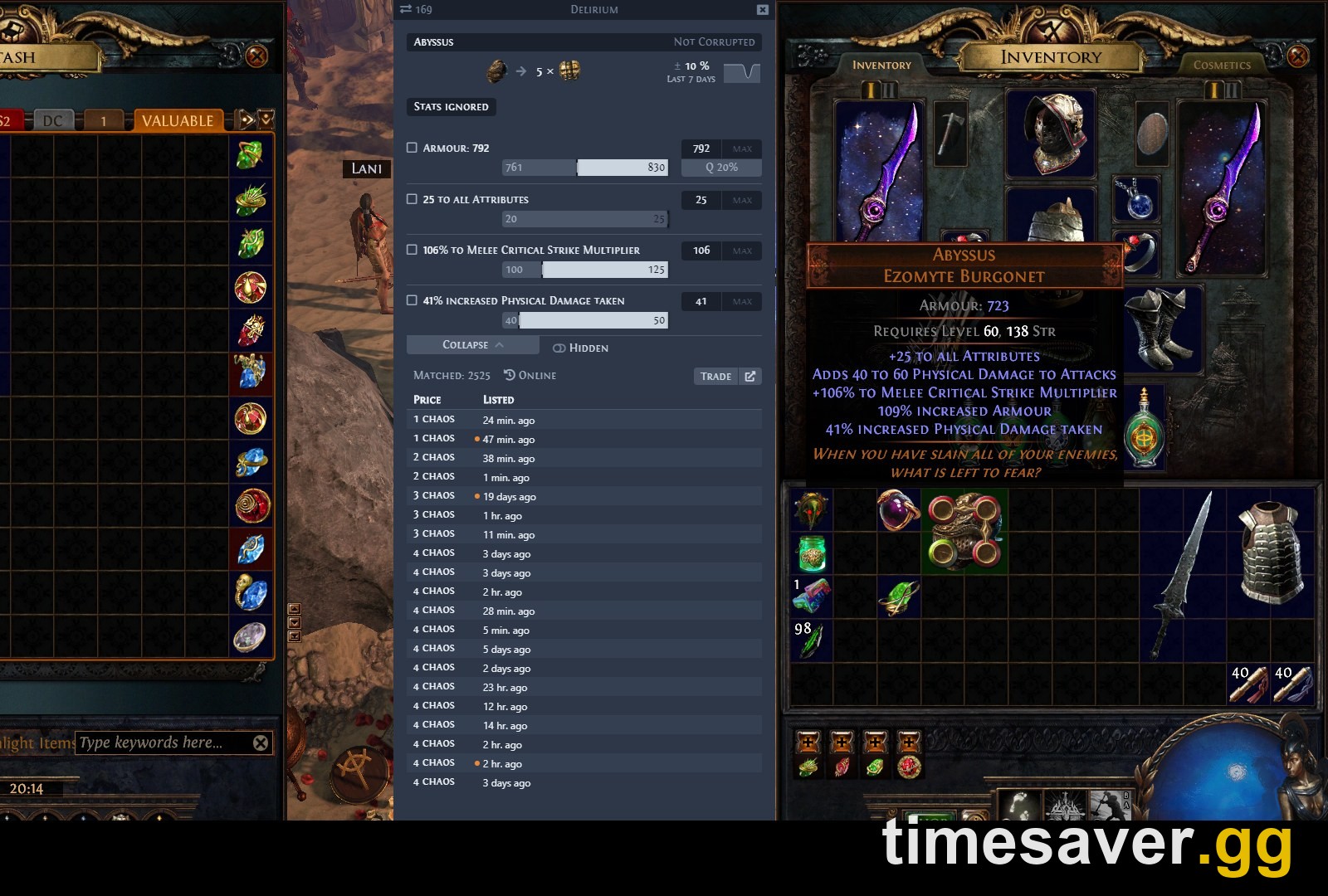
For volume selling, a community overlay is far faster than typing mods by hand. Exiled Exchange 2 (exiledexchange2.com) is the free, open-source successor to Awakened PoE Trade — hover an item, hit a hotkey, and it runs the trade search for you and shows the price distribution. Sidekick and PoE Overlay II do the same job. These pull from the same official trade data; they just save you the manual entry. They're safe, community-standard tools, but always download from the official project pages.
Key stat: the built-in Shift+Alt+Click checker (0.5.0) covers ~80% of your price checks; reserve the manual trade-site search for your top-value rares and chase uniques.
Why won't my items sell? (the real reasons)
If items sit unsold for hours, it's almost never bad luck. It's one of these:
- You're overpriced. This is #1 by a mile. If you listed at a price you hoped for instead of the market floor, buyers skip you for the cheaper listing. Re-check the lowest live listings and match or undercut them.
- A mod tier is dragging the value down. In PoE2, tier matters enormously. A staff with +5 to all spell skills looks great until you realize buyers can get +8 on comparable bases — that single tier gap can drop the price from hundreds of Divines to a few. Price-check against items with your exact tier, not the fantasy version.
- It's late in the league. Prices decay over a league as crafted gear floods the market and the player base shrinks. A rare that sold for 20 Divines at launch might be 2 now. The Runes of Aldur league launched May 29, 2026 — the deeper in you are, the more you undercut.
- You listed junk. Not every rare is sellable. A rare with mismatched mods, no sockets, or off-meta stats is worth more disenchanted or vendored than the time it takes to list. Sell the top ~5% of your drops; recycle the rest.
- Your listing isn't public. If the item isn't in a public tab (or properly listed in the Market), it never reaches the trade site at all — a silent, common mistake.
The blunt community truth: overpriced items are the reason trade chat feels clogged. Price to sell, not to dream, and your stash actually turns into currency.
How to list items for sale
Listing is simple once your tab is set up:
- Make a stash tab public. Right-click a premium (or merchant-style) stash tab, mark it public, and give it a price note if you want a blanket price. Items in a public tab are crawled onto the trade site automatically.
- Set a buyout price per item. Right-click an item in the public tab and set an exact price (e.g. `~b/o 15 exalted`). A fixed buyout is far more likely to sell than "price on whisper" — buyers filter for buyouts and skip negotiation.
- Use the in-game Market panel (press `/`) to manage listings and confirm your item appears with the price you set.
Fixed, competitive buyouts sell themselves while you keep mapping. Vague or missing prices sit forever.

PoE2 - Items
Skip the grind — get Items
What's actually worth selling?
Focus your listing time where the currency is:
- High-tier rare bases with 2+ desirable T1–T2 mods (life + resistances + a damage stat that a build wants). These are the bread-and-butter sellers.
- Chase uniques and build-enabling uniques — always price-check, because a single good roll can be worth many Divines.
- Runes, Soul Cores, and desecrated/crafting currency — stackable, easy to move via the Currency Exchange or bulk listings.
- Foiled/shiny uniques from Reliquary Vaults — same mods as the base unique but a cosmetic premium.
As GGG put it in the 0.5.2 patch notes (June 12, 2026): "Significantly improved the rewards from Remnant Encounters Tier 14 Maps and above." In plain terms — the most sellable loot comes from juiced high-tier maps and Expedition, not from raw orb drops. Farm value-dense content, and you'll have plenty worth listing. (See our early currency farming guide for the fastest routes.)
Selling currency in bulk (the Currency Exchange)
Never whisper strangers to swap orbs. The Currency Exchange is PoE2's automatic order-book market for stackables: set what you give and what you want, and it fills from standing orders — no other player, no travel. It's the fastest trade in the game and the correct way to convert a pile of Chaos into Divines, sell off Exalted, or move fragments and catalysts. Full walkthrough in our Currency Exchange guide and the broader PoE2 trade guide.
Skip the grind
Selling well is a skill, but sometimes you just want the currency or the clear now — before the league prices move again. You can buy PoE2 Divine & Exalted Orbs at the live market rate with instant delivery, or grab a boss carry or leveling boost from pro players and skip the flip entirely.
Get it now, skip the flip:
- PoE2 Divine Orbs — instant delivery · trusted · best rate
- PoE2 Exalted Orbs — fast & secure
- PoE2 Currency (all orbs) — divine · chaos · exalted · more
- PoE2 Leveling & Boss Carries — skip the grind · pro players
FAQ
How do I price-check an item in PoE2? Hover it in a town or hideout and press Shift + Alt + Click for the built-in checker (added in 0.5.0). For valuable rares, verify on pathofexile.com/trade2 by entering the 2–3 mods that carry the value and reading the lowest live listings. Overlays like Exiled Exchange 2 do the same search faster.
Why won't my items sell in PoE2? Almost always overpricing. Re-check the cheapest online listings for a near-identical item and match or undercut them. Other common causes: a low mod tier tanking the value, late-league price decay, or the item not being in a public/listed tab.
Where do I sell currency and orbs? Use the Currency Exchange, not the item trade site. It's an automatic order book for stackables (orbs, runes, fragments, catalysts) — set what you give and want, and it fills without whispering anyone.
How much is a Divine Orb worth right now? As of July 20, 2026 in Runes of Aldur, roughly 426 Exalted Orbs per Divine — but it floats daily and has been deflating versus Exalted all league. Always confirm the live rate on our price checker or poe.ninja before a large trade.
Should I sell or vendor a rare item? Only list the top ~5% — high-tier bases with 2+ wanted mods, or chase uniques. Everything else is worth more disenchanted or vendored than the time it takes to list and trade it.
Is Exiled Exchange 2 safe to use? Yes — it's a free, open-source price-check overlay (the successor to Awakened PoE Trade) that queries the official trade data. Download it only from the official project page (exiledexchange2.com) and it stays within GGG's accepted-tool rules.