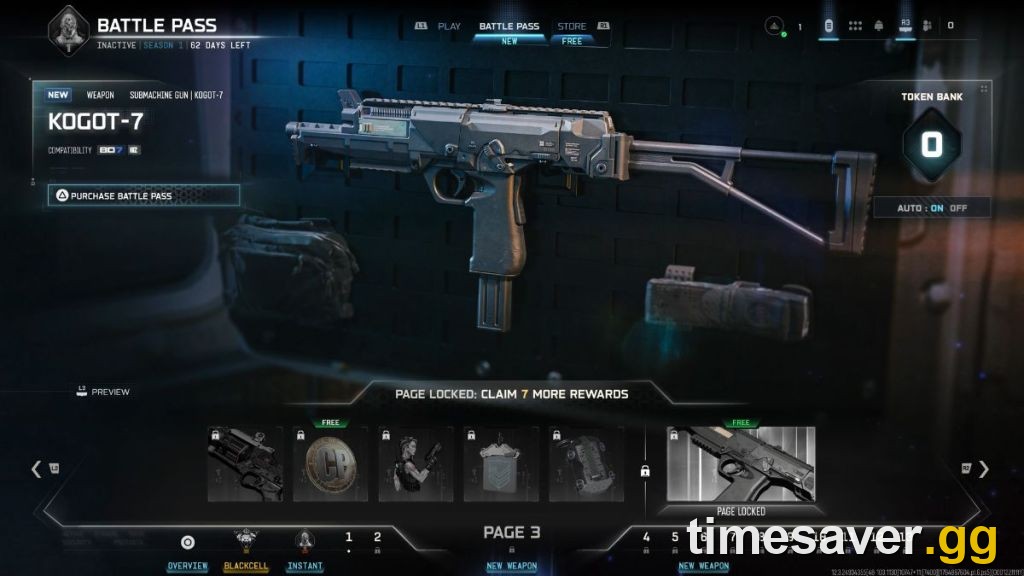
Quick answer: In the Black Ops 7 Season 05 Battle Pass, turn Auto-Claim OFF if you own the paid pass. Auto-Claim spends your Battle Pass Tokens in numerical order (Tier 1, 2, 3…), which means you burn tokens on filler before you reach the reward you actually want. With Auto off, you bank your tokens and spend them in any order — grabbing the Spectre Operator, the FG42, or a specific Blueprint the moment you have enough tokens, then filling in the rest later. Keep Auto on only if you don't care which order rewards arrive and just want zero clicks.

Call of Duty - Bot Lobby
Get bot lobby in 10 minutes
Key Takeaways
- Auto-Claim ON = tokens spent Tier 1 upward automatically. Simple, but you can't cherry-pick rewards.
- Auto-Claim OFF = you choose which Tier each token unlocks. This is the power setting for targeting HVTs and Blueprints early.
- You only need to unlock and claim 5 Tiers on a Page to open the next Page — not the whole Page.
- The High-Value Target (HVT) at the end of each Page only unlocks once every Tier on that Page is claimed.
- Free Battle Pass players don't get Tokens at all — rewards come in numerical order only, so Auto-Claim doesn't apply to you.
- Tokens come from XP earned across every public mode in BO7 and Warzone, then sit in your Battle Token Bank until you spend them.
The Season 05 Battle Pass ("Reloaded" content is live now) runs 16 Pages headlined by the returning assassin Spectre, and BO7 uses a page-and-token system — not the old linear tier bar. If you leave the default settings alone, the game quietly makes progression decisions for you. This guide breaks down exactly how the token system works, when Auto-Claim helps, when it hurts, and the exact settings to target the rewards you care about first.
How the BO7 Battle Pass Actually Works
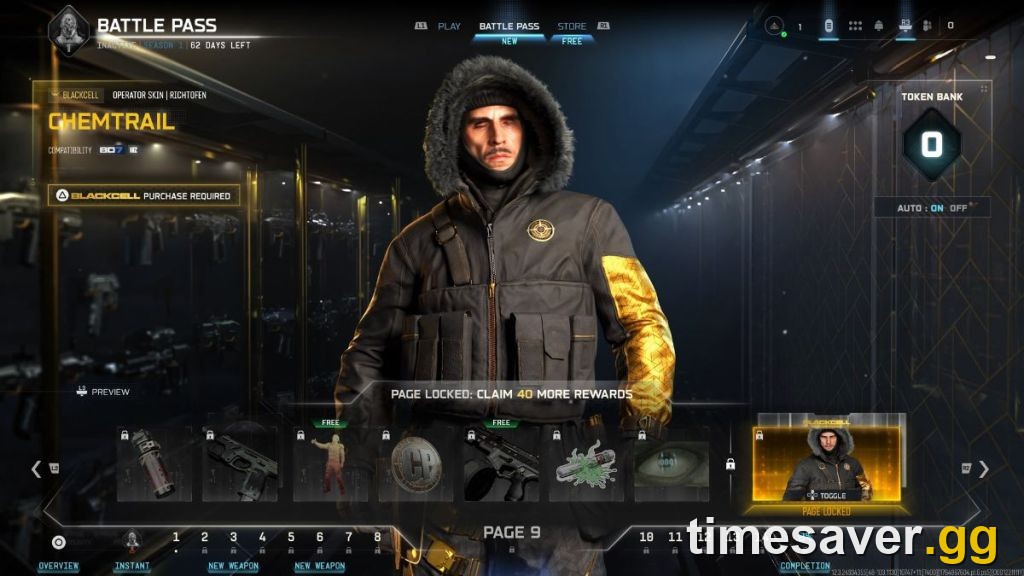
Black Ops 7 (and Warzone, which shares the same pass) uses a page-based rewards progression system, per the official Activision Support page. Here's the structure:
- The Battle Pass is split into a series of Pages. Page 1 is unlocked by default at the start of each Season.
- Each Page holds several Tiers (the individual rewards) plus one High-Value Target (HVT) — the standout reward on that Page.
- You earn XP across all public modes in BO7 and Warzone. That XP converts into Battle Pass Tokens.
- Tokens land in your Battle Token Bank, and you spend one token to unlock (and instantly claim) a Tier.
The critical detail most players miss: Tiers can be unlocked and claimed in any order you wish using Battle Pass Tokens. You are not forced up the ladder one rung at a time — unless you let Auto-Claim do it for you.
"The XP you earn across all public game modes in Call of Duty: Black Ops 7 and Call of Duty: Warzone contributes to earning Battle Pass Tokens. Battle Pass Tokens are then used to unlock Tiers in the Battle Pass." — Activision Support
The 5-Tier Page Rule
This is the single most useful mechanic to understand. Per Activision Support:
- To access the HVT on a Page, you must unlock and claim every Tier on that Page.
- But to open the next Page, you only need to unlock and claim any 5 Tiers on the current Page.
That means you can "tunnel" downward — clear 5 Tiers per Page to race deeper into the Battle Pass toward a reward you want on a later Page, then double back and mop up the HVTs. This is impossible if Auto-Claim is on, because Auto will always fill the current Page from Tier 1 before moving on.
Auto-Claim On vs Off: What Each Setting Does
Black Ops 7 gives you a toggle called Auto-spending Battle Pass Tokens (shown in-game as Auto-Claim). Here's the plain-English difference.
Auto-Claim ON
- Every time you earn enough XP for a token, the game automatically unlocks and claims the next Tier in numerical order.
- Zero clicks — you never open the Battle Pass to spend anything.
- You lose control of order. If the reward you want is on Tier 40 and a Blueprint you'll never use is on Tier 3, you pay for Tier 3 first.
Auto-Claim OFF (recommended for paid pass)
- Tokens accumulate in your Battle Token Bank untouched until you decide.
- You open the Battle Pass, pick the exact Tier you want, and spend a token on it.
- You can save a stack of tokens and burst-unlock a specific HVT (like the Spectre Operator or a weapon Blueprint) the moment it's reachable.
- The trade-off: it takes a few clicks, and you have to remember to spend — banked tokens do nothing sitting in the bank.
| Setting | Token order | Control | Best for |
|---|---|---|---|
| Auto-Claim ON | Numerical (Tier 1 → up) | None | Casual players who want zero clicks |
| Auto-Claim OFF | Any order you choose | Full | Targeting HVTs, Blueprints, or the Operator early |
When to Turn Auto-Claim Off (and When to Leave It On)

Turn it OFF if any of these apply:
- You bought the Base Battle Pass (1,100 CP), the Bundle (2,400 CP), or BlackCell — only paid passes get Tokens, so only paid players benefit from manual control.
- There's a specific reward you want first — the Spectre Operator Skin, the FG42 Assault Rifle, or the dual-wield Gremlin SMG Blueprint headlining Season 05.
- You want to use the 5-Tier Page rule to dive deep quickly.
Leave it ON if:
- You genuinely don't care about reward order and just want everything eventually.
- You're worried you'll forget to manually spend and let tokens rot in the bank.
For most players chasing a season's headline Operator or a meta weapon Blueprint, off is the correct answer — it's the only way to guarantee you hold the reward you actually logged in for as early as possible.

Call of Duty - Ranked Boost
Get ranked boost in 10 minutes
How to Save Battle Pass Tokens and Target the Best Rewards
Here's the step-by-step play to unlock the rewards you want first in Season 05.
- Set Auto-Claim to OFF. In the Battle Pass menu, open settings and toggle off Auto-spending / Auto-Claim. Your tokens now bank instead of auto-spending.
- Preview every Page. All Pages can be previewed before they're unlocked — scout where the Spectre Operator, FG42, Gremlin, and any Blueprints you want actually sit.
- Bank tokens by playing high-XP modes. Every public-mode match feeds your token bank (more on the fastest modes below).
- Use the 5-Tier rule to reach the right Page. Spend just 5 tokens per Page to open the next one until you reach the Page holding your target reward.
- Burst-unlock your target. Once that Page is open, spend banked tokens directly on the HVT or Blueprint you want.
- Backfill afterward. With your priority reward secured, spend remaining tokens filling in Pages to claim the up-to-1,100 COD Points scattered across the pass so you can fund the next season.
Fastest Ways to Bank Tokens
Tokens are pure XP under the hood, so the fastest way to stack them is the fastest way to earn XP. High-density, objective-heavy modes win:
- Double XP + Double Battle Pass XP tokens stacked together roughly double your token rate — save them for a focused session, not a random Tuesday.
- High-density 6v6 modes (fast-respawn playlists like Nuketown 24/7 when it's live) maximize eliminations per minute.
- Zombies round grinds convert to strong XP if you can push and reset efficiently.
- BlackCell owners get extra Daily Challenges across Endgame, Multiplayer, Zombies, and Warzone — more challenges means more XP means more tokens.
For a deeper breakdown of the single fastest XP methods this season, see our BO7 fastest way to level up in Season 5 guide, and our full Season 5 Battle Pass rewards guide for the complete reward list.
The BlackCell "Start on Any Page" Trick
If you own BlackCell, you get a bonus that stacks perfectly with Auto-Claim off. When you enter the Battle Pass for the first time, BlackCell lets you begin unlocking Tiers on any Page — not just Page 1.
So if the reward you want is on Page 7, you can start straight there and claim it immediately. The catch: once Page 7 is complete, Page 8 won't open until you've also completed Pages 1 through 6. After finishing your chosen Page, your progression continues on the lowest Page that's unlocked but not yet complete. It's a head-start on one specific reward, not a way to skip the whole pass.
BlackCell also bundles 20 Battle Pass Tokens up front, 1,100 COD Points, the BlackCell Instant Rewards Page, and a 10% Battle Pass XP boost — all of which accelerate how fast your bank fills.
Skip the Grind Entirely
The token system rewards time — and if you've priced out how many hours 16 Pages takes, the math isn't friendly for a working schedule. A weapon and account leveling service clears the XP grind so your token bank fills without the daily slog, and a camo unlock service handles the mastery grind that the Battle Pass doesn't touch.
Want the rewards without the hours?
>
- CoD Account & Weapon Leveling (BO7) — skip the grind, tokens bank fast, done by pro players
- CoD Bot Lobbies — easy lobbies, level and earn XP fast
- BO7 Mastery Camo Unlocks — mastery camos, fast and secure
Frequently Asked Questions
Should Auto-Claim be on or off in Black Ops 7? Turn it off if you own a paid Battle Pass and want to choose which rewards you unlock first. Auto-Claim spends your tokens in numerical order (Tier 1 upward), so it can waste tokens on filler before you reach the Operator or Blueprint you want. Leave it on only if you don't care about order and want zero clicks.
Do I lose tokens if Auto-Claim is off? No. Banked tokens stay safe in your Battle Token Bank until you spend them — you can see the balance whenever you enter the Battle Pass. The only "loss" is opportunity: tokens do nothing while they sit unspent, so remember to actually spend them on rewards.
How do I earn Battle Pass Tokens in BO7? You earn them passively from XP across all public game modes in Black Ops 7 and Warzone — every match feeds your token bank. Tokens can also be purchased directly with COD Points. Free Battle Pass players do not earn Tokens; their rewards unlock in numerical order through normal play.
Can I unlock a later Page without finishing the current one? Yes. You only need to unlock and claim 5 Tiers on a Page to open the next Page. You must claim every Tier on a Page to unlock that Page's High-Value Target, but the 5-Tier rule lets you dive deeper into the pass quickly.
Is the Spectre Operator worth targeting first? Spectre — a returning assassin from Black Ops 3 and 4 — is the Season 05 headliner and unlocks instantly when you buy the Base Battle Pass, so you don't need to spend tokens to get the Operator itself. Save your manual token spending for the Blueprints, HVTs, and the FG42 / dual-wield Gremlin spread across the 16 Pages.
Does Auto-Claim matter on the free Battle Pass? No. Free players don't receive Battle Pass Tokens, so there's nothing to auto-spend — free rewards simply unlock in numerical order as you play. The Auto-Claim setting only affects paid pass owners.