Quick answer (TL;DR): In Black Ops 7 Season 5 Reloaded, "frozen" or "locked" scorestreaks — where the game refuses to change your streaks and keeps forcing the default Scout Pulse, Skewer and Watchdog Helo back into your loadout — are almost always caused by Overclocks, specifically the discounted (yellow-numbered) streaks. The fastest working fix: remove every Overclock, unequip all three scorestreaks, then start a Private Match with scorestreaks disabled, back out, fully close and relaunch the game, and re-add your streaks before you queue. If it only happens in one playlist (Cranked Moshpit is the repeat offender), switch playlists. And because this same bug blocks the airborne/aerial scorestreak weekly challenge, remember you only need to finish 6 Weekly Challenges across four modes — Multiplayer, Zombies, Endgame and Warzone — so you can complete a stuck challenge in Warzone or Zombies instead. Full step-by-step below.
If you've sat in the Scorestreaks menu swapping your loadout five times, backed out, joined a match — and the game still hands you Scout Pulse, Skewer and Watchdog Helo, you're hitting the most annoying open bug in Black Ops 7 right now. It's all over r/blackops7 this week, it's been on-and-off since launch, and Treyarch still hasn't fully patched it. The good news: players have reverse-engineered exactly what triggers it and there are two reliable resets. This guide verifies the cause against Activision's own Season 5 systems, walks the fix in order, and shows you how to still knock out the scorestreak-gated weekly challenge while the bug persists.
Bug eating your grind before Modern Warfare 4 drops on October 23 (campaign early access October 16)? Don't lose your Season 5 progress to a menu glitch — our pros can knock out challenges and levels for you.
- CoD Calling Cards & Challenges Boost (BO7) — clear weekly + Dark Ops challenges · fast · secure
- CoD Account & Weapon Leveling — skip the grind · pro players
- CoD Bot Lobbies — easy lobbies · farm streaks & XP fast

Call of Duty - Bot Lobby
Get bot lobby in 10 minutes
Why are my scorestreaks stuck on default in Black Ops 7?
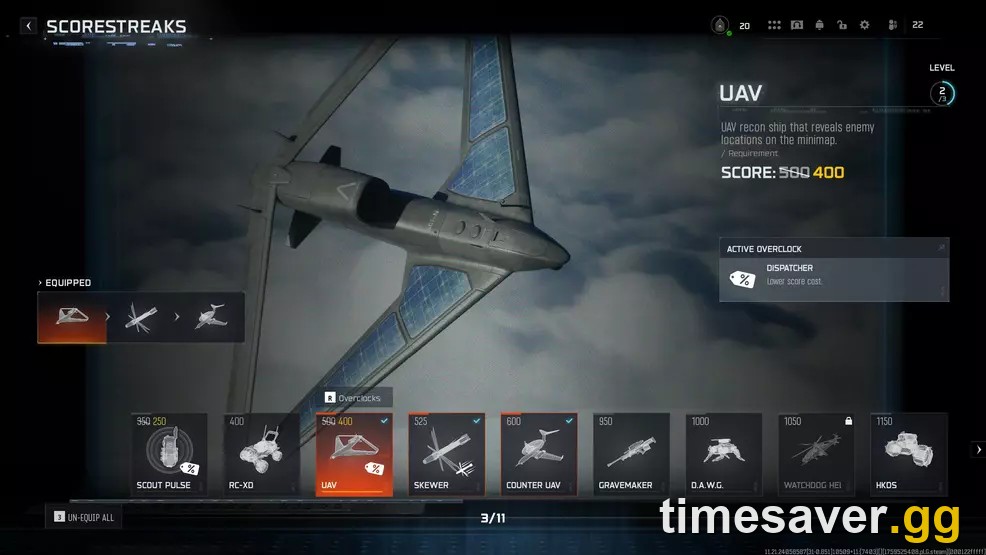
The core symptom is consistent across dozens of reports: you set your streaks, but in-match you're stuck with the default trio — Scout Pulse, Skewer and Watchdog Helo — or the menu simply won't let you swap them. Some players see "errored" streaks that show a blank white box instead of an icon, and unequipping everything just re-equips your first pick into the wrong slot.
The pattern the community has nailed down is that it's tied to Overclocks — the Season 5 modifiers that discount a scorestreak's cost (shown as a lower, yellow score number). When an Overclock is applied — even to a streak you're not currently running — the loadout can desync when the match loads, and the game falls back to defaults. As one r/blackops7 player put it after testing: "I think it might have to do with running UAV, or the cheaper UAV alternative, and running the Overclock that makes them cheaper." Another summarized the working reset: "Go into a private match and remove all Overclocks and it fixes it."
These desyncs cluster around the client loading your loadout before your profile data finishes syncing — the same reason display bugs spike right after patches like the August 20, 2026 Season 5 Reloaded update. When the discount data and the streak data don't line up, the game plays it safe and gives you the stock loadout.
Before you assume your save is corrupted, confirm you're actually hitting the Overclock trap: if you have any streak showing a discounted yellow cost, that's very likely your culprit.
How to fix frozen scorestreaks in Black Ops 7 (in order)
Work these in order — most players are fixed by step 2, and it's cost-free.
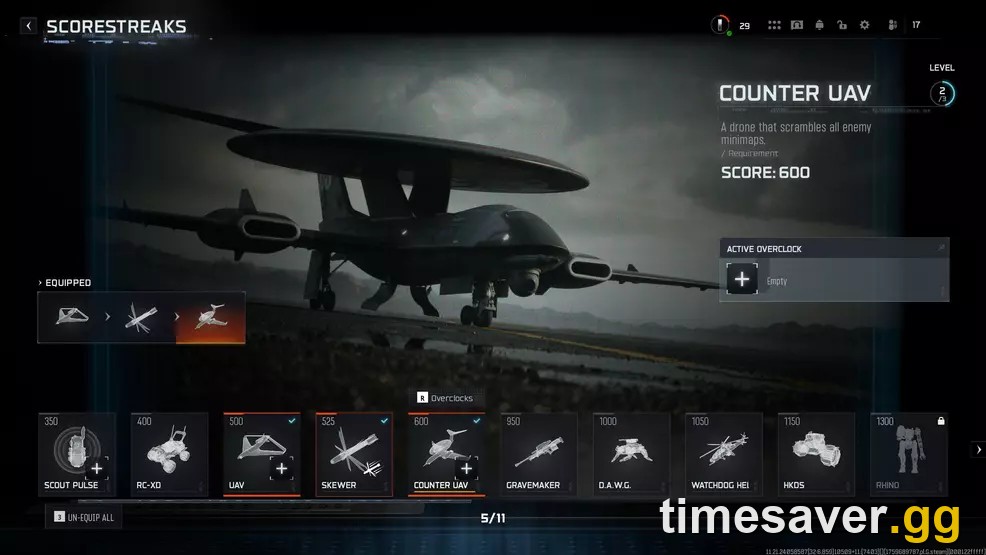
1. Strip every Overclock first
Go to Multiplayer → Loadouts → Scorestreaks. Remove every Overclock, whether it's on a streak you run or not — including any streak showing a yellow (discounted) score cost. Do not leave a single discount active. This alone clears it for some players; if it doesn't, keep going.
2. The Private Match reset (most reliable)
This is the fix with the highest success rate in the threads:
- Start a Private Match (Custom Game).
- In the game rules, set Scorestreaks to disabled / none — this strips all streaks and Overclocks from your active loadout.
- Back out of the Private Match completely.
- Fully close the game and relaunch it — not just back to the menu; hard-quit to your console/PC dashboard and reopen.
- Go back to Scorestreaks, select the three you want (leave Overclocks off for now), and queue a normal match.
One player confirmed the sequence: "Start a private match and set parameters to no scorestreaks — this removes all scorestreaks and Overclocks. Quit out and totally restart the game, then you're able to set your scorestreaks and Overclocks back up." Note that Private Match loadouts are stored separately, so the disable step only works if you follow it with the hard restart — skipping the relaunch is why it "doesn't work" for some.
3. Manually cycle the streaks
If you're still stuck, try the brute-force method that clears the desync live:
- In the Scorestreaks menu, swap your streaks around (change all three to different ones), enter a match, check if they stick, then back out and set the ones you actually want. Rinse and repeat.
- Hold L3 (or the "remove all" prompt) to clear the slots, then re-add — but pair this with a game restart, or the stale trio tends to return.
4. Change your playlist
Multiple players report the bug is playlist-specific. If your streaks only break in one mode — Cranked Moshpit is the most-named offender — switch to a standard playlist. As one player found: "Mine did that only on Cranked Moshpit. Once I moved to a different playlist it started working again."

Still can't select an aerial scorestreak for a weekly challenge?
Here's the part that's actually costing people rewards: several Season 5 Reloaded Weekly Challenges require you to earn kills with a specific streak — often an airborne/aerial scorestreak — and if the bug won't let you equip it, the challenge looks impossible.
You don't have to fight the bug to finish it. Per Activision's own Season 5 structure, Weekly Challenges span four modes — Multiplayer, Zombies, Endgame and Call of Duty: Warzone — and you only need to complete 6 of them across those modes, not six in Multiplayer. So if Multiplayer won't cooperate:
- Complete the challenge (or a different one) in Warzone, Zombies or Endgame, where the streak/loadout desync usually doesn't apply.
- Resurgence Quads in Warzone plays close enough to multiplayer that streak-style challenges are easy to knock out there.
As one frustrated player put it: "They keep posting challenges that need [the streak] unlocking" — and the community's standard answer is blunt: "Do one challenge in Zombies or Warzone, done." It's not elegant, but it keeps your Weekly Challenge rewards moving while the bug is live.
If you're chasing calling cards or Dark Ops challenges on top of the weeklies, our Endgame Dark Ops calling cards guide breaks down every challenge and the fastest route.

Call of Duty - Ranked Boost
Get ranked boost in 10 minutes
Is this the same as scorestreaks "not working" or reverting to default?
Closely related, but worth separating. If your streaks aren't frozen by an Overclock but simply revert to defaults every match or won't save at all, that's the broader loadout-desync bug we cover in full in our BO7 scorestreaks not working / stuck on default guide — same family, and the High Roller wildcard is a common trigger there. If your streaks vanish entirely mid-menu or the whole scorestreaks tab errors out, check whether it's part of a wider matchmaking/loadout failure after the Season 5 update.
The distinction matters because the Overclock trap has a specific fix (strip the discounts), while a pure save-desync usually just needs the hard-restart-before-queue habit.
Will Treyarch patch the scorestreak bug?
It's a known issue that's persisted across multiple Season 5 updates, and players have been vocal — "the fact the scorestreak bug isn't fixed yet is crazy to me" is a common refrain on r/blackops7. Historically these loadout-sync issues get quietly addressed in a mid-season or seasonal patch (the same way Season 5 and Season 5 Reloaded patched several Zombies and menu display bugs), but Activision hasn't published a dated fix for this specific Overclock desync as of early September 2026. Until it lands, the Private Match reset above is your best bet — and keep an eye on the official Black Ops 7 patch notes for a line item mentioning scorestreaks or Overclocks.
With Modern Warfare 4 arriving October 23 (campaign early access October 16), don't count on a big BO7 fix landing right before the handoff — plan around the workaround.
FAQ
Why do my scorestreaks keep resetting to Scout Pulse, Skewer and Watchdog Helo? That's the default scorestreak trio, and the game forces it back when your loadout fails to sync at match start. The most common trigger in Season 5 Reloaded is an active Overclock (a discounted, yellow-cost streak). Remove all Overclocks, do the Private Match reset, and hard-restart the game before you queue.
What actually is the Overclock trap in Black Ops 7? Overclocks are Season 5 modifiers that lower a scorestreak's score cost (shown as a yellow number). When a discount is applied, the streak data can desync as the match loads, and the game drops you back to defaults. Even an Overclock on a streak you're not running can cause it, which is why you must strip every discount, not just the one on your equipped streaks.
How do I do the Private Match fix step by step? Start a Custom/Private Match, set Scorestreaks to disabled in the game rules, back out, then fully close and relaunch the game (hard-quit to the dashboard, not just to the menu). Reopen, pick your three streaks with Overclocks off, and queue. The hard restart is the part people skip — without it, the fix won't hold.
I can't equip an aerial scorestreak for the weekly challenge — am I locked out of the reward? No. Weekly Challenges only require 6 completions across four modes (Multiplayer, Zombies, Endgame, Warzone). If Multiplayer won't let you equip the streak, complete the challenge in Warzone, Zombies or Endgame instead — the desync usually doesn't apply there.
Does the bug happen in every playlist? No — several players report it's tied to specific playlists, with Cranked Moshpit the most-named. If your streaks only break in one mode, switching to a standard playlist often clears it instantly.
Is this bug worth waiting for a patch, or should I just grind around it? It's a long-running known issue with no dated official fix as of early September 2026, so don't wait — use the Private Match reset and the hard-restart habit. If it's costing you weekly challenge or camo rewards before Modern Warfare 4, it's faster to complete those in an unaffected mode (or have a pro clear them).