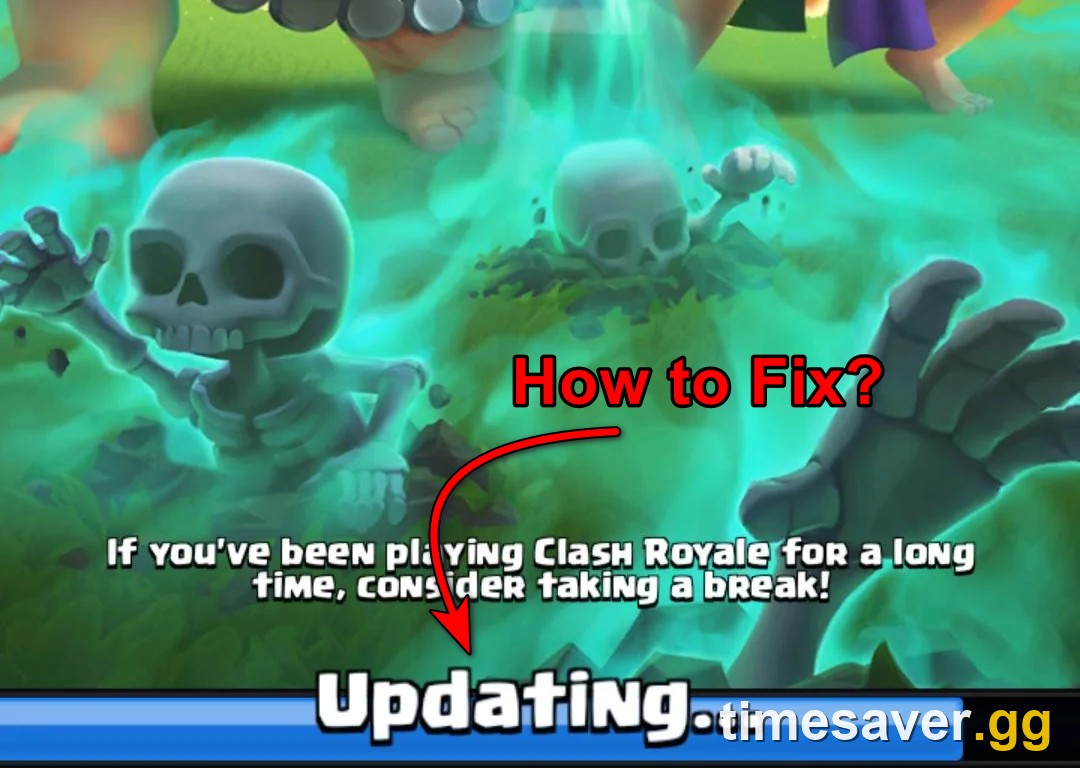
If Clash Royale opens, starts loading, and then throws "Connection lost - please try logging in again" — often freezing at "50% Updating…" first — you are not locked out of your account and you almost certainly have not lost your progress. This is one of the oldest and most common Clash Royale errors, it is almost always a connection or client problem on your side, not a ban or a deleted account, and in most cases it clears in under five minutes once you try the fixes in the right order.
This guide lists every fix that actually works, ordered from fastest to most involved, plus the one step you must do before you reinstall so you do not risk your account. Everything here is checked against Supercell's official Clash Royale support portal and current player reports on r/ClashRoyale as of September 5, 2026.
Quick answer: how to fix "Connection lost - please try logging in again"
- First, rule out a server outage. If Clash Royale is down for everyone, no fix on your phone will help — check Downdetector and @ClashRoyale on X first.
- Force-close and reopen the app. This alone fixes the most common version — the one that appears during a friendly battle or randomly mid-session.
- Switch networks: turn Wi-Fi off and play on mobile data (or vice versa). This is the single most underrated fix. Restricted Wi-Fi — school, university, office, or even some home routers — silently blocks Clash Royale's servers.
- Toggle Airplane Mode on for 10 seconds, then off. Forces your phone to re-establish a clean data connection.
- Restart your phone. Clears a stuck network stack; fixes the "stuck at 50% Updating" freeze more often than any in-app step.
- Update Clash Royale from the App Store / Google Play. The error frequently appears the day a new season or balance patch drops because your client is out of date.
- Only reinstall as a last resort — and link your Supercell ID first (see the warning below). Reinstalling without a linked account is how people actually lose progress.
Work down this list in order. The first three steps fix the large majority of cases.
Is it me or is Clash Royale down? Check this first
Before you touch a single setting, spend thirty seconds confirming the problem is even yours. Supercell does periodic server maintenance (usually announced in-app and on @ClashRoyale), and servers can also wobble in the first hours after a new season or balance update goes live — a real risk in this exact window, with Season 87 (Minion Giant) launching September 7, 2026.
Two fast checks:
- Downdetector — downdetector.com/status/clash-royale shows a live spike if the outage is widespread.
- @ClashRoyale on X and the pinned threads on r/ClashRoyale — if everyone is posting the same error at the same minute, it is a server issue.
If it is a Supercell-side outage, there is no fix on your end. Wait it out; your account and trophies are untouched. If the servers are healthy and only you are stuck, move on to the steps below.
Fix 1: Force-close and reopen the app
The most common flavour of this error — the one that hits mid-session or when you try to start a friendly / challenge battle — is a temporary desync, not a real disconnect. Players on r/ClashRoyale describe the exact pattern: "Clash Royale always says 'connection lost' when I challenge anyone to a friendly battle," with the fix being as simple as "close the game and re-enter."
- iOS: swipe up from the bottom (or double-press Home) and swipe Clash Royale off the app switcher, then reopen.
- Android: open Recents, swipe Clash Royale away, then relaunch.
Do this once. If the game reconnects, you are done — this is by far the highest-hit-rate fix for the in-battle version.
Fix 2: Switch your network (the fix nobody mentions)
If reopening did not work, the problem is your connection — and the most overlooked cause is a network that quietly blocks Clash Royale's servers. This is not a theory; it is the single most upvoted real-world fix in recent threads. One player who could not get past the loading screen for days discovered: "Turns out it was my university Wi-Fi. Somehow it blocks CR of all things — turning Wi-Fi off makes it work." Another added it is not just campuses: "I switched to data instead of home Wi-Fi and it worked (we have no Wi-Fi restrictions)."
So the test is simple:
- On Wi-Fi and stuck? Turn Wi-Fi off, enable mobile data, and open the game.
- On mobile data and stuck? Connect to a different Wi-Fi network.
- If switching networks fixes it, the original network is the problem — a firewall, content filter, VPN, or router setting is blocking Supercell. Schools, offices, hotels, and some parental-control routers are the usual culprits.
Also try a quick Airplane Mode toggle (on for ~10 seconds, then off) on your current network — it forces a clean reconnect and clears a surprising number of "stuck" states without needing to switch networks at all.
Fix 3: Restart your phone
If a network switch does not do it — especially for the "stuck at 50% Updating… then Connection lost" freeze — restart the whole device. A full reboot clears a stuck network stack and any background app hogging the connection, and it resolves the loading-screen freeze more reliably than any in-app toggle. After the reboot, open Clash Royale on a known-good connection.
Fix 4: Update (or clear the cache for) Clash Royale
This error spikes the day a new update lands, because your client and Supercell's servers are briefly on different versions. With balance patches and the Season 87 flip in this window, an out-of-date client is a live suspect. See our Clash Royale August 2026 balance changes for the full breakdown.
- Update the app: open the App Store (iOS) or Google Play (Android), search Clash Royale, and install any pending update. Then relaunch.
- Android — clear cache (not data): Settings → Apps → Clash Royale → Storage → Clear cache. This wipes temporary files without touching your account. Do not tap "Clear data" / "Clear storage" on an account that is not linked to a Supercell ID — that behaves like a fresh install.
- iOS — offload the app: Settings → General → iPhone Storage → Clash Royale → Offload App, then reinstall it. Offloading keeps your documents and data while refreshing the app itself.
Fix 5: Reinstall — but link your Supercell ID FIRST (important)
Reinstalling is the nuclear option, and it works when the install itself is corrupted. But this is the one step where people actually lose their account, so do it in the right order.
⚠️ Before you delete the app: make sure your account is connected to a Supercell ID. Your progress lives with that Supercell ID, not with the app on your phone. If you reinstall without a linked ID and the game can't find your account, you can be dropped onto a brand-new save. As r/ClashRoyale veterans put it, linking a Supercell ID means "you retain the same progress and actually safeguard your account," so you can restore it on any device.
The safe reinstall sequence:
- Open Clash Royale → Settings → connect / verify your Supercell ID. Confirm it shows a linked email. (If the error stops you from reaching Settings entirely, get the game to load first with Fixes 1–4 — do not reinstall while locked out and unlinked.)
- Delete the app.
- Reinstall from the App Store or Google Play.
- Launch it and log back into the same Supercell ID. Your name, trophies, cards, and Gold come straight back.
If you are already stuck at the error and cannot reach Settings to link an ID, do not reinstall — instead, contact Supercell in-game support (or via the support portal) so they can recover the account by player tag before you wipe the install.
Why does this keep happening?
The "Connection lost - please try logging in again" message is Clash Royale's catch-all for "the client could not complete a handshake with the server." That is why the fix is almost never one specific thing — it is whichever link in the chain broke. The realistic cause list, in rough order of how often it is the culprit:
- A flaky or restricted network — the #1 real-world cause, and the reason switching to mobile data fixes so many cases.
- A temporary app desync — the friendly-battle / mid-session version; cured by reopening.
- A version mismatch after an update — the game needs the latest client, especially around a new season.
- A Supercell-side outage or maintenance — out of your hands; check Downdetector.
- A corrupted local install — rare, and what the reinstall fixes.
Note what is not on this list: a ban. A banned account shows a specific ban message, not "Connection lost." If you see the connection error, your account is fine.
FAQ
What does "Connection lost - please try logging in again" mean in Clash Royale? It means your device could not complete a connection to Clash Royale's servers, so the game dropped you back to the login screen. It is a connection or client-version problem in the vast majority of cases — not a ban and not a deleted account. Force-closing the app or switching networks fixes most instances.
Why is Clash Royale stuck at 50% "Updating…" and then says connection lost? That freeze is almost always a stuck network connection or an out-of-date client. Restart your phone, switch from Wi-Fi to mobile data (or to a different Wi-Fi), and make sure the app is updated in the store. If it is happening right after a new season or balance patch, give Supercell's servers an hour and try again — check Downdetector first to confirm it is not a wider outage.
Will I lose my account or progress because of this error? No. The error itself does not affect your account — your trophies, cards, and Gold are stored server-side against your Supercell ID. The only way to lose progress is to reinstall the game without first linking your account to a Supercell ID. Connect your Supercell ID before you ever delete the app.
My Wi-Fi works for everything else — why does only Clash Royale fail to connect? Some networks block or throttle game servers specifically. Schools, universities, offices, hotels, VPNs, and some home routers with content filtering will let web pages through while silently blocking Supercell's servers. The quick test: turn Wi-Fi off and open the game on mobile data. If it connects, the network was the problem.
Do I need a VPN to fix Clash Royale connection issues? Usually the opposite — if you are using a VPN, disable it, because many VPN exit nodes are blocked by Supercell and cause exactly this error. Only consider a VPN if your regular network is the thing doing the blocking and you have no other connection available.
Is Clash Royale down right now? If several people report the same error at the same time, it may be a server outage or scheduled maintenance rather than your device. Check Downdetector and the @ClashRoyale account on X. During a server-side outage there is nothing to fix on your end — your account is safe and it will reconnect once the servers are back.
More Clash Royale guides
If you came here mid-grind, these are the other explainers worth a look while you are back online:
- Clash Royale card levels explained: Level 16, upgrade costs, and what maxing really takes
- How to unlock Ranked in Clash Royale: the real trophy requirement
- Best Clash Royale decks (October 2026): the post-balance meta explained