Crossplay is the setting most FC 27 players never touch and then blame for everything. It is on by default, it decides who you can even be matched against, and it lives in three different menus — which is exactly why so many people are convinced it is broken when it is simply switched off.
The confusion peaked this week on r/fut, where a PC player reported meeting console opponents in every online mode except FUT Champions, and assumed EA quietly put PC in its own Champions queue. It hasn't. Here is what EA actually documents, what it has never published, and the one honest reason a PC-only Champions run happens.
Quick answer: FC 27 crossplay works across PC, PlayStation and Xbox, but strictly inside your platform generation. Current-gen = PlayStation 5, Xbox Series X and S, and PC in one shared pool. Old-gen = PlayStation 4 and Xbox One in a second pool. The two never meet. Nintendo Switch and Switch 2 have no crossplay at all — Switch players only ever face other Switch players. Crossplay is enabled by default and is toggled at Main Menu → EA Connect → Social settings → Cross-play → Cross-play settings, or from Ultimate Team at Settings → Matchmaking Settings. EA has never published a Champions-specific PC-only pool — if you are on PC and only seeing PC opponents, the overwhelmingly likely cause is that your own Cross-play Enabled toggle reads No.
Phase check: FC 27 is in Season 1, which EA confirmed runs 17 September → 22 October 2026 in the Launch Rewards Pitch Notes. Future Stars is the live campaign, having launched 9 October after Destined for Glory closed. Season 2 begins 22 October 2026. Everything below is current as of 11 October 2026.
EA Sports FC 27 - Coins
Stock up on Coins
Does FC 27 have crossplay, and which platforms share a pool?
Yes — and the rule that matters is not platform, it is generation. EA's cross-play help article states it directly:
"You'll be grouped by platform generation, which means you can only play against others in the same generation."
That produces two sealed pools and one island:
| Pool | Platforms | Can match each other? | |
|---|---|---|---|
| Current generation | PlayStation 5, Xbox Series X\ | S, PC | ✅ Yes — all three share one pool |
| Old generation | PlayStation 4, Xbox One | ✅ Yes — with each other only | |
| Nintendo | Switch, Switch 2 | ❌ No crossplay whatsoever |
Three platforms sit in the current-gen pool and two in the old-gen pool, and there is no bridge between them. EA spells out the consequence: if you are on PlayStation 5 you cannot play against someone on PlayStation 4, "or vice versa."
The detail PC players keep missing is the first row. PC is not a separate queue in FC 27 — it is pooled with PS5 and Xbox Series X and S. That is EA's documented design, not a community theory.
One trap worth naming: owning current-gen hardware is not the same as running the current-gen version. If you play the PS4 or Xbox One build via Dual Entitlement on a PS5 or Series X, you should expect the old-gen pool, since the generation rule follows the version of the game you launched rather than the hardware it runs on. EA does not spell this case out explicitly, so treat it as the logical reading of its generation rule. Our FC 27 Division Rivals carryover guide covers the related platform-family rule for progress coming out of FC 26.
Why do you only match PC players in FUT Champions?
This is the question that prompted this guide, so let's answer it properly rather than repeat the rumour.
EA has published no Champions-specific matchmaking split. There is no line in EA's cross-play article, no Pitch Note, and nothing in the FC 27 Launch Update that separates PC from console in Champions while leaving Rivals mixed. Anyone telling you FC 27 runs a dedicated PC Champions queue is guessing — treat it as unconfirmed.
What is documented produces exactly the symptom people describe:
- Your toggle is off. Crossplay is a single account-level setting, and with it disabled, matchmaking is restricted to your own platform. The community tracker fifauteam puts the effect plainly: "If you disable it, matchmaking will be limited to players using the same platform, reducing the number of available opponents." A PC player with crossplay off plays PC opponents — in Champions and everywhere else.
- You changed it mid-run and didn't notice. EA is explicit that "you can't enable or disable cross-play during a match." Flip it between games in a 15-match Champions run and you will see your opponent mix change partway through, which feels mode-specific but isn't.
- Thin pools look like platform locks. Community trackers note that crossplay availability can be affected platform-by-platform by maintenance, server releases, Title Updates and matchmaking changes — EA has not published an FC 27 statement on this, so treat it as unofficial. Either way, a narrow Champions pool at an odd hour, inside a tight skill band, can hand you three PC opponents in a row out of a mixed pool. That is variance, not a rule.
The fix is 20 seconds of menu work, not a workaround: open the toggle and confirm what it actually says. Most players who post this complaint have never looked.
How do you turn crossplay off in FC 27?
Crossplay is enabled the first time you launch the game — EA's wording is "when you play FC for the first time, cross-play is enabled by default." Nobody opts in; you only ever opt out.
EA documents three routes to the same screen, which is the single biggest source of "the setting isn't there" confusion:
Route 1 — EA Connect (EA's primary instructions):
- From the Main Menu, open EA Connect
- Open Social settings
- Select Cross-play, then Cross-play settings
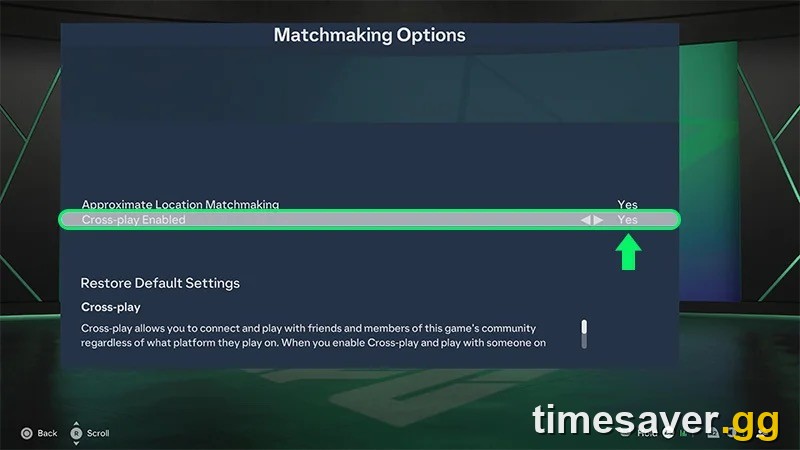
- Under Cross-play Enabled, toggle to No to turn it off, or Yes to turn it back on
Route 2 — the global settings path: Main Menu → Customise → Online Settings → Matchmaking Options.
Route 3 — from inside Ultimate Team: Main Menu → Ultimate Team → Settings → Matchmaking Settings.
All three land on the same `Cross-play Enabled` row shown in EA's own screenshot at the top of this guide, sitting directly beneath Approximate Location Matchmaking. There is no per-mode version of this setting — one toggle governs Rivals, Champions, Rush, Online Draft, Clubs and friendlies together.

Per community tracking, crossplay covers FC 27's online modes broadly — The Grounds, Clubs, Kickabouts, Co-Op Seasons, Online Friendlies, Online Seasons, and the Ultimate Team modes including Champions, Challengers, Rivals, Rush, Online Draft and Play a Friend. EA itself has not published a definitive FC 27 mode list, so treat that breakdown as community-verified rather than official.
Should you turn crossplay off before a Champions run?
Almost always no, and the reason is arithmetic rather than preference.
Turning crossplay off cuts your opponent pool to a single platform. Smaller pool means longer searches and a looser skill match — fifauteam notes that keeping it on "generally results in faster matchmaking and a better chance of finding opponents with a similar skill level." And you are not dodging anything mechanical: community trackers report crossplay has no direct impact on FC 27's gameplay, and EA has published nothing claiming otherwise.
That matters more in Champions than anywhere else, because Champions is a fixed-length competition. Community tracking has FC 27's Season 1 format at 15 matches per run with one win equal to one rank, and qualification at 1,000 Champions Qualification Points, with the in-game Champions screen listing a minimum of Rivals Division 10. With 15 matches and no play-offs, every match you burn in a 4-minute queue against a badly-matched opponent is a rank you don't get back. Our FC 27 FUT Champions qualification guide covers the CQP maths, and the Season 1 format and rewards breakdown maps what each rank actually pays.
The one defensible reason to switch it off is input-method frustration — some console players prefer avoiding the PC pool over suspected cheating. Accept the trade honestly: slower queues and worse skill matching in exchange for a platform preference, in a mode where your run length is capped.
One behaviour the toggle does change is what you can see. With crossplay on, the friends widget shows a platform indicator next to a player's name. Players in this week's r/fut threads described using the pre-match screen to decide whether to back out of a game at all — reading opponent names, language and apparent region, and dodging anyone who looked like a stronger player. If that is happening to you, your lobby is being judged on far more than your platform.
EA Sports FC 27 - FUT Champions Boost
Get fut champions boost in 10 minutes
Does crossplay work on Nintendo Switch or Switch 2?
No — and this is the hardest line EA draws anywhere in the system. From EA's dedicated Switch cross-play article:
"No, the Nintendo Switch™ doesn't support cross-play for EAS FC—you can only play with other Switch players. You can't play on Switch against someone playing on a PC, PlayStation®, or Xbox."
This closes a question that was genuinely open earlier in the FC 27 cycle: Switch 2, despite being current-generation hardware, gets no crossplay either. Switch and Switch 2 players share a pool with each other and nobody else.
Switch players do keep the full online mode list within that pool — Rivals, Champions, Online Draft, Friendlies and Rush are all reachable with a Nintendo Switch Online membership — plus Local Seasons against another Switch within a 10-metre range. It is a working game, just a sealed ecosystem.
Can you move your club between platforms?
Crossplay and cross-progression are different features, and conflating them is the most expensive mistake in this guide.
- Same platform family: yes. EA confirms progress carries from PlayStation 4 to PlayStation 5, or Xbox One to Xbox Series X and S.
- Across brands: never. EA's wording is blunt — you cannot carry over "from PlayStation® to Xbox."
- PlayStation has a mode restriction: "Cross-progression on PlayStation® is only available in Ultimate Team™." Your FUT club travels; other modes' progress does not.
- Nintendo: cross-progression works between Switch and Switch 2 in Ultimate Team, and nowhere else. EA: "your progress won't carry over to other platforms."
So crossplay decides who you play; cross-progression decides where your club lives. Switching on the first never moves the second.
What crossplay does not change
Three claims circulate every year that EA's own documentation does not support:
- It does not alter gameplay. No source, EA or community, documents crossplay changing how FC 27 plays. Delay, input lag and "the game feels heavy" complaints are not crossplay symptoms — see our FC 27 connection and ping-spike fixes for what actually drives those.
- It is not a mode or playlist. There is no crossplay queue to join; the setting filters the pool the mode already uses.
- It is not a cheating control. Turning it off narrows your pool to your own platform — it is a preference filter, and EA has published nothing framing it as an anti-cheat measure. To report a suspected cheat, use EA's player-reporting flow.
One privacy note worth knowing: per community documentation of EA's cross-play terms, enabling crossplay means the other platform may receive your platform ID and the other information needed to make cross-play work. EA's privacy and cookie policy is the authoritative text here.
Short on time to grind a 15-match Champions run? Season 1 ends 22 October — these are the fastest routes to finish it:
- EA FC 27 FUT Champions Boost — pro players run your Weekend League for the rank you want
- EA FC 27 Coins — Comfort Trade with paced delivery
- EA FC 27 Evolutions Boost — Future Stars and Season 1 pathways cleared for you
- All EA FC 27 services
A word on safety, because it matters more than a sales line: EA's User Agreement still prohibits buying, selling or transferring coins for real money, and enforcement can include coin removal, a transfer-market ban or an account ban. We use Comfort Trade and paced delivery with no cheats, bots or injectors — that lowers the risk, it does not eliminate it. Anyone promising you zero risk is lying.
FAQ
Is FC 27 crossplay on by default? Yes. EA states cross-play is enabled the first time you play, so you are in the shared pool unless you deliberately turned it off. It is an opt-out setting, never an opt-in.
Can PC players match PS5 and Xbox Series X and S players in FC 27? Yes. EA groups PlayStation 5, Xbox Series X and S, and PC together as the current generation, so all three meet in matchmaking with crossplay enabled. PC is not isolated.
Does FC 27 put PC players in their own FUT Champions queue? EA has never published such a split, so no — treat it as unconfirmed. If you only meet PC opponents, check that Cross-play Enabled reads Yes at Ultimate Team → Settings → Matchmaking Settings, since a disabled toggle restricts you to your own platform in every mode.
Can you turn crossplay off mid-match in FC 27? No. EA is explicit that you can't enable or disable cross-play during a match. Change it between games, and expect your opponent mix to shift for the rest of your Champions run.
Does FC 27 have crossplay on Nintendo Switch 2? No. EA confirms neither Switch nor Switch 2 supports cross-play for FC — Nintendo players match only other Nintendo players, though cross-progression does work between Switch and Switch 2 in Ultimate Team.
Will turning crossplay off make Champions easier? Unlikely. It shrinks your opponent pool, which lengthens queues and worsens skill matching, and nothing EA has published suggests crossplay changes how matches play. In a 15-match run, slower and looser matchmaking usually costs you more than any platform preference gains.