Quick answer: If FC 27 is spiking ping or flashing Connection Unstable on PC today, do these four things in order before you touch anything else: check EA's server status page (worldwide launch day is the single heaviest server load of the FC year), plug in an Ethernet cable, disconnect any VPN, and close every background overlay and launcher. Then run one diagnostic that almost nobody runs: play an offline Squad Battles match. If the input delay is still there offline, it is your PC, not your connection — and EA's two troubleshooting paths are completely different. One thing you can stop waiting for: Title Update 1.0.1 did not fix Ultimate Team lag. Its ping fix is scoped to The Grounds League Matches, not FUT.
Current FC 27 phase: worldwide launch day. EA SPORTS FC 27 went live on PC on 24 September at 23:00 UTC and on all other platforms on 25 September at 00:00 regional time — EA's Launch Update Pitch Notes states it verbatim: "Worldwide Launch: EA SPORTS FC™ 27 launches on PC on 24 September at 23:00 UTC, and on all other platforms on 25 September at 00:00 regional time." Early access had been running since 17 September (PC) / 18 September (consoles) for Ultimate, Ultimate Plus and EA Play Pro. Today every remaining buyer arrives at once, which is exactly why the connection complaints on r/fut and r/EASportsFC are stacking up by the hour.
EA Sports FC 27 - Coins
Stock up on Coins
Key takeaways
- EA scores your connection on three metrics, not one. Per EA: "We measure Connection Quality using three metrics, which make up the Connection Score; ping, packet loss, and jitter." A "good ping" number on a speed test tells you nothing about the other two.
- Title Update 1.0.1's ping fix does not apply to Ultimate Team. The line sits inside the patch's The Grounds section and names League Matches. FUT, Rivals and Champions got no connection fix.
- PC-specific symptoms have a separate EA article. Delayed inputs offline, slow-motion gameplay at normal FPS and frametime spikes are performance problems, and EA's first recommended step is to lower your target frame rate, not to change routers.
- Cross-play is on by default and you can turn it off — but the toggle is a matchmaking-pool decision, not a lag fix. Smaller pool means longer queues and a narrower skill spread.
- Wi-Fi is the single biggest self-inflicted wound. EA's own guidance: "An ethernet cable usually ensures a more stable connection." On 2.4GHz, EA names the non-overlapping channels outright — 1, 6 and 11.
- Lag is expensive this year. FC 27 pays 15 to 100 Season Points per eligible match up to 850 per day, and Champions qualification now runs through Rivals and Squad Battles. Every disconnect loss is progress you have to re-earn.
Why is FC 27 "connection unstable" hitting PC players hardest right now?
Two things are happening at once, and they are not the same problem.
The first is load. Worldwide launch is the biggest concurrency spike EA sees all year: early-access players never stopped playing, and the entire standard-edition population joined them within the same 24 hours. On PC specifically, a separate error string — "Unable to connect to EA server" — has been reported since early access and resurfaced at launch, which is a client/authentication failure rather than in-match instability.
The second is routing. EA is unusually candid about the fact that you are not guaranteed the nearest data centre: "EAS FC will always try to connect you to online matches on your best game data center. Although that's often the nearest one, this isn't always the case." EA adds that ISPs "route data across locations, sometimes across the globe" for reasons that have nothing to do with the game. If your connection quality was fine yesterday and is poor today, being shunted to a different game data centre is one of the first explanations EA itself offers.
On r/fut and r/EASportsFC today, launch-day threads cluster into four recognisable shapes — all paraphrased, none quoted:
- unstable connection specifically on PC, in Ultimate Team
- random high ping spikes in "every game" rather than one bad match
- input lag on PC that the player insists was not there in early access
- disconnect losses being recorded as defeats after a winning position
That last one matters more than it looks, and we will come back to it.
Did Title Update 1.0.1 fix FC 27 lag?
No — and this is where most coverage gets it wrong. Title Update 1.0.1 went live on all platforms on 23 September, two days before worldwide launch. It is a small patch: 10 line items across 4 sections — 8 bug fixes and 2 tuning changes. EA distributed the notes through the official EA SPORTS FC Discord and @EASFCDirect rather than as a numbered Pitch Notes article.
It does contain a ping fix, worded like this: "Sometimes, players would have unexpectedly high ping in League Matches." But read where it sits. That line is inside The Grounds section, alongside a Hot Join matchmaking fix and a Street Football skill-move fix. League Matches is a Grounds mode. Nothing in that patch touches Ultimate Team connection quality — the entire Ultimate Team section of 1.0.1 is a single UI fix for the Filter Evolutions By Player option.
The same misreading applies to the gameplay section. The jockey slider change is fenced by EA explicitly: "In Authentic Gameplay only (available in Career Mode and Kick Off) Jockey and Sprint Jockey Speed default slider values have moderately been increased. This change does not impact Competitive Gameplay." FUT, Rivals, Champions and Squad Battles all run on Competitive Gameplay. EA's stated intent, via @EASFCDirect on 22 September, was to "continue preserving the Early Access and launch gameplay tuning" — a deliberate balance freeze through launch week.
Practical conclusion: the published notes contain no Ultimate Team connection fix, so do not sit and wait for a patch that has already shipped to solve your ping. (Server-side tuning is never published and cannot be ruled out, but that is not something you can plan around.) For the full breakdown of what 1.0.1 did and did not touch, see our FC 27 Update 1.0.1 patch notes analysis.
What does EA actually measure when it says your connection is unstable?
This is the part worth internalising, because it changes which fix you try first.
EA measures a Connection Score built from three separate metrics:
| Metric | What it measures | Typical cause when it is the problem |
|---|---|---|
| Ping | Round-trip time from your PC to the FC game data centre and back | Physical distance, ISP routing, being placed on a non-local data centre |
| Packet loss | The share of game data packets that never complete the round trip | Wi-Fi interference, overloaded router, failing cable, congested ISP link |
| Jitter | How much your ping value changes over time | Another device saturating the line, 2.4GHz channel overlap, unstable Wi-Fi |
That third row is the one people miss. A connection can average 20 ms and still play horribly if the ping is swinging between 12 ms and 90 ms — that is jitter, and it is what "Connection Unstable" usually reflects. It is also why "but my speed test is fine" is a meaningless defence: speed tests measure bandwidth, and bandwidth is not one of the three metrics EA grades you on.
EA describes the underlying mechanic plainly: "When you push a button during an FC online match, it sends a game data packet from your home network to an FC game data center. After we receive it, the data packet travels back to trigger the corresponding in-game action. Any delays or interruptions during this process can cause lag, visual stuttering, or a full disconnection."
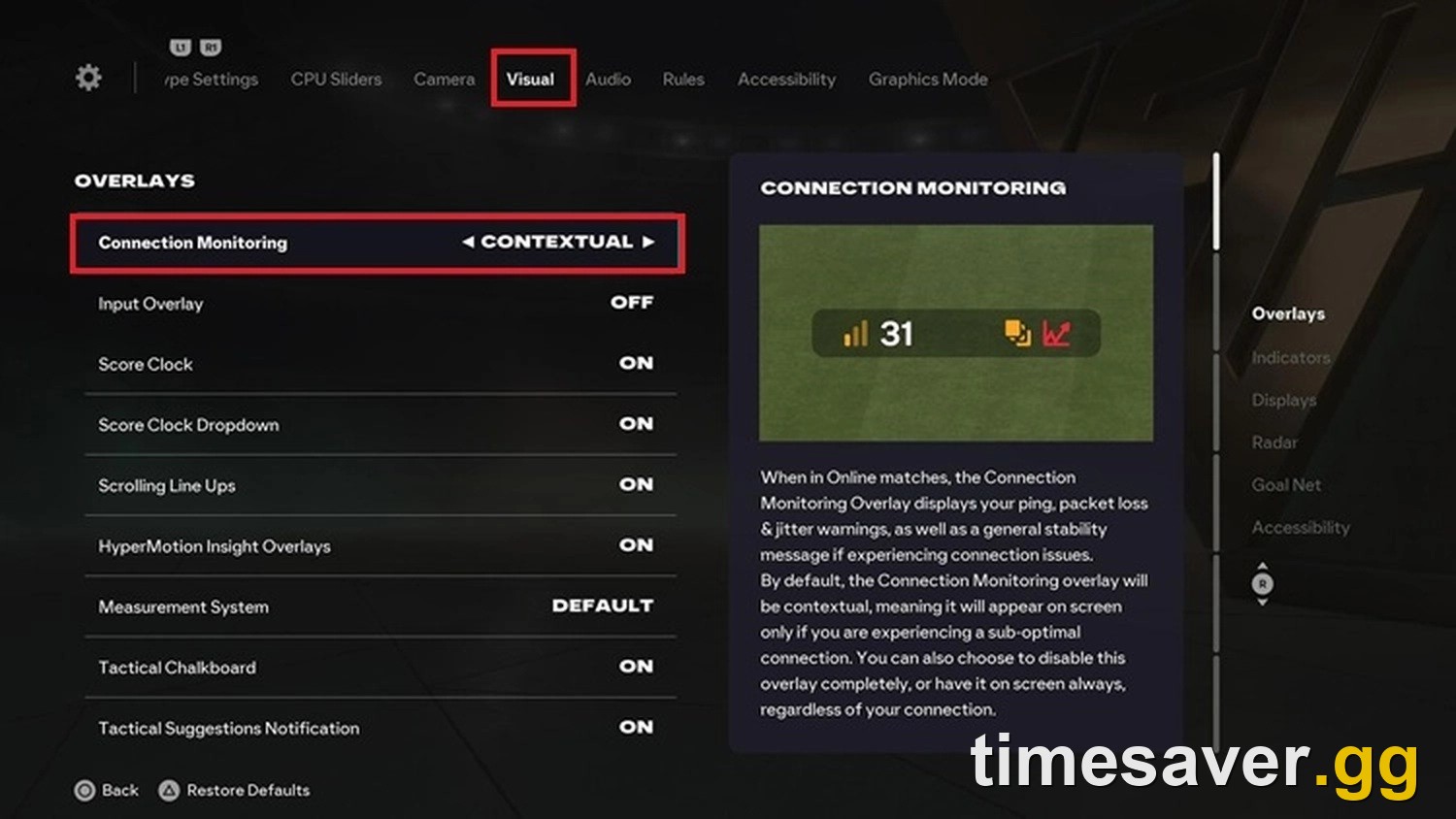
Before changing anything, run EA's Connection Quality Report (linked from EA's connection troubleshooting article) so you know which of the three metrics is actually failing. EA also gives two symptoms that mean your normally-good connection has degraded rather than always being bad: "you unexpectedly have Okay or Poor matches in your Match History" and "you notice connection monitoring icons in your EAS FC matches that aren't usually there."
Is it your connection or your PC? The 60-second test
Do this before any other fix, because it splits the problem in half.
Play one offline Squad Battles match. Squad Battles is played against the AI, so what you feel in that match is your PC rendering and responding locally rather than packets making a round trip to an EA game data centre.
- Input delay disappears offline → your problem is the network. Work through the connection fixes below.
- Input delay is still there offline → your problem is your PC, and EA has a completely separate troubleshooting article for it.
EA's own description of the PC-side symptom set is specific: "delayed inputs, including when playing offline or with low network latency", "gameplay moving in slow motion even when your average frames per second (FPS) looks normal", and "periodic stuttering or sudden frametime spikes." If that is your situation, no amount of router tinkering will help.
EA's recommended PC fix order is, verbatim in sequence: lower your target frame rate (EA's own example is "try changing from 60 FPS to 30 FPS"), reduce demanding graphics settings and resolution, close background applications using CPU/GPU/memory — "browsers, overlays, recording tools, launchers" — then check whether your RAM is running in dual-channel mode, update GPU drivers, and check Windows power mode and GPU control panel settings.
The RAM item is the surprising one and EA spells out the reasoning: "One possible cause of poor or unstable performance is running your system memory in single-channel mode instead of dual-channel mode… using compatible RAM in a dual-channel configuration may improve performance and reduce stuttering." A single stick of RAM in a gaming PC is a genuine, EA-acknowledged cause of FC 27 stutter.
How do you fix FC 27 ping spikes on PC?
If the offline test pointed at the network, work down this list in order. It is ordered by effort-to-payoff, and every step is either from EA's official connection article or a standard launch-day client fix.
| # | Fix | Why it works | Effort |
|---|---|---|---|
| 1 | Check EA's server status page | On launch day, the problem genuinely may not be yours | 30 sec |
| 2 | Switch Wi-Fi → Ethernet | Removes interference, packet loss and jitter in one move | 2 min |
| 3 | Disconnect your VPN | EA: "If you're using a VPN, disconnect it to check if that helps" | 30 sec |
| 4 | Restart router and modem, 30+ seconds off | EA's explicit instruction: "Wait at least 30 seconds before turning your router and modem back on" | 3 min |
| 5 | Stop other network activity | EA names downloads, HD/4K streaming and shared-network use | 1 min |
| 6 | If stuck on Wi-Fi: move to 5GHz, router close by | EA: 2.4GHz "is generally slower and leads to higher ping and potential network instability" | 5 min |
| 7 | On 2.4GHz: change to channel 1, 6 or 11 | EA names these as the non-overlapping options | 10 min |
| 8 | Update router firmware | EA lists firmware updates as a fix for router-side network bugs | 15 min |
| 9 | Enable QoS prioritising FC traffic | EA: gives you "the appropriate bandwidth available for the game data packets" on a shared network | 15 min |
| 10 | Close background overlays and launchers | Frees CPU/GPU; also removes overlay hooks that add input latency | 1 min |
For the PC-only "Unable to connect to EA server" error specifically — a launch-day failure to authenticate, not in-match lag — the working sequence reported by PC players since early access is: verify the integrity of the game files in your launcher; end any leftover FC 27 process in Task Manager before relaunching; run `ipconfig /flushdns` from an admin terminal if you have ever set a custom DNS for ad-blocking or privacy; and try a completely different connection (a phone hotspot is the fastest test) because some ISPs restrict the traffic. Treat these as community-tested rather than EA-published — EA has not issued a dedicated statement on that error string for FC 27.
If the game will not even start, that is a different article: FC 27 won't launch on PC or instantly crashes. And if the failure is on the Web App rather than in the game client, see FC 27 Web App not working — every error message and fix.
EA Sports FC 27 - FUT Champions Boost
Get fut champions boost in 10 minutes
Should you turn off cross-play in FC 27?
This is circulating as a lag fix on launch day. It is not one — but it is a real setting with a real trade-off, and the menu path is documented by EA.
How to turn it off (EA's own steps): Main Menu → EA Connect → Social settings → Cross-play → Cross-play settings → set Cross-play Enabled to No. EA also gives two alternative routes: Main Menu → Customise → Online Settings → Matchmaking Options, or from Ultimate Team: Main Menu → Ultimate Team → Settings → Matchmaking Settings. One hard limit worth knowing: "You can't enable or disable cross-play during a match."
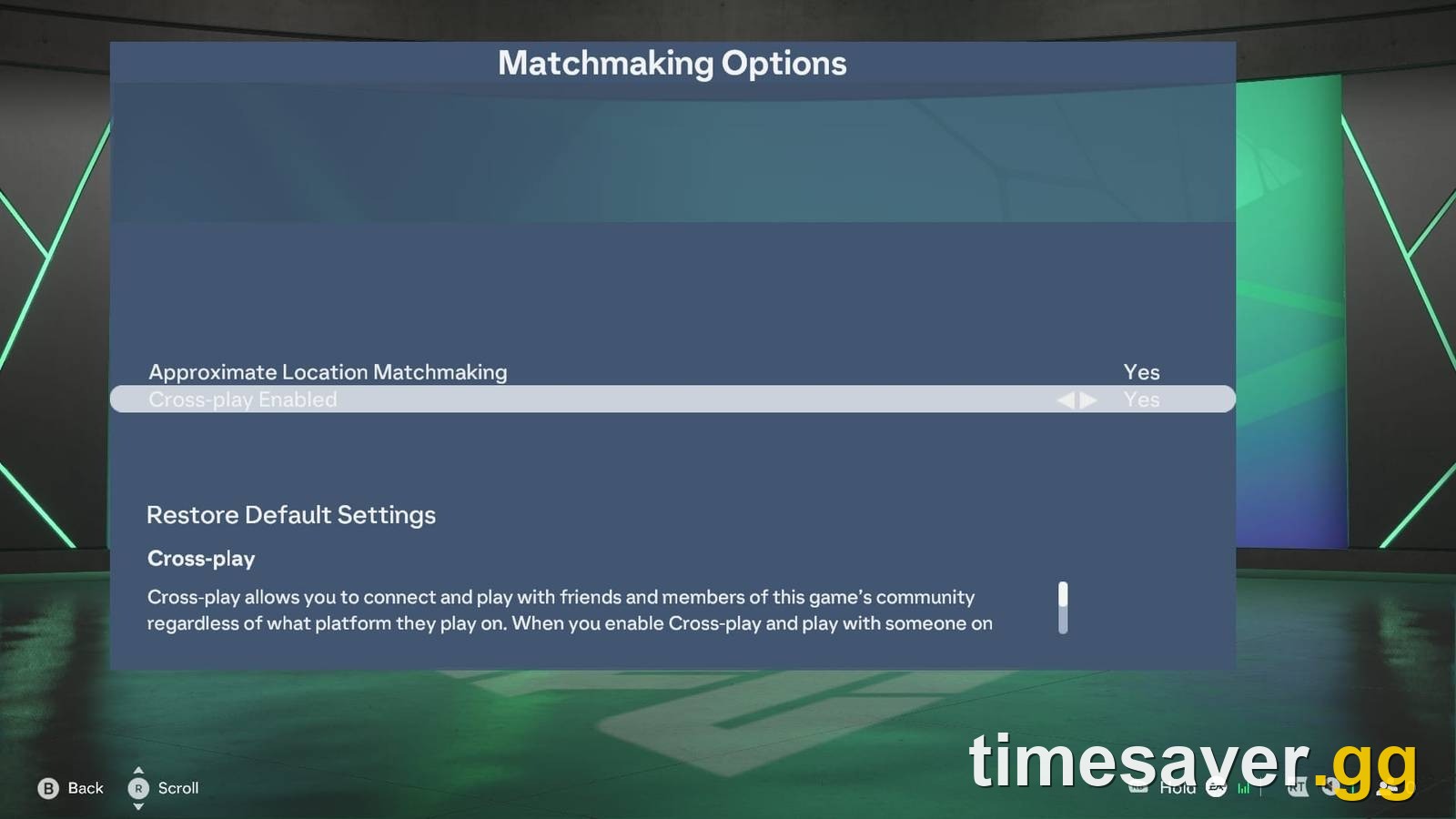
Two facts to weigh before you flip it:
- Cross-play is enabled by default. EA: "When you play FC for the first time, cross-play is enabled by default."
| - You are already grouped by console generation. Cross-play in FC runs across PC, PlayStation and Xbox, but only within a generation — *"current-generation consoles (PlayStation®5, Xbox Series X | S, and PC)"* in one pool and PS4/Xbox One in another. Nintendo Switch and Switch 2 do not support cross-play for FC at all. |
|---|
So what does turning it off actually do? It shrinks your matchmaking pool to your own platform. That means longer queues and a narrower spread of opponents — and on PC, a smaller pool is a meaningfully smaller pool. It does not change your ping, your packet loss or your jitter, because the game data centre still hosts the match either way. The one honest argument for disabling it on PC is avoiding cheaters, not avoiding lag. Decide on that basis, not on a lag promise.
Does lag actually cost you rewards in FC 27?
Yes, more than in previous years, and this is the part that turns a technical annoyance into a real cost.
FC 27 pays between 15 and 100 Season Points per eligible match depending on result and mode, up to 850 Season Points per day — EA's own numbers from the Launch Update Pitch Notes. Rivals results feed Champions qualification, and EA has confirmed CQP is now earnable through both Rivals and Squad Battles, with the Division 6 requirement removed. Rivals weekly rewards land on a fixed clock: per EA's help centre, "Rewards are released on Thursdays at 06:59 AM UTC."
Add it up and a launch week spent fighting your connection is a launch week of lost Season Pass levels, lost CQP and a worse Rivals rank going into the first Champions weekend — at exactly the moment EA has increased the coins available through Rivals and made all Rivals pack rewards tradeable at launch. The matches you cannot play cleanly are the most valuable matches of the year.

Two practical mitigations while you are sorting the network out: play your Squad Battles games (offline, unaffected by your ping, and they now count toward CQP), and save your Rivals attempts for the hours when your line is quiet rather than burning them on a congested evening. Our full breakdown of the new qualification rules is here: FC 27 FUT Champions qualification — Division 6 is gone. And if the gameplay itself feels unresponsive rather than laggy, the defending changes are a likelier culprit than your router: FC 27 manual defending guide.
Losing launch week to a connection you can't fix today? Squad Battles and objectives still bank progress while you troubleshoot — and if you want your club built while you sort the line out, we handle the grind.
- EA FC 27 Coins — Comfort Trade, paced delivery
- EA FC 27 FUT Champions Boost — pro players, launch-window ranks
- EA FC 27 Evolutions Boost — Pathways cleared for you
- All EA FC 27 services
What should you do first on launch day, in order?
The short version, if you only have five minutes before your next Rivals game:
- Server status first. Launch day is the one day of the year when the answer genuinely is "it's EA."
- Ethernet in. It removes two of EA's three metrics as suspects in one move.
- VPN off. EA names it explicitly as a thing to test by disconnecting.
- One offline Squad Battles match. This is the diagnostic that decides everything else — network path or PC path.
- Close overlays, browsers, recording software and spare launchers. Free, instant, and it is step 3 of EA's own PC list.
- Only then start on router firmware, Wi-Fi channels and QoS.
And do not spend launch-day money on a "gaming VPN" or a lag-reduction tool because a search result told you to. Routing your traffic through a third party adds a hop; EA's own advice points the other way — disconnect the VPN and see if things improve.
If you are still assembling your launch-week routine, our FC 27 launch day checklist covers what to claim and when.
FAQ
Is FC 27 "Connection Unstable" my fault or EA's? Both are possible and the test is quick. Check EA's server status page first; if servers are healthy, run the Connection Quality Report to see which of ping, packet loss or jitter is failing, then play one offline Squad Battles match to rule your PC in or out. Launch day genuinely does carry the year's heaviest server load, so a temporary EA-side problem is more likely today than on any other date.
Did Title Update 1.0.1 fix ping in Ultimate Team? No. The patch's high-ping fix is written into The Grounds section and names League Matches, a Grounds mode. The whole Ultimate Team section of 1.0.1 is one UI fix for the Filter Evolutions By Player option. The published notes contain no FUT connection fix.
Does turning off cross-play reduce lag in FC 27? There is no mechanical reason it should. Matches are hosted by an EA game data centre regardless of which platform your opponent is on, so disabling cross-play changes who you are matched with, not how your packets travel. It does shrink your matchmaking pool, which means longer queues. Disable it if you want to avoid PC cheaters, not to fix ping.
Why do I get input lag in FC 27 even when my ping is low? Because ping is only one of EA's three connection metrics — jitter (how much your ping swings) and packet loss both produce exactly that feel at a low average ping. And if the delay persists in an offline match, it is not the network at all: EA's PC performance article lists delayed inputs offline, slow-motion gameplay at normal FPS, and frametime spikes as PC-side symptoms with their own fix list.
What fixes "Unable to connect to EA server" in FC 27 on PC? Community-tested order: verify the integrity of the game files, end any leftover FC 27 process in Task Manager, flush your DNS with `ipconfig /flushdns` if you have ever used custom DNS, and test a different connection such as a phone hotspot in case your ISP is restricting the traffic. EA has not published a dedicated fix for this error string in FC 27, so treat all of it as unverified troubleshooting.
Is it worth changing my Wi-Fi channel for FC 27? Only if you cannot use Ethernet — and then yes, it is one of EA's own recommendations. On the 2.4GHz band EA names channels 1, 6 and 11 as the non-overlapping options; on 5GHz the advice is simply to sit as close to the router as possible, since 5GHz is faster and more stable but has shorter range.
Sources
- EA Help — Troubleshoot EA SPORTS FC connection issues
- EA Help — EA SPORTS FC Connection Quality explained
- EA Help — Fix EA SPORTS FC 27 PC performance issues
- EA Help — Cross-play in EA SPORTS FC
- EA Help — About EA SPORTS FC game data centers
- EA Help — EA server status
- EA — FC 27 Launch Update Pitch Notes
- EA SPORTS FC Title Update 1.0.1 notes, distributed via the official EA SPORTS FC Discord and @EASFCDirect, 22–23 September 2026