FC 27 Quick Sell Recovery can return an eligible Player Item you accidentally discarded, but it is not a general undo button for your club. In EA FC 27, officially EA SPORTS FC 27, the important checks are the discard date, your remaining recovery allowance, and whether you still have enough coins to reverse the original Quick Sell. This guide explains the recovery route, the two separate limits, and what to check when a player does not appear.
Published: 8 October 2026. Current phase: post-launch, Season 1. The rules below come from EA's current-version recovery documentation, re-checked today, rather than an assumed carryover from an older game's guide.
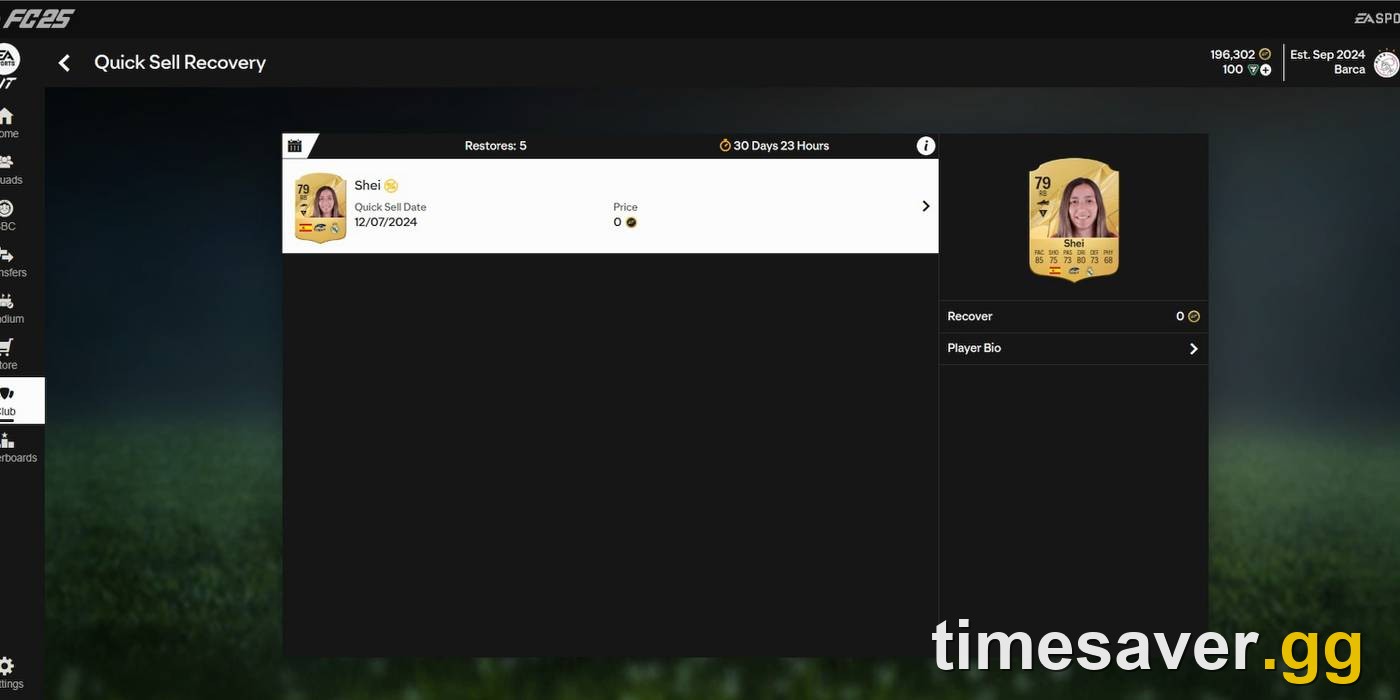
Quick answer: Open the Web or Companion App, then select Club → Quick Sell Recovery. Choose the discard date with the calendar, select the player, and press Recover. EA allows recovery for up to seven days after a Quick Sell and five Quick Sells per 31-day period. You must repay the coins originally received; the recovered player returns to Unassigned Items. Loan players and non-player items are excluded.
EA Sports FC 27 - Coins
Stock up on Coins
How do you use FC 27 Quick Sell Recovery?
Use EA's Web or Companion App rather than searching for an undo command on the console Transfer Market. EA's official Quick Sell Recovery instructions give the following sequence:
- Log in to the EA SPORTS FC Web or Companion App for your club.
- Open Club.
- Select Quick Sell Recovery.
- Use the calendar icon to find the day you discarded the item.
- Select the exact Player Item you want back.
- Select Recover.
- Check Unassigned Items, then assign the recovered item from the Ultimate Team Store or Home screen.

EA's own help illustration of the Quick Sell Recovery panel. The panel sits under Club in the Web and Companion Apps and states the seven-day limit directly.
The calendar step matters. A player discarded yesterday will not necessarily be visible while you are looking at today's list. Start with the date you remember, then check the relevant dates still inside EA's recovery window. Do not buy a replacement simply because the first date you opened looks empty.
Check the item version as well as the player name before confirming. If you own different versions of a footballer, recovering the wrong item can consume a recovery you wanted to keep for something else. Treat the selection screen as the final check, not as a place to click through quickly.
If you cannot reach the app, use our FC 27 Web App troubleshooting guide. Fixing access does not extend the discard window, so return to recovery promptly once you can log in.
What are the seven-day and 31-day limits?
These are different rules. The seven-day window concerns one discarded item. The 31-day limit concerns your recovery allowance. Having allowance left does not make an older discard eligible, and having a recent discard does not give you an extra recovery.
| Check | EA's documented rule | What you should do |
|---|---|---|
| Age of the discard | Up to seven days after Quick Sell | Find the item promptly; do not plan around a last-minute cutoff |
| Recovery allowance | Five Quick Sells per 31-day period | Check the remaining count in the app |
| Reset timing | App displays how long until recoveries reset | Read your own timer rather than a calendar-month assumption |
| Unused allowance | Does not roll over | Do not expect ten recoveries after an unused period |
| Extra recoveries | EA cannot add more or reset the timer | Preserve the remaining allowance for items you need |
EA states: “You can undo five Quick Sells per 31-day period.” It also directs you to the app to check the remaining allowance and reset timer. That is the source of truth for your account; “it is October now” is not evidence that your recoveries have refreshed. Source: EA Help.
For a simple example, using three recoveries from an allowance of five leaves two. If a fourth item is approaching the end of its seven-day window, waiting for an allowance reset can be the wrong choice: the item deadline and account timer do not have to line up.
EA's public wording does not establish a universal midnight cutoff for every discard. This guide therefore does not promise that a player discarded on a particular date remains available until 23:59 seven calendar dates later. Recover the item as soon as you identify the mistake and use the app's actual eligibility display.
How many coins do you need to recover a player?
You repay the coins received from the original Quick Sell, not the player's current Transfer Market price. EA gives a direct example: if Quick Selling the player paid 500 coins, your club needs 500 coins available for recovery, and those coins are deducted when the player returns. EA's coin-repayment explanation.
| Illustrative situation | Calculation | Result |
|---|---|---|
| Original discard paid 500; balance is 500 | 500 − 500 | Player returns; balance becomes 0 |
| Original discard paid 500; balance is 300 | 500 − 300 | You need another 200 coins before recovery |
| Original discard paid 500; balance is 2,000 | 2,000 − 500 | Player returns; balance becomes 1,500 |
These are examples using EA's 500-coin figure, not a discard-price table for FC 27 cards. Your actual repayment depends on what that item paid when you discarded it.
The distinction saves you from a common budgeting error. A card's replacement price might be much higher than its Quick Sell return. Recovery does not ask you to buy it again from another player; it reverses the eligible discard and removes the original proceeds. Keep the necessary balance available until the transaction is complete.
Recovery is also not coin generation. Quick Sell, receive coins, recover, and repay those same coins leaves you with the player again, not a permanent coin gain. Repeating the process spends limited recoveries without creating a free-profit loop.
For a small balance shortfall, consult our FC 27 coin-earning guide and choose a normal activity you can complete before the item expires. Do not discard another important player just to fund the first recovery without checking the consequences.
Why is your discarded player missing from the list?
Work through the eligibility checks before treating this as an outage. An empty list is not, by itself, proof of a new FC 27 bug.

Quick Sell Recovery lives inside Club in the Web App rather than on the Transfer Market screen, which is why players often report not finding it at all.
Check the date, item type, and current game
EA limits the feature to Player Items, excludes Loan Player Items, and says recovery is available only for the current version of FC. A discarded consumable, stadium item, or player from an older title does not become eligible just because you can access your current club. EA also says it cannot restore an Ultimate Team you deleted. Official eligibility rules.
Check that you opened the club you intended to use, selected the correct date, and are looking for the correct item version. These checks help distinguish a navigation mistake from an ineligible item; they are not a promise that every missing player can be recovered.
Check allowance and coin balance
A visible player can still be impossible to recover if you lack either a recovery or the required coins. Read both values. Adding coins does not bypass the recovery count, and waiting for the recovery count does not extend the player's seven-day eligibility.
EA says its advisors cannot reset the timer or add recoveries. Do not rely on a support request as a way to secure a sixth recovery. If the app behaves inconsistently despite apparent eligibility, document what it shows and use official support, without assuming that support can override the limits.
Can you recover a player submitted to an SBC?
No. SBC submission and Quick Sell are different actions. EA's missing-items guidance says submitted SBC items are permanently removed from your club in exchange for rewards and that the action cannot be reversed.
That means a recently submitted player does not gain a seven-day grace period. The recovery calendar tracks eligible Quick Sells; it is not a history of every player removed from your club. Looking through more dates will not turn an SBC submission into a recoverable discard.
Before assuming a recovery failure, reconstruct the last action you took. Did you press Quick Sell, submit an SBC, complete a Transfer Market sale, or simply move the item out of your active squad? Different actions need different checks. The absence of a player from your lineup does not establish which action happened.
For the separate submission problem, see our FC 27 wrong-player SBC guide. Recovery cannot reverse that loss; the useful next step is preventing another mistaken submission rather than spending time on the wrong tool.
EA Sports FC 27 - FUT Champions Boost
Get fut champions boost in 10 minutes
What if the player was never Quick Sold?
EA recommends restarting Ultimate Team, checking your Club and the Store for unclaimed items, and reviewing Transfer Targets, Won Items, and Expired Items when a market purchase is involved. These are useful checks when you cannot remember discarding the item at all. EA missing-items checklist.
EA says an item stuck after a Transfer Market purchase should be automatically corrected within 72 hours. After that period, check Transfer Targets again. Its missing-content guidance also directs players to support when items or packs remain missing after 72 hours.
Do not confuse that advice with Quick Sell Recovery. The 72-hour market-item troubleshooting period does not extend the seven-day discard window. If you know you Quick Sold the player and it is eligible now, use recovery now rather than waiting three days because a different help section mentions 72 hours.
If recovery succeeds but the player is not immediately in your squad, return to Unassigned Items. EA explicitly identifies that as the destination. Assigning the returned player is a separate step from clicking Recover.
How do you avoid wasting your remaining recoveries?
Treat the allowance as mistake protection, not guaranteed overflow storage. Before discarding a player you may want again, check whether you can keep the item using the options your current screen provides. Do not base a pack-opening plan on recovery availability you have not checked.
Use this short checklist before the next big club clear-out:
- Check the item version and whether you use it in a squad.
- Read the action label: Quick Sell and SBC submission have different consequences.
- Check your remaining recoveries before relying on one.
- Keep enough coins available to repay any discard you intend to reverse.
- Recover important mistakes promptly instead of waiting until the final day.
If several eligible items compete for limited recoveries, compare their importance to your club and the cost of replacing each one. That is a personal prioritization decision, not a universal claim that the highest-rated card should always win. An item you actually use can matter more than a higher-rated card you do not need.
Which FC 27 service fits a separate squad-budget shortfall?
Recover the eligible item first. timesaver.gg services do not restore discarded players, add recovery allowance, or reverse SBC submissions. If your separate goal is planning a squad upgrade, review the relevant service details below.
- EA FC 27 Coins — service details for a separate squad-budget purchase; not a recovery tool.
- All EA FC 27 services — browse the current game's service options.
FAQ
How long do you have to recover a Quick Sold player in FC 27? EA says up to seven days after the Quick Sell. Check the date in the recovery calendar and act promptly; do not assume a universal midnight cutoff.
How many Quick Sell recoveries do you get? EA permits five Quick Sells to be undone per 31-day period. The app shows the remaining count and reset timer. Unused recoveries do not roll over.
Why do you need coins to recover a discarded player? Recovery deducts the coins paid by the original Quick Sell. EA's example requires 500 coins to reverse a discard that paid 500 coins; it does not charge the current market price.
Can EA support give you another recovery? EA says it cannot reset the timer or add more recoveries. A support request should not be treated as a way around the allowance.
Can you recover an SBC player or a loan player? No. SBC submissions are irreversible, and Loan Player Items are excluded from Quick Sell Recovery. Non-player items are also excluded.
Where does the player go after recovery? EA says it returns under Unassigned Items. Assign it from the Ultimate Team Store or Home screen before looking for it in your squad.
Sources checked 8 October 2026: EA Quick Sell Recovery and EA missing Items and Packs. All coin examples above are illustrative arithmetic, not live player prices.