Downloaded Once Human on your PS5 or Xbox, hit the character screen, and the game won't let you in? You are not alone, and in almost every case it is not a broken download — it is one of four specific, fixable errors. The two that stop the most players cold are "Character creation is currently unavailable" and "Invalid characters detected." Both have a clean fix, and neither means your account is broken.
Quick answer: If you see "character creation is currently unavailable" (or every server shows "Registration Full" / "Maintenance"), the problem is the server you picked, not your account — back out to Scenario Selection, filter for a server marked Low or New, and create there. If you see "invalid characters detected" while typing your survivor's name, the name field is rejecting a character — use plain letters only, no spaces, no symbols, no emoji, and keep it short. If the creator keeps resetting your skin tone or you're stuck on "Generating Character," that is a connection/session hiccup — restart the client and retry.
| Every fix below is verified against the official Once Human Scenario Selection guidance and current console behaviour as of the 3.0.7 build (September 28, 2026). Once Human launched on **PS5 / PS5 Pro and Xbox Series X | S on August 25, 2026 (11:00 PT / August 26 in EU and Asia) with full crossplay and cross-progression, so a wave of brand-new console players is hitting these exact walls for the first time — and the ocean expansion Isles of Abyss lands October 22, 2026**, which will bring another surge of new installs onto these same screens. |
|---|
Why Once Human blocks character creation (the one fact that explains it)
Once Human does not have a single global character. When you create a survivor, that character is permanently tied to one specific server — and servers are grouped by scenario (Manibus, The Way of Winter, Evolution's Call, Prismverse's Clash, and so on) and by region (NA, EU, SEA, SA, HK-MO-TW, JP-KR).
That design is the root of most "I can't create a character" reports. Each server has a hard population cap — the studio has stated servers hold roughly 6,000–8,000 players — and once a server fills, or while it is in a maintenance window, it closes registration. The game surfaces that as "character creation is currently unavailable" or a server list where everything reads Registration Full or Maintenance. Nothing is wrong with your game or your account; you are simply pointed at a door that is temporarily locked.

Get that mental model straight and every fix below makes sense: you are almost always fixing which server you're on or what you typed into the name box, not reinstalling the game.
Fix 1 — "Character creation is currently unavailable" / every server is full
This is the most common block at a fresh launch, and it is a capacity problem, not a bug.
What's happening: the server you're trying to create on is full, closed, or mid-maintenance. On a new launch the newest, most-advertised servers fill within minutes, so the default highlighted server is frequently the one you can't join.
The fix, step by step:
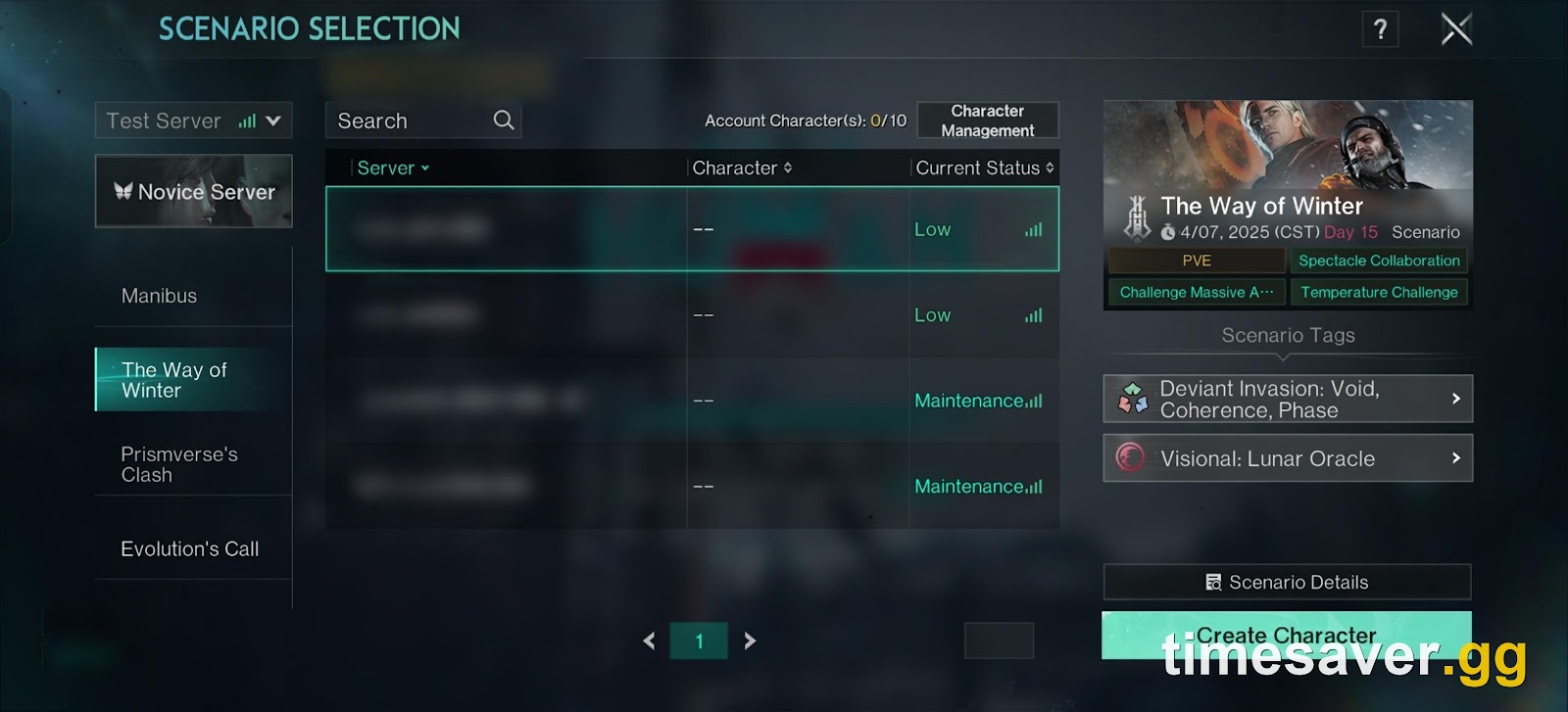
- Back out to the Scenario Selection screen (the server browser).
- Pick the scenario you actually want to play. For a brand-new player the right answer is almost always Manibus (Novice) or Manibus (Normal) — the flagship PvE scenario.
- Look at the Current Status column on each server. Avoid anything marked Registration Full, Maintenance, or flagged yellow. Create on a server marked Low population or New.
- Confirm the region nearest you (NA, EU, SEA, etc.) — latency is regional, and a far server both plays worse and can show odd availability states.
- Hit Create Character on that server.
A Steam community moderator put the mechanic plainly: "if your server has no connection or is extremely low, it won't allow you to create the character. However, if you switch which server you are using, then you are able to move forward." Switching servers is the fix the overwhelming majority of the time.
If every server in your region shows full or unavailable, wait for the next scheduled server-opening wave rather than forcing it. In NA and EU, Endless Dream and Manibus servers open Monday and Saturday at 08:00 local, with The Way of Winter and Prismverse's Clash opening Saturday; fresh servers mean open registration slots.
Fix 2 — "Invalid characters detected" when naming your survivor
This one is maddening because players swear they only typed letters — and they're right.
What's happening: the name field runs a strict content filter that rejects a surprising range of inputs. Players have reported the "invalid characters detected" message for names using only ordinary letters, which points to the filter flagging length, spaces, leading/trailing blanks, repeated characters, or a substring that trips the profanity/reserved-word list rather than a literal "illegal symbol."
The fix, in order of what resolves it most often:
- Use plain Latin letters only — strip every space, number, apostrophe, hyphen, underscore, period and emoji.
- Shorten the name. Over-long names and single-character names both fail; aim for roughly 4–12 characters.
- Change the actual word. If a clean, normal-length letters-only name still fails, the filter is almost certainly catching a hidden reserved substring — swap a few letters or pick a different name entirely.
- Remove accented or non-English characters (ü, ñ, ç, Cyrillic, etc.) — the field is inconsistent about Unicode and will reject them.
- If the field looks like it accepted the name but still errors on confirm, back out one screen and re-enter it fresh so no invisible trailing space is attached.
This is the same filter players hit when leaving in-world whispers and notes, so it is a known, game-wide quirk — not a console-specific defect.
Fix 3 — the skin tone keeps resetting (and other creator glitches)
A live report from a brand-new console player: "every time I attempt to create a character the game changes their skin color to black. Is this a glitch? Did I download the game wrong?"
What's happening: this is a creator-session rendering glitch, not a corrupted install. The appearance editor occasionally fails to apply or hold a slider/preset value — skin tone is the most-reported one — usually tied to a dropped connection or a stale session while the creator is loading assets.
The fix:
- Fully close and relaunch the game, then re-open the character creator. A clean session reloads the appearance assets correctly the large majority of the time.
- Set your skin tone and face values last, immediately before you confirm, so the editor has fewer chances to re-roll them.
- Make sure your connection is stable — the creator streams appearance data, and a weak link is what causes values to snap back to a default.
- If it still sticks, create the character anyway and fix the appearance in-game: as of the 3.0.7 update (September 28, 2026), facial-feature and body reshaping plus color-palette hair dye are free at a Floor Mirror in your Territory, no item required. You are not locked into a bad look.
Fix 4 — stuck on "Generating Character" or a black/infinite loading screen
What's happening: the character was accepted, but the client can't complete the hand-off to the server — a connection, session or login-state problem.
The fix:
- Check your network, then fully restart the game client (not just the character screen).
- Make sure you are online, not in an offline/guest state — an unauthenticated session can't finalize a character.
- On console, confirm the game is fully updated. Enable automatic updates so you're never trying to create on an outdated client (PS5: game → Options → Manage Game Content; Xbox: game → Manage → Updates).
- If it persists, switch to a different Low-population server per Fix 1 — a struggling server stalls the generation step just like it blocks creation.

Before you blame the game: two account traps
Two separate issues look like a creation bug but aren't, and both are worth ruling out:
- You linked accounts and your character "vanished." Console cross-progression works by account linking — but linking is not merging. If both your console and your existing PC/mobile account already have characters, the system cannot keep both sets; you choose one account's characters and lose the other's. Always link before you create a console character. (If a finished character disappeared after login rather than during creation, that's a different problem — see our guide on a missing character and the mystery "Level 50" save.)
- A surprise "Level 50" character you never made. If you picked RaidZone at the server screen, that scenario starts everyone at level 50 with no gear by design. It is not a corrupted character — it's a fair-start PvP mode. Create in Manibus instead if you wanted the normal level-1 start.
How to create a Once Human character cleanly on console — the no-error path
Do it in this order and you will almost never hit the errors above:
- Link your account first if you already play on PC or mobile (Account → link your NetEase/platform account), so cross-progression is set before any character exists.
- From the main menu, open Scenario Selection.
- Choose Manibus (Novice or Normal) for your first character.
- Pick a server in your region marked Low or New — never a Full/Maintenance one.
- In the creator, use a short, plain-letters-only name, set appearance, and set skin tone last.
- Confirm. If anything errors, change server first, name second — in that order — before assuming it's a bug.
New to Once Human on console and want more launch-day fixes and starter guides?
- Once Human character missing or stuck on "Level 50"? The console fix
- How to switch or change your server on PS5 & Xbox
- Once Human console beginner guide: your first 10 hours on PS5/Xbox
- Base-building guide for beginners
FAQ
Why does Once Human say "character creation is currently unavailable"? The server you selected is full, closed, or in maintenance — not your account. Back out to Scenario Selection and create on a server marked Low or New in your region. On a fresh launch the popular servers fill in minutes, so switching to a lower-population server almost always clears it.
Why do I get "invalid characters detected" when I use only letters? Once Human's name filter is strict and flags more than just symbols — long names, spaces, leading or trailing blanks, accented/non-English letters, and hidden reserved substrings all trigger it. Use plain Latin letters only, no spaces or symbols, keep it to about 4–12 characters, and if a clean name still fails, change the actual word.
Why does the character creator keep changing my skin tone? It's a creator-session rendering glitch tied to a weak connection or stale session, not a bad download. Fully restart the game, set skin tone and face last right before confirming, and if it still sticks, create the character and fix the look for free at a Floor Mirror in-game (free appearance editing shipped in the 3.0.7 update on September 28, 2026).
I'm stuck on the "Generating Character" screen — is my character lost? No. The character was accepted but the client can't finish handing off to the server, usually a connection or offline-session issue. Restart the client, confirm you're online and the game is fully updated, and if it persists switch to a different Low-population server.
Did I lose my old character by creating one on console? Only if you linked two accounts that both already had characters — linking is not merging, so you must pick one set to keep. If you link before creating, nothing is lost. A character that disappears after login (rather than during creation) is usually just the game showing the wrong server list, not a deletion.
| Is Once Human free on PS5 and Xbox? Yes. Once Human is free-to-play on PS5, PS5 Pro and Xbox Series X | S, the same as on PC and mobile, with full crossplay and cross-progression. There is no box price and no subscription required to play. |
|---|