
Quick answer — here's the fix: Path of Exile 2's runaway RAM usage (30GB+ in minutes) and the freeze-every-1–2-hours stutter are almost always the shader cache breaking: the game re-compiles shaders forever instead of storing them, so RAM climbs until Windows chokes. It's a long-running issue that the 0.5 shader-cache change made worse for a fresh wave of players. The fastest working fix, reported by dozens of players: delete the ShaderCache folder, make sure the game can actually write to it, and cap your driver's shader cache. Do these in order:
- Delete the shader cache: close the game, open `%localappdata%\Path of Exile 2\` and delete the `ShaderCache` folder (it rebuilds automatically).
- Give the game write access: right-click that `Path of Exile 2` folder → Properties → uncheck Read-only, Apply → confirm. If PoE2 can't write shaders, it recompiles them every session — that's the leak.
- NVIDIA users: NVIDIA Control Panel → Manage 3D Settings → add `pathofexile.exe` (and the Steam exe) → set Shader Cache Size to 10 GB or Unlimited, Apply.
- Lower the pressure in-game: Options → Graphics → set Texture Quality to Medium/Low and cap your frame rate; on 16GB systems this alone stops the crash.
- Still leaking? Increase your Windows pagefile and restart the client every couple of hours until GGG ships a full fix.
If your rig genuinely can't hold a build together and you just want to keep playing, you can buy PoE2 currency and orbs to gear up fast, or grab a PoE2 boss/leveling carry so a stutter-storm doesn't cost you the fight.

PoE2 - Divine & Exalted Orbs
Skip the grind — get Divine & Exalted Orbs
Update — Patch 0.5.4e (July 30, 2026): GGG Just Shrank the Shader Cache
Grinding Gear Games shipped a partial official fix for this exact problem on July 30, 2026. The restartless 0.5.4e patch directly targets the runaway shader cache that drives the RAM leak. Per the official patch notes:
"Significantly Improved shader loading times and reduced size of shaders. This change requires all shaders to be recompiled, so load times will be slower the first time you play the game after this patch." — Stacey_GGG, official 0.5.4e patch notes (pathofexile.com)
Three changes in 0.5.4e matter for the memory leak specifically:
- Shaders are now smaller — GGG "reduced size of shaders," which lowers the peak RAM/disk the cache can balloon to.
- The immense-cache bug is fixed on Steam — GGG "disabled the Fossilize Vulkan layer when playing on Steam, which fixes an issue where the Steam shader cache could grow to an immense size." That is the direct cause of the 100GB+ shader-cache reports.
- Vulkan GPU-crash recovery fixed — the patch fixed an issue where "shaders could be slow to load after recovering from a GPU crash when using the Vulkan renderer," and set Locked as the default Vsync (GGG no longer recommends "Adaptive," which had frame-pacing problems).
What to do: 0.5.4e was deployed without a server restart, so you must restart your client to receive it (consoles get it later). Because every shader recompiles once after the patch, your first session will stutter more than usual, then settle — that's expected, not the leak coming back. After updating, delete your old bloated `ShaderCache` folder one final time (step 1 below) so the smaller, fixed cache rebuilds clean. If you were sitting on a 100GB+ Steam shader cache, this patch is the one that finally caps it.
The manual steps below still apply as the belt-and-suspenders fix — especially write-access (step 2) — but 0.5.4e means the underlying bug is now being addressed at the source, not just worked around.
Why Is Path of Exile 2 Using 30GB of RAM?
Because it's compiling shaders it can't save. Path of Exile 2 builds a library of GPU shaders the first time it sees each effect, and normally caches them to disk so it never has to recompile. Players report the game either can't write that cache or invalidates it constantly — so it recompiles the same shaders over and over, holding each result in memory. The leak has dogged the game since early access, but the 0.5 patch changed shader-cache behaviour and pulled in a fresh wave of reports. RAM climbs from a normal ~6–10GB to 30GB+ within a minute or two, and once it saturates your system memory the game hard-freezes for a few seconds every 1–2 hours, or crashes with an out-of-memory error.
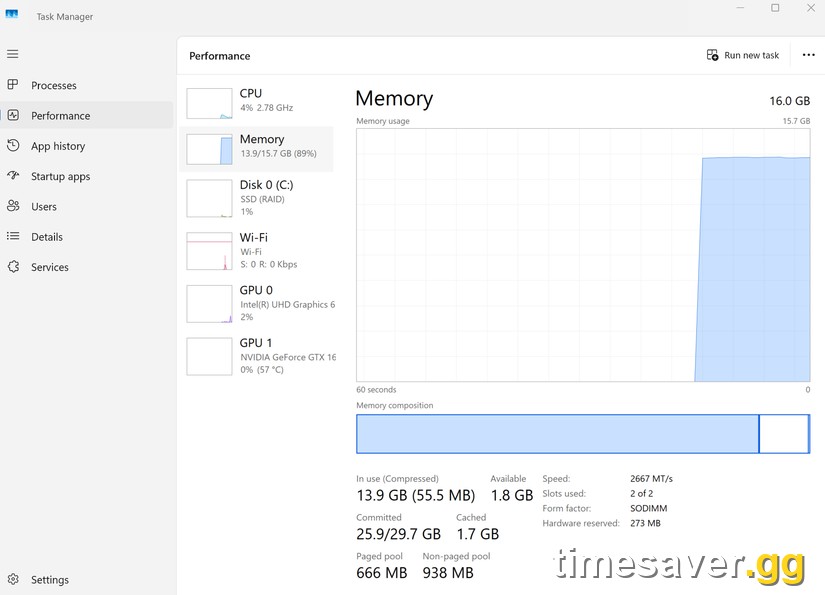
This is not a "your PC is too weak" problem. Players on 32GB and even 64GB rigs hit it, because a true leak will eat whatever you give it. As one 32GB user put it in the current bug thread, RAM went to "31GB / 32GB usage in 1 minute." An Intel Community moderator investigating the same reports noted: "After the most recent 0.5 update to the early access, GGG seems to have changed the shader cache behaviour." (community.intel.com) GGG has an open Early Access bug report titled "POE2 Shader Cache BUG 0.5 Version" on the official forums (pathofexile.com).
Three numbers worth knowing before you start:
- ~6–10GB is normal PoE2 memory use in a mapping session. Anything ramping past 20GB in the first minutes is the leak, not your build.
- 0.5 is the patch where the shader-cache behaviour changed — the reports cluster after it, not before.
- The shader cache lives in one folder — `%localappdata%\Path of Exile 2\ShaderCache` — which is why deleting it (and fixing write permissions) resolves it for most people.
How Do I Fix the PoE2 Memory Leak? (Step-by-Step)

Work top to bottom and test after each step — most players are fixed by step 2 or 3.
1. Delete the ShaderCache folder
- Fully close Path of Exile 2 (check it's gone from Task Manager).
- Press `Win + R`, paste `%localappdata%\Path of Exile 2\` and hit Enter.
- Delete the `ShaderCache` folder. (If you don't see it, enable Show hidden items in the View menu.)
- Relaunch. The game rebuilds a fresh cache — expect some first-run stutter, then it should settle.
Multiple players report this alone is the cure: "After deleting the shader cache a few weeks ago I haven't had any problems since," one wrote in the 0.5.4 patch thread (reddit.com).
2. Make sure the game can WRITE the cache (the real culprit)
If PoE2 can't save shaders, deleting the cache only helps until the next session — it'll recompile from scratch every launch and leak again. Force write access:
- In `%localappdata%\Path of Exile 2\`, right-click the folder → Properties → untick Read-only → Apply → "Apply to all subfolders."
- If you installed the game to a protected path (Program Files), give your user Full Control under Properties → Security, or move the install to a normal drive.
- One player summed up the mechanism: the game "was generating thousands of shaders and 'temporarily' storing them because it couldn't build its own library" — restoring write access to AppData ended the constant recompile (reddit.com).
3. Cap the driver shader cache (NVIDIA / Intel)
- NVIDIA: open NVIDIA Control Panel → Manage 3D Settings → Program Settings. Add `pathofexile.exe` (and `pathofexilesteam.exe` / `pathofexile_x64steam.exe` from your install folder). Set Shader Cache Size to 10 GB or Unlimited, then Apply. This gives the driver room to keep shaders instead of thrashing them. (A minority report the opposite trick — setting it to "Off" and clearing the driver cache — works for them; try the large size first, then Off if it doesn't help.)
- Update your GPU driver while you're here. The latest NVIDIA drivers include a hotfix for the PoE2 shader/DX12 issue — if you're crashing specifically on NVIDIA, follow our dedicated walkthrough: Path of Exile 2 crashing or stuttering on NVIDIA? Install the GeForce hotfix + every fix.
4. Lower in-game memory pressure
Options → Graphics:
- Texture Quality → Medium or Low. This is the single biggest RAM lever; on 16GB systems it often stops the crash outright.
- Cap your frame rate (e.g. 120 or your monitor's refresh) so the GPU isn't queuing extra work.
- If you're on the DirectX 12 renderer and still stuttering, try switching renderer in the launch options and let it rebuild the cache once — some players get smoother results on the alternate path after 0.5.
5. Give Windows more headroom
If it still climbs past your physical RAM:
- Increase the pagefile: Windows Search → "Adjust the appearance and performance of Windows" → Advanced → Virtual memory → Change → set a custom size (e.g. 16384–32768 MB) on your fastest SSD. This won't stop the leak but it prevents the hard out-of-memory crash while you play.
- Close background RAM hogs (Chrome with 40 tabs, overlays, Wallpaper Engine) before a session.
- Restart the client every 1–2 hours. Until GGG ships a permanent fix, a scheduled relaunch resets the accumulated memory — annoying, but reliable for long farming sessions.

PoE2 - Items
Skip the grind — get Items
Which Fix Should I Try First?
If you want the shortest path, match your symptom:
- RAM rockets to 30GB in the first minute → do steps 1 + 2 (delete cache, fix write access). That combo addresses the actual leak.
- Constant micro-stutter / "compiling shaders" hitching → step 3 (driver shader cache size) plus the NVIDIA hotfix.
- Crash-to-desktop "out of memory" on a 16GB machine → step 4 + 5 (lower textures, bigger pagefile).
- Freeze once every hour or two → step 2 first, then the restart cadence in step 5.
You don't need to do all of them. Test after each; stop when your RAM graph stays flat through a full map.
Is GGG Going to Fix This Permanently?
It's a known, acknowledged issue with an open Early Access bug report, and shader/DX12 fixes have shipped through both GGG patches and NVIDIA driver hotfixes across the 0.5 cycle. The July 30 hotfix, 0.5.4e, is the first patch that calls out the shader cache directly — smaller shaders, faster loading, and the Fossilize-layer fix that stops the Steam cache growing "to an immense size" (see the update section at the top). That's the source-level fix players had been asking for. It may not zero out the leak on every rig immediately, so keep the steps below as your working mitigation — but for the first time GGG is patching the cause, not just leaving players to clear folders. The next content drop, 0.5.5, is slated as a one-month event league with a new economy, so more client builds are coming.
FAQ
Where is the Path of Exile 2 shader cache folder? It's at `%localappdata%\Path of Exile 2\ShaderCache` on Windows. Paste `%localappdata%\Path of Exile 2\` into the Run box (`Win + R`) and you'll see the `ShaderCache` folder inside. Deleting it is safe — the game rebuilds it on next launch.
Is 30GB of RAM usage normal for PoE2? No. A normal mapping session sits around 6–10GB. If memory climbs past ~20GB within the first few minutes and keeps rising, that's the shader-cache leak, not your build or your endgame content. Follow the steps above.
Will more RAM fix the memory leak? Not really — it just delays the crash. Players on 32GB and 64GB still hit it because a true leak consumes whatever is available. Fixing the shader cache (delete + write access + driver cache size) addresses the cause; a bigger pagefile only buys you time.
Does deleting the shader cache delete my characters or settings? No. The shader cache is purely a rebuilt-on-demand graphics file. Your characters, stash, and settings are stored separately (server-side and in your config), so clearing `ShaderCache` only forces the game to recompile shaders once.
Did Patch 0.5.4e fix the PoE2 shader/memory problem? It's the first patch to fix it at the source. The July 30, 2026 hotfix "significantly improved shader loading times and reduced size of shaders," and — most importantly for the RAM/disk blow-up — it disabled the Fossilize Vulkan layer on Steam, which GGG says "fixes an issue where the Steam shader cache could grow to an immense size." Restart your client to get the patch (it was deployed without a server restart), expect a one-time recompile stutter on first launch, then delete your old bloated `ShaderCache` folder once so the smaller cache rebuilds clean.
Why is PoE2 stuttering more right after the 0.5.4e patch? That's expected and temporary. The patch notes state the shader change "requires all shaders to be recompiled, so load times will be slower the first time you play the game after this patch." Your first session recompiles the whole shader library, so you'll see extra hitching for a map or two, then it settles into the smaller, faster cache. If it never settles, run the manual steps above.
I'm on NVIDIA and still stuttering after this — what else? Update to the latest NVIDIA driver (it includes the PoE2 shader/DX12 hotfix) and set the per-game Shader Cache Size to Unlimited. Our full NVIDIA walkthrough covers the exact driver version and settings: PoE2 crashing/stuttering on NVIDIA fix.
Facts verified against the official Path of Exile forums (pathofexile.com), including the 0.5.4e patch notes (July 30, 2026), the Intel graphics community bug thread, and current r/PathOfExile2 reports. Updated July 30, 2026 for Patch 0.5.4e. Brand: timesaver.gg.