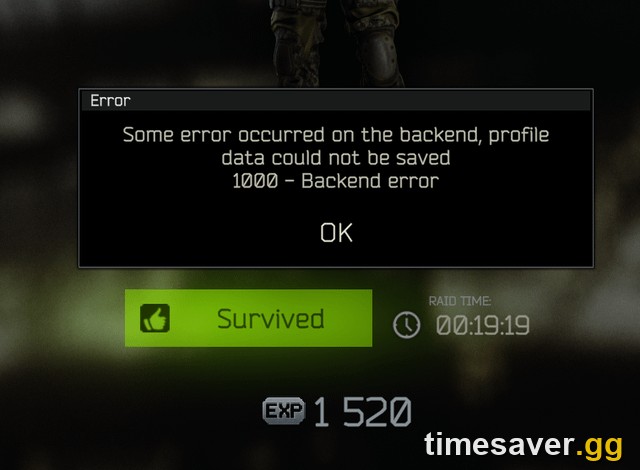
If Escape from Tarkov keeps kicking you to the menu with "1000 - Backend Error" — or the longer "Some error occurred on the backend, profile data could not be saved" — you are not alone, and your account is almost certainly fine. Since the Kord Breach season (patch 1.1.0.0) went live, this error has been the single most common complaint on r/EscapefromTarkov, and it hits PvE hardest because the new seasonal-character system leans on server-side profile saves for every raid.
Here's the important part: most Backend Errors right now are server-side load, not a broken install. But there is a fixed order of client-side steps that clears the ~30% of cases that are on your end — and knowing which is which stops you from wiping your cache for a problem only Battlestate can fix.

Escape from Tarkov - Roubles
Get millions of Roubles in 10 minutes
Here's the fix (fast order)
Work down this list and re-test after each step. Stop when you're back in:
- Check the official server status first — status.escapefromtarkov.com. If it's red or Downdetector is spiking, it's the servers; skip to step 8 and wait.
- Restart the launcher and re-login — fully close the Battlestate Games Launcher, reopen, log out, log back in. This refreshes your session token, which fixes the most transient Backend Errors.
- Clear the launcher cache — Battlestate Games Launcher → Settings → Clear cache, then relaunch. This is the #1 client-side fix.
- Verify game integrity — run the integrity check in the launcher (or Verify integrity of game files if you launch via Steam) to repair a corrupted patch file from the 1.1.0 update.
- Flush your network stack — open Command Prompt as admin and run `ipconfig /flushdns` then `netsh winsock reset`, and reboot.
- Go wired and drop the VPN — switch off any VPN/proxy and use an Ethernet cable instead of Wi‑Fi.
- Whitelist Tarkov in your firewall/antivirus — allow `EscapeFromTarkov.exe` and the launcher through Windows Defender and any third‑party AV.
- Wait out the load window — right after a wipe or hotfix, servers are saturated. Retry in 15–30 minutes or during off-peak hours.
Key Takeaways
- "1000 - Backend Error" = a failed handshake with Tarkov's servers — usually the server rejecting or timing out your profile save, not a corrupted game.
- PvE is hit hardest because the Kord Breach seasonal character writes progression server-side every raid; when servers are overloaded, that save fails and bounces you.
- ~70% of current cases are server-side. Check status.escapefromtarkov.com before touching your files — if it's down, no local fix will help.
- The fastest local fix is clearing the launcher cache (Settings → Clear cache), followed by an integrity check.
- A Backend Error on extract can void a PvE raid. Don't hot-swap incompatible/modded gear mid-raid, and let the game fully settle before extracting during a known outage.
What does "1000 - Backend Error" actually mean?
The Backend is Battlestate's server layer that stores your profile, stash, and raid results. Error 1000 fires when the client asks the backend to do something — usually save your profile after a raid or a stash change — and the backend doesn't answer in time or refuses the write.
You'll see it in a few forms, and they all point at the same place:
- `1000 - Backend Error` — the generic version, most common at menu, matching, and end-of-raid.
- `Some error occurred on the backend, profile data could not be saved` — the profile-save timeout, the one that can cost you loot.
- `Backend Error HTTP/1.1 502` or `504 Gateway Timeout` — the server gateway is overloaded and dropped your request outright.
Because the root cause is a server round-trip, this error spikes hardest right after a wipe or a big patch — exactly the window Kord Breach is in now.
Is it me or the servers?
Ninety seconds of triage saves you an hour of pointless troubleshooting. Battlestate publishes live server state at status.escapefromtarkov.com, and third-party outage tracking at Downdetector shows real-time report spikes.
Battlestate has been explicit that big-load connection failures are frequently upstream of them. On the official Escape from Tarkov account, the developer stated:
"We are aware that players are experiencing difficulties connecting to servers and logging into #EscapefromTarkov. These issues are related to network infrastructure beyond the control of Battlestate Games. We apologize for the inconvenience!" — @tarkov, official Escape from Tarkov
Rule of thumb: if the status page is green and only you are erroring, work the client-side steps below. If the status page is red or Downdetector is spiking, it's a server-side wave — clearing your cache 20 times won't help, and you're better off waiting.
Escape from Tarkov - Leveling
Get leveled up in 10 minutes
The fixes, explained
Why does restarting the launcher and re-logging fix it?
Your launcher holds a session token that authenticates every backend call. When that token goes stale — common after the servers blip during Kord Breach load — the backend rejects your requests as Error 1000. A full close, reopen, log-out, log-back-in mints a fresh token. It's the fastest fix and clears a surprising share of cases, so always try it first before anything heavier.
How do I clear the Tarkov launcher cache?
Corrupted temp files from the 1.1.0 download can poison every backend request. In the Battlestate Games Launcher, open Settings, choose Clear cache, confirm, then relaunch the game. This forces the client to rebuild its local state cleanly and is the most reliable single client-side fix for a persistent Backend Error.
When should I verify game integrity?
If clearing the cache didn't stick, a patch file from the Kord Breach update is likely corrupt. Run the launcher's integrity check (or, on Steam, right‑click Escape from Tarkov → Properties → Installed Files → Verify integrity of game files). It re-downloads only the broken files. Do this after a failed or interrupted 1.1.0 update, or when the error is constant rather than intermittent.
Can my network cause a Backend Error?
Yes — a flaky route to the servers looks identical to a server outage from the client's side. Three network fixes, in order:
- Flush DNS and reset Winsock. In an admin Command Prompt: `ipconfig /flushdns`, then `netsh winsock reset`, then reboot. This clears stale DNS entries and rebuilds the network stack that carries your backend calls.
- Kill the VPN/proxy. VPNs reroute you to distant matchmaking regions and frequently trip 502/504 gateway errors. Disable them entirely for Tarkov.
- Go wired. Wi‑Fi packet loss quietly breaks the profile-save handshake. An Ethernet cable removes the most common home-network cause.
Could my firewall or antivirus be blocking it?
Overzealous security software can silently block the launcher's outbound backend calls. Add exceptions for `EscapeFromTarkov.exe` and the Battlestate launcher in Windows Defender Firewall and any third‑party antivirus (Kaspersky, ESET, Norton are frequent culprits), then retest.
Is there a console version I need to fix differently?
No — Escape from Tarkov is PC-only. There is no PlayStation or Xbox version, so every fix here is Windows/launcher-based. If a "console fix" article tells you otherwise, it's wrong.
Did the Backend Error wipe my raid or loot?
This is the PvE-specific nightmare: you extract, hit "profile data could not be saved," and your run appears to vanish. What's actually happening:
- The save failed, but the raid usually didn't fully process. In most cases the backend simply didn't commit the result — your pre-raid stash is intact when you get back in.
- Don't hot-swap incompatible or heavily modded gear mid-raid during an outage window. A gear state the backend can't validate is a known trigger for the profile-save failure — historically players have fixed a stuck Error 1000 by unequipping the offending item.
- If you genuinely lost insured gear to a server-side failure (not to a player), file a ticket through the launcher's support portal with your raid time — Battlestate has restored progress lost to confirmed outages in the past.
During a known Kord Breach server wave, the safest play is to not run anything you can't afford to lose until the status page is green again.
Still broken after everything?
If you've worked the full list and the status page is green:
- Reboot the whole PC, not just the game — it clears lingering socket and driver state that `netsh` alone can miss.
- Try a different network (mobile hotspot) for five minutes. If it connects, the problem is your ISP's route to the Tarkov servers, not the game.
- Reinstall the launcher (not the whole game) — a corrupt launcher install can persistently mangle auth even after a cache clear.
- File a support ticket at the official support portal with your region, error text, and timestamps.
Once Kord Breach's load settles, these errors fade to the occasional post-raid blip — the same pattern every Tarkov wipe follows.
Servers finally stable and you're behind on the Season 1 grind? Skip the catch-up with timesaver.gg's Tarkov services — pro players, secure delivery:
- Tarkov Roubles — instant delivery — safe · best rate · fast
- Tarkov Quest & Kappa Boost — skip the grind · pro players
- Tarkov Leveling Boost — power-level your Kord Breach character fast · secure
If you also can't get into the game at all — stuck update, "Awaiting Session Start," or the launcher won't connect — see our companion guide: Escape from Tarkov 1.1.0.0 Won't Launch or Connect? Every Season 1 Launch-Day Fix.
FAQ
What is the 1000 Backend Error in Escape from Tarkov? It's a failed communication between the game client and Battlestate's server layer — usually the server timing out or rejecting a profile save. During the Kord Breach (Season 1, patch 1.1.0) load window it's most often server-side, but a stale session token, corrupted cache, or blocked connection on your end can cause it too.
Why do I get Backend Errors on PvE more than PvP? Kord Breach adds a seasonal character whose progression is written server-side every raid. When the backend is overloaded, that profile save is the request most likely to time out, so PvE players see Error 1000 and "profile data could not be saved" more often than PvP.
How do I fix the Tarkov 1000 Backend Error fast? Check status.escapefromtarkov.com first. If servers are up, restart and re-login to the launcher, then clear the launcher cache (Settings → Clear cache), then verify game integrity. If it persists, flush DNS with `ipconfig /flushdns`, reset Winsock with `netsh winsock reset`, disable any VPN, and go wired.
Will a Backend Error make me lose my loot? Usually not — the save typically fails without fully committing the raid, so your stash is intact when you reconnect. If you lost insured gear to a confirmed server outage, file a support ticket with your raid timestamp; Battlestate has restored outage-related losses before.
Is Tarkov down right now, or is it just me? Compare the official status page and Downdetector. If either shows a red/spiking outage, it's server-side and no local fix will help — wait it out. If both are green and only you are erroring, work the client-side steps above.
Does a VPN cause the Backend Error? It can. VPNs and proxies reroute you to distant matchmaking regions and frequently trigger 502/504 gateway timeouts on the backend. Disable them completely when playing Tarkov.