Quick answer: A Valheim seed is just the text string the game uses to generate your world's layout — type one into the Seed field when you create a world, and everyone on that seed gets the identical map for that game version. The catch for 2026: Valheim left Early Access on September 9, 2026, and the live build is now patch 1.0.17 (October 6, 2026), so most "best seed" lists written for the old `0.2xx` builds no longer generate the same world. The reliable move is to pick a seed by what you want — bosses close together, all early biomes on one island, or a safe Deep North route — then preview it in a seed-map tool before you commit. This guide gives you tested starter seeds, the exact steps to set or change a seed, and how world generation actually works in 1.0.
Valheim's map is procedural, but it is deterministic: the same seed always builds the same world on the same patch. That is why seed-sharing works at all — and why a 2021 "god seed" screenshot can be a trap today. Below is everything that still holds true on 1.0.17, the seeds worth starting on, and the one habit that saves you from a ruined 200-day world.
How Valheim seeds and world generation work
A world seed is a short text string that initializes the pseudorandom number generator Valheim uses to lay out your world. Per the official Valheim Wiki: "All worlds generated from the same seed will have the same layout for any given game version." That last clause is the whole story — the layout is locked to the seed and the patch number.
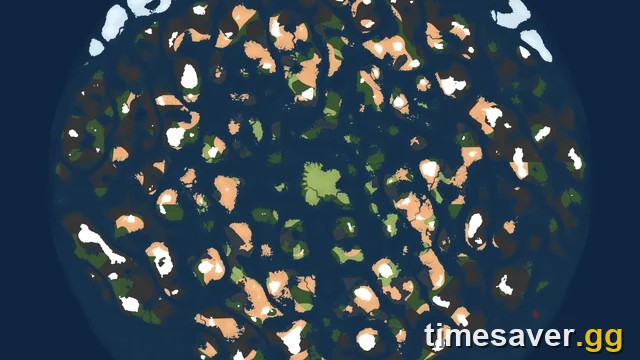
The world itself is shaped like a giant disc centered on world spawn, with biomes arranged in bands measured in meters from the center:
- Meadows — 0–5,100 m (your safe starting ring)
- Black Forest — ~500–8,000 m
- Swamp — ~2,000–6,000 m
- Mountain — anywhere above ~50 m altitude, from ~600 m out
- Plains — ~2,900–8,000 m
- Mistlands — ~5,900–10,000 m (the practical outer edge for most content)
- Ocean — the deep water between landmasses (below −26 m altitude)
- Deep North — the frozen cap at the far north, added as the final biome in 1.0
This banding is why the real progression advice in Valheim is always "sail further out." A seed doesn't change the rules — it changes where the good islands, boss altars, and traders happen to fall.
One mechanic matters more than any single seed: world generation is lazy and permanent. A zone's terrain and biome are baked into your world file the first time anyone loads that zone, and the game never re-evaluates it. That is the entire reason the Deep North question below exists.
How to set or change a seed in Valheim
Setting a seed takes about ten seconds:
- From the main menu, choose Start Game → New.
- In the Create World dialog, type a name in the top field.
- Click the Seed field below it — it is pre-filled with a random seed. Delete it and type (or paste) the seed you want. Seeds are case-sensitive.
- Click Done, then start the world.
A few things players get wrong:
- You cannot change a seed on an existing world. The seed is stamped into the world file at creation. To "change" a seed you make a brand-new world — your character carries over, but the map does not.
- To find the seed of a world you already have, open the world list: the seed is displayed next to each world's name in the Select World menu.
- Seeds can be any string — words, numbers, or gibberish. `maypoleplz` and `420691337` are both valid.

Best Valheim seeds to start on (patch 1.0.17)
These seeds are drawn from the community-curated list on the official Valheim Wiki and are grouped by what they give you. One hard rule before you commit to any of them: world generation changed across Valheim's updates, and several famous old seeds no longer produce their original layout — the Wiki itself flags some as outdated. Preview every seed in a map tool (next section) on the current patch before you sink hours into it. Treat the descriptions below as a starting shortlist, not a guarantee.
Best all-rounder / convenience seeds
| Seed | Why it's worth starting | Notes |
|---|---|---|
| `WorldEater` | All main biomes on the first continent, including Haldor the trader | Strong general-purpose start |
| `Gremlin` | Over 20 beehives and Haldor on the first continent | Great for early honey/food economy |
| `sBIkiadtIh` | Haldor on the starting island to the west; Black Forest, Swamp and Mountains all relatively close | Compact early progression |
| `42069lolxd` | Haldor reachable by following the coastline onto an attached southern island | Easy trader access |
Best speedrun / efficient-progression seeds
| Seed | Why it's worth starting | Notes |
|---|---|---|
| `TxCD10fTIP` | Five bosses and five biomes on the same continent, two traders close by | Minimal sailing |
| `lSB4fI46nV` | Five biomes and four bosses on the starting continent; Yagluth one island over; Haldor on an adjacent island | Fast boss clear |
| `HHcLC5acQt` | Three bosses, five major biomes and Haldor on one continent | Classic efficient start |
Fun / unique seeds
| Seed | Why it's worth starting | Notes |
|---|---|---|
| `maypoleplz` | A maypole sits just west of the starting continent | Cosmetic landmark |
| `jWM4fqFdSm` | Two maypole locations very close together on an island southwest of spawn | Rare double-maypole |
Best for building and dedicated servers
For a build-focused world, you don't want bosses in your face — you want flat Meadows and Plains coastline. Generate a handful of random seeds, preview them in a map tool, and pick the one with the largest contiguous flat biome near spawn. The same approach works for a group world: start a seed with all five early biomes and Haldor on one continent (like `WorldEater`) so new players on your dedicated server aren't stranded. If you're building, our base building guide covers layout once you've picked the spot.
Preview any seed before you commit: the map tools
The single most useful habit in modern Valheim is checking a seed in a browser before you create the world. Two community tools do this and both let you select the game version — which is essential now that 1.0 generation differs from the old builds:
- valheim-map.world — paste a seed (or upload a save file) and it renders the full biome map plus points of interest like Forsaken Altars and dungeons.
- valheim.th.gl — enter a seed to see the biome map with boss altars, Haldor, Hildir, the Bog Witch, dungeons, runestones, ruins, ore deposits and forageables, with a share link.
Workflow: generate three or four candidate seeds in-game (or invent strings), drop each into a map tool set to your current version, and keep the one whose spawn island and nearby biomes match your goals. This takes two minutes and beats any listicle, because it reflects your patch.

Seeds and the Deep North: the 1.0 trap
This is the mistake that will cost long-time players the most. The Deep North is the frozen final biome added in 1.0, and here is the problem: because world generation is lazy and permanent, the Deep North only generates in northern zones you have not yet explored.

Per Iron Gate's own 1.0 FAQ, your old saves are untouched — "Nothing. Your old saves will still be where you last left them, and you can continue to play with them if you like." But if you already sailed into the far north during Early Access, those zones are frozen as the old empty placeholder and will not become the new Deep North. Iron Gate therefore recommends a new world if you want the full Deep North experience.
So the seed decision for 2026 splits two ways:
- Returning player, far north already explored: start a new seed to get a proper Deep North, or accept that your veteran world won't have it. Either way, back up your world file first (`%USERPROFILE%/AppData/LocalLow/IronGate/Valheim` on Windows; `~/.config/unity3d/IronGate/Valheim` on Linux).
- New player or unexplored north: any seed works — just don't bee-line to the north cap and "spoil" the generation before 1.0 content is meant to appear. Follow the normal boss order outward.
If you want the final-biome details, our Deep North survival guide and Ashlands guide cover what's waiting at the edges of the map.
Why old "best seed" lists don't work in 1.0
If you searched this a year ago, half the seeds you saved are now unreliable. Three reasons:
- Version drift. Valheim's generation has been tweaked repeatedly across updates. The Wiki openly marks seeds like `9934622021` and `nai4qtPKFt` as outdated — they no longer produce their famous layouts.
- Boss relocation. Past patches moved where boss altars can spawn relative to the start, which breaks "all bosses on spawn island" claims from older seeds.
- The Deep North is brand new. No pre-1.0 seed list accounts for the final biome at all, and the lazy-generation rule means a pre-1.0 world can't retrofit it into explored zones.
The fix is the same every time: re-test on your current patch in a map tool. A seed is only "best" relative to a version, and the version you're on is 1.0.17.
FAQ
What is the best Valheim seed in 2026? There's no single best seed — it depends on your goal. For a convenient all-rounder on patch 1.0.17, `WorldEater` (all main biomes plus Haldor on the first continent) or `Gremlin` (20+ beehives and Haldor) are strong starts. For fast progression try `TxCD10fTIP` or `lSB4fI46nV`. Always preview a seed in valheim-map.world or valheim.th.gl on the current version before committing, because generation changes between patches.
How do I change the seed of my Valheim world? You can't change the seed of an existing world — it's locked in when the world is created. To use a different seed, create a new world (Start Game → New) and type the seed into the Seed field in the Create World dialog. Your character carries over to the new world, but the map is generated fresh.
Are old Valheim seeds still good after 1.0? Many are not. World generation has shifted across updates, so a seed's layout is only guaranteed for the game version it was captured on. The official Wiki flags several classic seeds as outdated, and no pre-1.0 seed accounts for the Deep North. Re-test any old seed in a map tool set to patch 1.0.17 before you rely on it.
Can I get the Deep North on my old Valheim world? Only in northern zones you never explored. Valheim bakes a zone's biome into the save the first time it loads, and never re-evaluates it, so already-explored far-north areas stay as the old placeholder. Iron Gate recommends starting a new world for the full Deep North — and always back up your world file before sailing north on a veteran save.
Where do I see a world's seed in Valheim? Open the Select World menu from the main screen. Each world shows its seed string next to the world name, so you can copy it to share or to recreate the map on the same patch.
Do seeds work across platforms and crossplay? Yes. A seed is just a text string, so the same seed produces the same world on PC, Xbox, PlayStation 5 and Switch 2 as long as everyone is on the same game version. This is what makes crossplay worlds consistent for the whole group.
Facts in this guide were verified against the official Valheim Wiki (World seed page) and Iron Gate's official 1.0 FAQ on valheimgame.com. Valheim 1.0 launched September 9, 2026; this guide applies to patch 1.0.17 (October 6, 2026). Seed layouts are version-specific — always re-check a seed in a map tool before committing.