Quick answer (TLDR): If Black Ops 7 or Warzone hard-freezes, black-screens, or gets stuck on the loading screen while loading into a match — the map load bar fills, then the game hangs — it's almost always a client-side problem, not your account and not the servers. The wave of fresh reports lines up with the Season 5 Reloaded update (August 20, 2026), and the four highest-hit-rate fixes are: run the game in Borderless and tap the Windows key twice on the black screen (the workaround players are confirming right now), clean-install your GPU driver with DDU, Scan and Repair / verify your game files, and turn off Frame Generation and every overlay (iCUE, Discord, RivaTuner). On PS5, a Rebuild Database in Safe Mode clears the same freeze. Work the checklist below in order — most players are back in a lobby within two or three steps.
When Black Ops 7 or Warzone locks up specifically as you load into a match — the pre-game loading screen finishes or sits at a black screen and the whole game freezes, forcing an Alt+Tab or a hard restart — you're looking at a load-in hang, not a network disconnect and not a shader-cache stall. Reports started stacking across r/blackops7 and r/CODWarzone right after the Season 5 Reloaded patch dropped on August 20, 2026 (the final BO7 mid-season), and they cut across hardware: players on brand-new AMD RX 9070 XT cards and older Ryzen 5800X3D rigs are hitting the same black-screen freeze, which is the fingerprint of a software/driver trigger rather than a dying part.
The good news: because it's client-side, you can almost always clear it yourself. One player on r/CODWarzone posted the workaround that's getting the most confirmations this week:
"Run the game in borderless and tap the windows key after about 3 seconds on black screen then tap again. You most likely will have to do it a second time as well. This seems to be the only fix since the new Warzone update dropped."
That trick gets you into the match today; the fixes below stop the freeze from happening in the first place. Everything here is checked against Activision's crash and freeze troubleshooting and Connectivity Troubleshooting guidance, plus the fixes the community is verifying on the current patch.

Call of Duty - Bot Lobby
Get bot lobby in 10 minutes
Why does Black Ops 7 freeze when loading into a match?
A freeze at the load-in moment is different from the other two things people confuse it with, and telling them apart saves you an hour:
- Frozen while loading into the match (this guide): the loading bar fills or you hit a black screen, then the whole game hangs. Cause is client-side — GPU driver, Frame Generation, an overlay, an overclock, or corrupted files from the patch.
- Stuck at "Installing Shaders" on the menu: that's the shader-optimization step at 0%, 33%, or 99%, not a match load — fix it in our BO7 & Warzone shaders not installing guide.
- Rubber-banding or micro-stutter once you're in the match: that's a networking or Frame Gen issue mid-game — see the BO7 & Warzone lag and stutter fix.
If your game never reaches the menu at all — a black screen on launch before you ever see the title — that's a launch failure, covered in the BO7 black screen on launch fix. Everything below is for the freeze that hits as the match loads.
Fix 1: The Borderless + Windows-key workaround (get in right now)
This is the on-the-spot trick to break the black-screen freeze and actually load into your match while you sort out the root cause.
- In the game's Display settings, set Display Mode to Borderless (not Fullscreen Exclusive).
- Launch into a match. When you hit the black screen, wait about 3 seconds, then tap the Windows key once to minimise, and tap it again to bring the game back.
- You'll usually have to do it twice before the match renders. Once you're in, it holds for the rest of the session.
It's a band-aid, not a cure — Borderless lets Windows reclaim the display when the game hangs the compositor, which is why the tap-out/tap-in forces a redraw. Do the real fixes below so you're not doing this every game.
Fix 2: Clean-install your GPU driver with DDU
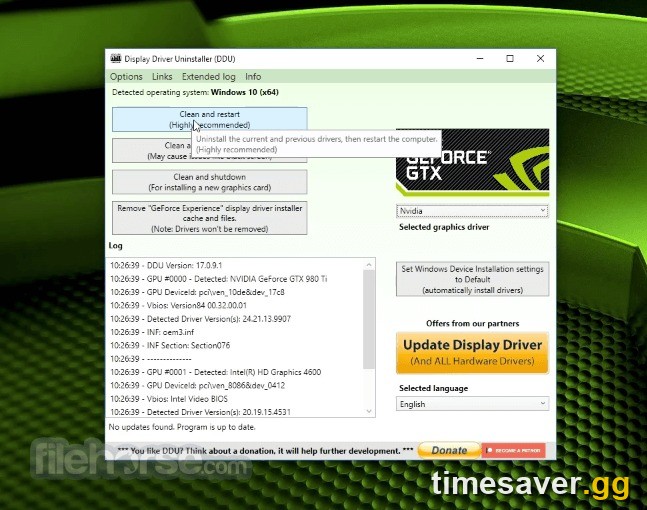
A hard freeze on load-in that started after a patch is very often a driver conflict, especially if you also updated your GPU driver recently. A plain "update" leaves old files behind; a clean install with Display Driver Uninstaller (DDU) removes them.
- Download the latest driver for your card (NVIDIA or AMD) and DDU (from Wagnardsoft) before you start.
- Boot into Windows Safe Mode, run DDU, and choose Clean and restart.
- Install the fresh driver, then reboot again.
If the freeze started the day you updated your driver, roll back instead — several RX 9070 XT users report the load-in freeze arrived with a recent AMD driver, and reverting one version cleared it. On NVIDIA, do the DDU clean-install first; if that fails, try the previous Studio/Game Ready branch.
Fix 3: Scan and Repair / verify your game files
The Season 5 Reloaded download is large, and one corrupted or half-patched file will hang the load into a match while everything else looks fine. Rebuild the files in place — no reinstall, no lost progress.
- Battle.net: open the app, select Call of Duty, click the gear icon next to Play, choose Scan and Repair, and let it finish.
- Steam: right-click Call of Duty in your library → Properties → Installed Files → Verify integrity of game files.
- Xbox / Microsoft Store (PC): the equivalent is to let the app re-check the install, or repair via Settings → Apps.
This is the single highest-hit-rate fix for the post-patch version of the freeze, because it targets exactly the files a big update leaves broken.
Fix 4: Turn off Frame Generation and every overlay
Frame Generation and third-party overlays are two of the most common causes of a freeze at high FPS — the screen locks even though the game was running fine a second earlier.
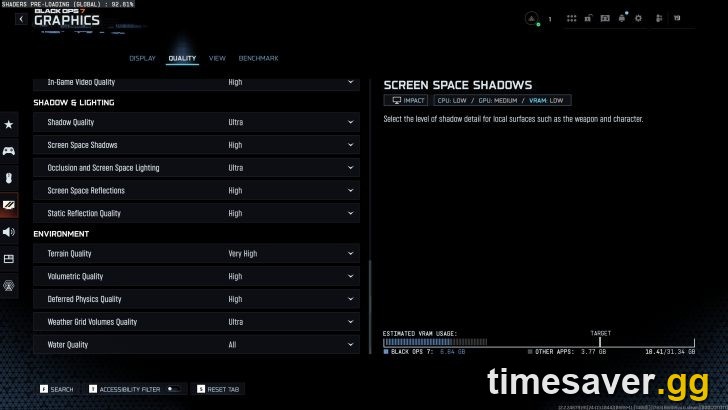
- Disable Frame Generation in Graphics settings (NVIDIA DLSS Frame Gen, AMD FSR Frame Gen, and driver-level AMD Fluid Motion Frames / AFMF). It's the top client-side freeze trigger this season.
- Close every overlay before launching: Discord, Corsair iCUE, MSI Afterburner / RivaTuner (RTSS), NVIDIA/AMD overlay, Steam overlay, and any wallpaper app. These hook the game and can deadlock it on a scene change like a match load.
- Cap your frame rate a little below your monitor's refresh (for example 141 on a 144 Hz panel) and set the game to V-Sync off — an uncapped load-in can spike VRAM and hang the frame.
If you're on a 8 GB card at 4K textures, drop the texture-quality/streaming setting one notch — a VRAM overrun during the load is another way the frame freezes.

Call of Duty - Ranked Boost
Get ranked boost in 10 minutes
Fix 5: Undo overclocks and set RAM to default
An overclock or memory profile that's stable in most games can fall over during the heavy, bursty load into a Call of Duty match.
- Revert any GPU overclock/undervolt (MSI Afterburner, AMD Adrenalin tuning) to stock and test.
- If you run an aggressive XMP/EXPO memory profile and the freeze persists, test with it off or on a slower profile — unstable RAM shows up exactly here.
- Skip the "C-States" rabbit hole. Experienced players in the same threads warn against disabling CPU C-States for this freeze; it's a driver/software issue far more often than a BIOS one, so change one thing at a time and don't gut power management chasing it.
Console fix: Rebuild Database and clear the cache (PS5 / Xbox)
Consoles hit the same load-in freeze, and the fix is a cache rebuild — no game deletion needed.
- Full power-cycle first: hold the power button until the console fully shuts down, unplug it for at least 60 seconds, then restart. This clears the system network and render cache.
- PS5 — Rebuild Database: power off, hold the power button until the second beep to enter Safe Mode, connect the controller with a cable, and choose Rebuild Database. It clears corrupted cache without touching your games or saves.
- Keep the system software updated — Activision's own guidance is that an out-of-date console is a leading cause of freezes; check Settings → System → System Software Update.
- Turn off Rest Mode / power-saver while testing — a console waking from Rest Mode into a match load is a known freeze trigger. Boot the game from a full power-on instead.
- Make sure the console is in a cool, well-ventilated spot; a thermal stall reads exactly like a load-in freeze.
When it's a known bug: wait for the hotfix
If you've clean-installed drivers, verified files, killed Frame Gen and overlays, and it still freezes on load-in for everyone at once right after the patch, it's a server- or build-side bug and the fix is a Treyarch hotfix, not your PC. Confirm it's widespread on r/blackops7, check Activision's server status and the official patch notes for an acknowledged issue, and use the Borderless + Windows-key trick from Fix 1 to keep playing until the hotfix lands.
Every match you can't load into is XP, camo progress, and Battle Pass tiers you're not earning. Once you're back in — and staring down the Season 5 Reloaded grind — our pros can knock it out for you:
Skip the grind and jump straight back into your progress:
>
- CoD Account & Weapon Leveling (BO7) — level fast, done by pro players
- CoD Warzone Bot Lobbies — easy lobbies, level guns fast
- All Call of Duty services — camos, ranked, Zombies and more
Frequently Asked Questions
Why does Black Ops 7 freeze right when I load into a match? It's a client-side hang, not the servers. The load into a CoD match is one of the heaviest moments for your GPU and VRAM, so a driver conflict, Frame Generation, an overlay like iCUE or RivaTuner, or a corrupted file from the Season 5 Reloaded patch locks the frame there. Clean-install your GPU driver, Scan and Repair the files, and turn off Frame Gen and overlays — that clears it for most players.
What's the fastest way to get into a match right now? Set Display Mode to Borderless, load into the match, and when you hit the black screen wait about 3 seconds, tap the Windows key once, then tap it again. You'll usually need two taps before the match renders. It's the workaround players are confirming on the current patch — a band-aid until you do the driver and file fixes.
It only started after I updated my graphics driver — what do I do? Roll the driver back one version. Several RX 9070 XT users report the load-in freeze arrived with a recent AMD driver and reverting fixed it. If you're not sure whether the driver or the game patch caused it, do a clean DDU install of the latest driver first, and if the freeze persists, drop back to the previous branch.
Does this hit Black Ops 7 and Warzone both? Yes — they share the same engine and render pipeline on PC, so the same driver, Frame Gen, or file issue freezes both on load-in, and the same fixes clear both. If you're getting kicked to the login screen instead of frozen, that's a connection error — see our Connection to the Blizzard Game Server Lost fix.
Do I need to reinstall the game? Almost never. Run Scan and Repair (Battle.net) or Verify integrity of game files (Steam) first — it rebuilds broken files without a reinstall or lost progress. Save a full reinstall for last, after drivers, files, Frame Gen, overlays, and overclocks have all been ruled out.
How do I fix the loading-screen freeze on PS5? Power the console fully off, unplug it for at least 60 seconds, then boot into Safe Mode (hold power until the second beep) and run Rebuild Database — it clears the corrupted cache behind the freeze without deleting anything. Also keep the system software updated and boot the game from a full power-on rather than waking from Rest Mode.