Quick answer (TLDR): "Connection to the Blizzard game server has been lost. Please exit and try again. Error Code: BLZBNTBGS000003F8" is a connection error between your PC and Blizzard's Battle.net backend — the same backend Black Ops 7 and Warzone sign in through on PC. It is almost never your account and usually not your hardware. Check the server status first (Battle.net + Activision) — if it's a Blizzard-side outage, no home fix will work. If servers are green, the three highest-hit-rate fixes are: run Scan and Repair in Battle.net (gear icon next to Play), flush your DNS and switch to Cloudflare 1.1.1.1 / Google 8.8.8.8, and turn off any VPN while allowing Battle.net through your firewall. A wired connection + full router power-cycle clears the mid-match "disconnects every few minutes" version. Work the checklist below in order — most players are back in a lobby within two or three steps.
If Black Ops 7 or Warzone boots you to the login screen with `Connection to the Blizzard game server has been lost` / `Error Code: BLZBNTBGS000003F8` — sometimes with `status: GOLDFLAKE` underneath — you didn't break anything and your account is fine. Fresh reports are stacking up across r/blackops7 and r/CODWarzone this week, with players getting kicked at sign-in or dropped mid-match on both titles at once. The tell is always the same: every other app connects fine, but Call of Duty on Battle.net won't hold a session.
This is one of the oldest and most stubborn Battle.net errors — a Blizzard support-forum thread on the exact code captured the frustration years ago, and it still reads true today:
"I was getting this error constantly. Before, during and after matches in both multiplayer and Warzone. I tried all the fixes I found online — port forwarding, firewall rules etc. No luck... Still disconnects anywhere from every 15 mins to every hour."
That pattern — works, then drops on a timer — is the fingerprint of a networking/route problem, not a broken install. Below is the exact order to clear it, fact-checked against Blizzard's Battle.net support and Activision's Connectivity Troubleshooting guidance, plus the fixes players are confirming right now.

Call of Duty - Bot Lobby
Get bot lobby in 10 minutes
What does BLZBNTBGS000003F8 mean in Call of Duty?
The "BLZBNT" prefix means Battle.net; "BGS" is Blizzard's Game Server subsystem. Put together, BLZBNTBGS000003F8 means your client established a link to Battle.net but lost the connection to the game server — the handshake that keeps you authenticated and in a session dropped. The optional `status: GOLDFLAKE` tag is just an internal server label; it carries no extra diagnostic meaning beyond "the game-server connection failed."
Because it lives in Battle.net's networking layer, the same code shows up across Blizzard's whole catalog — Warzone, Modern Warfare, Black Ops (including Black Ops 7), Overwatch 2, World of Warcraft and Diablo — whenever a PC can't hold a clean route to the game servers. For Call of Duty specifically, three things trip it the overwhelming majority of the time:
- An unstable or congested route to the game servers — the classic cause. Your ISP's path to the CoD/Battle.net data centres is dropping packets, or your router is holding a stale session. This is why a power-cycle or DNS change fixes it so often.
- Corrupted or partially-updated game files — after a patch, a bad or incomplete file can break the session handshake. Battle.net's Scan and Repair rebuilds them without a reinstall.
- A VPN, firewall, or Blizzard-side outage — a VPN can route you into a rate-limited or blocked path, an over-aggressive firewall/antivirus can sever the connection, and sometimes the servers themselves are simply down.
Because Black Ops 7 and Warzone authenticate through the same Battle.net services on PC, the error usually hits both on the same machine at once — and clears on both once you fix the connection. If your problem is actually a different connection string, we have targeted guides for the Networking Failed to Start: HUENEME – NEGEV error and the Black Ops 7 DirectX Unrecoverable Error too.
Fix 1: Check the Blizzard and Activision server status first (30 seconds)
Do this before touching anything. If the game server is down, no home fix will help and you'll waste an hour for nothing.
- Open the Battle.net client and look for a service banner, then check Blizzard's BlizzardCS status on X for outage posts.
- Confirm Call of Duty: Black Ops 7 and Warzone show green on Activision's Online Services / Server Status page.
- Cross-check downdetector.com/status/battle-net and downdetector.com/status/call-of-duty for a report spike.
If anything is red or spiking, the issue is on Blizzard/Activision's end: wait it out. Server-side BLZBNTBGS000003F8 outages typically clear within 30–90 minutes once the platform recovers. Nothing on your PC will fix a downed server.
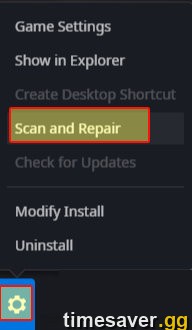
Fix 2: Run Scan and Repair in Battle.net (the #1 file-side fix)
If the disconnect started right after an update, corrupted or half-patched files are the likely cause. Battle.net can rebuild them in place — no reinstall, no lost progress.
- Fully close Black Ops 7 / Warzone.
- Open the Battle.net desktop app and select Call of Duty.
- Click the gear icon next to the blue Play button and choose Scan and Repair.
- Click Begin Scan and let it finish — it can take several minutes on a big install.
- Relaunch the game.
Scan and Repair is the single highest-hit-rate fix for the post-patch version of this error, because it targets exactly the files a broken update leaves behind.
Fix 3: Flush your DNS and switch to a faster DNS server
A slow or failing DNS server is one of the most common causes of a dropped Battle.net route. Flushing your cache and moving to a public DNS clears it for a large share of players.
Flush DNS and renew your IP — open Command Prompt as Administrator and run each line:
``` ipconfig /flushdns ipconfig /release ipconfig /renew netsh winsock reset ```
Restart your PC after `netsh winsock reset`.
Switch to Cloudflare or Google DNS:
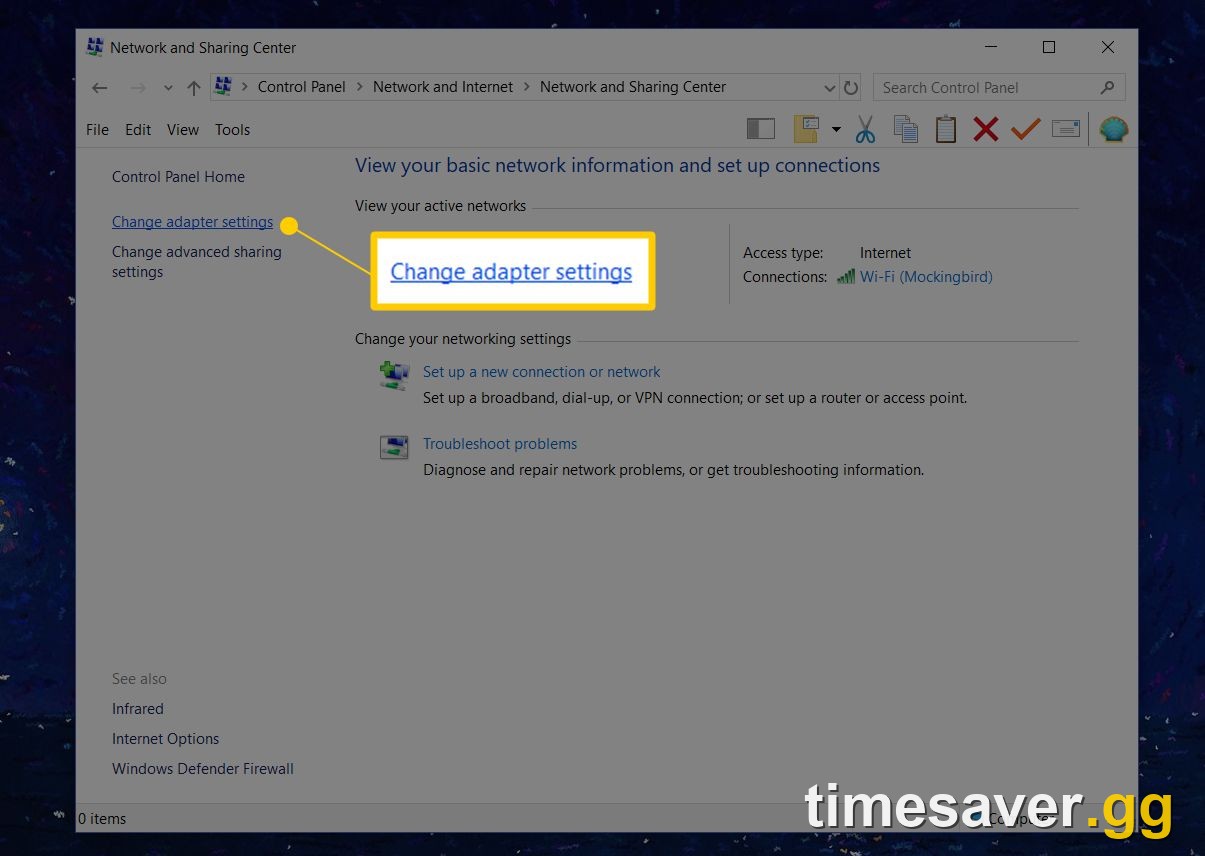
- Open Settings → Network & Internet → Advanced network settings, pick your adapter, and edit DNS server assignment to Manual.
- Turn IPv4 on and set Preferred: 1.1.1.1 and Alternate: 1.0.0.1 (Cloudflare), or 8.8.8.8 / 8.8.4.4 (Google).
- Save, then flush DNS again with `ipconfig /flushdns` and relaunch.
Fix 4: Go wired and power-cycle your router (kills the mid-match drop)
If the error hits you during matches on a timer — the "every 15 minutes" pattern from the quote above — you have an unstable route, not a broken install.
- Fully close Call of Duty and Battle.net.
- Unplug your router and modem from the wall (pull the plug, don't just press power).
- Wait at least 60 seconds so the session fully drops and your ISP hands you a clean one.
- Plug the modem back in first, let all lights go steady, then the router.
- Where you can, use an Ethernet cable instead of Wi-Fi — wireless packet loss is a leading cause of this specific disconnect.
A wired connection plus a clean session fixes the recurring drop for most players who were previously getting kicked mid-game. If the game connects fine but then stutters or rubber-bands once you're in, that's a separate issue — see our BO7 & Warzone lag and stutter fix for Season 5.

Call of Duty - Ranked Boost
Get ranked boost in 10 minutes
Fix 5: Allow Battle.net through your firewall and pause your VPN/antivirus
An over-aggressive firewall, antivirus, or VPN can sever the game-server connection the moment it's established.
- Turn off any VPN completely and test. VPNs frequently route you into a congested or rate-limited path that triggers BLZBNTBGS000003F8.
- Temporarily disable third-party antivirus (or add exclusions) and re-test. If the error clears, add `Battle.net.exe` and the Call of Duty game executable as exceptions, then re-enable protection.
- Allow both through Windows Firewall: Search "Allow an app through Windows Firewall" → Change settings → Allow another app, then add Battle.net.exe and the CoD launcher, ticking both Private and Public.
- On your router, enable UPnP (or forward Blizzard's ports) so the game can open the connections it needs — a Strict/Moderate NAT type contributes to repeated drops.
Fix 6: Reset Battle.net and clear its cache
A wedged Battle.net process or a stale cache folder can keep dropping the game-server link even after everything else is clean.
- Fully quit the game and Battle.net, then open Task Manager (Ctrl+Shift+Esc) and End task on any `Agent.exe`, `Battle.net.exe`, or Call of Duty processes still running.
- Press Windows + R, type `%ProgramData%`, and delete the Battle.net and Blizzard Entertainment cache folders (they rebuild automatically).
- Relaunch Battle.net and let it re-initialise, then start the game.
Console fix: clear the cache and rebuild the connection
On PlayStation and Xbox the same error means the console lost its route to the servers:
- Full power-cycle: hold the power button until the console fully shuts down, unplug for 60 seconds, then restart — this clears the console's network cache.
- Set a manual DNS in your console network settings (Cloudflare 1.1.1.1 / 1.0.0.1 or Google 8.8.8.8 / 8.8.4.4) and test the connection.
- PS5 only: boot into Safe Mode → Rebuild Database to clear corrupted cache without deleting games.
- Confirm PlayStation Network / Xbox Live status is green before assuming it's your setup.
When none of this works: it's on Blizzard's side
If you've worked the whole checklist and BLZBNTBGS000003F8 still hits — especially if it started suddenly for everyone at once — the game servers or a regional data centre are having problems. That's out of your hands. Confirm the outage on the status pages above, then wait; these clear on their own once Blizzard stabilises the backend. Filing a ticket with Activision Support helps them size the issue but won't get you in faster than the fix does.
Every minute this error keeps you out of a lobby is a minute you're not earning XP, camo progress, or Battle Pass tiers. Once you're back in, if you're staring down a Season 5 grind you don't have time for, our pros can handle it for you:
Skip the grind and jump straight back into your progress:
>
- CoD Account & Weapon Leveling (BO7) — level fast, done by pro players
- CoD Warzone Bot Lobbies — easy lobbies, level guns fast
- All Call of Duty services — camos, ranked, Zombies and more
Frequently Asked Questions
Is BLZBNTBGS000003F8 my fault or Blizzard's? Either — the code just means the connection to the game server dropped. Start by checking the Battle.net and Activision status pages: if they're green, it's a route/DNS/firewall issue on your side and the fixes above will clear it. If they're red or spiking on downdetector, it's a Blizzard-side outage and you just have to wait.
Why does it disconnect me every few minutes mid-match? That timed-drop pattern is a networking-route problem, not a broken install. An unstable Wi-Fi link, a failing DNS server, or a VPN keeps severing the session. Go wired, switch to Cloudflare/Google DNS, power-cycle your router, and turn off any VPN — that combination fixes the recurring drop for most players.
Does this hit Black Ops 7 and Warzone at the same time? Yes. On PC both titles sign in through the same Battle.net game-server backend, so when the connection fails it usually knocks out both at once — and clears on both once you fix your network.
What does "status: GOLDFLAKE" mean under the error? It's an internal Blizzard server label attached to the failed connection. It carries no extra troubleshooting detail — treat any BLZBNTBGS000003F8 with or without GOLDFLAKE the same way, working the checklist above.
Will a VPN fix or cause this error? Usually cause it. A VPN can route you into a congested or rate-limited path that triggers the disconnect. Turn it off first. In the rare case your ISP is throttling the CoD route, a VPN can help — but only test that after everything else, never as your first move.
Do I need to reinstall the game? Almost never. Run Scan and Repair in Battle.net first — it rebuilds corrupted files without a reinstall or lost progress. Save a full reinstall for the last resort, after the server, DNS, firewall and cache fixes have all failed. If the game won't even reach the login screen — hanging on a black screen instead — that's a launch problem, covered in our BO7 black screen on launch fix.