Call of Duty: Warzone is crashing to desktop for a wave of PC players after the Season 04 Reloaded update, and the pattern is exactly what you'd expect from a mid-season patch: random hard crashes, UNEXPECTED_KERNEL_MODE_TRAP blue screens, and the game silently closing three or four times in a row. This guide gives you the fastest working fixes first — the official Activision steps, plus the community workarounds that are actually landing right now — so you can get back in a match instead of alt-tabbing to Google.
Quick answer: Most post-Season 04 Reloaded crashes are fixed by scanning and repairing your game files (Battle.net Scan & Repair / Steam Verify Integrity) and updating to the officially recommended GPU driver (NVIDIA 591.59, AMD 25.12.1). If it still crashes, do a clean boot and disable overlays like MSI Afterburner, NZXT CAM, and Razer Cortex. On console, a hard power-cycle + reinstall clears most corrupted-update crashes.

Call of Duty - Bot Lobby
Get bot lobby in 10 minutes
Why is Warzone crashing after Season 04 Reloaded?
Season 04 Reloaded went live on June 25, 2026, adding Black Ops Classic as a permanent mode, four remastered maps, Operation King Killer in Endgame, and the Kowakujō Zombies map. Big content drops ship big executable changes — and that's when corrupted local files, stale shader caches, and overlay conflicts start throwing crashes that weren't there the week before.
There's a second trigger stacked on top this cycle: Black Ops 6 was split into a standalone app on July 7, which reshuffled how the shared Call of Duty launcher and Warzone files sit on disk. Several players report their crash-to-desktop problem started only after that split — a strong hint that the fix, for many, is a clean file repair or reinstall rather than a hardware issue.
Three quick reality checks before you start:
- Warzone supports Windows 10 and Windows 11 only — Windows 7/8 are unsupported and will crash. (support.activision.com)
- If crashes started the same day as a Windows Update or a new GPU driver, that's your prime suspect — roll it back or update forward.
- If you're crashing in one mode only (Zombies, or a specific map), note it — that points to a corrupted map/shader file, which Scan & Repair fixes.
First: the 60-second fixes that clear most crashes
Run these in order. Most people are back in a match by step 3.
| # | Fix | Platform | Time |
|---|---|---|---|
| 1 | Scan & Repair / Verify Integrity of Game Files | PC | 5–15 min |
| 2 | Update GPU driver to the recommended version | PC | 5 min |
| 3 | Fully close the launcher, then relaunch and let Shader Preloading finish | PC | 3 min |
| 4 | Clean boot — disable overlays (Afterburner, NZXT CAM, Razer Cortex) | PC | 5 min |
| 5 | Hard power-cycle (hold power 10s), rebuild database | Console | 3 min |
| 6 | Reinstall the game to a clean folder | PC & Console | 20–60 min |
How do I repair Warzone's game files?

Corrupted files are the number one cause of post-patch crashing, and a repair is non-destructive — you won't lose your account, unlocks, or settings.
- Battle.net: Click the Warzone tile → the gear icon next to Play → Scan and Repair → Begin Scan. Let it finish completely.
- Steam: Right-click Call of Duty in your Library → Properties → Installed Files → Verify integrity of game files.
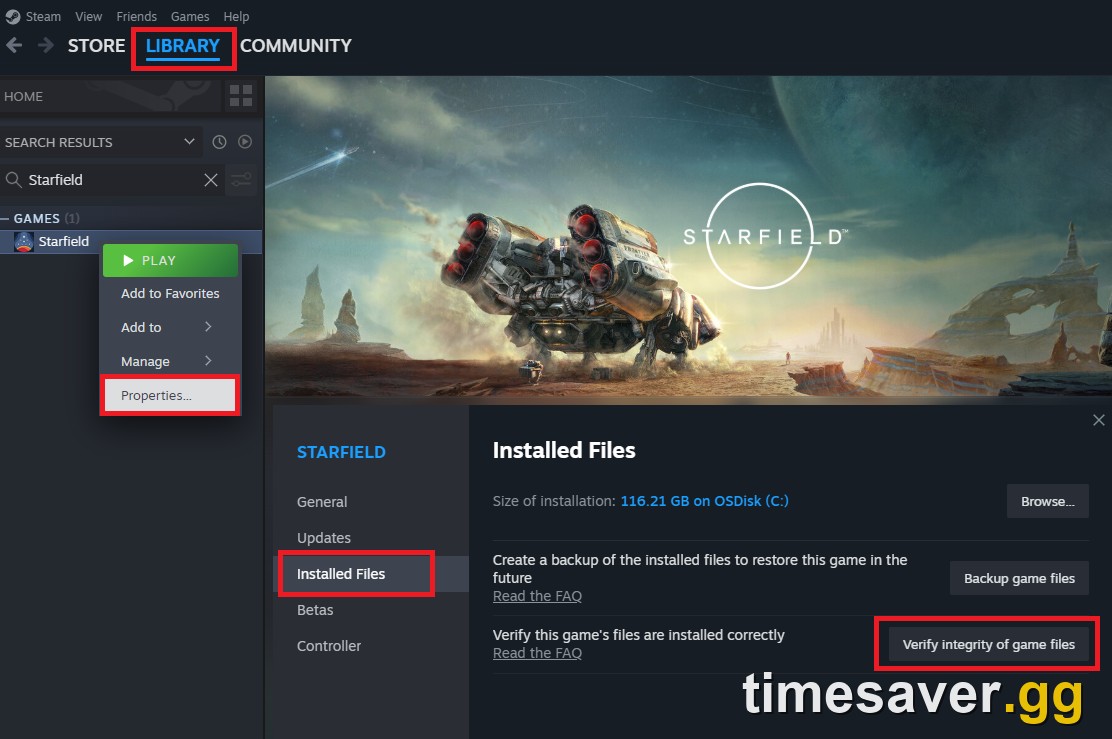
If the scan finds and replaces files, launch the game once and let it sit on the main menu for a minute so shaders rebuild before you queue.
Which GPU driver does Warzone officially recommend?
Activision publishes a specific recommended driver list for Warzone, and running an older or a brand-new-buggy driver is a common crash cause. As of the current season the recommended versions are:
- NVIDIA (Desktop): 591.59
- AMD: 25.12.1
- Intel Arc: 32.0.101.8531
Per Activision's official PC troubleshooting page: "If you're experiencing graphical issues in Call of Duty: Warzone, be sure to install the applicable video card drivers listed below." (support.activision.com)
If you're already on the latest driver and crashing, the cleanest fix is a DDU (Display Driver Uninstaller) wipe in Safe Mode, then a fresh install of the recommended version — a partial driver upgrade often leaves conflicting files behind after a big Windows or game update.
Why does clean-booting and disabling overlays help?
Warzone's anti-cheat and renderer are sensitive to programs that hook into the game. Activision explicitly calls out three: "Disable NZXT CAM, MSI Afterburner, and Razer Cortex, as these can conflict with Call of Duty: Warzone." Razer Synapse users should update to the latest driver, and if you ever disabled ASLR in Windows, re-enable it or the game may refuse to start. (support.activision.com)
To clean boot: msconfig → Services tab → check Hide all Microsoft services → Disable all → restart. Add the entire Warzone install folder to your antivirus exception list while you're at it — real-time scanners flag the anti-cheat mid-match and force a crash.

Call of Duty - Ranked Boost
Get ranked boost in 10 minutes
How do I fix the UNEXPECTED_KERNEL_MODE_TRAP (0x7F) crash?
A KERNEL_MODE_TRAP / 0x7F double-fault blue screen isn't a game bug — it's a driver-level conflict, most often an audio or chipset driver. Community reports point at outdated audio drivers as the trigger. Fix path:
- Update your audio driver (Realtek/onboard or your headset/DAC driver) and your motherboard chipset driver.
- Make sure Windows itself is fully updated — an out-of-date Windows build is a repeat culprit for this stop code.
- Disable any per-app audio enhancement software running in the background.
- If it persists, run sfc /scannow and DISM /Online /Cleanup-Image /RestoreHealth to repair Windows system files.
Community fix: the Battle.net switch and the BO6 reinstall
Two workarounds are landing repeatedly in the r/CODWarzone crash threads this week — both paraphrased here, no user details:
- Move from Steam to Battle.net. Multiple players say reinstalling Warzone on Battle.net cleared their "account signed out," "connection lost," and "Steam connection interruption" crashes. You don't lose progress — your Call of Duty account is platform-agnostic.
- Reinstall Black Ops 6 (standalone). Since BO6 went standalone on July 7, some players found that reinstalling BO6 stopped Warzone/BO7 from closing to desktop — a sign the crash is tied to the shared-file split, not their hardware.
Neither is official, but both are low-risk and worth trying before a full Warzone reinstall.
What about Warzone crashing on console (PS5 / Xbox)?
Console crashes after a patch are almost always a corrupted download. Fix order:
- Hard power-cycle: hold the console power button ~10 seconds until it fully shuts off, unplug for 30 seconds, restart.
- Clear cache / rebuild database: on PS5, boot into Safe Mode → Clear Cache and Rebuild Database. On Xbox, do a full power cycle (not Quick Resume).
- Check for a pending game update — a half-applied Season 04 Reloaded patch crashes on launch. Delete and re-download the update if it's stuck.
- If it still crashes, delete and reinstall the game to clear the corrupted install.
Once you've fixed the crashing and you're rebuilding your rhythm — or you just missed a chunk of the season fighting your PC instead of playing — the fastest way back to form is to skip the frustrating re-grind. Our team can level your account, weapons, and battle pass, or drop you into easier lobbies to warm up.
Get back into Warzone faster:
- CoD Bot Lobbies — easy lobbies to shake off the rust and level up fast
- CoD Account & Weapon Leveling — skip the grind, catch up on the season, done by pro players
- All Call of Duty services — camos, ranked, calling cards and more
If your crash is actually an anti-cheat error rather than a game crash, we've got dedicated fixes: see our guides on the Warzone failed attestation / BIOS fix, the enrollAIK.exe error fix, and the BO7 "waiting for relay" fix. If Black Ops 6 specifically won't open after the split, the BO6 won't launch fix covers it.
FAQ
Why did Warzone start crashing after Season 04 Reloaded? Season 04 Reloaded (June 25, 2026) shipped large game-file changes, and the Black Ops 6 standalone split on July 7 reshuffled shared launcher files. Both commonly leave corrupted or mismatched local files, which is why a Scan & Repair or verify-integrity clears the crash for most players.
Will repairing my game files delete my progress or unlocks? No. Scan and Repair (Battle.net) and Verify Integrity of Game Files (Steam) only replace damaged local files. Your account, unlocks, camos, and settings are stored on your Activision account and are untouched.
What GPU driver should I use for Warzone right now? Activision's officially recommended versions are NVIDIA 591.59 (Desktop), AMD 25.12.1, and Intel Arc 32.0.101.8531. If you're already updated and still crashing, do a clean DDU wipe in Safe Mode and reinstall the recommended driver.
How do I stop the UNEXPECTED_KERNEL_MODE_TRAP blue screen in Warzone? That 0x7F stop code is a driver conflict, not a game bug. Update your audio and chipset drivers, fully update Windows, and repair Windows system files with sfc /scannow. It's usually an outdated audio driver.
Does switching from Steam to Battle.net fix Warzone crashing? For "account signed out," "connection lost," and Steam connection-interruption crashes, several players report the Battle.net client is more stable. You won't lose progress since your Call of Duty account carries across platforms — it's a low-risk thing to try.
When does Season 05 launch? Black Ops 7 and Warzone Season 05 is expected around July 23, 2026 — the day the Season 04 Battle Pass timer runs out — though Activision hasn't officially confirmed the date. A fresh season patch can reset these crashes (for better or worse), so re-run Scan & Repair right after it drops.