If Warzone or Black Ops 7 throws "Windows cannot find 'enrollaik.exe'" or "Failed to enroll AIK" and boots you back to the menu, you are not soft-locked — this is the game's TPM 2.0 attestation check failing, and it has a repeatable fix. This guide is the fastest verified path back in-game on PC.

Call of Duty - Bot Lobby
Get bot lobby in 10 minutes
Quick answer: how to fix the enrollaik.exe error
enrollaik.exe is a small helper that ships inside your Call of Duty install. It registers your PC's TPM 2.0 attestation key with Microsoft so Ricochet anti-cheat will let you play. When it can't run or its enrollment fails, you get "cannot find enrollaik.exe" or "Failed to enroll AIK." Fix it in this order:
- Enable TPM 2.0 and Secure Boot in your BIOS (the root requirement). When the game prompts you, always choose Yes.
- Verify/repair your game files so enrollaik.exe is actually present.
- Run enrollaik.exe manually as Administrator from the Call of Duty install folder.
- Run the CODSecureAttestationWizard as Administrator from that same folder and let it generate the key.
- Confirm the "TPM Base Services" and "Cryptographic Services" Windows services are running.
- Update your motherboard BIOS/AGESA if you're on AMD (a known firmware bug re-prompts forever even after you click Yes).
Full step-by-step below, plus the specific fixes for the AMD "prompt won't stop" bug and the new Ryzen AI 300 "404" attestation error.
Why does Warzone/BO7 need enrollaik.exe at all?

Both current PC Call of Duty titles enforce a hardware-level anti-cheat check. Activision's official support article is blunt about it:
"These features are required for anti-cheat enforcement in Call of Duty: Black Ops 7 and Call of Duty: Warzone. Ensure your PC supports these settings." — Activision Support: TPM 2.0 and Secure Boot
The "features" are TPM 2.0 (a security chip that stores cryptographic keys) and Secure Boot. To prove your machine has them and hasn't been tampered with, Ricochet uses an attestation process: your TPM generates an AIK (Attestation Identity Key), and that key is registered with the Microsoft Attestation Authority (MAA). The tiny program that performs that registration is enrollaik.exe, which lives inside your CoD install alongside CODBrokerInstaller.exe. The CODSecureAttestationWizard is the front-end that calls it.
So when you see any of these, they're all the same underlying failure:
- Windows cannot find 'enrollaik.exe'
- Failed to enroll AIK
- You are under Failed Attestation status
- Secure Boot / TPM Attestation Failed
The game is telling you it could not complete the TPM key enrollment. Here's how to force it through.
Step 1: Turn on TPM 2.0 and Secure Boot (the real root cause)
The large majority of enrollaik errors trace back to one of these two being off in BIOS. Fix this first — the later steps won't stick otherwise.
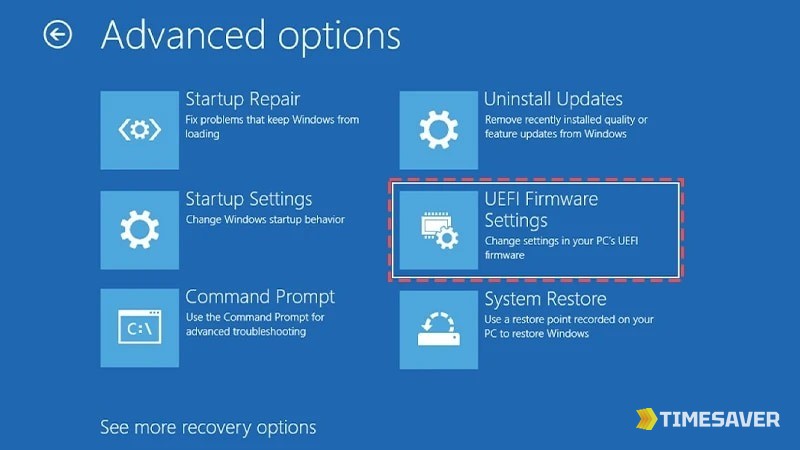
- Restart and enter BIOS/UEFI (usually Del or F2 during boot).
- Enable the TPM. It's named differently by brand:
- AMD boards: look for AMD fTPM / AMD CPU fTPM.
- Intel boards: look for PTT (Intel Platform Trust Technology).
- Enable Secure Boot (often under Boot or Security). Set the OS type to Windows UEFI mode, not "Other OS."
- Save and exit.
To confirm from Windows: press Win + R, type tpm.msc, and check that the TPM is ready for use and reads Specification Version 2.0. Then run msinfo32 and confirm Secure Boot State: On.
Heads up for older or budget boards: some only expose Secure Boot after you switch the partition style to GPT and disable CSM/Legacy boot. If Secure Boot is greyed out, that's usually why.
Step 2: Make sure enrollaik.exe actually exists
The literal "Windows cannot find 'enrollaik.exe'" message often means the file is missing or was quarantined by antivirus. Restore it before anything else.
- Verify/repair game files for how you launch:
- Steam: right-click Call of Duty → Properties → Installed Files → Verify integrity of game files.
- Battle.net: gear icon next to Play → Scan and Repair.
- Xbox / Game Pass PC app: ⋯ → Manage → Files → Verify and repair.
- Check your antivirus quarantine. Some third-party AV flags enrollaik.exe and CODBrokerInstaller.exe as suspicious because they touch the TPM. Restore them and add the Call of Duty folder as an exclusion.
- Confirm the file is there. Open File Explorer and browse to your install folder, then search it for enrollaik.exe. Typical locations:
| Launcher | Typical path to search |
|---|---|
| Steam | ...\steamapps\common\Call of Duty\_retail_\ |
| Battle.net | ...\Call of Duty\_retail_\ |
| Xbox / Game Pass | C:\XboxGames\Call of Duty\Content\ |
You should find enrollaik.exe, CODBrokerInstaller.exe, and a CODSecureAttestationWizard folder near each other.
Step 3: Run enrollaik.exe and the Secure Attestation Wizard manually
If the file exists but the in-game prompt keeps failing, force the enrollment yourself.
- Close Call of Duty and its launcher completely.
- In the install folder, right-click enrollaik.exe → Run as administrator. It may flash a console window and close — that's normal.
- Open the CODSecureAttestationWizard folder, then right-click the wizard → Run as administrator.
- Let it scan. When it prompts you to generate a key, accept. If it errors, press the button again — several players report it succeeds on the second or third attempt.
- When the wizard reports green / passed for TPM 2.0 and Secure Boot, relaunch the game.
A community fix thread on r/CODWarzone adds one detail that trips people up: the wizard and the enroll file need to be in the same place. As one player summarized it, "extract the attestation wizard in the same folder as enroll.aik for it to work." If your wizard was extracted to Downloads, move it (or copy enrollaik.exe) so they sit together, then re-run.
Step 4: Confirm the Windows services are running
The enrollment silently fails if the TPM services are stopped.
- Press Win + R, type services.msc, Enter.
- Find TPM Base Services — set it to running/automatic.
- Find Cryptographic Services — same.
- Reboot, then re-run the wizard from Step 3.

Call of Duty - Ranked Boost
Get ranked boost in 10 minutes
Fixing the AMD "it keeps asking even after I click Yes" bug
This is the single most-reported variant, and it is not something you're doing wrong. Per HP's support community, there's a firmware-level issue:
"An issue with AMD firmware 3.x.0.x, where x is any number, can result in a failure of registration through enrollaik.exe, surfacing the prompt multiple times even if a user selects Yes."
If you're on an AMD system and the attestation prompt loops endlessly:
- Go to your motherboard manufacturer's website (not AMD's) and download the latest BIOS/AGESA update for your exact board model.
- Flash it following their instructions (BIOS Flashback if available).
- Re-enable AMD fTPM and Secure Boot after the flash — updates sometimes reset them.
- Boot Windows, re-run the Secure Attestation Wizard as admin.
⚠️ Do not flash a BIOS meant for a different board revision. A player in the Black Ops 7 subreddit was mid-panic after exactly this: "Fingers crossed because I really don't wanna brick another board." Match the model and revision precisely, and don't cut power during a flash.
The new Ryzen AI 300 "404 / MAA" error
Some players on brand-new Ryzen AI 300 laptops and handhelds get an attestation failure that returns a 404 Not Found. This one is often not on your end: it means the Microsoft AIK Authority endpoint Windows is trying to reach is missing or misconfigured for that chip. Steps that help:
- Make sure Windows is fully updated (the certificate endpoints ship via Windows Update).
- Run the wizard as admin anyway — sometimes a retry after updates connects.
- If it still 404s, it's a server-side gap; watch the Activision and your CPU vendor support channels for a patch rather than reflashing repeatedly.
How to confirm the fix actually stuck
Before you queue up, verify the two hardware checks are genuinely passing — a lot of players "fix" it, relaunch too fast, and get the popup again mid-match. Sixty seconds of checking saves a wasted lobby:
- TPM: open tpm.msc — the status should read "The TPM is ready for use" with Specification Version 2.0. Anything less means fTPM/PTT is still off in BIOS.
- Secure Boot: open msinfo32 (System Information) and confirm Secure Boot State: On and BIOS Mode: UEFI. If BIOS Mode says Legacy, Secure Boot can't turn on until you convert the drive to GPT.
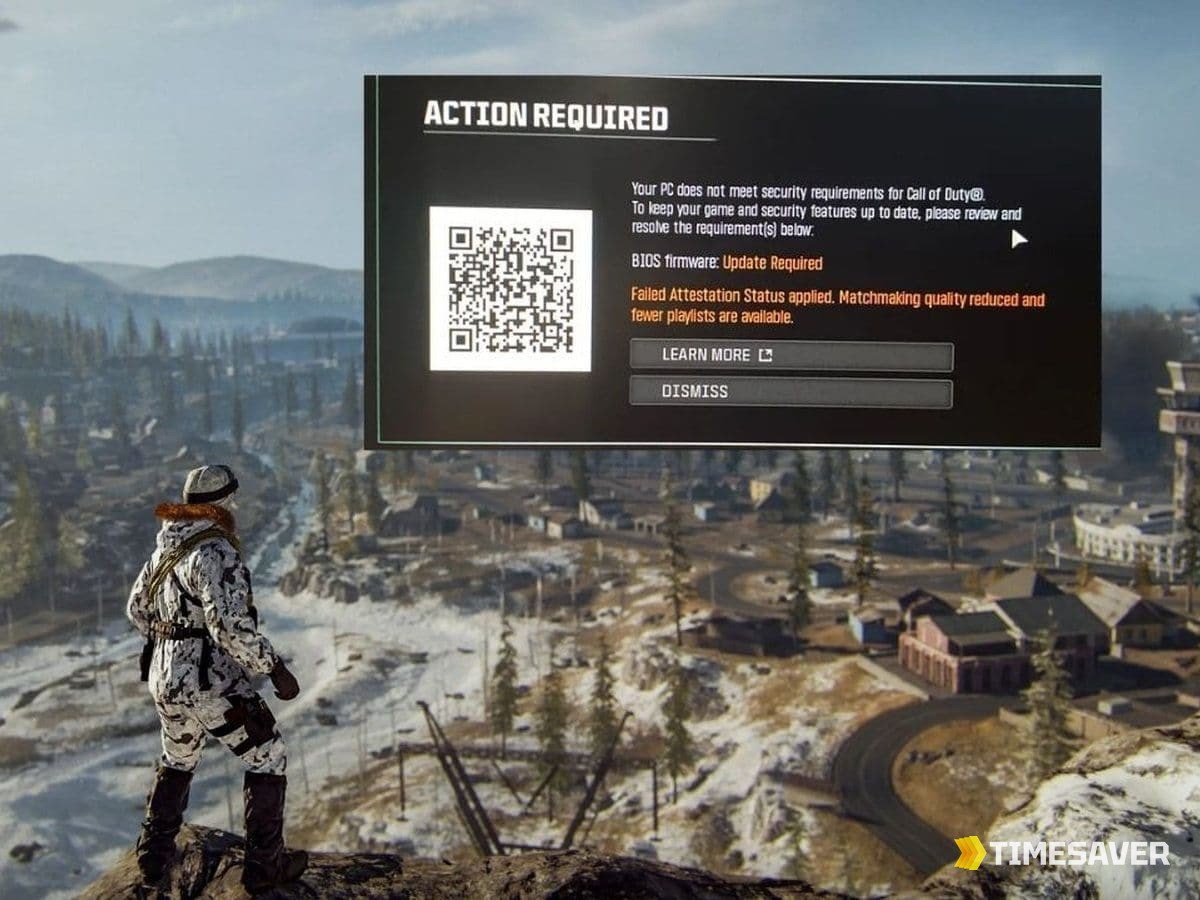
- In-game: launch the title and check that the Action Required / Failed Attestation banner is gone from the main menu. If it's still there but you pass both Windows checks above, re-run the Secure Attestation Wizard as administrator one more time — the key sometimes needs a second enrollment pass to register server-side.
If all three are green, you're done, and it typically stays fixed until a major BIOS or Windows update resets a setting — which is why this error tends to reappear after big patch weeks.
A note on dual-boot, VMs, and handhelds
Two edge cases catch people out. Dual-booting Linux can change Secure Boot behavior — if you boot Windows through a non-standard bootloader, attestation may fail even with the right BIOS settings, so boot Windows directly to test. And virtual machines and cloud gaming generally can't pass the check at all, because the TPM is virtualized and won't attest — Warzone and BO7 must run on native Windows with a real hardware TPM. Handhelds like the ROG Ally and Legion Go usually have fTPM available in BIOS but ship with it disabled, so the same Step 1 applies to them.
After you're back in: catch up fast
Attestation lockouts often hit right after a big update — Season 4 Reloaded pushed a wave of them — which means you may have lost days of grind time while your PC was locked out. If you'd rather skip the catch-up entirely, our verified boosters can level and unlock while you play something else:
Get back to winning instead of grinding:
- CoD Account & Weapon Leveling (BO7) — skip the grind, pro players handle it
- CoD Warzone Bot Lobbies — easy lobbies to level fast and pad stats
- BO7 Mastery Camo Unlocks — mastery camos, fast and secure
For more Warzone/BO7 PC troubleshooting, see our BIOS Update Required still-showing fix and the original Failed Attestation Status BIOS fix. Once you're stable, our Warzone Fast Leveling guide and Warzone Returning Player guide will get you current on Season 4.
FAQ
What is enrollaik.exe and is it a virus? No, it's a legitimate file. enrollaik.exe ships inside your official Call of Duty install and registers your PC's TPM 2.0 attestation key so Ricochet anti-cheat will let Black Ops 7 and Warzone run. Antivirus sometimes flags it because it touches the TPM, but if it's in your CoD folder it's safe — restore it from quarantine rather than deleting it.
Where is enrollaik.exe located? In your Call of Duty install folder next to CODBrokerInstaller.exe. On Steam and Battle.net that's usually ...\Call of Duty\_retail_\; on the Xbox/Game Pass PC app it's typically C:\XboxGames\Call of Duty\Content\. If it isn't there, verify/repair your game files to restore it.
Why does the attestation prompt keep appearing even after I click Yes? On AMD systems this is a known firmware bug — AMD firmware versions in the 3.x.0.x range can fail the enrollaik registration and re-prompt endlessly. Update to the latest BIOS/AGESA from your motherboard maker, re-enable fTPM and Secure Boot, then re-run the Secure Attestation Wizard as administrator.
Do I really need TPM 2.0 and Secure Boot to play Warzone and Black Ops 7? Yes. Activision states both are required for anti-cheat enforcement in Black Ops 7 and Warzone on PC. Without TPM 2.0 and Secure Boot enabled and attested, the game will not launch — there is no in-game toggle to bypass it.
Will enabling Secure Boot break my Windows install? It shouldn't if Windows is already installed in UEFI/GPT mode (almost all modern PCs are). If Secure Boot is greyed out or Windows won't boot after enabling it, your drive may be on legacy MBR — you can convert it to GPT with the built-in mbr2gpt tool before enabling Secure Boot. Back up first.
I got a "404" attestation error on a new Ryzen AI 300 PC. What now? That 404 usually means the Microsoft attestation server endpoint for your chip is misconfigured, not that your file is missing. Fully update Windows, retry the wizard as admin, and if it persists, wait for a server-side fix from Microsoft/Activision rather than reflashing your BIOS repeatedly.