The WoW Forever beta closes on October 21, and everything you built on it goes with it — characters, gold, and, if you do nothing, the UI you spent a month tuning. That's exactly the question r/classicwow is asking two days out: one player posted that they "want to save my UI from beta to Forever," and the replies were a scattered mix of "copy the WTF folder," "export Edit Mode," and "just move SavedVariables."
All three are partly right. This guide puts them in order: what to back up before the beta shuts down, how to restore it on November 4, and which addons actually have a Forever build — checked against Blizzard's beta development notes, not guesswork.
Quick answer: Before October 21, copy WTF/Account/<ACCOUNT>/SavedVariables, your macros-cache.txt and bindings-cache.wtf, and each character's folder from the beta client (reported by addon authors as World of Warcraft/_classic_beta_/) to a folder outside your WoW install, and export every Edit Mode layout as a text string. At launch, reinstall addons fresh — only files tagged Forever / game version 1.60.1 load — then drop in the SavedVariables for the addons you reinstalled and import your Edit Mode strings. Forever already has a built-in Damage Meter, Cooldown Manager and Aggro Display; Questie, DBM, Details!, Auctionator and Leatrix Plus have Forever builds; WeakAuras does not.
When does the WoW Forever beta end, and what gets wiped?
Blizzard's pre-purchase article is explicit: the beta "runs through October 21, 2026, PST" (Blizzard News). Launch is November 4, 2026 at 3:00 p.m. PST, per the What's Next panel recap.
Nothing on the beta server carries over — we covered that in full in Does WoW Forever Beta Progress Carry Over?. But your local files are different: they live on your PC, not Blizzard's server. Two things decide whether they survive:
- You copy them somewhere safe before you uninstall the beta client or Battle.net replaces it.
- You restore them selectively, because a beta-era file dropped blindly onto a live install can do more harm than good.
If you want the wider calendar — name reservation on October 27, Launch Week Invitations, the stress test — see WoW Forever Beta Ends October 21 — What Happens Next.
What exactly should you back up from the WoW Forever beta?
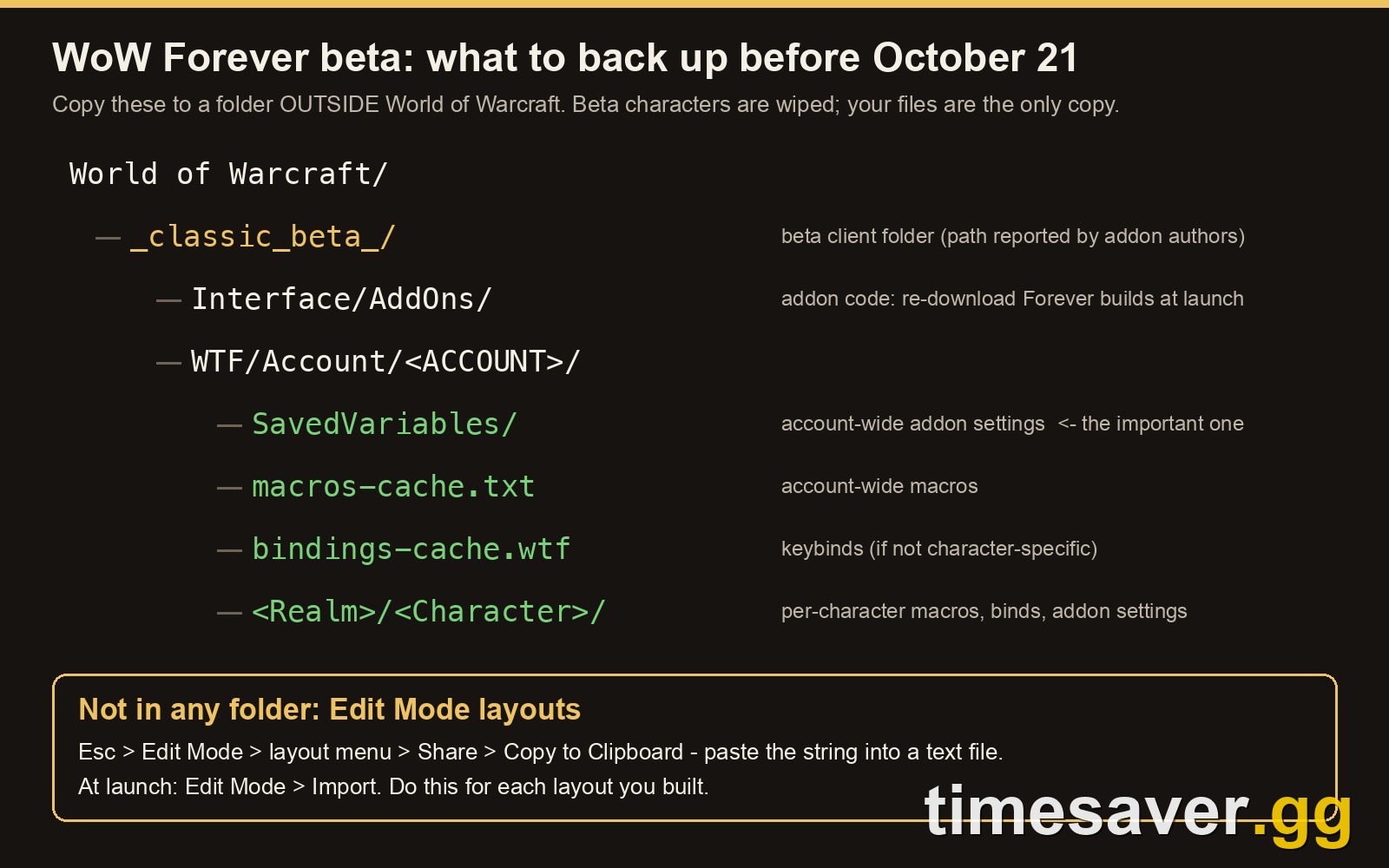
During the beta, addon authors and install guides consistently report the client folder as World of Warcraft/_classic_beta_/. Blizzard has not said what the launch folder will be called, so treat that as a beta-only path. Inside it, these are the files worth keeping:
| What | Where (inside the beta folder) | Why it matters |
|---|---|---|
| Addon settings | WTF/Account/<ACCOUNT>/SavedVariables/ | Every account-wide addon profile: bag layout, Auctionator lists, DBM bar positions |
| Character addon settings | WTF/Account/<ACCOUNT>/<Realm>/<Character>/ | Per-character profiles, plus per-character macros and keybinds |
| Account macros | WTF/Account/<ACCOUNT>/macros-cache.txt | General macros, as plain text you can copy back by hand |
| Keybinds | WTF/Account/<ACCOUNT>/bindings-cache.wtf | Account-wide keybinds |
| Edit Mode layouts | Not a file — export in game | Your action bar, unit frame and cast bar positions |
| Addon code | Interface/AddOns/ | Optional. Reinstall fresh at launch instead |
Do it in this order:
- Log in to the beta one last time and open Esc → Edit Mode. For each layout you built, open the layout menu, choose Share → Copy to Clipboard, and paste the string into a text file. One reply in the r/classicwow thread put it in one line: "Edit Mode > Export > paste into notepad." Full-UI packs such as EllesmereUI have their own export button — use it too.
- Exit the game completely, so the client writes your latest settings to disk.
- Copy the whole WTF folder to your desktop or a cloud drive — outside the World of Warcraft directory, so no uninstall or repair can touch it.
- Optionally copy Interface/AddOns as a record of what you ran. You'll redownload the addons themselves.
Why export Edit Mode separately? On the modern client Forever runs on, Edit Mode layouts are saved to your account rather than the WTF folder, so copying files won't bring them back. Blizzard also changed how they're stored during the beta — the October 8 notes say "Edit Mode layouts are now saved and loaded per ui type" (keyboard and gamepad layouts are kept apart). A text string is the only copy you control.
How do you restore your beta UI on November 4?
Don't paste the old WTF folder over the new one. A clean restore takes about ten minutes:
- Launch Forever once on November 4 (or once the live client is installed), log in to the character select screen, then exit. This creates the live folder structure.
- Reinstall each addon from a Forever-tagged file (next section). Don't copy the beta Interface/AddOns folder across — addons are updated constantly and a beta-era build can be outdated on day one.
- Copy only the SavedVariables files for addons you reinstalled into the new WTF/Account/<ACCOUNT>/SavedVariables/. Each addon's settings file is named after the addon (Questie.lua, Auctionator.lua and so on). Leave out anything you no longer run.
- Character settings: your new characters will have new names and new folders, so copy the contents of an old character folder into the new character's folder after you've logged that character in once.
- Macros: open your old macros-cache.txt in a text editor and paste the macros you want into the in-game macro window. That's slower than file copying but safe.
- Keybinds: copying bindings-cache.wtf may work, but the modern client also syncs keybinds to Blizzard's servers, so the live server copy can overwrite a pasted cache file. Keep your backup and rebind manually if that happens.
- Edit Mode: open Edit Mode, choose Import, paste each saved string and activate the layout.
- Do not copy Config.wtf — it stores client settings for the beta install, not your UI.
One more beta-specific warning: from September 18, players reported on the Blizzard forums that addon settings were saved to disk but didn't load back after a restart. Several said a September 25 patch fixed it, though Blizzard never replied in the 54-post thread. Keep a clean copy of your SavedVariables outside the game folder anyway — a new client is exactly when settings go missing.
Do Classic Era addons work in WoW Forever?
No — not as they are. Forever looks like Vanilla, but it runs on the modern WoW client. A Blizzard representative, quoted by Icy Veins, said Forever shares the modern game's UI architecture, including "the vast majority of APIs available in 12.1.5" — and the addon restrictions Blizzard introduced with Midnight.
In practice that means three things:
- You need a Forever build. On CurseForge, pick the file tagged for the Forever flavor or game version 1.60.1 (interface 16001). A Classic Era, TBC or Retail file shows as out of date and won't load unless you force it — and even then it usually breaks.
- Combat math is restricted. In combat, addons can display many of the game's values but can't freely read or calculate with them, and the classic combat-log approach to meters doesn't work. That's why some old favorites have no Forever port.
- Blizzard isn't loosening it — yet. An EU forum thread asking Blizzard to ease the restrictions for Forever, which has no rated PvP or Mythic+, has reached 60 posts with no official reply.
Classic Era and Anniversary realms are separate games with their own addon versions — for how the versions differ beyond addons, see WoW Classic+ vs Season of Discovery vs Classic Era.
What does WoW Forever have built in so you don't need an addon?

Blizzard has spent the beta filling the gaps the restrictions created. All from the official beta development notes unless noted:
- Cooldown Manager. "By default, the Cooldown Manager is disabled, and it can be enabled in Options under the Gameplay Enhancement settings," Blizzard wrote in the September 24 notes. As of the October 8 build it supports all classes, racial abilities and trinkets, and since October 15 spells with several ranks show as a single entry. Consumables are promised "in a later patch." We covered the class side in WoW Forever Beta Class Changes.
- Damage Meter. A built-in meter, confirmed by the developers in the September 17 live Q&A (see Wowhead's Damage Meter guide).
- Auto Attack / Auto Shot (October 15). A new setting lets Hunters switch automatically between melee auto attack and Auto Shot, gamepad included.
- Auction House upgrades (October 15). A column for the level you need to equip an item, and correct stats on suffix items like "of the Monkey."
- Scrolling Combat Text (October 15). Detailed options under Options → Gameplay → Combat, and searching "Threat" in Options now finds the Aggro Display setting.
- Voice (October 8). Party voice chat can be set to use Discord Voice, and Group Finder listings can prompt members to join it.
- Official gamepad support, confirmed in the BlizzCon panel recap.
Which WoW Forever addons work right now?
Here's the launch-day shortlist. "Forever build" means the addon's project page lists a file for the Forever flavor, as reported across several independent addon trackers in mid-October. Statuses change with every beta build, so check the file tag before you install.
| Job | Addon | Forever status | Notes |
|---|---|---|---|
| Quest helper | Questie | ✅ Forever build | New Forever quests are still being added to its database |
| Boss timers | Deadly Boss Mods or BigWigs | ✅ Forever build | Install one, not both |
| Damage meter | Details! | ✅ Forever build | Optional — the built-in meter covers most players |
| Auction House | Auctionator | ✅ Forever build | Best paired with a bag addon |
| Bags | Baganator / Bagnon | ✅ Forever build | Shows other characters' bags too |
| Quality of life | Leatrix Plus | ✅ Forever build | A few options missing |
| Waypoints | TomTom | ✅ Forever build | /way coordinates for quest routes |
| Action bars | Bartender4 | ✅ Forever build | Or stick with Edit Mode |
| Threat | ThreatClassic2 | ✅ Forever build | Tanks: keep it visible on every pull |
| Custom alerts | WeakAuras | ❌ No official build | Community port Musca Auras exists; Cooldown Manager covers the basics |
If you're new to Classic, start with Questie + one boss mod + Auctionator + a bag addon and add more only when you miss something.
How do you install WoW Forever addons?
With an app (easiest): in the CurseForge or Wago app, choose WoW Forever as the game version. The app finds the Forever folder and only offers Forever files. Use one app — two apps updating the same folder cause conflicts.
By hand:
- Download the zip marked Forever or 1.60.1 from the addon's page.
- Unzip it into your Forever client's Interface/AddOns/ folder (on the beta, _classic_beta_/Interface/AddOns/). The folder containing the addon's .toc file must sit directly inside AddOns, not one level deeper.
- Restart the game, then open AddOns on the character select screen and check each addon is ticked.
- Only tick Load out of date AddOns for files you trust.
On launch day, the live client may use a new folder, so set up there, not in the beta folder. Battle.net will show the install location under the game's settings.
What should you do before October 21?
- Export every Edit Mode layout to a text file.
- Export any full-UI pack profile (EllesmereUI and similar).
- Exit the game, then copy the WTF folder outside the WoW directory.
- Write down your addon list (or copy Interface/AddOns as a record).
- On November 4: launch once, reinstall Forever-tagged addons, restore SavedVariables, import Edit Mode.
Then add it to the rest of your WoW Forever Launch Day Checklist — names first on October 27 (name reservation guide), a quick system requirements check, and a leveling plan from WoW Forever Leveling Explained.
Want your UI ready and your character at 60 without the grind? timesaver.gg runs WoW Forever services on US and EU from launch.
- WoW Forever Power Leveling to 60 — skip the 1–60 grind and start endgame with your setup already dialled in.
- WoW Forever Gold — fund your first Auction House trips, training and mount; see our gold farming guide if you'd rather farm it.
- All WoW Forever services — leveling, gold, dungeons, raids and PvP.
FAQ
Will my WoW Forever beta UI carry over to launch automatically? No. Blizzard has not said beta UI settings transfer, and beta characters are wiped. Your local WTF files stay on your PC, but you need to copy them out before the beta client is removed and restore them by hand. Edit Mode layouts must be exported as text strings.
Where is the WoW Forever addons folder? On the beta, addon authors report it as World of Warcraft/_classic_beta_/Interface/AddOns/. Blizzard hasn't confirmed the launch folder name, so check the install location in Battle.net on November 4.
Do Classic Era addons work in WoW Forever? No. Forever runs on the modern client with Midnight's addon restrictions, so you need files built for Forever — tagged with the Forever flavor or game version 1.60.1 (interface 16001).
Is there WeakAuras for WoW Forever? There's no official WeakAuras build. A community port called Musca Auras has Forever files, and the built-in Cooldown Manager now covers all classes, racials and trinkets.
Does WoW Forever have a built-in damage meter? Yes. Forever ships a built-in Damage Meter and Cooldown Manager, so Details! is optional for most players.
Is it safe to copy my whole WTF folder into the live game? Not recommended. Copy only the SavedVariables files for addons you reinstall, plus character folders and macros. Skip Config.wtf, which stores beta client settings.