If Arena Breakout: Infinite is throwing a DMA Guard prompt at launch — a message that your system "has not activated the necessary hardware features (VT-d for Intel, IOMMU for AMD)" — you are not banned and your PC is not broken. DMA Guard is Morefun's new hardware-level anti-cheat layer, and it needs one BIOS toggle switched on before it will let the game run clean. This guide walks you through the exact fix: identify your motherboard, get into BIOS, flip VT-d (Intel) or IOMMU (AMD), and confirm it took — using Morefun's own official per-manufacturer instructions, published 2026-08-05.
Key Takeaways (TL;DR)
- DMA Guard began rolling out in early August 2026 as a system-level anti-cheat feature for Arena Breakout: Infinite (Steam appid 2073620, PC/Windows only). It is not a ban and not an error with your game files.
- The one-line fix: enter BIOS and enable VT-d on Intel systems, or IOMMU on AMD systems. Both sit on top of Windows' built-in Kernel DMA Protection.
- First, identify your hardware: press Windows + R, type `msinfo32`, and read your Motherboard Manufacturer, System Manufacturer, and Processor. That tells you your BIOS entry key and whether you're on Intel (VT-d) or AMD (IOMMU).
- Not every player sees this. Morefun says DMA Guard is "primarily designed for accounts with unusual login environments or potential security risks" — frequent network changes, account sharing, or new-device logins are common triggers.
- It won't hurt your PC. Morefun states DMA Guard "will not impact your device's performance or compromise your privacy," because it rides on Windows features most systems already have.
- Why the aggression? ABI runs a 0% tolerance anti-cheat regime — its August 12, 2026 fortnightly ban notice logged 11,065 cheating bans, 1,096 ten-year bans, and 897 device/IP bans in just two weeks. DMA Guard exists to shut down memory-reading DMA cheats at the hardware level.
What is DMA Guard in Arena Breakout: Infinite?
DMA Guard is a hardware-level memory-protection feature run by ABI's in-fiction security body, B.D.C. Morefun first announced it on 2026-07-31, writing: "DMA Guard is currently in active development and testing. We expect it to launch with the version update in August." By the 2026-08-05 DMA Guard Operation Guide, the studio confirmed the feature "was recently launched."
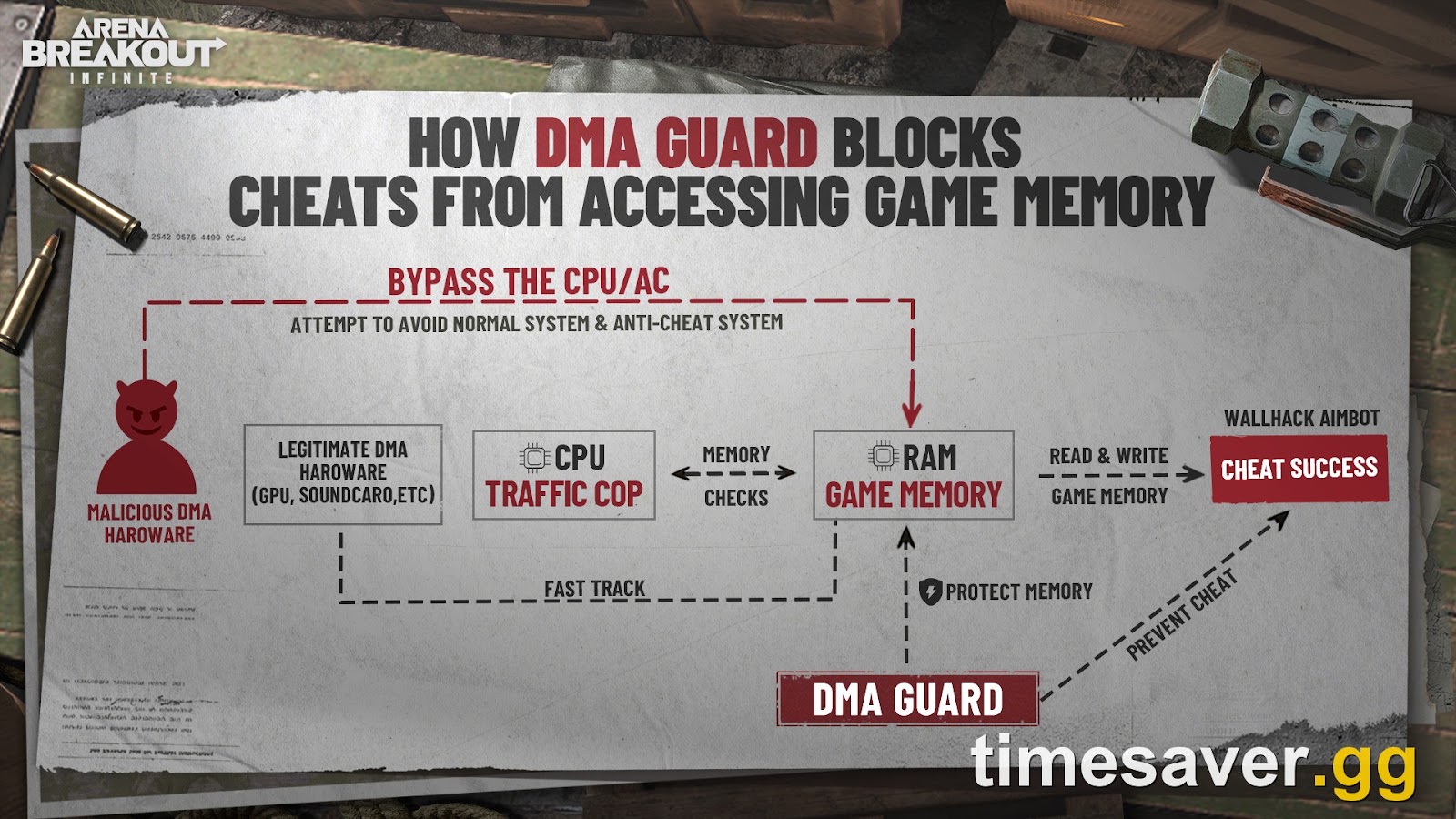
The target is a specific class of cheat. DMA (Direct Memory Access) cheats use external hardware — often a second PC and a special capture card — to read the game's memory directly, feeding a cheater wallhacks or radar without running detectable software on the gaming machine. Because the cheat lives outside the PC running the game, traditional anti-cheat can't always see it.
DMA Guard closes that gap. As Morefun describes it, the feature "further enhances the protection of external abnormal hardware on the basis of the existing Windows security feature 'Kernel DMA Protection,' preventing unauthorized access to memory by external hardware devices and avoiding DMA attacks." In plain terms: it forces your CPU's memory-management hardware (Intel VT-d / AMD IOMMU) to police what external devices can touch, which is exactly the doorway DMA cheats walk through.
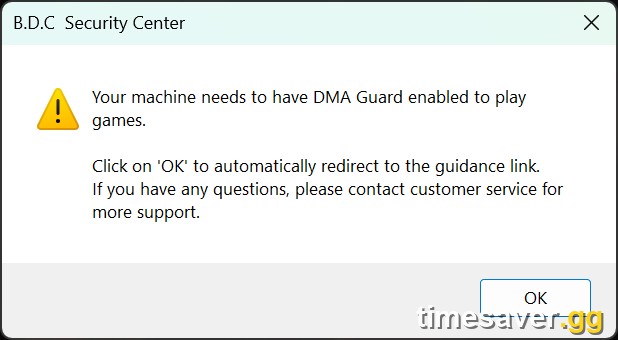
What does the DMA Guard error message mean?
If you're reading this, you probably got a prompt while starting or running the game. Morefun's Operation Guide spells out exactly what it means:
"This message indicates that your system has not activated the necessary hardware features (VT-d for Intel, IOMMU for AMD) that allow B.D.C to deploy its high-security DMA Protection shield. You simply need to enter your computer's BIOS settings and manually enable this feature."
So the prompt is not an accusation and not a crash — it's a configuration request. Your CPU almost certainly supports the feature; it's just switched off in BIOS by default on many boards. Turn it on and the prompt goes away.
How do I fix the DMA Guard / VT-d / IOMMU error? (Step by step)
Step 1 — Identify your motherboard and CPU
Before touching BIOS, find out what you're working with. Morefun calls this the "recon protocol":
- Press Windows Key + R.
- Type `msinfo32` and hit Enter.
- In System Information, read three fields: Motherboard Manufacturer, System Manufacturer, and Processor.
The manufacturer tells you which BIOS entry key to press. The processor tells you whether you need VT-d (any Intel CPU) or IOMMU (any AMD Ryzen/AMD CPU).
Step 2 — Enter your BIOS
Restart the PC and rapidly tap the entry key the moment the screen lights up, before Windows starts loading. Morefun's guide lists the typical keys per manufacturer:
| Manufacturer | Typical BIOS entry key |
|---|---|
| ASUS | F2 or DEL |
| Gigabyte | F12 or DEL |
| MSI | DEL |
| HP | F2, F10 (laptops), F12 or ESC (desktops) |
| Dell | F2 (sometimes F12) |
| Lenovo | F2 or Fn+F2 (F1 for ThinkPads) |
| Acer | F2 |
| Sony | F2 (Assist button on some models) |
| Toshiba | F1 or F2 during cold boot |
| IBM / ThinkPad | F1 during cold boot |
If none of these work, Morefun advises checking your motherboard manufacturer's specifications for the correct key — some OEMs remap it.
Step 3 — Enable VT-d (Intel) or IOMMU (AMD)
Once you're in BIOS, find the toggle for VT-d (Intel) or IOMMU (AMD) and enable it. The exact menu path depends on your board. The official guide gives detailed paths for the four biggest manufacturers:
| Board | Platform | Path to the setting |
|---|---|---|
| HP | Intel | Advanced → check VT-d and DMA Protection |
| Lenovo | Intel | Security → Virtualization → enable Intel VT-d Feature and Kernel DMA Protection |
| ASUS | Intel | Advanced → System Agent (SA) Configuration → set VT-d to Enabled (set Control IOMMU Pre-boot Behavior to Enable IOMMU during boot) |
| ASUS | AMD | Advanced → AMD_CBS → set IOMMU to Enabled (also check DMA Protection and DMAr Support under NBIO Common Options if present) |
| MSI | Intel | Overclocking → CPU Features → set Intel VT-D Tech to Enabled (set Control IOMMU Pre-boot Behavior to Enable IOMMU during boot) |
| MSI | AMD | Overclocking → Advanced CPU Configuration → AMD CBS → set IOMMU to Enabled (also DMA Protection / DMAr Support if available) |

On other brands (Gigabyte, Dell, Acer, ASRock, etc.), the setting exists but the menu name varies — look under an Advanced, CPU Configuration, or Chipset menu for anything labeled VT-d, Intel Virtualization Technology for Directed I/O, or IOMMU. Morefun explicitly notes: "Some computer manufacturers may customize BIOS pages and commands, so there may be situations where the entry keys/pages do not match the tutorial." When in doubt, search your exact motherboard model plus "enable VT-d" or "enable IOMMU" on the vendor's support site — don't guess and change unrelated settings. Arena Breakout Infinite Zombie mode guide
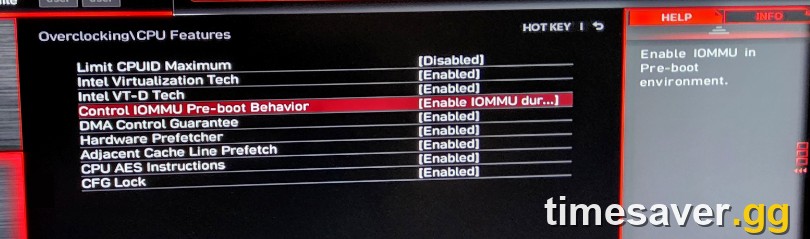
Step 4 — Save, reboot, and verify
Save your BIOS changes (usually F10 → confirm) and let Windows boot normally. To confirm the change stuck:
- Open `msinfo32` again (Windows + R → `msinfo32`).
- Scroll the System Summary for the Kernel DMA Protection line — you want it to read On. (Microsoft documents this check in its Kernel DMA Protection article, which Morefun links directly in the guide.)
Launch Arena Breakout: Infinite. The DMA Guard prompt should be gone. If it isn't, jump to the troubleshooting section below.
Why is Arena Breakout: Infinite asking me to do this? Is my account flagged?
This is the question every player asks, and Morefun answers it directly in the Operation Guide's FAQ:
"This is a proactive defense protocol. To prevent external programs from exploiting system vulnerabilities, the security system may require enabling DMA hardware protection for accounts that show potential signs of an abnormal login environment or security risks (based on historical login devices, network changes, etc.). This measure is preventative and significantly boosts your account protection."
Translation: getting the prompt does not mean you've been caught cheating. The system flags environments, not verdicts — things like logging in from several different devices, big network/IP changes, or account sharing can all read as an "unusual login environment." Morefun's own advice in the same post is to reduce account sharing, change your password, and avoid frequent network changes that add risk to your account.
There's a practical takeaway here for anyone tempted by third-party account services: an account accessed from someone else's machine is, by definition, an "unusual login environment," which is exactly what escalates DMA Guard checks (and, separately, ABI's ban systems).
Is DMA Guard safe? Will it hurt my FPS or privacy?
Short answer, per Morefun: no. The Operation Guide states plainly that "DMA Guard relies on built-in Windows security features. These protections are already enabled by default on most systems and will not impact your device's performance or compromise your privacy."
VT-d and IOMMU are standard, long-established CPU virtualization features — the same ones that power virtual machines and Windows' own memory-integrity protections. Enabling one toggle to satisfy an anti-cheat check is low-risk on modern hardware. Morefun's one behavioral tip: "For maximum security, we advise against running unnecessary third-party software while playing Arena Breakout: Infinite" — overlays and injectors are exactly what DMA Guard is built to scrutinize.
Why is ABI's anti-cheat this aggressive?
Because the cheating problem is real, and Morefun publishes the receipts. ABI runs fortnightly public ban notices under a stated 0% tolerance policy and real-time banning. The August 12, 2026 notice, covering July 27–August 9, logged:
- 11,065 bans for cheating
- 1,096 ten-year bans
- 897 device/IP bans
- 55,977 players compensated (with a Koen value of 63.61 billion returned to victims)
That's a two-week window. The Season 5 Security Report (2026-07-03) went further, confirming the studio will "proactively and severely penalize any offline transactions," and that verified plug-in users receive 10-year bans even if they never eliminated anyone. DMA Guard is the hardware-level extension of that posture — it's designed to "force cheaters to leave detectable and verifiable cheating evidence" by locking down the memory access DMA hardware relies on.
Troubleshooting: still seeing the DMA Guard prompt
- You enabled it but the prompt persists. Re-open `msinfo32` and confirm Kernel DMA Protection reads On. If it still says Off, your VT-d/IOMMU toggle didn't save — re-enter BIOS and check you hit Save & Exit (F10), not just Exit.
- You can't find VT-d or IOMMU in BIOS. Update your BIOS/UEFI to the latest version from your motherboard vendor — older firmware sometimes hides or lacks the toggle. On some prebuilt/OEM machines it lives under a Security menu (as on Lenovo) rather than Advanced.
- The setting is greyed out. Disable Secure Boot temporarily, apply the VT-d/IOMMU change, then you can usually re-enable Secure Boot. Also make sure any "CPU Virtualization"/"SVM" master toggle is on first.
- It's a laptop. Laptops still expose VT-d/IOMMU, but the menu is often buried — use the `msinfo32` manufacturer field and the entry-key table above, and check the OEM support page for your exact model.
- Nothing works. Morefun's guide says to contact your motherboard service provider for the correct BIOS path, since some OEMs customize the menus. Do not download third-party "BIOS unlocker" tools — that's the kind of unnecessary software the anti-cheat is watching for.
More Arena Breakout: Infinite help
We're building out a full library of accurate, no-nonsense Arena Breakout: Infinite guides — economy, maps, ammo, and systems, verified against Morefun's official posts, not content-farm guesswork.
Keep reading: More Arena Breakout: Infinite guides on timesaver.gg
Frequently Asked Questions
Is the DMA Guard message a ban in Arena Breakout: Infinite? No. The prompt only means your system hasn't enabled VT-d (Intel) or IOMMU (AMD) yet. It's a configuration request, not a penalty — enable the setting in BIOS and the message clears. Actual bans in ABI come as explicit account restrictions, not a "enable this feature" prompt.
Do I have to enable VT-d or IOMMU to play ABI? Only if you're prompted. Morefun says DMA Guard is "primarily designed for accounts with unusual login environments or potential security risks," so not every player is asked. If you get the prompt, enabling the setting is required to keep playing on that account/system.
Will enabling VT-d / IOMMU slow down my PC or affect other games? No meaningful performance impact on modern hardware. Morefun states DMA Guard "will not impact your device's performance or compromise your privacy," and VT-d/IOMMU are standard CPU features used by virtual machines and Windows security. Leaving them on is fine for everyday use and other games.
How do I know if I have an Intel or AMD system? Press Windows + R, type `msinfo32`, and read the Processor line. An Intel CPU needs VT-d; an AMD (Ryzen) CPU needs IOMMU. The same window shows your motherboard manufacturer so you know which BIOS entry key to press.
I enabled it but ABI still shows the DMA Guard prompt — what now? Re-check `msinfo32` for Kernel DMA Protection: On. If it's still Off, the BIOS change didn't save — re-enter BIOS, enable VT-d/IOMMU, and use Save & Exit. If the toggle is missing or greyed out, update your BIOS and make sure Secure Boot/virtualization master switches aren't blocking it.
Why does Arena Breakout: Infinite need hardware-level anti-cheat at all? To stop DMA cheats that read game memory from external hardware, which software anti-cheat can miss. ABI's ban reports show the scale of the problem — over 11,000 cheating bans in a single two-week period — so B.D.C. added DMA Guard to lock down that hardware attack surface.
Accurate as of the DMA Guard Operation Guide (2026-08-05) and the August 12, 2026 Bans Notice, on Arena Breakout: Infinite Season 6: White Nights. Anti-cheat features and BIOS menus can change between updates — always cross-check against Morefun's official Steam announcements for app 2073620. Sources: official Arena Breakout: Infinite Steam posts (store.steampowered.com/news/app/2073620); Microsoft Kernel DMA Protection documentation. For a full breakdown, see our Hostile Sector map guide guide.