Quick answer: The small Black Ops 7 update that rolled out on August 1, 2026 (a Season 5 Reloaded hotfix) is causing two problems on PC: hard crashes — some players report their entire PC restarting mid-match — and large FPS drops, with players who normally sit at 160–190 FPS falling below 100. The fastest fixes, in order: scan & repair / verify game files, clear the shader cache, roll back or clean-install your GPU driver, cap your frame rate and lower a few heavy settings, and — for whole-PC restarts specifically — remove any GPU overclock/undervolt and check power/thermals. Do the first three and most people are playing again within 15 minutes.
If your game won't even boot or you're getting a different error, jump to the sibling guides linked below — this one is specifically for crashes and frame-rate loss that started after the latest patch.

Call of Duty - Bot Lobby
Get bot lobby in 10 minutes
What actually broke on August 1?
Season 5 went live on Thursday, July 23, 2026, and the mid-season Season 5 Reloaded content (the Rex Infernus Zombies map, Astra Malorum Rogue Run) landed at the end of July. On August 1, Activision pushed a small follow-up update — and that's the one players are pointing at.
The pattern on r/blackops7 is consistent and easy to reproduce:
- "Was working fine this morning but this afternoon after the small update my PC restarts after like a minute of launching the game." — a Black Ops 7 player on r/blackops7 (Aug 1, 2026)
- Independent reports in Spanish describe the same thing: the whole PC crashes and reboots, not just the game.
- On the performance side: "went from avg 160–190 FPS to under 100 after update" — with others confirming choppy, "all over the place" frame times and returning input lag on cards as strong as an RTX 2080 Ti at 1440p DLSS Balanced.
There are two separate failure modes here, and they have different fixes:
| Symptom | Most likely cause | First fix to try |
|---|---|---|
| Game crashes to desktop after a patch | Corrupted/mismatched game files, stale shader cache | Scan & repair, clear shader cache |
| Whole PC restarts during play | GPU instability under load (OC/undervolt), power/thermal | Remove GPU OC/undervolt, cap FPS, check PSU/temps |
| FPS dropped hard after update | Reset in-game settings, shader cache, GPU driver profile | Reset settings + clear shader cache + driver refresh |
| Stutter / frame pacing all over the place | Shader cache rebuild, background apps, Rebar quirk | Clear shader cache, close overlays, test Resizable BAR |
A quick reality check before you start: BO7 requires Secure Boot and TPM 2.0 on PC, so if you recently changed BIOS settings, confirm those are still on — otherwise you'll fight the anti-cheat instead of the crash. (See the Failed Attestation / BIOS fix if attestation is your real problem.)
Fix 1 — Scan & repair / verify game files (do this first)
A patch that downloads while the game is open, or an interrupted update, leaves mismatched files — the number-one cause of "it crashed right after the update."
- Battle.net: open the launcher → Call of Duty → gear icon next to Play → Scan and Repair → Begin Scan.
- Steam: Library → right-click Call of Duty: Black Ops 7 → Properties → Installed Files → Verify integrity of game files.
- Xbox app (PC): Library → BO7 → ⋯ → Manage → Files → Verify and repair.
Let it finish completely (it can re-download a few GB). This alone resolves a large share of post-patch crashes because it forces the launcher to reconcile the new build.
Fix 2 — Clear the shader cache and rebuild it
Every CoD update ships new shaders. If the game keeps using the old cached shaders, you get exactly what people are describing after this patch: stutter, choppy frames, and crashes the moment a new effect loads. As one player put it when troubleshooting the FPS loss: "Did you reset shaders?" — it's the single most common community fix for post-update performance regressions.
Two ways to clear it:
- In-game (best): Settings → Graphics → Shaders → Restart Shaders Installation (or "Clear Shader Cache"). Then let the shader install finish on the main menu before you queue — don't skip it.
- On disk: close the game, then delete the CoD shader cache folder (Documents\Call of Duty\players\shadercache or the game's `shadercache` folder) and relaunch to rebuild.
Also delete the NVIDIA/AMD driver-level shader cache if stutter persists: `%LocalAppData%\NVIDIA\DXCache` and `%LocalAppData%\NVIDIA\GLCache` (NVIDIA), or clear it in AMD Adrenalin. Expect the first match after clearing to stutter while it rebuilds — that's normal; it smooths out after.
Fix 3 — Refresh your GPU driver (and check for a Windows conflict)
An update can invalidate the driver's game profile, which is why some players see input lag and frame drops return after a patch even though nothing on their end changed.
- Update to the latest driver, but if the drop started with this patch and a new driver doesn't help, roll back one version — the newest driver is not always the fastest one for a specific build.
- Do a clean install: in the NVIDIA/AMD installer choose Custom → Perform a clean installation, or use DDU in Safe Mode if you want it spotless.
- AMD users: confirm Adrenalin isn't silently forcing a custom game profile — reset BO7 to the global/default profile if input lag reappears.
- Windows note from the community: if you installed a recent Windows 11 emergency/out-of-band update, that's been fingered as a trigger for the FPS loss. Check Settings → Windows Update → Update history and, if a KB landed the same day your frames dropped, that's a strong suspect.
Fix 4 — Whole PC restarting? Treat it as a power/GPU-stability problem
This is the scary one, and it's not a normal game crash. When the entire PC reboots after a patch, the game is now pushing your GPU harder than the previous build and exposing an instability that was always borderline. Software won't fully fix a hardware limit — but these steps stop it for most people:
- Remove any GPU overclock or undervolt (MSI Afterburner, Adrenalin tuning). Set the card back to stock. Aggressive undervolts that "passed" on the old build crash on the new one.
- Cap your frame rate in-game (e.g. 116–141 FPS) so the GPU isn't slamming 100% every second. Uncapped frames in menus/loading are a classic reboot trigger.
- Lower the two heaviest settings first: turn texture streaming/on-demand texture streaming down or off, and drop shadows — these spike VRAM and power draw the most.
- Check temps and power: if your CPU/GPU is hitting the 90s °C or your PSU is marginal for a modern card, a load spike from the new build will trip a reboot. Improve airflow; if it only happens under full load, an under-spec PSU is the usual culprit.
- Test Resizable BAR: some players fixed post-update 1%-low collapse by toggling Resizable BAR off in BIOS — try it if frame pacing is broken.
If your PC restarts the instant you launch — before you even reach the menu — verify game files (Fix 1) first, since a corrupted core file can hard-crash the driver.

Call of Duty - Ranked Boost
Get ranked boost in 10 minutes
Fix 5 — Reset in-game settings and close background load
Patches sometimes reset or scramble your video config (resolution, GPU selection, upscaler). Several players chasing the FPS drop were asked the right diagnostic questions: "Did it reset your settings? Did your res change? Did it change your gfx card selection?"
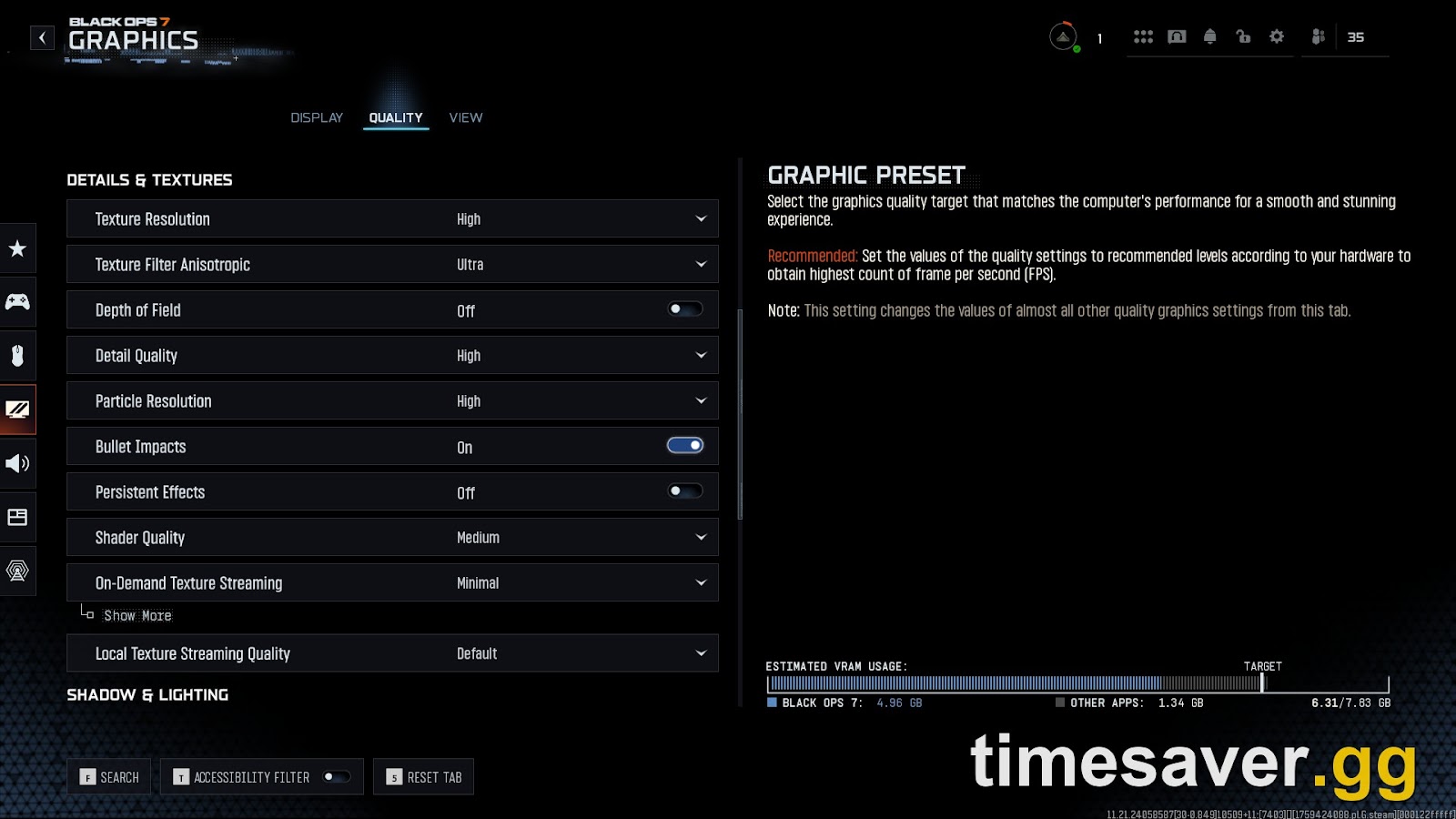
- In Settings → Graphics, confirm your display GPU is the dedicated card (not the iGPU), your resolution/refresh are correct, and your upscaler (DLSS/FSR/XeSS) and preset match what you ran before.
- If you use DLSS, note that a preset/model change after a patch can cost frames — set it back to the model and quality you had.
- Close overlays and capture tools (Discord, GeForce Experience/NVIDIA App overlay, Xbox Game Bar, MSI Afterburner OSD, streaming software). Overlays are a frequent post-update crash source.
- Set Windows Graphics performance for BO7 to High performance (Settings → System → Display → Graphics).
How long until Activision fixes it?
Short answer: usually within a few days. These "small update broke performance" waves almost always get a follow-up hotfix — and this one already is. Players on r/blackops7 reported a second PC update the same day ("I just got another update on PC but I'm scared to test it"), which is exactly how a rapid-response patch rolls out. Keep your launcher on auto-update, watch the official Black Ops 7 patch notes and @CallofDuty / Activision Support (@ATVIAssist), and re-run Fix 1 (scan & repair) after each new download so you're never on a half-patched build.
Back in the game — now don't lose your Season 5 progress to downtime
Once you're stable, the clock is the real enemy: Season 5 Reloaded XP events, camo grinds, and the battle pass are all time-boxed, and every hour spent troubleshooting is an hour off the grind. If a crash streak cost you a weekend of double XP, catching back up by hand is brutal.
Skip the make-up grind and get straight back to playing:
- CoD Account & Weapon Leveling (BO7) — skip the grind, handled by pro players, so a patch outage doesn't set you back a level cap.
- CoD Bot Lobbies — easy lobbies to fast-track weapon XP and camo challenges once you're stable again.
- CoD Camo Unlocks (BO7) — mastery camos done fast and secure while you sit out the buggy build.
- All Call of Duty services — everything BO7, BO6, Warzone and MW in one place.
Want the fastest legit route to make up lost time? See our BO7 fastest way to level up in Season 5 guide. And if crashing turns into a different post-patch problem, we've got the BO7 matchmaking-not-working fix and the Warzone Verdansk DirectX / KERNELBASE crash fix too.
FAQ
Why did Black Ops 7 start crashing after the August 1 update? The August 1 hotfix changed game files and shaders; if your install still has old/mismatched files or a stale shader cache, the game crashes when new content loads. Running a scan & repair and clearing the shader cache fixes the majority of these post-patch crashes.
Why did my FPS drop so much after the update? Updates commonly reset your video settings, invalidate the GPU driver's game profile, and force a shader rebuild. Players have gone from 160–190 FPS to under 100 after this patch. Reset your in-game graphics settings, clear the shader cache, and refresh (or roll back) your GPU driver — that combination restores most of the lost frames.
The whole PC restarts, not just the game — is my hardware broken? Usually not. A full reboot means the new build is pushing your GPU past a borderline overclock/undervolt or your power/thermal limit. Set the GPU back to stock, cap your frame rate, lower texture streaming and shadows, and confirm temps and PSU headroom. If it only happens under full load, an under-spec PSU is the most common cause. For a full breakdown, see our BO7 scorestreaks not working fix guide.
Do I need Secure Boot and TPM on for Black Ops 7? Yes. BO7 requires Secure Boot and TPM 2.0 on PC. If you changed BIOS settings recently and now get anti-cheat or attestation errors alongside crashes, re-enable them — see our Failed Attestation BIOS fix for the exact steps.
Should I wait for an official fix or troubleshoot now? Do both. Activision typically ships a follow-up hotfix within a few days (a second update already went out August 1), but scan & repair, shader clear, and a driver refresh are safe, fast, and often fix it immediately — so there's no reason to wait.
Will verifying game files delete my loadouts or progress? No. Scan & repair / verify only checks and re-downloads game files. Your loadouts, camos, and progress are stored on your account, not in those local files.