Behaviour Interactive revised the official Dead by Daylight Cross-Progression FAQ on 7 October 2026, four days ago, and the quiet edit matters: the participating-platform list now ends with Nintendo Switch 2. That takes cross-progression from eight platforms to nine — and it happened without a news post, a patch note or a tweet. Almost every cross-progression guide currently ranking on Google still lists eight.
This is the full picture as it stands on Patch 10.2.0, the Mid-Chapter build Behaviour published on 6 October 2026: how to turn cross-progression on, what the two separate steps actually do, everything that carries across, the handful of things that never will, and the two decisions you cannot undo afterwards — not even by asking Player Support.
Quick answer: what is DBD cross progression?
Cross-progression links your Dead by Daylight platform accounts to a single Behaviour Account and merges your inventory across all of them. It has been live since 22 July 2024.
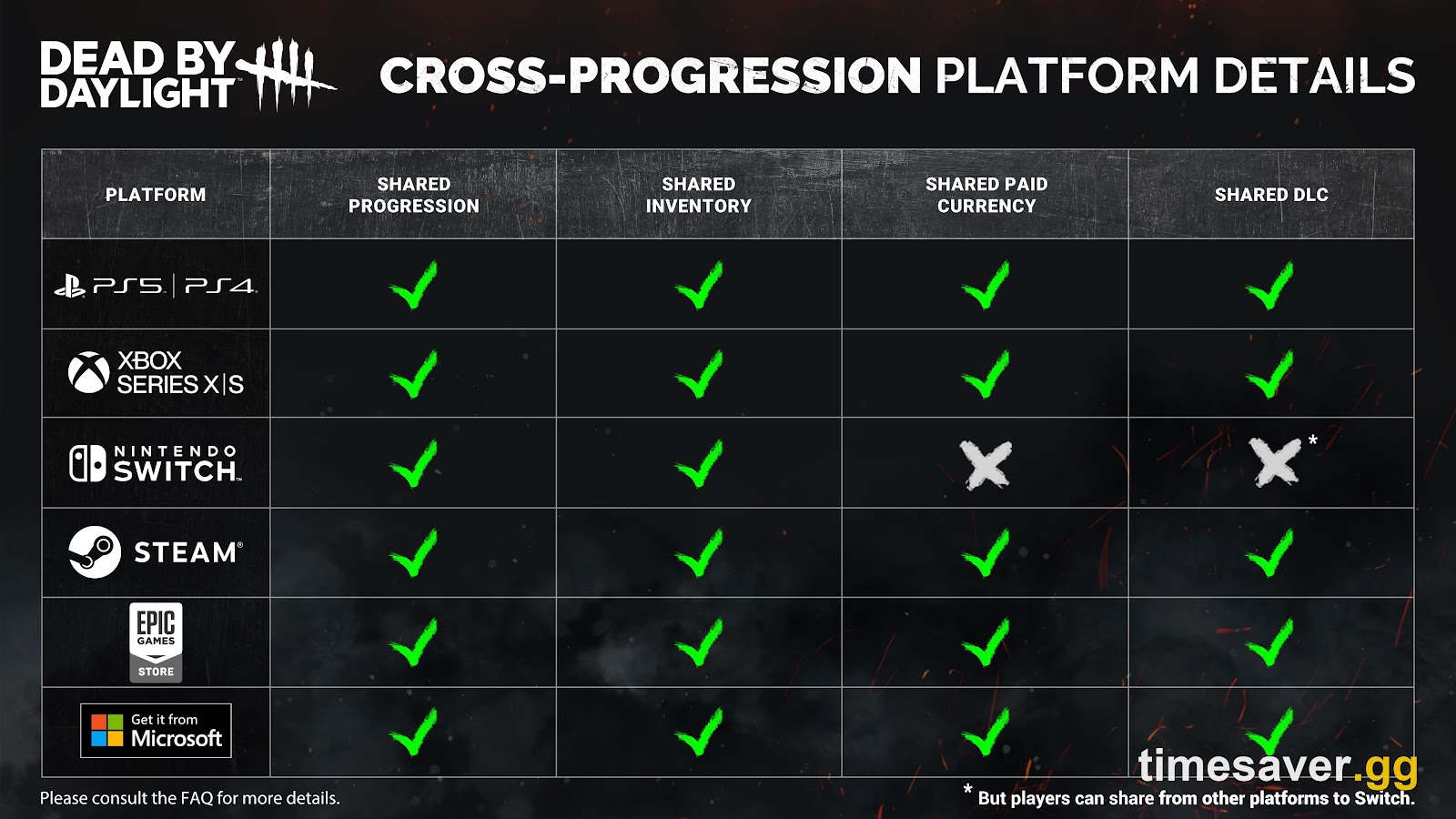
- Nine platforms participate: Steam, Epic Games Store, Windows Store, PlayStation 4, PlayStation 5, Xbox One, Xbox Series X and Series S, Nintendo Switch and Nintendo Switch 2.
- It is two steps, not one. Linking connects a platform account to your Behaviour Account. Syncing merges the progress. Linking alone does nothing to your inventory.
- Highest value wins. Character levels, perks, items and offerings all adopt the best version across your accounts.
- Bloodpoints, Iridescent Shards and Rift Fragments pool across every platform. Auric Cells pool across every platform except Nintendo Switch.
- Syncing is permanent. There is no unsync, and Behaviour states Player Support cannot override it.
- Set it up at account.bhvr.com, on the connections page.
If you own duplicate DLC on more than one platform, syncing also pays you 4,500 Iridescent Shards automatically, and every first-time syncer gets the Campfire Charm.
How do you set up cross progression in Dead by Daylight?
The whole process happens on Behaviour's website, not in-game.
- Create a Behaviour Account at https://account.bhvr.com/ — or log in if you already have one.
- Open the connections page.
- Link each platform account you want to merge.
- Sync once every platform you want is linked.
Behaviour explains the split precisely: "Linking will take the account(s) of your choice, on PC & Consoles, and create the link between that account and your Behaviour Account… Syncing allows players to unify their Dead by Daylight accounts and share their progress in the future."
The order matters and it is where most players stall. Plenty of people link every account, close the browser tab, load the game, see nothing has changed and assume cross-progression is broken. It is not broken — they never pressed sync.
There is one hard prerequisite, and Behaviour marks it mandatory for exactly one platform: "This is a mandatory requirement for players on Nintendo Switch. The game will need to be updated and launched before you can begin setting up Cross-Progression on your account." On every other platform, booting the latest version first is a strong recommendation rather than a rule. On Switch it is a gate — launch the game at least once on the current build or the sync will not take.
Sync duration is not fixed. Behaviour attributes the variance to how much data the account holds and how many players are syncing at once, so a decade-old main takes longer than a fresh install.

What is the difference between linking and syncing?
This is the single most expensive thing to misunderstand, because both steps are one-way — in different ways.
Linking binds a provider account to your Behaviour Account. Once linked, you cannot swap that slot for a different account on the same provider. You can re-link the same provider account if it gets unlinked, and Behaviour confirms there is no waiting period for that. What you cannot do is link Steam account A, change your mind, and link Steam account B instead.
Syncing merges the inventories, and it closes the door behind it. Behaviour's wording leaves no room: "You are not able to unsync platforms from your Behaviour account once you have synced accounts. Player Support is also unable to circumvent this restriction on request."
One further constraint people hit constantly: one account per provider. You can sync one Steam account, one Epic account and one Xbox account together. You cannot sync two Steam accounts into the same Behaviour Account. If you have a main on one Steam login and a smurf on another, only one of them can live inside cross-progression.
What actually transfers between platforms?
Progress merges by taking the best version of everything rather than overwriting with the most recent login. Behaviour's own example is the clearest statement of the rule: "if Jake is on level 50 on Steam, and level 3 on your Xbox, Jake will be level 50 on all the platforms you have synced."
The same highest-value logic applies to items and offerings. Nothing is lost by syncing a weak account into a strong one — the weak side is simply raised.
Cosmetics transfer, with one exception that catches people out: platform-exclusive cosmetics stay where they are. If an outfit was given out for a specific store or console, cross-progression will not move it.
Currencies behave in two tiers. Syncing creates a new shared wallet holding the accumulated total of Auric Cells from every account — except Nintendo Switch, where Auric Cells stay on the platform and cannot be shared at all. Bloodpoints, Iridescent Shards and Rift Fragments accumulate and share across all platforms, Switch included. If you are weighing up a currency purchase before syncing, our DBD Auric Cells price and pack breakdown covers which platform is actually cheapest per cell.

Clear the 5,000,000 Bloodpoint cap before you sync
Here is the arithmetic nobody writes down. Bloodpoints pool across platforms, and the account cap is 5,000,000. Behaviour's FAQ states the consequence flatly: "If the accumulated total of Bloodpoints exceeds the maximum amount of 5,000,000, you will not be able to earn them from trials, Daily Challenges, and Archives."
Two accounts sitting on 3,000,000 Bloodpoints each are each comfortably under the ceiling. Sync them and the pooled total is 6,000,000 — 1,000,000 over, and from that moment every Trial you play, every Daily Challenge you complete and every Archive objective you finish earns you nothing until you spend back down below the line.
The fix costs nothing but time: burn the surplus through the Bloodweb on both accounts before you press sync. Nothing you buy in the Bloodweb is lost, because items and add-ons carry over at their highest value anyway — so pre-sync spending converts a currency that is about to be capped into inventory that survives the merge intact. Our Bloodpoint cap guide goes deeper on what still earns past the ceiling and what does not.
What does not transfer?
Short list, but each item generates support tickets.
- Auric Cells on Nintendo Switch. They stay with the platform account, permanently.
- Nintendo eShop DLC, outbound. DLC can be shared from other platforms to the Switch, but never from the Switch to anywhere else. Note the precise boundary Behaviour draws: characters and outfits bought through the in-game store on Switch do share normally. Only eShop DLC purchases are stuck. The widespread claim that anything bought outside the game is non-transferable is wrong everywhere except Switch eShop.
- Platform-exclusive items and cosmetics.
- Settings. The FAQ is explicit that settings are not part of the sync and will need readjusting after you merge, which is why your sensitivity and keybinds feel wrong on first boot.
- Trophies and achievements. They are platform-specific and do not carry over, "except for the few that might automatically unlock when the requirements are met through syncing progress alone."
- DLC you never owned. If a chapter reached you through a family share or a primary-console setting rather than a purchase on your own account, there is nothing on your account for cross-progression to move.
One trap is Behaviour-specific and easy to miss: Windows Store and Xbox are separate platforms in BHVR's system, despite both being Microsoft. Treat them as two distinct link slots.

What do you get for syncing?
Two rewards, both automatic.
The Campfire Charm goes to every player on their first sync. Behaviour granted it retroactively to anyone who had already synced before the charm existed, with no action required — though it notes the charm may not appear immediately.
4,500 Iridescent Shards go to players who had bought the same DLC on more than one platform. The FAQ frames it as compensation rather than a refund: "We are unable to retroactively refund your duplicate DLC, but we want to thank you for your long-term support of DBD. As a thank you, we will gift players with 4500 Iridescent Shards automatically the first time they sync accounts if they acquired the same DLC on multiple platforms." Switch DLC is explicitly excluded from the duplicate gift, in line with the rest of the Switch rules.
Both are granted on the first sync, which is another reason to link every platform you intend to use before pressing the button rather than syncing in stages.
Nintendo Switch, Switch 2, and the crossplay blackout
Switch owners carry one extra operational quirk that has nothing to do with the sync itself. Behaviour's Switch release-time FAQ explains that Switch receives release updates roughly two days after other platforms, and that the first bugfix patch is typically rolled into the second one about a week later.
While Switch is running an older version than everyone else, it cannot cross-play with other platforms — Behaviour states that Switch players will be unable to play with friends or other players on other platforms during those periods. Cross-progression is explicitly unaffected and remains unchanged. For the lost Rift time, Behaviour compensates with Rift Fragments to unlock the initial Tiers of the Rift.
On hardware, the FAQ is unambiguous: "There are no plans at the present time to make an upgraded Nintendo Switch 2 version." Switch 2 now appears on the cross-progression platform list, so the account layer recognises it — but recognising the console is not the same as shipping a native version for it. Behaviour has also said it has no plans to end support for the original Switch.
Worth flagging a genuine inconsistency in Behaviour's own documentation: the separate cross-play support article, last updated 13 August 2025, still lists only eight platforms and does not mention Switch 2. The cross-progression FAQ, updated 7 October 2026, does. When two first-party pages disagree, the more recently updated one is the safer read — but do not be surprised if a support agent quotes the older list at you.
What if cross progression loses your progress?
It happens, and the recovery path is specific. Behaviour updated its progress-loss article on 9 October 2026 — yesterday — and the instruction is to submit a Player Support ticket, select loss of progress as the issue type, and attach a screenshot of your Player Cloud ID. The Cloud ID is what lets support locate the correct account record, and tickets filed without it move slowly.
One behaviour worth knowing before you panic-retry: a sync that throws an error on the website has sometimes already landed in-game. Players have reported the site reporting failure while the merged inventory was waiting for them on next launch. Check the game before you attempt the sync again — and since the process is irreversible, do not try to force it through a second time until you have confirmed the first attempt genuinely did nothing.
FAQ
Is Dead by Daylight cross progression free? Yes. It requires only a free Behaviour Account at account.bhvr.com. There is no purchase, subscription or in-game unlock attached to it.
How many platforms does DBD cross progression support? Nine, as of the FAQ revision on 7 October 2026: Steam, Epic Games Store, Windows Store, PlayStation 4, PlayStation 5, Xbox One, Xbox Series X and Series S, Nintendo Switch and Nintendo Switch 2.
Can I undo cross progression in Dead by Daylight? No. Syncing is irreversible, and Behaviour states Player Support cannot remove the restriction on request. Linking is also one-way in the sense that you cannot replace a linked account with a different account from the same provider, although re-linking the identical account is allowed with no delay.
Do Auric Cells transfer with cross progression? On every platform except Nintendo Switch, yes — syncing creates a shared wallet containing the accumulated total from all synced accounts. Switch Auric Cells stay locked to the Switch account.
Do Bloodpoints transfer between platforms in DBD? Yes, on all nine platforms, along with Iridescent Shards and Rift Fragments. Clear any surplus above 5,000,000 before you sync or you will stop earning Bloodpoints from Trials, Daily Challenges and Archives.
Will I lose my Switch DLC if I sync? No, but you cannot export it. DLC bought on the Nintendo eShop stays on the Switch, while DLC from other platforms can be shared to the Switch. Characters and outfits bought in the Switch in-game store do share outward normally.
Do achievements carry over with cross progression? No. Trophies and achievements are platform-specific, apart from any that unlock automatically because the synced progress already meets their requirements. Settings are not carried across either and need reconfiguring per platform.
Can I sync two Steam accounts to one Behaviour Account? No. Cross-progression allows exactly one account per provider — one Steam, one Epic, one Xbox, and so on.
How long does DBD cross progression take to sync? Behaviour does not publish a fixed figure. The time depends on how much data your account holds and how many players are syncing concurrently, so larger and older accounts take longer.
The bottom line
Cross-progression is still the highest-value free thing you can do to a Dead by Daylight account, and the Switch 2 addition on 7 October 2026 widens who it covers. Two rules worth remembering: spend down past 5,000,000 Bloodpoints before you sync, and link every platform you will ever use before you press the button — the first sync is the only one that pays out the Campfire Charm and the 4,500 Iridescent Shards, and it is the last decision on this screen you will ever get to make.
More Dead by Daylight guides from Timesaver:
- Every active DBD code for October 2026
- How to redeem codes in Dead by Daylight
- Dead by Daylight Patch 10.2.0 notes
- The Academia Rift: release date, rewards and Rift Pass value
Sources: Behaviour Interactive Player Support, Cross-Progression FAQ (updated 7 October 2026); Behaviour Interactive Player Support, "Help! I've lost my progress!" (updated 9 October 2026); Behaviour Interactive Player Support, FAQ for Nintendo Switch Release Time Changes (updated 27 July 2026); Behaviour Interactive Player Support, "Which platforms are included in cross-play?" (updated 13 August 2025); official Dead by Daylight cross-progression announcement, deadbydaylight.com (16 July 2024). Accurate as of Patch 10.2.0, released 6 October 2026.