Two of the pages ranking for this question right now give opposite instructions. One sends you to the top-right corner of the store, the other to the bottom left. Only one matches the game you are looking at.
Behaviour Interactive publishes the answer itself, in a support article it last updated on 2 August 2026, with current screenshots. This guide follows that article step by step on patch 10.1.2a, live since 17 September 2026, then covers the part no code list bothers with: the two error messages the game can show you, what each actually means, and the four Dead by Daylight rewards that are not redeemed with a code at all.
Quick answer
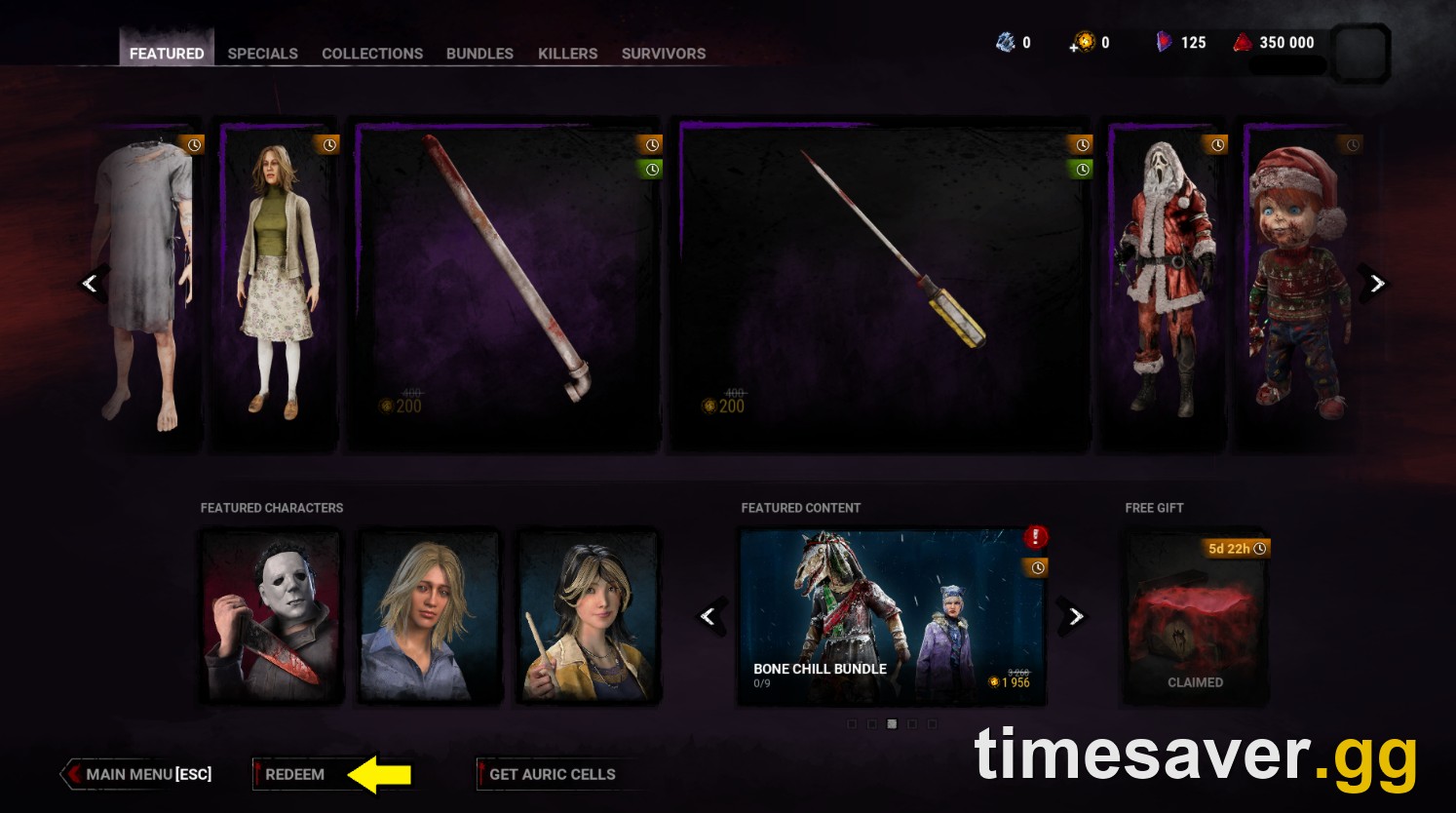
- The path is Store, then the FEATURED tab, then REDEEM on the bottom left. Not the top right. That was the old store layout and it is still being copied.
- The code field accepts 50 characters. That is why the long hyphenated codes fit, and it is the fastest way to spot a code that has been truncated by a copy-paste.
- There are only two error messages. One means the code is dead or mistyped. One means you already own the item. Neither means your platform is broken.
- You redeem once, not once per platform. With a synced Behaviour Account, cosmetic rewards follow you across all eight supported platforms.
- Bloodpoints from codes ignore the 5,000,000 cap and overflow past it, which is the opposite of how Bloodpoints from Trials behave.
- Twitch Drops, Support a Creator codes, Discord Quest rewards and BHVR Account rewards are four different systems. Only one of them uses the Redeem box, and putting a creator code in the wrong field is the single most common reason a "code" appears not to work.
Where do you redeem codes in Dead by Daylight?
Behaviour's own instructions, from its player support article "How do I redeem a code?", are five steps:
"Launch Dead by Daylight. Select the STORE menu, and navigate to the FEATURED tab. On the bottom left, select REDEEM. Enter your code and click REDEEM. Enjoy your new item(s)!"
The first step is the one people skip. The Store is reached from the main menu, under Play as Killer, Play as Survivor, Getting Started, The Archives and Custom Game. It is not inside a character lobby, and it is not the same screen as the Shrine of Secrets, which moved into the character lobbies in Patch 7.7.0.

Once you are in the Store, the tab row across the top reads FEATURED, SPECIALS, COLLECTIONS, BUNDLES, KILLERS, SURVIVORS. You want FEATURED, the default landing tab. The bottom bar of that tab carries three options: Main Menu on the far left, then REDEEM, then Get Auric Cells.
That bottom-left position is the detail worth getting right. A top-ranking code page updated this month still tells readers to "click the Redeem Code button in the top-right-hand corner". That instruction describes a store layout that no longer exists, and it is the reason a chunk of players conclude that codes are broken on their platform before they have found the button.
What does the Redeem Code box actually accept?
The dialog is a single text field under the line "Please enter the code you wish to redeem below", with CANCEL and REDEEM beneath it. In Behaviour's own screenshot of that dialog, a six-character code is typed and the counter under the field reads 6/50.

That 50-character ceiling matters more than it looks. Dead by Daylight codes come in two shapes: short word codes, typically 6 to 20 characters, all capitals, no spaces, which is what announcements and streams hand out; and long hyphenated codes of 36 characters, in the pattern eight-four-four-four-twelve, which is the format used by one-time-use promotional rewards.
Both fit inside 50 characters with room to spare. So if your counter reads far below the length of the code you copied, your clipboard dropped something — usually a trailing character from a line break.
On capitalisation, the honest answer is that Behaviour has not published a rule, and the guides disagree with each other. Player reports on console are consistent enough to act on: enter the code exactly as it is published, capitals and hyphens included. There is no downside to being literal.
Why is my Dead by Daylight code not working?
The game gives you one of two messages, and they are not interchangeable. Both are visible in Behaviour's own support screenshot:

"This code is not valid. Please double check that you have entered it correctly and try again."
This is the message for everything wrong with the string itself: expired, mistyped, never existed, or invented by an aggregator. It is by far the message most players see, and in most cases the code is simply dead. Behaviour has never published a master list of Bloodpoint codes — not on deadbydaylight.com, not on the official wiki — which is exactly why fabricated strings survive on tracker sites for months after they stop working. We maintain a verified list for this reason: see the October 2026 DBD codes page, where a code only enters the active table if Behaviour published it or two genuinely independent sources agree on it.
"This code could not be redeemed because you already own the associated item."
This is a success message wearing a failure costume. The code worked; you simply already have the charm, banner or badge it grants — often because you redeemed it months ago on a different platform and cross-progression carried it over. There is nothing to fix.
Causes that are not the code
| Symptom | Likely cause | What to do |
|---|---|---|
| Code accepted, reward missing | Reward delivered to a different linked platform account | Check the platform your Behaviour Account is actually synced to. Windows Store and Xbox are separate platforms |
| Store action fails entirely | Store overloaded, which Behaviour names directly as the usual cause | Wait and retry. If you were charged for a failed payment, contact support immediately |
| Bloodpoint code accepted, balance unchanged | You are reading the number before the Store refreshes it | Back out to the main menu and re-enter |
| Code works for a streamer, not for you | Creator-distributed codes are frequently capped at a small number of uses | Nothing to do. The code ran out |
If you end up filing a ticket, Behaviour asks for your Player Cloud ID. It is in Options, General tab, Account tab on the left, hidden behind a Show button. If you are banned, it is printed at the bottom of the ban pop-up instead.
Do you have to redeem a code on every platform you play on?
No, provided your accounts are synced. Cross-Progression covers eight platforms — Steam, Epic Games Store, Windows Store, PlayStation 4, PlayStation 5, Xbox One, Xbox Series X and S, and Nintendo Switch — and Behaviour's Cross-Progression FAQ, updated 26 September 2026, is unambiguous about what happens to anything a code grants you:
"Yes, your cosmetic items will be shared between platforms. However, please note that platform exclusive cosmetics cannot be shared."
Since nearly every Dead by Daylight code grants a charm, banner or badge, one redemption covers your whole account. Three caveats:
- Nintendo Switch is the exception. Auric Cells stay on the Switch account, and DLC can be shared to the Switch but not from it.
- One account per provider. One Steam, one Epic, one Xbox. Two Steam accounts cannot sync into the same Behaviour Account.
- Syncing is irreversible. There is no unsync, and Player Support cannot override it on request.
Two side benefits that are easy to miss: first-time syncers receive the Campfire Charm, and anyone who bought the same DLC on more than one platform is gifted 4,500 Iridescent Shards.
Why do code Bloodpoints behave differently from match Bloodpoints?
Because they are exempt from the cap. The official wiki states it directly:
"Bloodpoints awarded by other sources (e.g. Log-in Rewards, promotional Codes, Email Codes, etc.) are exempt from the Cap and do not count towards it, allowing for an overflow past the Cap."
So a Bloodpoint code pushes you past 5,000,000 and the overflow is kept. Bloodpoints earned in Trials do not: Behaviour's Cross-Progression FAQ confirms that above that total, "you will not be able to earn them from trials, Daily Challenges, and Archives". The practical rule is to spend down toward the cap before you farm, but redeem Bloodpoint codes whenever you like — they cannot be wasted against the ceiling. The rest of the numbers are in our Dead by Daylight Bloodpoints guide.

Which Dead by Daylight rewards are not redeemed with a code?
This is where most "my code doesn't work" reports actually come from. Dead by Daylight has five separate reward routes and only one of them is the Redeem box.
Twitch Drops are not codes. They are tied to a linked Twitch and Behaviour Account and land in your inventory directly. The current run is live: 1 October 2026 at 11:00 AM ET until 1 November 2026 at 10:59 AM ET, earnable from any channel streaming Dead by Daylight with the DropsEnabled tag, not only the official one. Each drop takes one hour of watch time, across four windows — the Corvidicus Malificus Charm from 1 to 11 October, the Kite-Flying Fright Banner from 12 to 18 October, the Fanged Flier Badge from 19 to 25 October, and the Smile, Pumpkin Banner from 26 October to 1 November. Four hours for all four. Full schedule in our October 2026 Twitch Drops guide.
Support a Creator codes go in a completely different field. They are entered through the Auric Cells purchase flow, via a "Support Content Creator" option — also bottom left, which is precisely why the two get confused. A creator code typed into the Redeem box returns the invalid-code error every time, because it is not that kind of code. Behaviour has also narrowed the programme: with tiers added, Support a Creator is now limited to Iridescent-tier members.
BHVR Account rewards are claimed on the web. Cross-promotional rewards, such as those tied to owning The Casting of Frank Stone alongside Dead by Daylight, are claimed at account.bhvr.com under Game Library, then Rewards, then Claim Now. Nothing is typed into the game.
Discord Quest rewards are a hybrid, and the one genuine exception. Behaviour's Discord Quests FAQ describes it precisely: "Upon completing the quest, players receive a unique one-time use code that can then be redeemed in the Dead by Daylight in-game store." So the quest issues the code, and the code goes in the normal box.
And one famous input is not a code at all. The Left, Down, Up, Right sequence tied to the Nostromo Wreckage map is a hack-terminal interaction performed inside a Trial, on the control panel in the left wing, to open the MU/TH/UR room. It does nothing in the Redeem box, and any page presenting it as a redemption code has never tested it.
What is worth redeeming in October 2026?
As of today, 4 October 2026, the only code with a confirmed published deadline is STARSGUIDE, dated on the official wiki as redeemable between 10 September and 10 October 2026 for the Stardotter banner. If you have not entered it, that is the one with a clock on it.
A charm code for Jason was circulating on the subreddit today with a reported 31 October expiry, but no first-party source had published the string at the time of writing, so it is not reproduced here. That rule is deliberate: a guessed code costs you the thirty seconds of finding out it was never real. The current verified set lives on the DBD codes list for October, and Bloodpoint-specific history in our DBD Bloodpoint codes guide.
One timing note: Behaviour has still published no dates for Haunted by Daylight 2026, and historically the event code appears when the event goes live, not before. Every older Halloween code is expired. Status tracked on our Haunted by Daylight 2026 page.
FAQ
Where is the Redeem button in Dead by Daylight? On the bottom left of the FEATURED tab in the in-game Store, between Main Menu and Get Auric Cells. Behaviour documents this path in its own support article, last updated 2 August 2026. Guides telling you to look in the top-right corner are describing an older store layout.
Are Dead by Daylight codes case sensitive? Behaviour has not published a rule, and the major guides contradict each other on it. Enter codes exactly as published — all capitals and all hyphens included. Console players in particular report that exact formatting is what makes the difference.
Can I redeem the same code twice? No. The message "This code could not be redeemed because you already own the associated item" is what you get when the reward is already on the account — commonly because cross-progression carried it over from another platform.
How long can a Dead by Daylight code be? The field accepts up to 50 characters. Short announcement codes run 6 to 20, long hyphenated promotional codes are 36. If your character counter reads short, the paste dropped something.
Do codes work on PlayStation, Xbox and Nintendo Switch? Yes. Behaviour publishes one redemption path, and all eight Cross-Progression platforms use the same in-game Store route. The platform restrictions are on Auric Cells and Switch DLC, not on code redemption.
Why did my Bloodpoint code not appear in my balance? Either you read the total before the Store refreshed it, which backing out to the main menu fixes, or the reward landed on a different linked platform account. Windows Store and Xbox count as separate platforms in Behaviour's system.
More Dead by Daylight guides
Working through the codes cluster? These three pages cover the rest of it, and all of them are maintained rather than archived.
- DBD codes October 2026: every working code, verified
- DBD Bloodpoint codes: what actually pays out
- DBD Twitch Drops October 2026: schedule and rewards
Sources: Behaviour Interactive player support — "How do I redeem a code?" (2 August 2026), "Cross-Progression FAQ" (26 September 2026), "Twitch Drops" (1 October 2026), "Discord Quests FAQ", "Support a Creator FAQ"; the official Dead by Daylight wiki for the Bloodpoint cap exemption and the STARSGUIDE window; Steam patch notes for app 381210 confirming 10.1.2a live on 17 September 2026.