EA SPORTS FC 27 shipped Title Update 1.0.4 on 7 October 2026, and within a day r/EASportsFC and r/fut filled up with the same sentence: unable to connect to the EA servers ever since patch 1.04. PS5 players posting "V1.04 has left me unable to connect," others asking whether the servers are just bad today, and a separate cluster locked out of the Companion and Web App entirely.
Here is the part nobody in those threads says out loud: 1.0.4 contains no network, netcode, or matchmaking changes at all. EA's own patch article lists 12 fixes, and one of them actually repaired a connection error. So if you cannot get online right now, the patch is almost certainly not the cause — and the fix you need depends entirely on which of four very different failures you are hitting.
EA Sports FC 27 - Coins
Stock up on Coins
Quick answer (TLDR)
- Update 1.0.4 changed nothing about connections. 12 fixes across Ultimate Team (2), The Grounds (2), Career Mode (6) and General/Audio/Visual (2). EA's wording: "There are no gameplay balance and tuning changes in this update." There is no network section at all.
- 1.0.4 fixed a connection error, it did not add one. One of the two Ultimate Team items addresses a "Service Unavailable" error appearing after you finish a FUT match.
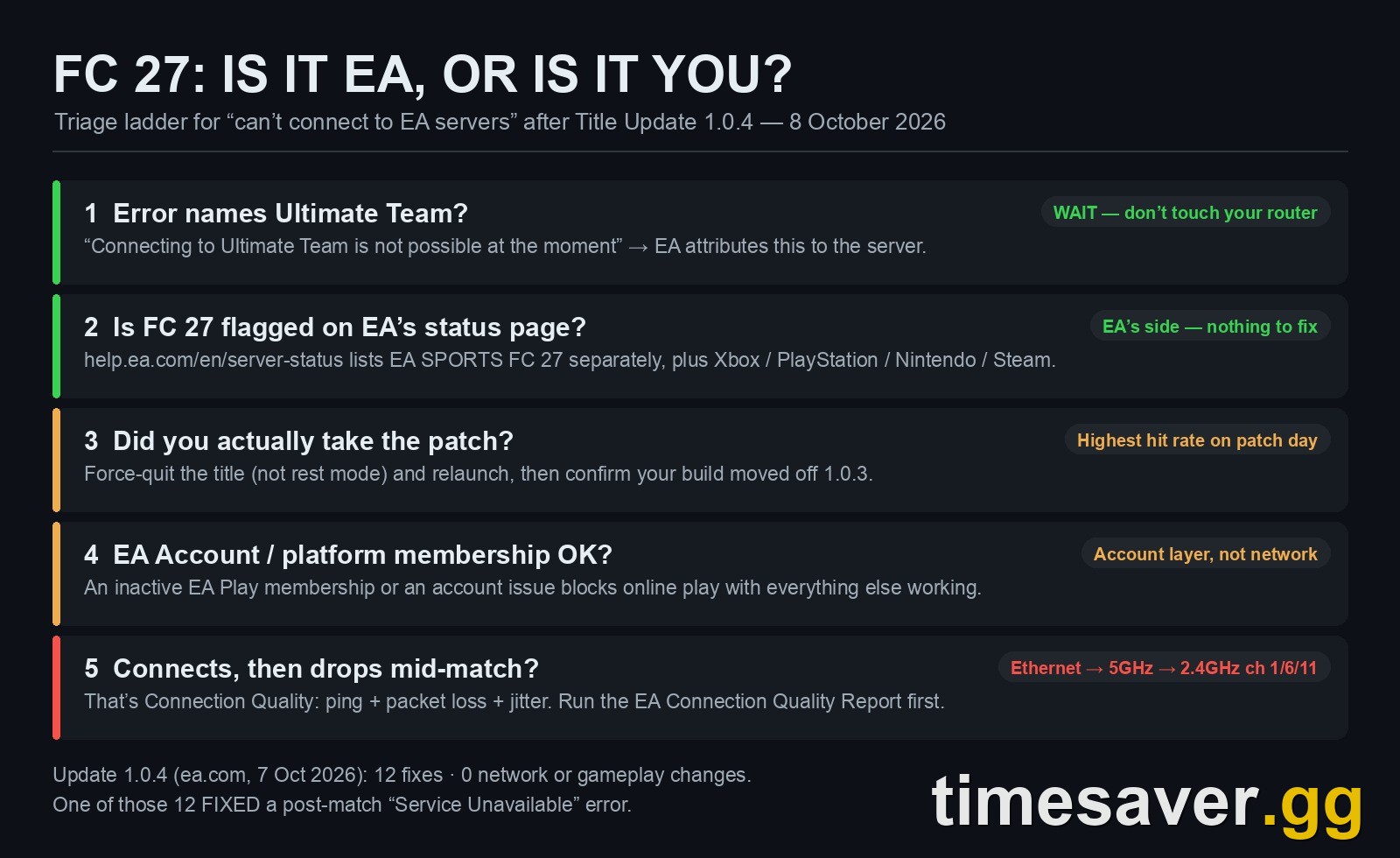
- Check EA's server status page first. It lists EA SPORTS FC™ 27 as its own entry, separately from FC 26 and FC 25, plus platform entries for Xbox, PlayStation, Nintendo and Steam. If FC 27 is green and Steam is red, your problem is not EA's game servers.
- If the error says "Connecting to Ultimate Team is not possible at the moment," stop troubleshooting your router. EA explicitly attributes that one to the server side.
- Did you actually take the patch? The single most common self-inflicted version of this on launch-era patch days is a client that downloaded 1.0.4 but never fully relaunched. Force-quit the title — not rest mode, not suspend — and relaunch.
- Disconnects cost you coins, not just games. Unfinished matches feed your DNF multiplier, which scales the coins from every match you play afterwards. With Season 1 ending 22 October, a bad connection week is a measurable loss.
Did update 1.0.4 break FC 27's connection?
No. And this is worth being precise about, because the same misconception recycled through all of launch month.
EA's post-launch cadence for FC 27 so far is two consecutive bug-fix patches. Update 1.0.3 landed on 2 October 2026 with 10 items and no gameplay section — EA's own wording was that "EA SPORTS FC 27 version 1.0.3 (Small Bug Fix Update) is now live." Update 1.0.4 followed on 7 October 2026, and EA's published article lists 12 items: Ultimate Team (2), The Grounds (2), Career Mode (6) and General/Audio/Visual (2). EA opens it by stating: "There are no gameplay balance and tuning changes in this update."
The two Ultimate Team entries in 1.0.4 are the telling part. One addresses base items showing holographic visuals they were never meant to have when opening certain Player Picks. The other, in EA's exact words, addresses the situation where "a Service Unavailable error could appear after completing a match in FUT modes."
Read that again: 1.0.4 is the patch that repaired a post-match connection error. It did not introduce one. This is the same pattern as the "1.0.4 nerfed dribbling" claim doing the rounds — EA has not shipped a single post-launch gameplay pass for FC 27, so a patch cannot have nerfed what it never touched.
What is true is that patch day concentrates everybody's reconnection attempts into the same few hours, which plausibly produces the symptoms people then attribute to the patch itself. EA has not published load figures for patch-day reconnection, so treat that as the likely explanation rather than a confirmed one — but the timing correlating is not the same as the patch being the cause.
How do I tell if it's EA's servers or my connection?
This is the triage step almost everyone skips, and it determines whether the next 20 minutes are useful or wasted.
EA Help's FC connection article is explicit about one specific error string:
"Getting the error message Connecting to Ultimate Team™ is not possible at the moment? It may be due to an issue with the server. You can check the FC server status on our page or keep an eye on @EASPORTSFC and the EA SPORTS FC Direct WhatsApp channel for outage info. If the servers are working, try the following steps."
— EA Help, Troubleshoot EA SPORTS FC™ connection issues
So the branch is clean:
| What you see | Where the fault is | What to do |
|---|---|---|
| "Connecting to Ultimate Team is not possible at the moment" | Server side, per EA | Check status page, wait. Do not touch your router |
| "Unable to connect to the EA servers" at boot, FC 27 green on status page | Your client, account, or platform network | Force-quit and relaunch, then the client-side ladder below |
| Connects fine, then drops mid-match | Connection Quality — ping, packet loss or jitter | Network ladder below |
| Game online, Web App / Companion locked out | Separate web-layer auth path | See the Web App error list |
EA's status page at `help.ea.com/en/server-status/` lists EA SPORTS FC™ 27 on its own, alongside FC 26, FC 25 and FC Mobile, plus four platform-server entries (Xbox, PlayStation, Nintendo, Steam). That granularity matters: a PlayStation Network incident and an FC 27 incident produce an identical error message in-game and have completely different resolutions — and only one of them is EA's to fix.
Alongside the status page, the channels EA names at the foot of its own 1.0.4 article are @EASFCDIRECT on X and WhatsApp, the EA SPORTS FC Tracker, the EA SPORTS FC Discord, and the Player Feedback Portal at `go.ea.com/fc27_pfp`. The community-tracked Trello board is cited by third-party outlets rather than by EA, so treat it as useful but unofficial.
The client-side fixes, in the order worth trying
Work down this list. It is ordered by time cost versus hit rate, not by how clever it sounds.
1. Force-quit and fully relaunch the title. On a patch day this is the highest-value 30 seconds you will spend. A client that pulled 1.0.4 while suspended can sit in a half-patched state that authenticates against the wrong build. Close the application entirely — not rest mode, not suspend — and reopen it. One of the few replies in the r/EASportsFC thread raising the 1.04 lockout asked the poster exactly this: whether they were sure they had actually taken the patch, and suggested a force-quit and relaunch.
2. Verify the patch installed. Console builds for 1.0.4 have been listed as 1.04 / 1.000.004 — that label comes from platform build trackers rather than an EA-published version string, so treat it as a guide. If your client is still on the 1.0.3 build while EA's services have moved on, you can get connection failures that look like an outage.
3. Check your EA Account status. EA Help's general connection guide calls this out as its own cause: account-level issues — including an inactive EA Play membership on PlayStation — can block online play while everything else on your network works fine.
4. Restart the router and modem properly. EA's instruction is specific: if your router and modem are separate units, restart both, and wait at least 30 seconds before powering them back on. A five-second cycle does not clear the session state the guidance is aimed at.
5. Disconnect any VPN. EA's own wording: if you're using a VPN, disconnect it to check whether that fixes your connectivity. This is a frequent cause for players who set one up chasing early access unlock timing and never turned it off.
6. Stop competing network activity. Large downloads, 4K streams, and a shared household all degrade the same pipe your game data uses. EA lists downloading large files, streaming HD or 4K video, and network sharing as direct Connection Quality drains.
EA Sports FC 27 - FUT Champions Boost
Get fut champions boost in 10 minutes
Why do I connect fine and then drop mid-match?
That is a different failure, and EA documents it through Connection Quality — a score built from exactly three metrics: ping, packet loss, and jitter. All three can end a match.
EA's definitions, and the disconnect threshold each one carries:
- Ping measures the round trip from your console or PC to an FC game data center and back. EA: "At very high ping levels, you may see visual lag or be disconnected from your match."
- Packet loss is data that never completes the round trip. EA: when packets are lost "they need to be re-sent, causing delays, stuttering, or even disconnections."
- Jitter is variance in ping over time — EA's example is 20ms one moment and 90ms the next. EA: "If your jitter is high, you may experience visual stuttering or a disconnection from the game."
Before changing anything, run the EA Connection Quality Report and read your actual Connection Score. EA's guidance is to check it first, because the fix for "normally good, suddenly dropped" is not the fix for "always poor."
If your quality is normally good and has suddenly degraded, EA points at two likely causes: you were matched to a different game data center than usual, or local network contention. EA is candid that routing is not under your control — ISPs "route data across locations, sometimes across the globe," and your connection "can be routed elsewhere if internet issues impact the route" or if one of EA's own data centers is having problems.
If your quality is inconsistent, EA's hierarchy is: Ethernet first, then 5GHz, then 2.4GHz. And if you are stuck on 2.4GHz, EA names the exact channels — 1, 6, and 11 — as the non-overlapping options, noting you may need to try several to find the best one. If quality is persistently Okay or Poor, the escalation is router firmware updates, then QoS prioritisation for FC traffic if your router supports it.

One important limit: for The Grounds, EA is explicit that there is no manual control. "You can't manually choose a Grounds server, lock your region, or set a maximum ping." If you are grouping with friends in another region, EA's own suggestion is to play separately and compare your Connection Quality.
Worth noting on ports: no EA-published port list exists for FC 27. The port ranges and NAT advice circulating for FC 27 are carried over from FC 24-26 community testing. Port forwarding is a real tool, but treat any specific FC 27 port list as unverified rather than official.
What a bad connection week actually costs you
This is the part that turns a technical annoyance into a number.
Unfinished matches feed your DNF multiplier, and that multiplier scales the coins you earn from every subsequent match. EA does not publish the DNF formula itself — the mechanic is community-documented and has been consistent across FC releases — but the direction is not in dispute. A connection-dropped match is not just a lost result — it quietly reduces your coin rate going forward, which is why two players grinding identical hours can end up hundreds of coins apart per game.
Stack that against the calendar. Season 1 ends on 22 October 2026, and the full list of what expires versus carries over is unforgiving about objectives and Season Pass levels. Champions Qualification Points are the same story — EA has never published whether unused CQP survives a Season rollover, so the safe assumption is use-it-or-lose-it. Losing four days of Rivals to a routing problem in the second week of October is not a neutral event; it is a deadline you may not be able to recover from, especially given how the Division 6-8 bracket is stacked with last year's Elite players.
Behind on Season 1 because the servers ate your week? There's no shame in buying the time back instead of grinding it twice.
- EA FC 27 FUT Champions Boost — pro players run your Champions weekend while you sit out the connection mess
- EA FC 27 Coins — Comfort Trade, paced delivery, no DNF multiplier required
- EA FC 27 Evolutions Boost — pathways cleared before Season 1 closes on 22 October
- All EA FC 27 services
When it's worth just waiting
Three situations where further troubleshooting is actively counterproductive:
- The error names Ultimate Team specifically. EA attributes "Connecting to Ultimate Team is not possible at the moment" to a server issue. Changing DNS settings will not help.
- FC 27 is flagged on EA's status page. Nothing on your end is the cause.
- It started within a couple of hours of a patch going live and others on your platform report the same. Patch-day reconnection load is self-resolving.
If none of those apply and you have worked the client-side ladder, the remaining causes are your platform's network stack or your ISP's routing — the two areas EA explicitly says it cannot control. That is the point to contact your ISP, and to stop blaming 1.0.4.
For the longer-form network tuning — DNS, wired setup, PC-specific ping spikes — our connection-unstable and ping-spike guide and the lost-connection fix guide for Rivals and Champions go deeper than this triage.
FAQ
Did FC 27 update 1.0.4 break the servers? No. EA's published 1.0.4 article lists 12 bug fixes with no network, netcode or matchmaking changes, and it states outright that there are no gameplay balance and tuning changes in the update. One of its two Ultimate Team fixes actually addresses a "Service Unavailable" error that could appear after completing a FUT match. The timing of patch-day reconnection load is what creates the impression that the patch caused the problem.
How do I check if EA's FC 27 servers are down? Use EA's own server status page at help.ea.com/en/server-status/ — EA SPORTS FC 27 is listed as its own entry, separate from FC 26 and FC 25, and there are separate entries for Xbox, PlayStation, Nintendo and Steam platform servers. EA also points to @EASFCDIRECT on X and WhatsApp, the EA SPORTS FC Tracker and the EA SPORTS FC Discord for outage information.
What does "Connecting to Ultimate Team is not possible at the moment" mean? EA Help attributes this specific message to a server-side issue rather than your connection. If you see this exact string, check the status page and wait rather than changing network settings.
Do connection drops reduce my FC 27 coins? Yes, indirectly. Unfinished matches feed the DNF multiplier, which scales the coins you earn from subsequent matches. A run of disconnects lowers your coin rate even after the connection problem is resolved.
Can I pick a lower-ping server in FC 27? Not in The Grounds. EA states you cannot manually choose a Grounds server, lock your region, or set a maximum ping — the game places you in the world it judges best for your region and ping site. For matches, EA says it always tries to connect you to your best game data center, which is often but not always the nearest one.
Will I lose Season 1 progress because of a connection problem? Possibly. Season 1 ends 22 October 2026, and objectives and Season Pass levels tied to it do not survive the rollover. EA has not published whether unused Champions Qualification Points carry over either, so treat CQP as use-it-or-lose-it and plan around the deadline rather than assuming a grace period.
Sources: EA Help — Troubleshoot EA SPORTS FC™ connection issues; EA SPORTS FC™ Connection Quality explained; the ping, packet loss and jitter articles; About EA SPORTS FC™ game data centers; EA server status; Troubleshoot your connection to EA games. EA SPORTS FC™ 27 Title Update v1.0.4 (ea.com, 7 October 2026) and Title Update v1.0.3 (ea.com, 2 October 2026). Player reports from r/EASportsFC and r/fut, 8 October 2026, paraphrased.