Updated September 1, 2026 — The MW4 Open Beta is now over. Every fix in this guide applies directly to the October 23, 2026 full launch, when server load will be at its highest.
Quick answer: "Networking Failed to Start" with a random code like HUENEME – NEGEV is not a hardware failure and it's not your account — it's Modern Warfare 4 failing to build a clean route to Activision's online services. During the free Open Beta Weekend Two (August 28 – September 1) the #1 cause is simple server load, so check the Activision server status first. If servers are green, the fastest home fixes are a 60-second router power-cycle, switching DNS to Cloudflare (1.1.1.1) or Google (8.8.8.8), and a full restart of the game and your console/PC. PC players also need TPM 2.0 and Secure Boot on or online modes stay locked. Full step order below.
You queued up for the Modern Warfare 4 Open Beta, the download finished, you hit Multiplayer — and instead of a lobby you get "Networking Failed to Start" followed by two random words. Weekend One handed thousands of players HUENEME – NEGEV, and the free Weekend Two (open to everyone, all platforms) is going to do it again at scale. The good news: this is one of the most fixable errors in Call of Duty, and it almost never means your PC or console is broken.
This guide is Modern Warfare 4 and Open Beta specific — the beta's server spikes, the "Checking for Update" hang, and the PC security wall behave differently from a normal launch-day error. Work the fixes in order; most players are back in a match within two or three steps.
Call of Duty: Modern Warfare 4 - Bot Lobbies
Get bot lobby in 10 minutes
What does "Networking Failed to Start / Hueneme Negev" mean in MW4?
Call of Duty labels connection failures with two random words (Hueneme – Negev, and dozens of other pairs) instead of a numeric code. The word pair itself is meaningless — it's a session tag, not a diagnosis. What all of them share is the underlying problem: the game could not establish and authenticate a network route to Activision's online services in time, so it refused to sign you in.
Because Modern Warfare 4, Warzone and Black Ops share the same online backend (Call of Duty HQ), the same error hits across titles. In the MW4 Open Beta specifically, it clusters around four triggers:
- Server capacity — a free open beta on PS5, Xbox, Steam, Battle.net and Switch 2 at once means the authentication servers are hammered during peak hours.
- A stale route — your router or ISP is holding a dead path to the CoD servers, or your DNS cache is pointing at the wrong node.
- NAT / firewall — a strict NAT type or blocked ports stop the handshake before it finishes.
- PC security gate — on PC, if TPM 2.0 and Secure Boot aren't active, RICOCHET blocks online play (this often surfaces as an attestation error, but a failed security check can also drop you into a networking error).
Knowing it's a routing/auth problem, not a hardware fault, tells you the fix order: rule out the servers, then reset your route, then loosen your network, then (PC only) clear the security gate.

Is it you or the MW4 servers? Check this in 30 seconds
Do not power-cycle anything until you've ruled out the servers — during a free beta weekend, "Networking Failed to Start" is very often a queue problem, not a you problem.
- Open the Activision Online Services status page at support.activision.com and look for Modern Warfare 4 / Call of Duty HQ. If it's flagged Limited or Down, no local fix will work — wait it out.
- Cross-check the official @CODUpdates and Call of Duty channels for a "servers at capacity" note.
- If it's peak evening hours on a free open beta day, assume load first: back out to the main menu, wait 60–90 seconds, and retry before touching your hardware.
Activision confirmed the window you're playing in: "The Open Beta is scheduled to begin August 28 and end on September 1." That's a compressed, high-traffic weekend by design — expect the worst congestion at launch (10:00 AM PT, Friday) and evening prime time.
MW4 beta-specific causes to rule out
Before the network fixes, clear the three things unique to the beta that masquerade as a connection error:
- You haven't redeemed / installed the right build. Activision's instruction is blunt: "Head over to callofduty.com/betaredeem and follow the instructions on the page to secure your spot." If you're on an older beta build, the servers can reject the session. Force an update check and make sure the beta client is fully patched.
- Stuck on "Checking for Update" forever. This is a sibling of the networking error — the client can't reach the manifest server. A Scan and Repair (Battle.net) or a delete-and-reinstall of the beta update usually clears it.
- PC only — TPM 2.0 / Secure Boot off. Activision Support states plainly: "TPM 2.0 and Secure Boot are required to play online game modes." With them disabled, MW4 blocks online play, and the failure can read as a networking error rather than a clean security prompt. If you're on PC and nothing below works, that's your next stop.
Fix 1: Power-cycle your router and modem (the #1 home fix)
The single most reliable fix for a bad route. Fully unplug your modem and router from the wall, wait a full 60 seconds (this clears the device's session table, not just the lights), then plug the modem in first, let it fully sync, then the router. Relaunch MW4. A soft reboot from the admin panel is not the same — pull the power.
Fix 2: Restart the game and the platform completely
Close Modern Warfare 4 fully (don't just background it), then restart the console or PC — not rest mode, a full power-off. This drops any half-open network sockets the beta left behind. On PS5, close the app from the home screen; on Xbox, use Quit from the game menu, not the Guide.
Fix 3: Change your DNS to Cloudflare or Google
A slow or misrouted DNS is a top cause of failed handshakes. Point your device (or router) at a fast public resolver:
- Cloudflare: Primary `1.1.1.1`, Secondary `1.0.0.1`
- Google: Primary `8.8.8.8`, Secondary `8.8.4.4`
On PC, follow with an admin Command Prompt: `ipconfig /flushdns`. On PS5/Xbox, set DNS manually in the network connection settings, then restart the console.
Fix 4: Open your NAT type (UPnP or port forwarding)
A Strict or Moderate NAT type routinely blocks the CoD handshake. The easy path: log into your router and enable UPnP, then reboot the router. If you'd rather forward ports manually, Activision's published Call of Duty ports are the standard set (TCP `3074`, `27014–27050`; UDP `3074`, `3478`, `4379–4380`, `27000–27031`, `27036`). After either change, confirm your NAT reads Open in the MW4 network test.
Call of Duty: Modern Warfare 4 - Mastery Camo Bundle
Get mastery camos in 10 minutes
Fix 5: Turn off VPN, and go wired if you can
A VPN or geo-filter is a common culprit — it can route you to a server region your account isn't provisioned for and trigger the failure outright. Disable any VPN, and if your router runs a geo-filter (Netduma and similar), whitelist or disable it for MW4. If you're on Wi-Fi and the error keeps returning, a wired Ethernet connection removes the most common source of packet loss during the handshake.
Fix 6: The mobile-hotspot re-auth trick
When the servers are fine but your line is stuck, this forces a fresh authentication: launch MW4 on your phone's mobile hotspot, let it push you all the way into a lobby, then quit and switch back to your home Wi-Fi. It re-registers your session on a clean route and clears a surprising number of stubborn cases. Watch your mobile data.
Console-specific steps (PS5 and Xbox)
"Hueneme Negev on PS5" is one of the most-searched versions of this error for a reason — console players can't touch DNS as easily, so these matter:
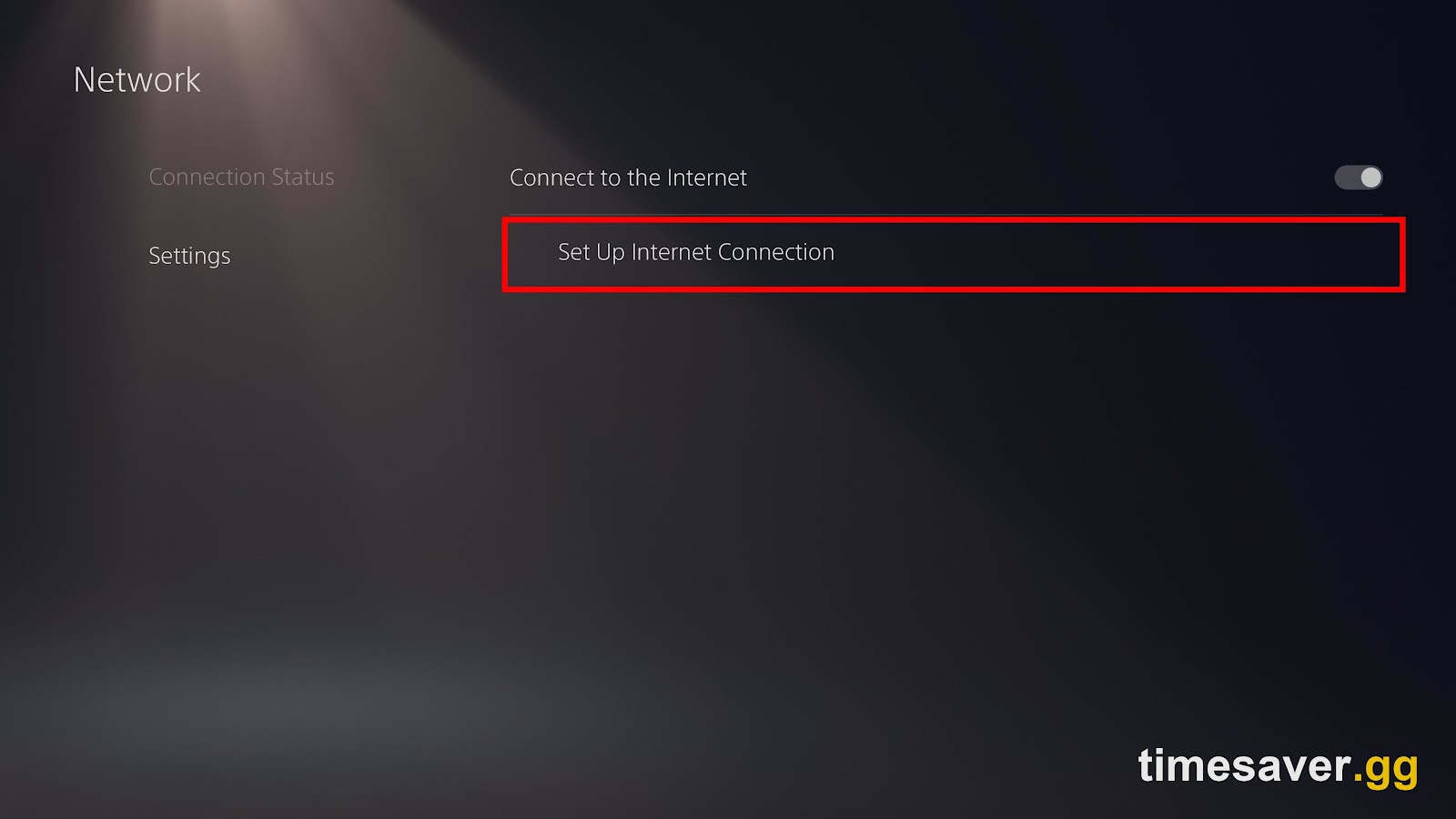
- PS5: Fully power off (not rest mode), wait, and reboot. If it persists, boot into Safe Mode → Rebuild Database / Clear Cache, and confirm system software is fully updated under Settings → System → System Software.
| - **Xbox Series X | S: Do a full power cycle** — hold the power button 10 seconds until it's off, unplug for 30 seconds, restart. This clears the console's persistent network cache, which a normal restart leaves intact. |
|---|
- Both: Run the built-in network/connection test after each change and confirm NAT type reads Open.
Fastest fixes at a glance
| Symptom | First thing to try | If that fails |
|---|---|---|
| Networking Failed to Start (Hueneme Negev) | Check server status | Power-cycle router 60s |
| Error only at peak beta hours | Wait 60–90s, retry | Retry off-peak |
| Stuck on "Checking for Update" | Scan and Repair / reinstall beta patch | Full platform restart |
| Strict/Moderate NAT | Enable UPnP, reboot router | Manual port forward |
| PC: online modes locked | Enable TPM 2.0 + Secure Boot | Update BIOS |
| PS5/Xbox persistent | Full power cycle + clear cache | Wired Ethernet |
Get into the action, then skip the grind
Fixing the connection is step one. Once you're actually landing in MW4 lobbies — in the beta and at the October 23 launch — the next wall is the grind: camo challenges, weapon levels, and account rank that eat weeks. That's what we handle.
Lock in your MW4 setup before launch — day-one ready:
- MW4 Bot Lobbies — private easy lobbies from $5.90; grind levels & camos without the sweat
- MW4 Weapon Leveling — max any gun, unlock every attachment
- MW4 Mastery Camo Unlock — all mastery camos, fast and secure
- MW4 Account Leveling — skip the rank grind entirely
- All MW4 services — the full Modern Warfare 4 hub
New to the beta chaos? Start with our MW4 beta not working — every crash & error fix, and if you're on PC, clear the Secure Boot & TPM 2.0 error before anything else. For access itself, see how to get into Open Beta Weekend Two free.
Before October 23 launch day: four things to do now
The beta ended September 1 — the October 23 full launch will see more simultaneous players than any beta weekend, meaning the same error hits harder on day one. Do these now so you're not troubleshooting on launch morning:
- Keep your DNS change in place. If you switched to Cloudflare (1.1.1.1) or Google (8.8.8.8) during the beta, leave it. These resolvers are faster for Activision's servers than most ISP defaults and cost nothing to keep.
- Verify NAT type is Open before launch day. Go into your router settings and confirm UPnP is on. A Strict NAT on launch night means you're in a queue even when servers are up.
- PC players: confirm TPM 2.0 and Secure Boot stay on. Activision Support confirmed these requirements carry to the full game. One BIOS check now prevents a 30-minute fix on October 23 at midnight.
- Expect the first two to four hours to be rough. Every major Call of Duty launch hits authentication server strain the moment millions hit Play simultaneously. Bookmark the Activision Server Status page — when it shows Limited or Down, waiting it out is the only fix.
Planning your loadout and unlocks before launch? Our MW4 beta TTK changes guide covers the final weapon damage model from the beta, and the MW4 perks breakdown maps everything Infinity Ward confirmed for launch day.
FAQ
Does "Hueneme Negev" mean my account is banned or broken? No. The two-word code is a random session tag, not an account flag. It means the game couldn't complete a network handshake with Activision's servers. Nothing is wrong with your account — work the connection fixes above.
Why do I only get "Networking Failed to Start" during the beta weekends? Because a free open beta floods the authentication servers. When Activision's servers are at capacity, the handshake times out and drops you into this error. Check server status first; during peak Weekend Two hours, waiting a minute and retrying is often the whole fix.
Do I really need TPM 2.0 and Secure Boot for the MW4 beta? On PC, yes — Activision Support states "TPM 2.0 and Secure Boot are required to play online game modes." Consoles are unaffected. If you're on PC and every network fix fails, enabling these in BIOS is your next move.
What are the best DNS settings for MW4? Cloudflare (`1.1.1.1` / `1.0.0.1`) or Google (`8.8.8.8` / `8.8.4.4`) both resolve CoD's servers fast. Set them on your console or router, flush your DNS on PC, then restart and retry.
Is the error different on PS5 versus PC? The cause is the same, but the fix set differs — PS5 players lean on a full power cycle, a Rebuild Database / Clear Cache in Safe Mode, and system updates, while PC players add DNS flushing and the TPM 2.0 / Secure Boot check. NAT and router fixes apply to both.
Will I see Hueneme Negev or a similar error at the October 23 full launch? Almost certainly in the first few hours — every major Call of Duty release floods the authentication servers at the moment millions of players hit Play simultaneously. Run through this guide's fix order before launch: set DNS, confirm NAT is Open, and keep your router power-cycled and connected by wire if possible. Check server status first before trying local fixes.
Do my beta DNS and NAT settings carry over to the full game? Yes. DNS settings made at the router level apply to all games on your network permanently — there's nothing MW4-specific about them. NAT improvements (UPnP enabled, ports forwarded) also persist. You won't need to redo anything unless you reset your router or update its firmware before October 23.
| When does MW4 fully launch if I want to be ready? Modern Warfare 4 releases October 23, 2026 on PS5, Xbox Series X | S, PC and Nintendo Switch 2, with 12 all-new 6v6 maps day one. The connection fixes here carry straight over to launch day, when server load spikes again. |
|---|