Quick answer (TL;DR): Most Modern Warfare 4 beta problems are access problems, not bugs. The Early Access Beta runs August 21–25, 2026 and needs a pre-order; the Open Beta runs August 28 – September 1, 2026 and is free for everyone, including Nintendo Switch 2 (support.activision.com). If the beta won't let you in, check that (1) you pre-ordered for Weekend 1, (2) on PC your machine has TPM 2.0 and Secure Boot enabled — Activision states these "are required to play online game modes" — and (3) your beta code is redeemed at callofduty.com/betaredeem. If it crashes or won't launch, the fix order that clears the majority of cases is: verify/Scan and Repair the files → update your GPU driver → close overlays and background apps → restart the game and router. Full step-by-step below, separated by PC and console. For more on this, check out the Modern Warfare 4 on Game Pass guide.
Last updated August 25, 2026 — Weekend 1 (Early Access, Aug 21–25) ends today. Weekend 2 Open Beta opens free to all players on August 28, adding Nintendo Switch 2. All fixes below apply to both weekends; Weekend 2 typically hits the same "Checking for Updates" surge in the first hour as servers absorb launch volume.
The Modern Warfare 4 beta is the first time most players actually touch the game before its October 23, 2026 launch — and every Call of Duty beta arrives with the same launch-day wall of crashes, "won't launch" black screens, and connection drops. The difference this year is the two-weekend structure: a pre-order-gated Early Access weekend, then a fully open weekend. That means two separate windows where the number-one "bug" is simply not having access the way you think you do.
This guide is the triage sheet. It separates the confirmed beta rules from the general Call of Duty fixes that have cleared crashes and errors across the last several launches, so you can stop watching a loading spinner and get into a match.
Call of Duty: Modern Warfare 4 - Bot Lobbies
Get bot lobby in 10 minutes
Why won't the Modern Warfare 4 beta let me in?
Before you touch a single setting, rule out the most common cause: you don't have access for the weekend you're trying to play. The beta has two tiers with different rules, and mixing them up is the top reason players think the beta is "broken."
| Beta weekend | Dates (2026) | Who gets in | Platforms | |
|---|---|---|---|---|
| Early Access (Weekend 1) | Aug 21 – 25 | Pre-order required (any MW4 edition) | Xbox Series X\ | S, PS5, PC |
| Open Beta (Weekend 2) | Aug 28 – Sep 1 | Free — no pre-order | Above + Nintendo Switch 2 |
Source: support.activision.com. Key rules that trip people up:
- Digital pre-orders are registered automatically through the platform store — no code needed. If you pre-ordered digitally and can't get in during Weekend 1, make sure you're signed into the same account that made the purchase.
- Physical pre-orders ship an Early Access code you must redeem at callofduty.com/betaredeem and link to your Activision account first.
- No pre-order? You are not locked out — you just wait for the Open Beta on August 28, which is free for everyone. Nothing is wrong with your game.
If access checks out and you still can't launch, work through the platform sections below.
How do I fix Modern Warfare 4 beta "won't launch" or a black screen on PC?
A beta that installs but won't open — black screen, instant crash to desktop, or an endless "Preparing…" — is almost always a file, driver, or security-setting issue. Run these in order and test after each:
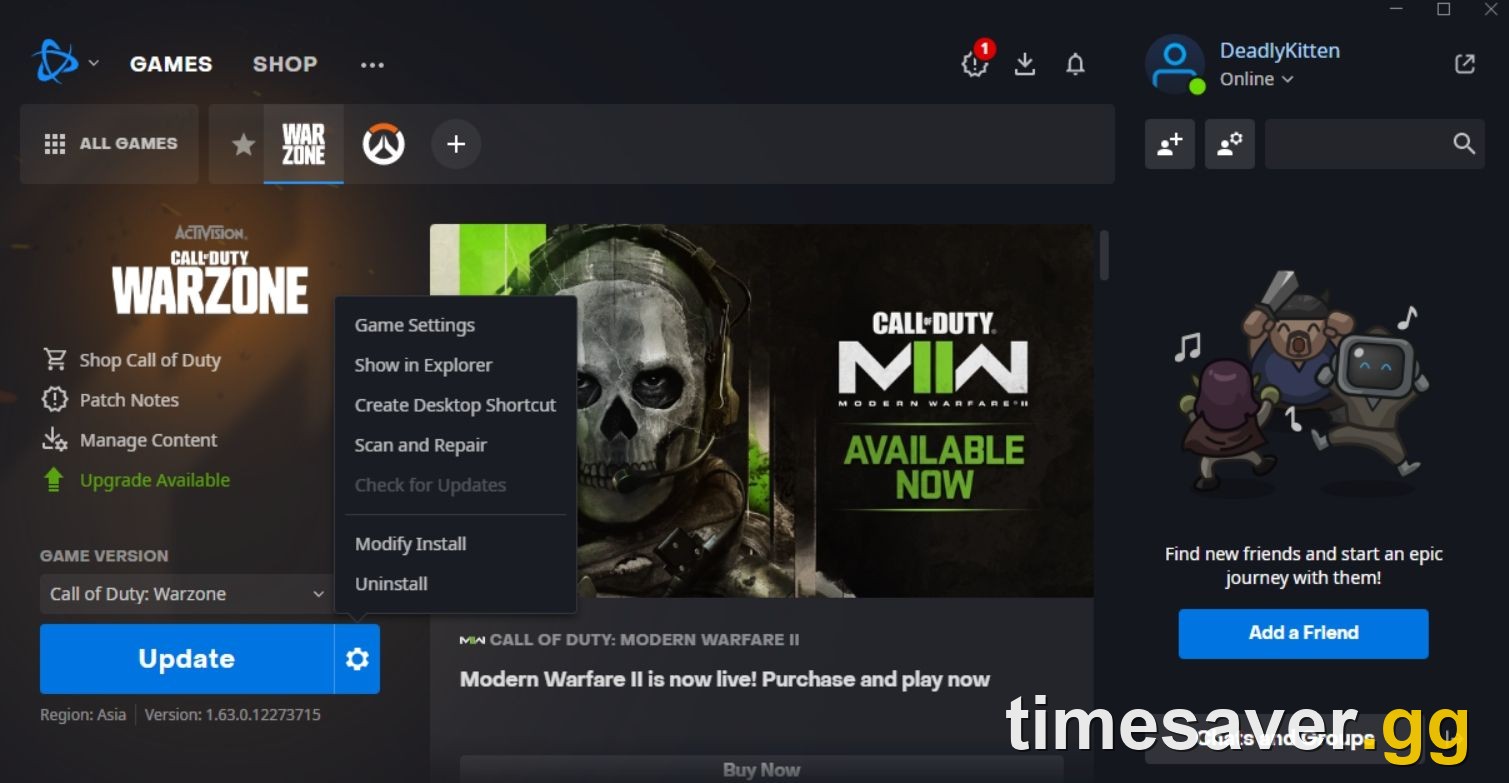
- Verify the game files. On Steam: right-click the beta → Properties → Installed Files → Verify integrity of game files. On Battle.net: click the gear next to Play → Scan and Repair. This rebuilds a corrupted or half-downloaded install, which is the single most effective launch fix.
- Enable TPM 2.0 and Secure Boot. This is the MW4-specific one. Activision confirms "TPM 2.0 and Secure Boot are required to play online game modes" (support.activision.com). Both are toggled in your motherboard BIOS/UEFI — if the anti-cheat can't verify them, the game closes on launch. Enable both, then reboot.
- Update your GPU driver. Install the latest NVIDIA/AMD/Intel driver (a fresh "game ready"/"Adrenalin" release usually ships around a CoD beta). An out-of-date driver is the most common black-screen cause.
- Run as administrator and disable overlays. Launch Steam/Battle.net as admin, and turn off Discord, GeForce Experience/NVIDIA App, Xbox Game Bar, and MSI Afterburner overlays — overlay injection is a frequent instant-crash trigger.
- Update Windows and Visual C++/DirectX. Missing runtime files cause launch failures; run Windows Update and let the launcher install its prerequisites.
How do I fix Modern Warfare 4 beta crashes and Dev Errors mid-match?
Crashing after you're in — a "Dev Error," freeze, or drop to desktop during a match — points at overloaded hardware or bad files rather than access. Players describe it exactly this way: "before, no issues at all, now it's almost unplayable" is the recurring complaint on the CoD subreddits, and it usually traces to one of these:
- Scan and Repair / verify files again — a mid-match crash often means a specific asset is corrupt.
- Cap your frame rate and drop textures one notch. The beta is unoptimized by design; an uncapped frame rate or max texture streaming can exhaust VRAM and crash the game. See our MW4 best PC settings for FPS guide for a stable baseline.
- Close background apps. Browsers, other launchers, and RGB software (iCUE, Armoury Crate) steal RAM and CPU. Shut them before you queue.
- Check your temperatures. Thermal throttling on a hot GPU/CPU causes hard crashes under load — clean airflow and a modest undervolt fix more "random" beta crashes than any in-game setting.
- Confirm you meet the spec. If you're crashing constantly, verify your rig against the MW4 PC system requirements — a below-minimum GPU or too little RAM will never be stable no matter what you toggle.
One honest note from the community: several players report the game is simply more stable on console than on PC during betas. If you own both and PC is unplayable, the fastest path to matches is switching platforms for the weekend — beta progress and rewards are account-bound, not platform-bound.
How do I fix Modern Warfare 4 beta connection errors and disconnects?
Connection drops, "lost connection to host," packet burst, or a queue that never resolves are usually network or server-side, and the beta's opening hours are the worst for it because everyone loads in at once.
- Check server status first. During the Aug 21 and Aug 28 openings, servers get hammered. Confirm at the Activision Online Services status page before assuming it's you — if it's a global outage, no local fix helps.
- Go wired. A physical Ethernet cable beats Wi‑Fi for stability and ping; it eliminates the most common source of packet burst.
- Power-cycle your router. Unplug it for 60 seconds. This clears the stale connection behind most "sudden lag" that wasn't there an hour ago.
- Open an Open NAT type. A Strict/Moderate NAT causes matchmaking failures and disconnects — enable UPnP or port-forward the Call of Duty ports on your router for an Open NAT.
- Pause other downloads. A background console/PC update or another device streaming 4K will starve the game of bandwidth and drop you.
How do I fix the Modern Warfare 4 beta stuck on 'Checking for Updates'?
A frozen "Checking for Updates" spinner is the most-searched MW4 beta problem during peak launch windows — and it almost always traces to one of these causes. Work through them in order and test after each step:
- Wait 2–3 minutes, then fully relaunch. During the opening hours of both beta weekends (Aug 21 and Aug 28), Activision's update-check servers were briefly overloaded. The spinner stalls because the launcher can't reach the update endpoint, not because the game itself is broken. Close Battle.net or Steam completely (not just the game window), wait a few minutes for server load to drop, then reopen the launcher and try again. This clears the majority of cases in the first hours of a new weekend.
- Flush your DNS cache. A stale DNS entry can block the launcher from reaching Activision's update servers even when your general internet connection is fine. On Windows: open Command Prompt as administrator → type ipconfig /flushdns → press Enter. On console: power-cycle your router (unplug for 60 seconds, not just restart). Then relaunch the game.
- Check firewall and antivirus. Windows Defender or third-party AV software (Bitdefender, Norton, Avast) can silently block the launcher's update-check request, producing an infinite spinner with no error message. Temporarily disable real-time protection, retry the launch, then re-enable it. If that fixes it, add Battle.net and the Call of Duty HQ installation folder to your AV's permanent exceptions list.
- Run Scan and Repair / Verify Files. A corrupted update manifest produces the same symptom. On Battle.net: gear icon next to Play → Scan and Repair. On Steam: right-click the beta → Properties → Installed Files → Verify integrity of game files. This forces a fresh manifest download and bypasses whatever the launcher was stuck on.
- Switch to a public DNS server. If your ISP DNS is rate-limited or returning errors, switching to Google DNS (8.8.8.8 / 8.8.4.4) or Cloudflare (1.1.1.1) can unblock the update check in under a minute. Set the alternate DNS in your Windows network adapter settings or on your router.
If all five steps fail, check the Activision Online Services status page directly. A confirmed server-side issue there means waiting is the only fix — no local troubleshooting helps until Activision clears it. Most "Checking for Updates" loops during the MW4 beta weekend launches resolved within 15–30 minutes as Activision scaled capacity. Also check our MW4 Secure Boot and TPM error fix guide if the spinner clears but then the game closes immediately on the next launch attempt.
Call of Duty: Modern Warfare 4 - Mastery Camo Bundle
Get mastery camos in 10 minutes
How do I fix 'Checking for Updates' on PS5, Xbox or Switch 2?
The same frozen spinner happens on console but you can't flush DNS from a settings menu — here's the console-specific fix sequence:
- PS5: Close the game completely (PS button → "Close Game," not just background it), then go to Settings → Network → Test Internet Connection. If the test passes, relaunch. If still frozen, do a full power cycle: hold the power button until you hear two beeps — this clears the console's DNS cache and update queue, fixing most stuck update screens.
- Xbox Series X|S: From My games & apps → the beta → More options → Manage game → Check for updates. If that hangs, hard-reset: hold the Xbox power button on the console for 10 seconds until it fully shuts off, wait 30 seconds, power on. This clears the system update cache, which a normal restart doesn't touch.
- Nintendo Switch 2 (Weekend 2 only): Switch 2 access begins August 28 — a stuck update screen on Switch 2 before then is expected, not a bug. On August 28+: highlight the game → press + → Software Update → Via the Internet. If the update check hangs, power off fully (power button hold → Power Options → Turn Off, not sleep) then restart. A clean boot clears Switch 2's equivalent of the DNS cache.
- All consoles — peak-hour rule: During the opening hour of Weekend 2 on August 28, expect the same congestion surge that hit Weekend 1's launch. If the Activision Online Services status page shows degraded service, no local fix helps — weekend launches historically clear within 15–30 minutes as Activision scales capacity. The fastest fix is often waiting.
Beta code not working or "content not installed" — how do I fix it?
Two specific errors deserve their own fixes because they look scary but are simple:
- "Beta code invalid / already used": codes are single-use and region/platform-specific. Redeem at callofduty.com/betaredeem on the correct platform account, and make sure you're not entering a code meant for a different store. Digital pre-orders don't use codes at all — check your store library instead.
- "Content not installed" / beta pack missing / stuck at 0%: the beta shares the modular Call of Duty HQ launcher, so the install can desync. Fully quit the launcher, restart it, and re-queue the download; if it's still stuck, delete the partial beta pack and let it re-download. For the full download flow, see our MW4 beta preload & download guide.
Console-specific fixes (PS5, Xbox, Switch 2)
- PS5: Rebuild trust in the files — highlight the beta → Options → Check for Update, then if it still crashes, delete and reinstall the beta app. A full power cycle (hold the power button until it beeps twice) clears most console-side crashes.
| - **Xbox Series X\ | S: Use My games & apps → Manage → the beta → check for updates**; a hard reset (hold power 10s) fixes stuck installs. Xbox Play Anywhere lets your progress carry between Xbox and PC. |
|---|
- Nintendo Switch 2 (Open Beta only): Switch 2 access begins with Weekend 2 on Aug 28 — if you can't find the beta before then, that's expected, not a bug.
Quick-reference: Modern Warfare 4 beta fix table
| Problem | Fastest fix | Platform |
|---|---|---|
| Can't access at all | Confirm pre-order (W1) or wait for Aug 28 open weekend | All |
| Won't launch / black screen | Enable TPM 2.0 + Secure Boot, verify files | PC |
| Instant crash on open | Update GPU driver, disable overlays | PC |
| Crash mid-match / Dev Error | Scan and Repair, cap FPS, close background apps | PC |
| Lost connection / packet burst | Check server status, go wired, power-cycle router | All |
| Code invalid | Redeem at callofduty.com/betaredeem, correct account | All |
| Stuck at 0% / content missing | Restart launcher, re-queue download | All |
| Stuck on "Checking for Updates" | Flush DNS, restart launcher, check firewall/AV; during peak hours wait 15–30 min | All |
The beta ends September 1 — the grind doesn't. Once the beta closes, MW4 launches October 23 and the leveling reset starts for real. Skip the slow parts and hit launch already set up:
- CoD Bot Lobbies — easy lobbies to level weapons and complete challenges fast.
- CoD Account & Weapon Leveling — skip the grind with pro players.
- CoD Camo Unlocks — fast, secure mastery camo unlocks.
- All Call of Duty services — everything in one place.
When exactly does Weekend 1 end and when does the MW4 Open Beta (Weekend 2) start? Weekend 1 (Early Access, pre-order required) ends August 25, 2026. Weekend 2 (Open Beta, free for everyone including Nintendo Switch 2) opens August 28 at 10 AM PT / 1 PM ET / 6 PM BST and runs through September 1. Between weekends (August 26–27), servers go offline to prepare for the expanded open access — if you can't log in on those days that's expected, not a bug. See our MW4 Open Beta Weekend 2 access guide for the full Weekend 2 schedule and what's new.
Will the 'Checking for Updates' bug happen again on Weekend 2? Almost certainly in the first hour of August 28 — Weekend 2 is larger than Weekend 1 because it's free and includes Switch 2, so expect a bigger launch-hour surge. All the same fixes apply: flush DNS, disable AV temporarily, run Scan and Repair. On console, do a full power cycle before the weekend opens. The most reliable approach: don't queue the moment the servers go live; wait 30–45 minutes for the rush to clear, then launch. Past CoD open betas resolved launch-window issues in under an hour. Once you're in, see MW4 beta maps and modes and your beta level cap and rewards to make the most of the weekend.
Want the full pre-launch checklist? Our MW4 beta prep guide covers everything to do before you queue, and the beta dates & early access breakdown has every start time. Wondering what survives to launch? See does your progress carry over to MW4. If you're in and making the most of the weekend, see which operators you can unlock in the MW4 beta and the full beta camos and rewards that carry to launch.
FAQ
Why can't I access the Modern Warfare 4 beta right now? The Early Access Beta (Aug 21–25) requires a pre-order of any MW4 edition. If you didn't pre-order, you aren't locked out — the Open Beta on Aug 28 is free for everyone on all platforms, including Nintendo Switch 2. Nothing is broken; you're just waiting for the open weekend.
Why does the Modern Warfare 4 beta close instantly on PC? The most common cause is TPM 2.0 or Secure Boot being disabled — Activision requires both for online modes, and the anti-cheat closes the game if it can't verify them. Enable both in your BIOS, then update your GPU driver and run a Scan and Repair (Battle.net) or verify integrity (Steam).
How do I fix a stuck Modern Warfare 4 beta download at 0%? The beta installs through the shared Call of Duty HQ launcher, which can desync. Fully quit and restart the launcher, then re-queue the download. If it's still stuck, delete the partial beta pack and let it re-download from scratch.
Is my Modern Warfare 4 beta code not working because it's invalid? Beta codes are single-use and platform/region-specific. Redeem yours at callofduty.com/betaredeem on the correct account and platform. If you pre-ordered digitally, you don't need a code at all — access is automatic on the account that made the purchase.
Does Modern Warfare 4 beta progress carry over to the full game? Beta ranks and multiplayer unlocks are for the beta, but the rewards you earn carry to launch. Progress is tied to your account, not the platform, so switching between Xbox and PC (Play Anywhere) keeps it. See our full carry-over guide for what transfers to the October 23 release.
Why is the Modern Warfare 4 beta stuck on 'Checking for Updates'? This almost always means the launcher can't reach Activision's update-check servers — either because they're overloaded at beta launch, your DNS cache has a stale entry, or a firewall is silently blocking the request. Fix order: wait 2–3 minutes and fully relaunch → flush DNS (ipconfig /flushdns on PC, power-cycle router on console) → temporarily disable AV and add the launcher to exceptions → run Scan and Repair. If Activision's Online Services status page shows a server issue, no local fix helps — wait 15–30 minutes for capacity to scale.
How do I fix the MW4 beta update screen that never finishes loading? A never-finishing update screen means the launcher is stuck waiting for Activision's servers to respond. Close and relaunch the game or launcher, flush your DNS cache, switch to Google DNS (8.8.8.8) or Cloudflare (1.1.1.1) in your network settings, and run a file Scan and Repair to force a fresh manifest download. If every other service on your device works normally, the problem is server-side — retry in 15–30 minutes. Also see our guide on MW4 Open Beta Weekend 2 access if you're trying to get in on August 28+ and aren't sure whether the open window has started yet.