Updated August 31, 2026 — The Open Beta ends September 1 at 10 AM PT. The Secure Boot and TPM 2.0 requirement is permanent: it carries unchanged to the October 23, 2026 full launch, so fixing this once is a one-time task.
If Modern Warfare 4 refuses to launch on PC and throws a Secure Boot or TPM 2.0 error — or the maddening "BIOS update required" message even after you've enabled everything — you are not alone, and your PC is almost certainly fine. Activision now requires both Secure Boot and TPM 2.0 to play MW4, and the beta is the first time most players are hitting the wall. This guide walks the exact fix, in order, plus the one BIOS trap that traps thousands of AMD Ryzen and laptop owners.
Call of Duty: Modern Warfare 4 - Bot Lobbies
Get bot lobby in 10 minutes
Quick answer: why won't MW4 launch on my PC?
TL;DR — Modern Warfare 4 needs TPM 2.0 + Secure Boot enabled on PC to play any online mode. If it won't launch, you'll see "Secure Boot is not enabled," "compatible TPM cannot be found," or a failed attestation / "BIOS update required" error. The fix lives in your BIOS/UEFI, not the game: (1) enable fTPM (AMD) or PTT (Intel), (2) confirm Boot Mode is UEFI (not Legacy/CSM), (3) turn on Secure Boot and install default keys, (4) reboot and verify in Windows with `msinfo32`. If it still fails on an AMD board, your fTPM firmware version is too old — you need a BIOS update, and some 2023-era laptops simply don't have one yet. Full steps below.
This is a security requirement, not a bug. Per Activision, TPM 2.0 and Secure Boot "help protect your system against cheats and unauthorized access by verifying your PC's integrity from startup to gameplay… and work alongside RICOCHET™ Anti-Cheat to keep matches fair" (Activision Support). Miss the requirement and you're restricted from every online mode in the MW4 beta — not just Ranked Play.
Three numbers that frame this:
- October 23, 2026 — MW4's full launch date. The requirement isn't going away; enable it once and you're set through launch (callofduty.com).
- Windows 10 22H2 is the minimum OS build. Older Windows 10 can't reliably run the security stack; Windows 11 already ships with TPM 2.0 on by default.
- 2 platforms feed the second wave — the free Open Beta runs Aug 28–Sep 1 with no pre-order, so a second, much larger crowd of PC players is about to hit this exact error. Fix it now and skip the launch-day queue of frustration.
What are the exact Secure Boot / TPM errors in MW4?
The requirement is official; the error strings are what players are reporting across r/CODWarzone and support tickets during the beta. The common ones:
- "Secure Boot is not enabled" — the most frequent PC block. Secure Boot is off, or your board is in Legacy/CSM boot mode.
- "Compatible TPM cannot be found" — TPM/fTPM/PTT is disabled in BIOS, or Windows can't see it.
- Failed attestation — messages along the lines of secure attestation failed, failed to enroll AIK, or TCG Event Log failed. This is the trickiest bucket: TPM and Secure Boot look enabled, but the firmware can't prove it cleanly.
- "BIOS update required" — the game detects your fTPM/Secure Boot but rejects the firmware version.
Confirmed vs. rumored: the requirement itself is Activision-confirmed, and so are the codes. Activision ships an official diagnostic — the Call of Duty Secure Attestation Wizard (`CODSecureAttestationWizard.exe`, on the Activision Support TPM/Secure Boot page) — that scans your PC and returns the exact reason you're blocked: TPM 2.0 Not Enabled, Secure Boot Not Enabled, Boot Partition not GPT, BIOS Boot mode not UEFI, BIOS Firmware Update Required, Authorization Key Failed, or TCG Event Log Failed. Run it first — it tells you which of the fixes below you actually need instead of guessing.
How do I enable TPM 2.0 for MW4? (AMD and Intel)
TPM 2.0 is a firmware feature baked into modern CPUs — you almost never need a physical chip. You need at least an Intel 8th-gen (or newer) CPU with PTT, or an AMD Ryzen 2000-series (or newer) with fTPM. You just have to switch it on.
Step 1 — Enter your BIOS/UEFI. Restart and tap Delete or F2 during boot (some boards use F10 or Esc).
On AMD (Ryzen):
- Go to the Advanced menu.
- Find AMD fTPM configuration (sometimes under AMD CBS → FCH Common Options or Trusted Computing).
- Set TPM Device Selection to Firmware TPM (fTPM).
- Save with F10.
On Intel:
- Open Advanced.
- Find PCH-FW Configuration (or Trusted Computing).
- Enable PTT (Platform Trust Technology).
- Save.
Step 2 — Verify in Windows. Press `Win + R`, type `tpm.msc`, and press Enter. You want "The TPM is ready for use" and Specification Version 2.0. (For a fast check, an admin PowerShell running `Get-Tpm` should show `TpmReady : True`.) If it says a compatible TPM cannot be found, the BIOS toggle didn't take — reboot back in and re-check.
How do I turn on Secure Boot without bricking my boot?
This is where most people get stuck, because Secure Boot only works in UEFI mode — and a PC installed years ago may still be booting in Legacy/MBR mode. Flip Secure Boot on in Legacy mode and your PC won't boot.
Step 1 — Check your boot mode first. Press `Win + R`, type `msinfo32`, Enter. Look at BIOS Mode:
- UEFI → you're good, skip to Step 3.
- Legacy → do Step 2 before touching Secure Boot.
Step 2 — Convert Legacy/MBR to UEFI/GPT (only if BIOS Mode = Legacy). Windows 10/11 includes a safe converter. Open an admin Command Prompt and run: ``` mbr2gpt /validate /allowFullOS mbr2gpt /convert /allowFullOS ``` Then set your BIOS boot mode to UEFI and disable CSM. (Back up important files first — conversion is reliable but boot changes always carry a small risk.)
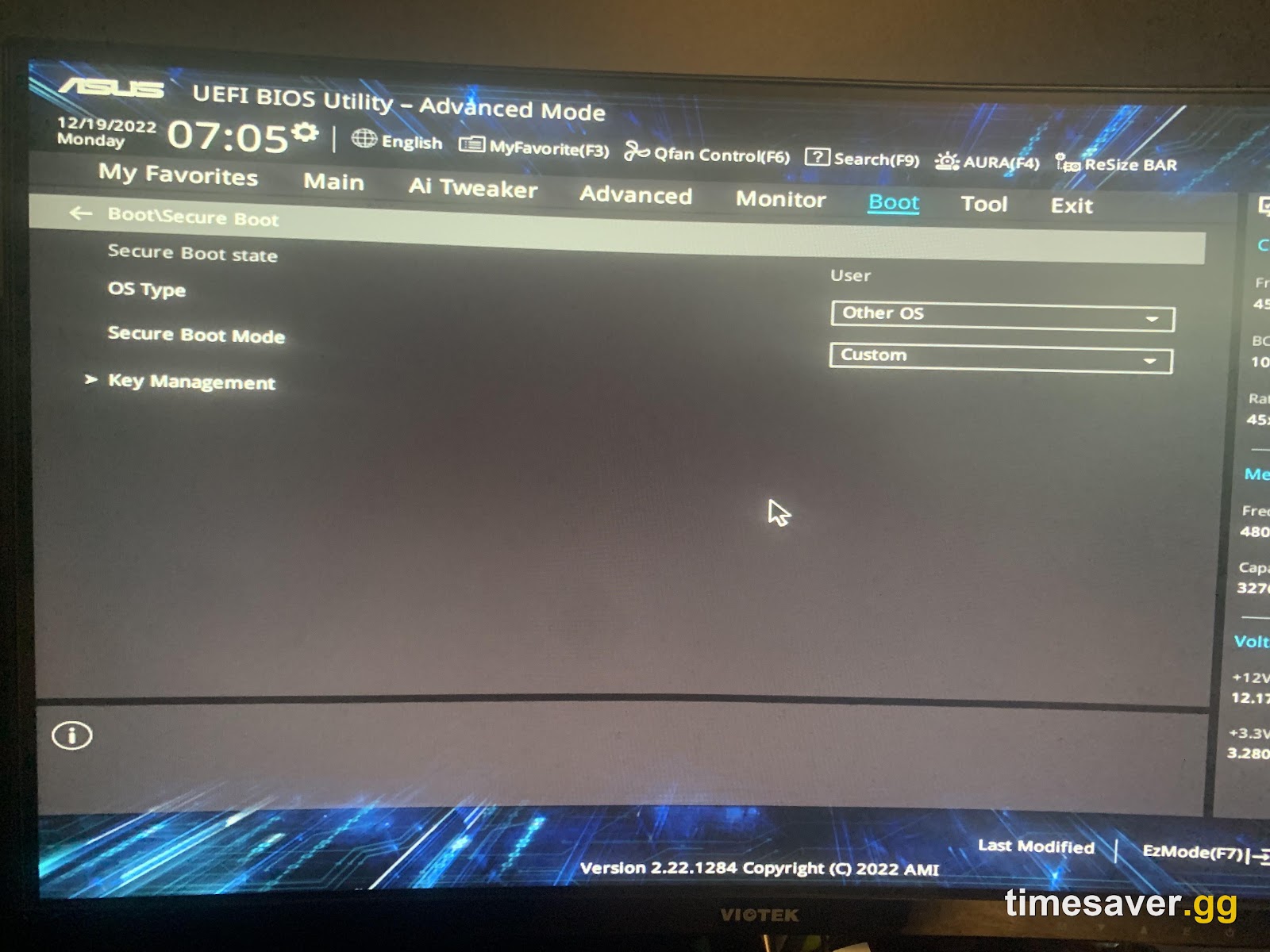
Step 3 — Enable Secure Boot.
- In BIOS, open the Boot section and disable CSM if it's on.
- Open the Secure Boot menu.
- Set Secure Boot to Enabled.
- If prompted, Install default Secure Boot keys (a.k.a. "Restore factory keys").
- Save and reboot.
Step 4 — Confirm in Windows. Back in `msinfo32`, Secure Boot State should read On. That's the line MW4's launcher checks. (PowerShell equivalent: `Confirm-SecureBootUEFI` should return `True`.)

The 'BIOS update required' trap — the fix no one mentions
Here's the wall thousands of players smash into: you enable fTPM + Secure Boot, `msinfo32` says everything's on, and MW4 still throws a failed-attestation or "BIOS update required" error. The real culprit isn't the toggles — it's the fTPM firmware version reported by your motherboard. This is a known, Activision-acknowledged AMD issue: AMD fTPM software in the 3.x.0.x version range returns an attestation error, and the only fix is a BIOS/firmware update (which bumps the fTPM manufacturing version to one attestation accepts).
The tell-tale sign, straight from the beta community: in `tpm.msc`, a stuck machine shows an old fTPM Manufacturer Version in that 3.x range — the module is technically "TPM 2.0-capable," but the firmware is stale enough that RICOCHET's attestation refuses it. As one beta player put it after a full Windows reinstall didn't help: "just because you're on the latest available BIOS doesn't mean it'll work — especially when the 'latest' is from 2023." (Heads-up: a BIOS flash can reset fTPM and Secure Boot, so re-enable both afterward.)
The fixes, in order of effort:
- Update your motherboard BIOS to the newest version. This is the real fix for most desktops. Use your vendor's tool: EZ Flash (ASUS), M-Flash (MSI), Q-Flash (Gigabyte), or the ASRock equivalent. A newer BIOS ships an updated fTPM that passes attestation.
- Laptop owners: if your manufacturer hasn't released a newer BIOS, you may be stuck — some 2023-era gaming laptops (several ASUS TUF AMD models have been flagged) have no updated firmware yet. Contact the vendor's support and ask specifically about a beta BIOS for Call of Duty attestation; keep an eye on the vendor forums.
- Desktop workaround: on a desktop with a spare header, a discrete TPM 2.0 module (~$15) can sidestep a bad firmware TPM entirely. Not an option on laptops.
- Update Windows to the latest build (10 → 22H2 or newer, or Windows 11) — an outdated OS can also fail the check even when the hardware is fine.
If you've done all of the above and MW4 still won't launch, it's worth ruling out the more general beta crashes and install errors — our Modern Warfare 4 beta not working? every crash & error fix guide covers the non-security launch problems.
Call of Duty: Modern Warfare 4 - Mastery Camo Bundle
Get mastery camos in 10 minutes
Do I really need Secure Boot for MW4, or just for Ranked?
Both. Unlike some earlier CoD titles that only gated Ranked Play behind Secure Boot, MW4 requires TPM 2.0 + Secure Boot for all online play. Per Activision, they're mandatory to play the game on PC, working alongside RICOCHET Anti-Cheat (Activision Support). There is currently no official way to play MW4 online on PC without meeting them.
| A quick note on console: PlayStation 5, Xbox Series X | S, and Nintendo Switch 2 have hardware-level equivalents built in — you don't touch any of this. This is a PC-only hoop. If you're weighing platforms, our MW4 crossplay & cross-progression breakdown covers who plays with whom. |
|---|
Pre-launch checklist: verify your settings before October 23
The beta is ending, but the requirement doesn't. Before MW4's full launch on October 23, 2026, run through these three checks — takes under five minutes:
- Confirm Secure Boot is still on. Open
msinfo32→ Secure Boot State: On. Some BIOS updates reset it during installation; re-enable if it shows Off. - Verify fTPM/PTT is still active. Run
tpm.msc→ should say "The TPM is ready for use, Specification Version 2.0." A BIOS flash can silently disable fTPM. - Check your BIOS version again. A motherboard manufacturer may have released a newer BIOS between the beta and launch — particularly relevant for the Ryzen 7000/7800 series (AM5 socket) where fTPM firmware in the 3.x.0.x range is the most-reported attestation failure. AMD's AGESA 1.1.0.0 and later addresses the worst offenders, but not every board vendor ships it under the same BIOS revision number; check your vendor's board page directly.
Three stats that frame this issue at scale:
- Ryzen 7000 series (AM5) CPUs account for the largest share of "BIOS update required" reports in the beta, per r/CODWarzone threads — the fTPM 3.x firmware is endemic to AM5 boards with BIOS firmware from 2022–2023.
- Windows 10 22H2 is the minimum OS build for MW4 on PC; any earlier October 2022 or older build fails the check entirely regardless of BIOS state.
- The Call of Duty Secure Attestation Wizard classifies exactly 7 failure codes (TPM 2.0 Not Enabled, Secure Boot Not Enabled, Boot Partition not GPT, BIOS Boot mode not UEFI, BIOS Firmware Update Required, Authorization Key Failed, TCG Event Log Failed) — run it before guessing which fix you need.
Windows 10 vs Windows 11 — does it matter?
Slightly. Windows 11 already requires TPM 2.0 to install, so most Win11 users only need to enable Secure Boot (and confirm fTPM/PTT is on). Windows 10 can run MW4, but only on version 22H2 or later, and you must enable both TPM 2.0 and Secure Boot manually. Activision's guidance: keep Windows current and turn both on, because "TPM 2.0 is available for Windows 10 but is required for Windows 11… enabling both ensures your system is ready" for the game (Activision Support).
Once you're actually in-game, if your frames are rough, a quick pass through our MW4 best PC settings for high FPS guide is worth the five minutes — beta builds are unoptimized and a few toggles buy you a lot.
Get in, then skip the grind

Clearing the Secure Boot wall is step one. The beta level cap resets at launch, and the camo and weapon grind in MW4 is as long as ever — one shared camo track across Multiplayer, Warzone, and DMZ. Once your PC's actually launching the game, here's how to spend your time on kills instead of chores:
Lock in your MW4 setup before the Oct 23 launch — ready day one:
- MW4 Bot Lobbies — private lobbies from $5.90; level and grind camos on easy mode without SBMM stomping you.
- MW4 Weapon Leveling — max any gun and unlock every attachment fast.
- MW4 Mastery Camo Bundle — every mastery camo, done for you, secure.
- MW4 Account Leveling — skip the rank grind with pro players.
Want to understand the full MW4 system before launch? Our MW4 perks guide and MW4 aim assist settings breakdown are worth bookmarking now. Getting into the beta smoothly? Our MW4 open beta weekend 2: how to play free on every platform and MW4 preload, file size & unlock times guides cover the rest of the day-one checklist.
FAQ
Why does Modern Warfare 4 need Secure Boot and TPM 2.0? They're anti-cheat requirements. Together they verify your PC booted through a trusted, untampered path before the game trusts it online — Activision uses them alongside RICOCHET Anti-Cheat. Without both enabled, you're blocked from every online mode on PC.
How do I fix "Secure Boot is not enabled" in MW4? Enter your BIOS/UEFI, confirm your Boot Mode is UEFI (check `msinfo32` in Windows — if it says Legacy, convert with `mbr2gpt` first), disable CSM, then set Secure Boot to Enabled and install default keys. Reboot and verify `msinfo32` shows "Secure Boot State: On."
MW4 says "BIOS update required" but everything is already enabled — what now? Your motherboard's fTPM firmware version is too old to pass attestation even though it reports TPM 2.0. Update your motherboard BIOS to the newest version (EZ Flash / M-Flash / Q-Flash). On laptops with no newer BIOS available, contact the manufacturer about a beta BIOS — some 2023-era models don't have a fix yet.
Is Secure Boot required only for Ranked in MW4? No. Unlike some past CoD titles, MW4 requires TPM 2.0 and Secure Boot for all online play on PC, not just Ranked Play.
| Can I play MW4 on PC without Secure Boot or TPM 2.0? Not officially. There's currently no supported way to play MW4 online on PC without meeting both requirements. Consoles (PS5, Xbox Series X | S, Switch 2) have the equivalents built in and need no setup. |
|---|
Will enabling Secure Boot delete my files or break my PC? Enabling Secure Boot itself doesn't touch your files. The only risk step is converting from Legacy/MBR to UEFI/GPT — the built-in `mbr2gpt` tool is reliable, but back up important data first as a precaution before changing boot mode.
Does MW4 run on Windows 10? Yes, on Windows 10 version 22H2 or later, with both TPM 2.0 and Secure Boot enabled. Windows 11 is recommended and already includes TPM 2.0 by default, so most Win11 users only need to turn on Secure Boot.
Will my Secure Boot and TPM settings carry from the beta to the full MW4 game? Yes. Secure Boot and TPM 2.0 are OS/BIOS-level settings — once enabled, they persist across game updates, reinstalls, and from the beta to the full October 23 release. You will not need to re-enable them unless a BIOS flash resets them (check after any firmware update).
Which AMD CPUs are most affected by the fTPM firmware attestation failure? The heaviest concentration of "BIOS update required" errors in the beta came from Ryzen 7000/7800 series (AM5 socket) boards running BIOS firmware from 2022 or early 2023 with fTPM in the 3.x.0.x version range. Ryzen 5000 (AM4) boards are less affected because AGESA updates for that platform have been more consistently distributed. If you're on AM5 and still blocked after enabling fTPM, updating your motherboard BIOS to the newest 2024/2025 AGESA build (AGESA 1.1.0.0+) is the most reliable fix.