Quick answer
In NBA 2K27, the best attributes to upgrade with VC are the ones that unlock the Badges your position actually needs and hit a usable breakpoint — not the ones you can push to the highest number. Because 2K27 equips Badges with Badge Tokens and the Builder shows in real time which Badges each attribute value qualifies you for and how many tokens each one costs, every VC dollar you spend on an attribute is really buying two things at once: the rating, and the Badge access that rating unlocks. The smart spend order for almost every build is: 1) your primary scoring attribute (three-point for guards/wings, driving dunk or close shot for bigs), 2) the defensive attribute your position is graded on (perimeter D for guards, interior D and block for bigs), 3) speed with ball and ball handle for anyone who initiates, then 4) physicals (speed, strength, vertical). Stop each attribute at the value that unlocks the Badge tier you want and don't blindly chase a maxed rating — 2K has not published NBA 2K27's exact overall cap, and the last few points of any attribute are the most expensive VC you will ever spend for the least on-court return.
NBA 2K27 launched worldwide on September 4, 2026, so as of today the Builder is live, real builds are on the court, and the community is figuring out the breakpoints hands-on. This guide explains how VC upgrades actually work in 2K27, which attributes to prioritise by position, how to read the Builder's live Badge-qualification display before you commit VC, and where to stop so you don't burn currency on ratings that don't change how you play.
How VC upgrades work in NBA 2K27
VC — Virtual Currency — is NBA 2K27's premium currency, and its primary sink is MyPLAYER attribute upgrades (along with animations, apparel, and boosts). When you build or edit a MyPLAYER in the Builder, raising any attribute costs VC, and the cost per point climbs steeply as the rating gets higher. That curve is the whole reason "best attributes to upgrade" is a real question: you have a finite pile of VC, and where you put it decides what your player can and can't do.
Two systems make 2K27's spend decisions different from older years, and you need both in your head before you drop a single point.
First, Badges are now gated by Badge Tokens. This is the headline Builder change this year. As PlayStation.Blog put it:
"The biggest game-changer is the introduction of Badge Tokens, which you'll use to equip Badges. In the Builder, you can see in real time how your selected size and position affect which Badges you qualify for and how many tokens each Badge will cost." — PlayStation.Blog, NBA 2K27 MyPLAYER Builder reveal
Read that carefully, because it changes how you value an attribute point. An attribute rating no longer just improves your make/miss math — it also determines which Badges you qualify for and how expensive they are in tokens. So the "best" three-point rating isn't the highest one you can afford; it's the one that unlocks the shooting Badges you want at a token cost you can actually pay. (For the full token system, see how to earn Badge Tokens fast and the MyPLAYER Builder & Badge Tokens breakdown.)
Second, Cap Breakers raise your ceilings later — VC doesn't have to reach the top on day one. Cap Breakers are permanent boosts that let an attribute climb past its initial ceiling, and 2K27's Builder previews them so you can see how high a category can eventually go. The safe, verified framing from the knowledge base: Cap Breakers raise your attribute ceilings as your overall climbs — 2K has not published NBA 2K27's exact overall cap. Practically, that means you should spend VC to the breakpoint your build needs today, then let Cap Breakers (earned through progression and Build Specialization) lift the ceiling over time. Dumping VC into the final expensive points before you've even unlocked the ceiling for them is the single most common waste. Full detail lives in the Cap Breakers guide.
What does it cost to upgrade attributes with VC?
There's no single flat price — the VC cost per attribute point scales up as the rating rises, which is exactly why spend order matters. For scale, here's what buying VC actually costs, verified off the official Virtual Currency Pack listings on September 7, 2026:
- 5,000 VC — $1.99
- 15,000 VC — $4.99
- 35,000 VC — $9.99
- 75,000 VC — $19.99
- 200,000 VC — $49.99
- 450,000 VC — $99.99
- 700,000 VC — $149.99
The per-dollar rate climbs from about 2,513 VC per dollar on the smallest pack to roughly 4,667 VC per dollar on the largest — about 86% more VC per dollar at the top tier. (Prices can change and differ by region — 2K's own footnote says actual retail price may vary — so re-check the store before you buy. Full breakdown: NBA 2K27 VC prices and what VC is and what it does.)
One hard rule before you spend real money: VC does not carry over between versions. 2K states VC cannot move from NBA 2K26 to NBA 2K27. Whatever you had last year is gone; plan this year's spend from zero. And if you'd rather grind than buy, the earn routes are in how to earn VC fast.
Which attributes should you upgrade first?
The right answer depends on your position and playstyle, but the framework is universal: spend on the attribute that unlocks your role's core Badges, hit the breakpoint, then move to the next role-critical attribute. Breadth beats a single maxed number, because a two-way player who qualifies for the Badges at both ends is more valuable in The REC and The City than a one-dimensional 99 who gets hunted on defense.
Here's the priority framework by position. Treat every specific number below as community-reported — always confirm the exact qualification value live in your own Builder, because it updates in real time with your height and position, and 2K has not published a master breakpoint table.
Guards (PG / SG):
- Three-Point Shot — your primary scoring attribute and the biggest Badge unlocker for a guard. Push it to the value that qualifies you for the shooting Badges you want.
- Speed With Ball & Ball Handle — separation and shot creation. If you initiate offense, these are not optional.
- Perimeter Defense & Steal — this is what stops you getting targeted online.
- Speed / Acceleration (Physicals) — closes the athletic gap.
Wings / Forwards (SF / PF):
- Three-Point Shot or Driving Dunk — pick your scoring identity and fund it first.
- Perimeter Defense — wings guard the most dangerous scorers; this carries your on-court value.
- Strength & Driving Layup — for finishing through contact.
- Speed / Vertical (Physicals).
Bigs (C / stretch PF):
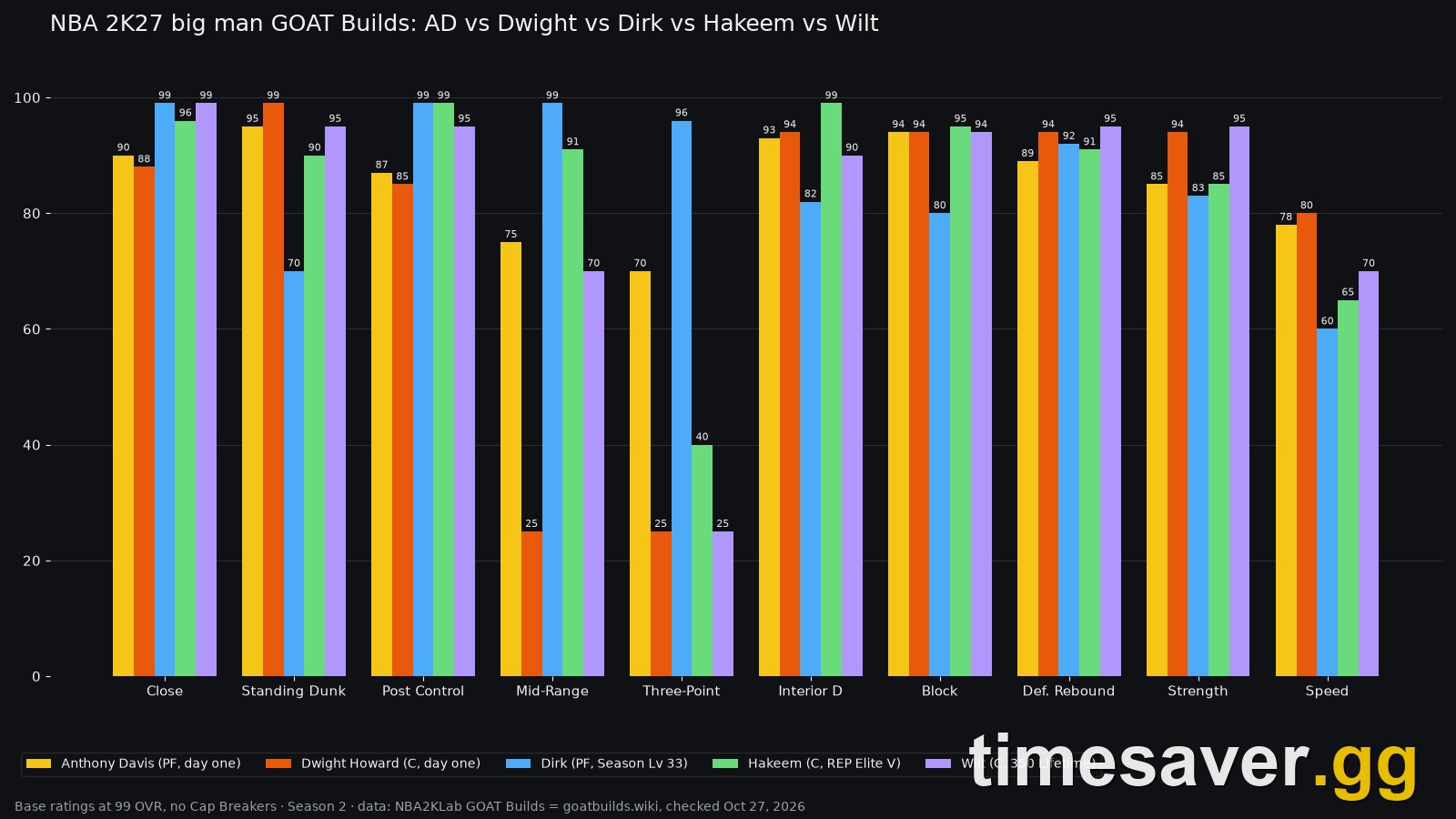
- Interior Defense & Block — a big who can't protect the rim is a liability; fund this first.
- Driving Dunk or Close Shot / Post Control — your paint scoring.
- Rebounding (Offensive & Defensive Boards).
- Strength & Standing Dunk (Physicals + Finishing).
Notice defense sits higher for wings and bigs than most VC-spend habits assume. Offense feels good in the Builder preview; defense is what keeps you on the floor in competitive modes. If you're building a stopper, read how to play defense before you allocate.
How to read the Builder before you spend VC
The Builder is the only breakpoint table you can trust, because it reflects your height, position, and weight. Use this loop for every attribute:
- Raise the attribute one increment and watch the Badge panel. The Builder shows in real time which Badges you now qualify for and how many tokens each costs. If nothing changes, that point bought you nothing but a slightly higher number.
- Stop at the value where your target Badge unlocks — that's your breakpoint for that attribute. Extra points past it only matter if they unlock a second Badge tier you actually want.
- Check the token cost, not just the qualification. Qualifying for a Badge you can't afford in tokens is a paper unlock. Balance the attribute rating against your Badge Token budget.
- Preview the Cap Breaker ceiling. If an attribute's ceiling is still low for your current overall, don't spend VC forcing the last points now — let Cap Breakers raise it and top up later.
This is also where you decide your shot and finishing identity: a jumper's animation and timing matter as much as the raw three-point number, so a moderate 3PT rating with a green shooting window can outperform a higher rating you can't time.
Where NOT to spend VC
Knowing where to stop saves more VC than any single upgrade:
- Don't chase a maxed rating "for the badge you already have." Once an attribute clears the breakpoint that unlocks your Badge, the next points are the most expensive VC in the game for the least return.
- Don't fund attributes your position won't be graded on. A pure shooter dumping VC into interior defense, or a rim-running big buying three-point rating, is spending for a preview screen, not for games.
- Don't front-load the final points before Cap Breakers. The top of a category is where cost-per-point spikes hardest. Reach the breakpoint, then let progression raise the ceiling and finish the climb cheaply later.
- Don't ignore Badge Tokens while maxing attributes. You can qualify for a Badge and still not have the tokens to equip it. Attribute VC and Badge Tokens are two separate budgets — spend both deliberately.
The bottom line on VC spend order
For most builds, this order wastes the least VC: primary scoring attribute → position-critical defensive attribute → ball control (if you initiate) → physicals, with each attribute stopped at the Badge-unlock breakpoint rather than pushed to its ceiling. Fund the two ends of the floor before you fund vanity ratings, respect the Badge Token budget as a separate cost, and let Cap Breakers do the expensive top-end work over time. Do that and a modest VC pile builds a player who's genuinely useful in The City and MyCAREER — instead of one impressive number and a lot of holes.
For more build math, spending routes, and system explainers, browse our full library of NBA 2K27 guides.
FAQ
What are the best attributes to upgrade with VC in NBA 2K27? Prioritise the attributes that unlock your position's core Badges and hit a usable breakpoint: your primary scoring attribute first (three-point for guards and wings, driving dunk or close shot for bigs), then the defensive attribute your position is graded on, then ball handling and speed with ball if you initiate, then physicals. Stop each attribute at the value that unlocks the Badge tier you want rather than chasing the highest possible number.
How much VC does it take to fully upgrade a build in NBA 2K27? There's no published flat figure, because VC cost per attribute point scales up sharply as ratings rise and depends on your height, position, and target overall. The practical takeaway is that the last several points of any attribute cost far more VC than the first several, so full-maxing every category is the most expensive way to build. Spend to breakpoints and let Cap Breakers raise ceilings over time.
Should I chase a 99 overall in NBA 2K27? Not by dumping VC into the final points. 2K has not published NBA 2K27's exact overall cap, and Cap Breakers raise your attribute ceilings as your overall climbs. Reach the Badge-unlock breakpoints your build needs, then let progression lift the ceilings so you finish the climb far more cheaply than paying VC for the top-end points early.
Does attribute rating affect Badges in NBA 2K27? Yes. In the 2K27 Builder you can see in real time how your selected size, position, and attribute values change which Badges you qualify for and how many Badge Tokens each one costs. That's why the best attribute to upgrade is the one that unlocks the Badge you want at a token cost you can pay — the rating and the Badge access are bought together.
Does VC carry over from NBA 2K26 to NBA 2K27? No. 2K states that VC cannot move between NBA 2K versions, including from 2K26 to 2K27. Plan this year's spend from zero.
How much does VC cost in NBA 2K27? As verified on the official store on September 7, 2026: 5,000 VC is $1.99, 15,000 is $4.99, 35,000 is $9.99, 75,000 is $19.99, 200,000 is $49.99, 450,000 is $99.99, and 700,000 is $149.99. Larger packs give more VC per dollar, but prices can change and vary by region — check the store before buying.