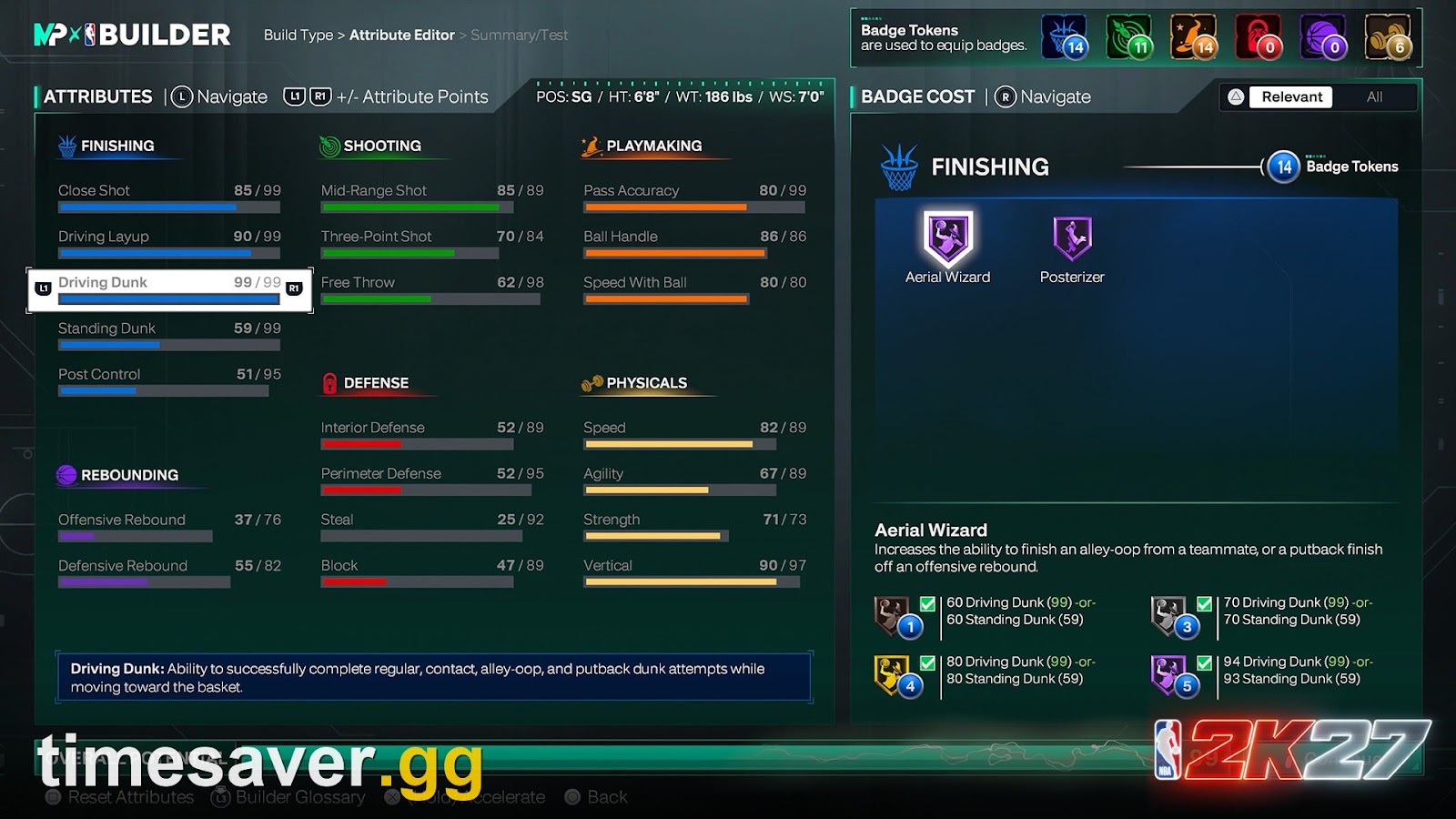
If your contact dunks stopped triggering after NBA 2K27's Update 2.0, you are not imagining it — but you are probably misreading what the patch did. Players across r/NBA2k are posting builds with a 99 Driving Dunk, 90 Vertical and 89 Strength who "can't get a single contact dunk," and the knee-jerk conclusion is that 2.0 nerfed dunking into the ground. It didn't. Update 2.0 actually buffed contact dunks — and most of the "contact dunks are dead" posts come down to one of four fixable things. This guide walks each one down in order, so you can get your posters triggering again before Season 2 flips on October 16, 2026.
Why do my contact dunks feel dead after Update 2.0? Update 2.0 (live October 8, 2026 on PS5/Xbox; October 16 on PC and Switch 2) did not nerf contact dunks — it made them succeed more often at every Rise Up level and fixed dunks that missed on correct timing. If yours stopped working, the cause is almost always one of these four: your contact-dunk animations aren't equipped, you're mistiming the manual Dunk Meter, the 2.0 Takeover changes (Airspace/Detonator) tuned down specific dunk sources, or shooting got easier so dunking only feels weaker by comparison.
What Update 2.0 actually changed about dunking
Here is the single most important fact, because it reverses the assumption behind most of the complaints: Update 2.0 buffed finishing, it did not nerf it. Visual Concepts' Update 2.0 notes (live October 8, 2026 on PS5 and Xbox; PC and Nintendo Switch 2 get the same build October 16, the day Season 2 starts) list these dunk-side changes:
- Contact dunks succeed more often at every badge level of Rise Up, not just the top tier — so a Gold or even Silver Rise Up now returns more dependable contact finishes than it did at launch.
- Reduced missed dunks when Dunk Timing is turned off — routine dunks clank less when the situation supports a finish.
- Fixed an issue where dunks and alley-oops could be missed even with correct timing on the Dunk Meter — a genuine bug fix, not a tuning change.
- Standing dunks succeed more often, most noticeably against average and below-average interior defenders.
So if the raw mechanic got better, why are so many players saying the opposite? Because three other things changed at the same time, and together they make contact dunks feel worse even though the dunk itself is stronger. The rest of this guide is those three things — plus the one setup mistake that accounts for most "99 Driving Dunk and nothing" posts.
Cause 1: Your contact dunk animations aren't equipped
This is the most common fix, and the most embarrassing one — it catches high-overall builds constantly. Owning a contact dunk package is not the same as having it equipped, and in 2K27 there is a final step players routinely skip. One r/NBA2k player summed up the whole saga in a single comment: "If you have a custom dunk package make sure you have contact dunk animations equipped. I didn't and was pissed I couldn't get any CD then I realized I didn't have it equipped and it changed my life."
If your build meets the rating and you still get a "sad layup animation" into the chest of a defender, check this first:
- Enter MyCAREER or The City on your MyPLAYER — the Dunk Style Creator lives in the animation menus, not the build screen.
- Open the Animations menu, then the Gameplay Moves → Dunk Style Creator.
- Confirm the contact dunk packages are actually slotted into your custom style. A package you bought but never dragged into the active style does nothing in a game.
- Re-select your named custom style after editing it so the game loads it. This is the step most players miss — editing a style but leaving a different one active means you play with the wrong animations all night.
If the packages are greyed out entirely, that's a requirement problem, not a 2.0 problem — jump to Cause 4.
Cause 2: You're mistiming the manual Dunk Meter
NBA 2K27 is not a hold-the-stick-and-posterize game. 2K's own gameplay page states that dunk attempts "must now be manually timed using the Dunk Meter," and a Dynamic Dunk Meter shrinks your green window when a defender closes out late. A contact dunk is a timed input into contact — mistime it and the engine kicks you to a layup read or a miss, no matter how high your Driving Dunk is.
Update 2.0 actually helped here — it fixed dunks and alley-oops that were missing even on correct timing. But that fix also removed the free passes some players were getting. Two settings decide your experience:
- Dunk Timing OFF: the game auto-resolves the finish. 2.0 reduced missed dunks in this mode, so if you were spamming dunks with timing off and clanking, you should clank less now. This is the safer mode for players who find the meter inconsistent.
- Dunk Timing ON (manual meter): you control the window, which is the only way to reliably hit the flashy contact packages — but you have to green it, and the window tightens against a late contest. If you're missing contested contact dunks specifically, that's the Dynamic Dunk Meter doing its job, not a bug.
The practical read: if you're greening open dunks fine but clanking in traffic, don't add more Driving Dunk — tighten your release timing, or switch to Dunk Timing OFF and let the 2.0 buff carry routine finishes. For the full meter mechanics, see our how to dunk guide.
Cause 3: The Update 2.0 Takeover changes tuned down specific dunk sources
Here is the real dunk nerf in 2.0 — and it's narrow, not global. The patch rebalanced Takeovers, and two of them were the biggest free-dunk generators in the game:
- Airspace now produces fewer successful dunks, and Rim Guardian counters it directly — so an active Airspace Takeover no longer bullies the paint the way it did at launch.
- Detonator was tuned to dunk less often and less successfully.
If your "contact dunks stopped working" complaint is really "I can't fly through the lane during my Takeover anymore," this is why. It is a deliberate defense-matters change, not a bug, and it only applies while those specific Takeovers are active. Outside of Airspace and Detonator, your base contact dunks are stronger than before 2.0, not weaker. The fix is a mindset one: stop relying on Takeover to force finishes through help defense, and pick your contact-dunk spots against a beaten or out-of-position defender instead.
Cause 4: Your build doesn't actually meet the requirement (and 2.0 didn't change that)
If the packages are greyed out in the Dunk Style Creator, the game is telling you the build doesn't qualify — and no patch fixes that. Contact dunks in 2K27 are a stack: the right Driving Dunk (or Standing Dunk for bigs), an eligible height, the equipped package, and a greened meter in a real contact situation. Miss any one and the poster never triggers.
- Driving Dunk is the master gate. Community testing since the September 4, 2026 launch puts the elite one-hand and two-hand contact packages in the low-to-mid 90s Driving Dunk, with player-signature contact animations a few points lower. These are community-reported, not an official 2K table, and reportedly shifted at launch — read the exact requirement shown next to each package in your own Dunk Style Creator.
- Height is a hard filter. Several flashy packages don't appear for builds above a cutoff commonly cited around 6'10" — so a 7-foot center can meet the Driving Dunk number and still never see a guard-style contact dunk in the list. Bigs lean on Standing Dunk for power posters instead.
- A couple of points can lock an animation out. The most-cited launch example is a Ja Morant-style signature contact dunk reported to need around 89 Driving Dunk — players who capped at 87 found it greyed out. That is exactly where a Cap Breaker pays for itself; see where to put Cap Breakers.
For the full attribute and height breakdown, read our contact dunk requirements guide, and for the specific animations worth equipping once you qualify, our best dunk packages guide.

Why it feels nerfed even though it isn't: the shooting buff
There's one more reason the paint feels different after 2.0, and it has nothing to do with dunking. Update 2.0 made shooting easier for quality shooters and killed "ghost contests." The official note reads: "Open shots from quality shooters are more effective, mid-range gets a boost in competitive modes, and overall three-point percentages have been slightly rebalanced." On top of that, the ghost-contest fix means a defender now has to be squarely in front of the shooter at release to lower their percentage.
The side effect: everyone is shooting, and shooting well. One player's complaint captures it — "dudes with low ratings greening contested shots more than open looks." When threes are falling at a high clip across the lobby, a build that was designed to attack the rim feels underpowered relative to the shooters, even though your dunk itself got stronger. That's a meta shift, not a dunk nerf. If your identity is slashing, the counter isn't more Driving Dunk — it's spacing and shot creation to force the defense to commit before you attack. Our buffs and nerfs breakdown sorts every 2.0 change into a winner-or-loser verdict by playstyle.
Quick fix checklist
Run this top to bottom the next time a contact dunk clanks:
- Animations equipped? Open the Dunk Style Creator, confirm contact packages are slotted, and re-select your named style so it loads.
- Meter timed? Green the manual Dunk Meter, or switch Dunk Timing OFF to let the 2.0 missed-dunk reduction carry routine finishes.
- Takeover active? If you're failing dunks during Airspace or Detonator, that's the 2.0 tuning — pick your spots instead of forcing it.
- Requirement met? Greyed-out packages mean your Driving Dunk, Standing Dunk or height doesn't qualify — not a bug.
- Real contact? An empty lane pushes you to a standard dunk; contact animations only trigger into a defender in your landing zone.
FAQ
Did Update 2.0 nerf contact dunks in NBA 2K27? No. Update 2.0 buffed them — the official notes state contact dunks succeed more often at every Rise Up badge level, standing dunks succeed more often against average-and-below interior defenders, and dunks that missed on correct Dunk Meter timing were fixed. The only dunk-side nerfs were to the Airspace and Detonator Takeovers, which now produce fewer successful dunks.
Why can't I contact dunk with 99 Driving Dunk after the patch? The most common reason is that your contact dunk animations are bought but not equipped in the Dunk Style Creator — slot them into your active style and re-select the named style. If they're greyed out, it's a height cap (several packages lock out builds above roughly 6'10"), not a rating issue. And remember every dunk is manually timed in 2K27, so a mistimed Dunk Meter sends you to a layup read regardless of rating.
Do I need Dunk Timing on or off after Update 2.0? Either works. Dunk Timing OFF benefits from 2.0's reduced missed dunks and is the safer choice if the meter feels inconsistent. Dunk Timing ON (the manual meter) is still the only way to reliably hit the flashiest contact packages, but you must green the window, which tightens against a late contest via the Dynamic Dunk Meter.
Why do my dunks miss during my Takeover now? Update 2.0 tuned the Airspace and Detonator Takeovers to produce fewer and less successful dunks, and Rim Guardian now directly counters Airspace. This is a deliberate defense-matters change. Your base contact dunks outside of those Takeovers are stronger than before the patch.
| When does Update 2.0 reach PC and Switch 2? PC and Nintendo Switch 2 receive Update 2.0 on October 16, 2026 — the same day Season 2 begins. PS5 and Xbox Series X | S got it on October 8. Until then, PC and Switch 2 players are on the pre-2.0 dunk tuning. |
|---|
Looking for more help with your build and the post-patch meta? Browse our full library of NBA 2K27 guides.