Applies to: ROB RUN Early Access on PC (Steam), checked on November 19, 2026. The screenshots below are frames from three in-game tutorial videos published on YouTube between November 11 and November 16, 2026 (the build number in their corner reads 0.7.0.4037 and 0.7.0.4040); we annotated them and blurred player names. Kefir can move menus in any Early Access patch. Every ROB RUN server wipes 7 days after it opens (Kefir calls it the Federal Raid), so your server number also tells you which wipe clock you're on.
This full loadout costs $90.49 on Timesaver and is delivered within 48 hours — see all ROB RUN prices.
Skip the grind in ROB RUN
| Item | Price | Delivery | Buy |
|---|---|---|---|
| ROB RUN Crew Kit | $34.99 | 2 hours | Buy now |
| ROB RUN Jail Time Boost | $49.00 | 48 hours | Buy now |
| ROB RUN Money | $6.50 | 2 hours | Buy now |
ROB RUN - ROB RUN Crew Kit
Get ROB RUN Crew Kit
Quick Answer / TLDR
- Fastest way: press Esc, open Settings and look at the bottom bar. Your server ID sits next to the Back and Default buttons, for example EU-0 2316. You don't have to leave the area you're in.
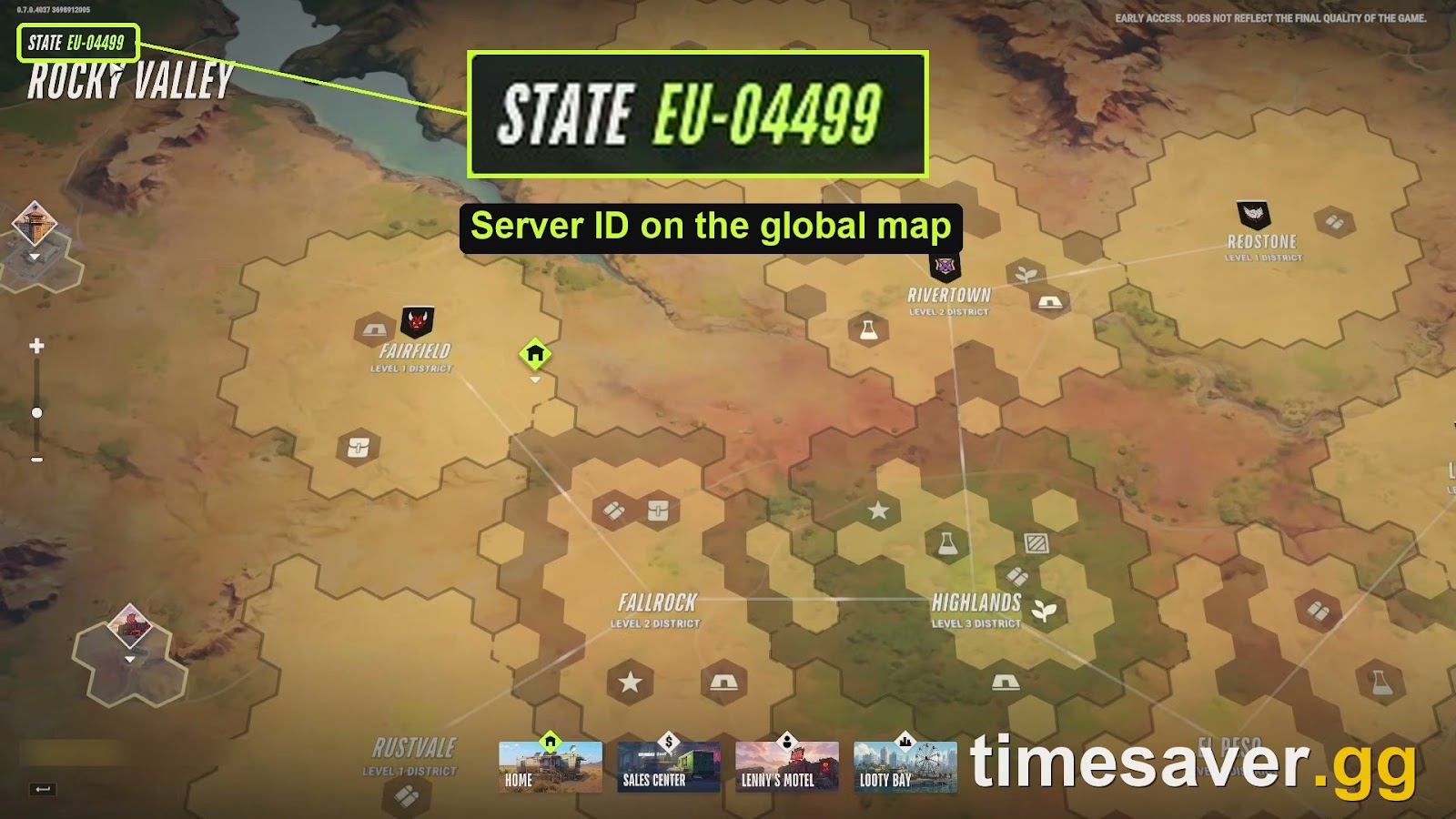
- Second way: the global map. The top-left corner reads STATE EU-04499, with the map name under it. The map writes the number without the space, so EU-04499 and EU-0 4499 are the same server.
- Third, for picking a server: the State Selection list in the Prison. It lists every server's ID, name, size, population and lifetime (how long ago it opened), and has an ID search box. You only reach it after surrendering, so it's not a way to check your current server.
- How to read it: the letters are the region (EU or US for East US), then 0 and a four-digit number. An ID like EU-0 3381 means server 3381 in the EU region.
- Don't send your UID instead. The UID under your name in the Esc menu is your player ID. Kefir's Help Center uses it for support, not for finding a server.
- Streamer mode hides the ID on the map, players report. Turn it off if the corner is empty.
What is a server number in ROB RUN?
ROB RUN runs many separate copies of its world at once. The game calls each one a State, and every State has an ID made of a region and a number. You see it in two spellings:
| Where you see it | How it's written | Example |
|---|---|---|
| Settings bottom bar | Region, "-0", space, number | EU-0 2316 |
| State Selection list | Region, "-0", space, number | EU-0 5178 |
| Global map, top left | "STATE", then the ID without the space | STATE EU-04499 |
| Search box in State Selection | "EU-0" is pre-filled, you type the number | EU-0 + 3381 |
So if a friend says "I'm on EU-0 3381" and your map says EU-03381, you're on the same server. If your map says EU-03318, you aren't: the last four digits have to match exactly.
There are only two regions. Kefir's First Changes & Server Schedule post says: "ROB RUN currently has two regions: EU and East US." East US IDs start with US-0 (fan trackers list IDs such as US-0 3776). Asia and Oceania are not coming before the end of 2026 at the earliest, per Kefir's November 13 developer Q&A.
The big name on the map (Rocky Valley in both of our map screenshots, taken on two different servers, EU-04499 and EU-06118) is not your server's name. The State Selection list gives each server its own name, such as Dusty Cerro or Iron Desierto, but names repeat across servers, so always share the ID.
Method 1: How do you find your server ID in Settings? (fastest)
This is the quickest route because it works anywhere, in a safe room or in the middle of the desert.
- Press Esc to open the menu on the right side of the screen.
- Click Settings (the gear icon, second-to-last item above Exit).
- Look at the bottom bar, left side, next to ESC Back and R Default. Your server ID is there, next to a small copy icon, for example EU-0 2316.
- Write the ID down, or take a screenshot. The bar showed it on both tabs we checked, Graphics and Other.

The screenshot above is the Other tab, which also holds two buttons you should leave alone while you're only checking your ID: Surrender To Feds and Region: Europe. The in-game tooltip on the first one is blunt: "Your character will surrender to the feds and go to jail. You will lose all your property and receive a sentence for the crimes committed." Checking your server number never needs either button.
Method 2: How do you see your server on the global map?
- Open the global map. In the tutorials we used, it also came up when the player left a location through its exit zone, for example by driving out of Lenny's Motel into the desert.
- Look at the top-left corner. The small line reads STATE, then your ID in green, such as EU-06118.
- The large text under it is the map name, not the server.
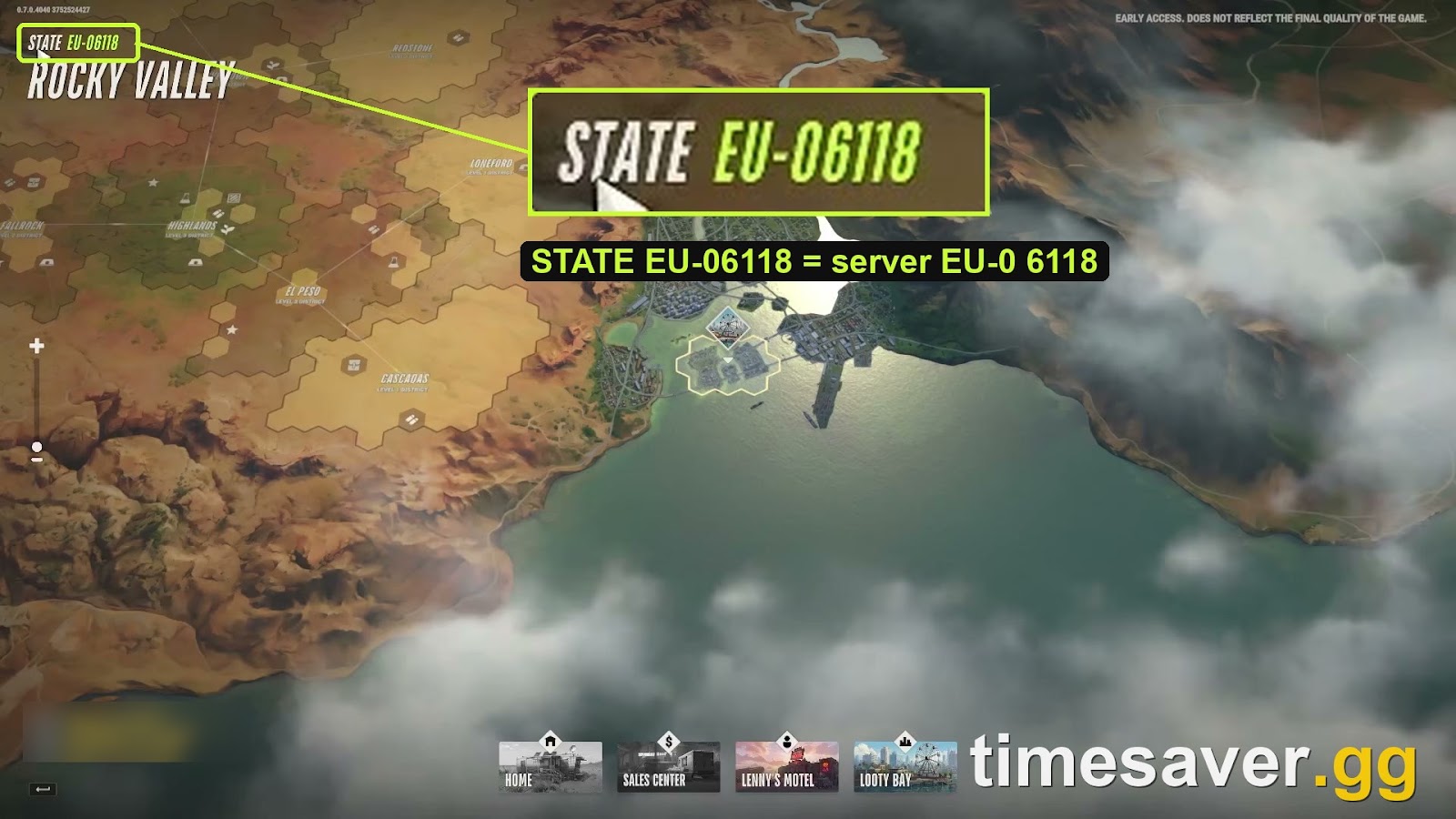
Nothing in the corner? Players report that streamer mode hides the server name on the map (one r/robrun player who couldn't load into a map read the ID US-05525 off this screen, in a thread from November 9). Turn streamer mode off in Settings and reopen the map, or just use Method 1.
Method 3: How do you find server IDs in the State Selection list (to switch servers)?
The State Selection screen is ROB RUN's server list. There is no server browser in the main menu, so the only way to see it is to go through the Prison, which costs you everything you own on your current server. Use it to pick a server, not to check the one you're on.

Here's what each column means:
- ID: the server number, for example EU-0 5178.
- Name: the State's name. Some rows carry a green Recommended tag.
- Size: 15000 on every row in our screenshot, so it isn't a live player count.
- Population: a three-dot indicator with a label such as Medium.
- Lifetime: how long ago the server opened, from 10m to 6h 31m on this screen. This is the number that matters for the wipe: the server wipes when its lifetime reaches seven days.
At the top there's an ID search box with "EU-0" already filled in and a ping readout for your region (Europe, 32 ms in the screenshot). To join a specific server, type its four digits, select the row and press Confirm.
You reach this screen from inside the Looty Bay County Prison. The tutorial we used cuts straight from walking through the Prison to this list, so we can't show the exact object you interact with; Kefir only calls it switching server "in the prison". If you're already serving time there, you don't need to surrender again. If you're out in a State, this is Kefir's route, from its Help Center:
"To sync up, open the global map, select the Prison location, and click 'Surrender to Feds'. Once inside, switch to your friend's server in the prison and resend the party invite."
Before it lets you go, the game warns: "If you surrender to the feds, all your belongings in the current state will be confiscated and you will receive a prison sentence." Read our ROB RUN servers guide before you move, and see our jail time guide for what the sentence does.
How old is your server, and when does it wipe?
The server ID alone doesn't tell you when it opened. The number isn't a date, and a higher number isn't always a newer server: in the list above, EU-0 5178 had been open for 50 minutes, while the lower-numbered EU-0 4797 was only 20 minutes old.
You can get the age two ways:
- State Selection: read the Lifetime column next to your ID.
- Main menu: players and fan trackers say the main menu shows your server's lifetime in the bottom-right corner, just above the Run button. We didn't capture this screen ourselves, so treat the position as a community report. Be careful: quitting to the menu from the field shows a Leave Game? warning that "Leaving the game will start a timer during which you will be vulnerable." Do it in a safe spot.
Then take the lifetime away from seven days: a server with a lifetime of 5 days has about 2 days left, so it wipes roughly 2 days from now. Or skip the maths: type the lifetime into our ROB RUN wipe timer and it gives you the wipe time for your server. Kefir publishes the seven-day rule and the daily opening times (EU at 5 PM UTC, East US at 8 PM ET, plus extra servers as needed), but no per-server wipe list.
ROB RUN - ROB RUN Jail Time Boost
Get ROB RUN Jail Time Boost
Server ID vs UID: what's the difference?

The Esc menu shows a number under your character name, and plenty of players send it as their "server". It isn't. Kefir's Help Center explains: "Press Esc: your UID is displayed on the right, under your character name." That UID belongs to your player, not to the server you're on.
| Server ID | UID | |
|---|---|---|
| What it identifies | The State (server) you're on | You, the player |
| Example format | EU-0 3381 | A number (8 digits in our screenshots) |
| Where to find it | Settings bottom bar, global map, State Selection | Esc menu, under your name |
| Changes when you switch server | Yes | No |
| Who asks for it | Friends, clan mates, in-game deliveries | Kefir support (lost progress, purchases) |
Why does your server number matter?
- Playing with friends. Parties hold up to three players and everyone has to be on the same server. Compare full IDs before anyone surrenders; two players who both picked EU can still be on different servers.
- Clans. A clan exists only on one server, so a new member needs your clan's ID.
- Wipe planning. Each server runs its own seven-day clock. Your ID plus its lifetime is the only reliable way to know when your Federal Raid hits. If the game is down rather than your server, check our ROB RUN server status page.
- Support and reports. When you report lag or a crash, add the server ID, the exact error and the time.
- In-game hand-overs. Anything handed over to you in game has to happen on your server, so whoever brings it needs the exact ID and region.
What mistakes do players make when sharing their server ID?
- Sending only the region. "I'm on EU" means nothing; there are hundreds of EU servers.
- Dropping or adding digits. EU-04499 on the map and EU-0 4499 in Settings are the same; EU-0 499 is not.
- Sending the UID. See the table above.
- Sending the map name. Rocky Valley showed on two different servers in our screenshots.
- Using an old ID after a wipe. When your server wipes it's gone; check the ID again on the new one.
FAQ
Can I buy this loadout instead of farming it? Yes: this loadout costs $90.49 on Timesaver, and a Timesaver pro completes it by hand within 48 hours. How handover works and what happens if something goes wrong: account safety.
How do I check my server number in ROB RUN? Press Esc, open Settings and read the ID in the bottom bar, for example EU-0 2316. You can also see it in the top-left corner of the global map, written as STATE EU-02316.
What does a ROB RUN server ID like EU-0 3381 mean? EU is the region (US means East US), and 3381 is the server's number in that region. The map writes the same server as EU-03381.
Why can't I see my server ID on the map? Players report that streamer mode hides it. Turn streamer mode off or read the ID in the Settings bottom bar instead.
Is my UID the same as my server ID? No. The UID under your name in the Esc menu identifies your player account and doesn't change between servers. The server ID starts with EU-0 or US-0.
Can I see a list of all ROB RUN servers? Only in the game's State Selection screen, which you reach from the Prison after you surrender to the Feds. Kefir publishes no official server list, and surrendering costs you what you own on your current server.
Does the server number tell me when my server wipes? No. Check the server's lifetime (State Selection, or the main menu per players) and subtract it from seven days to get the time left, or enter it in our wipe timer.
How do you use your server ID when you order?
Need a hand on a fresh server? timesaver.gg hands ROB RUN money and keys over in game on the server you name, so the first thing we ask for in the order chat is the ID you just found, plus your region and character name. Kefir's rules prohibit real-money trading and account selling, so read how ROB RUN delivery works before you order.
- ROB RUN Money: Dirty Cash by the million: handed over on your own server; like all cash, it resets at the Federal Raid.
- ROB RUN Safe Keys & Room Keys: a random mix of the key type you pick, handed over on your server.