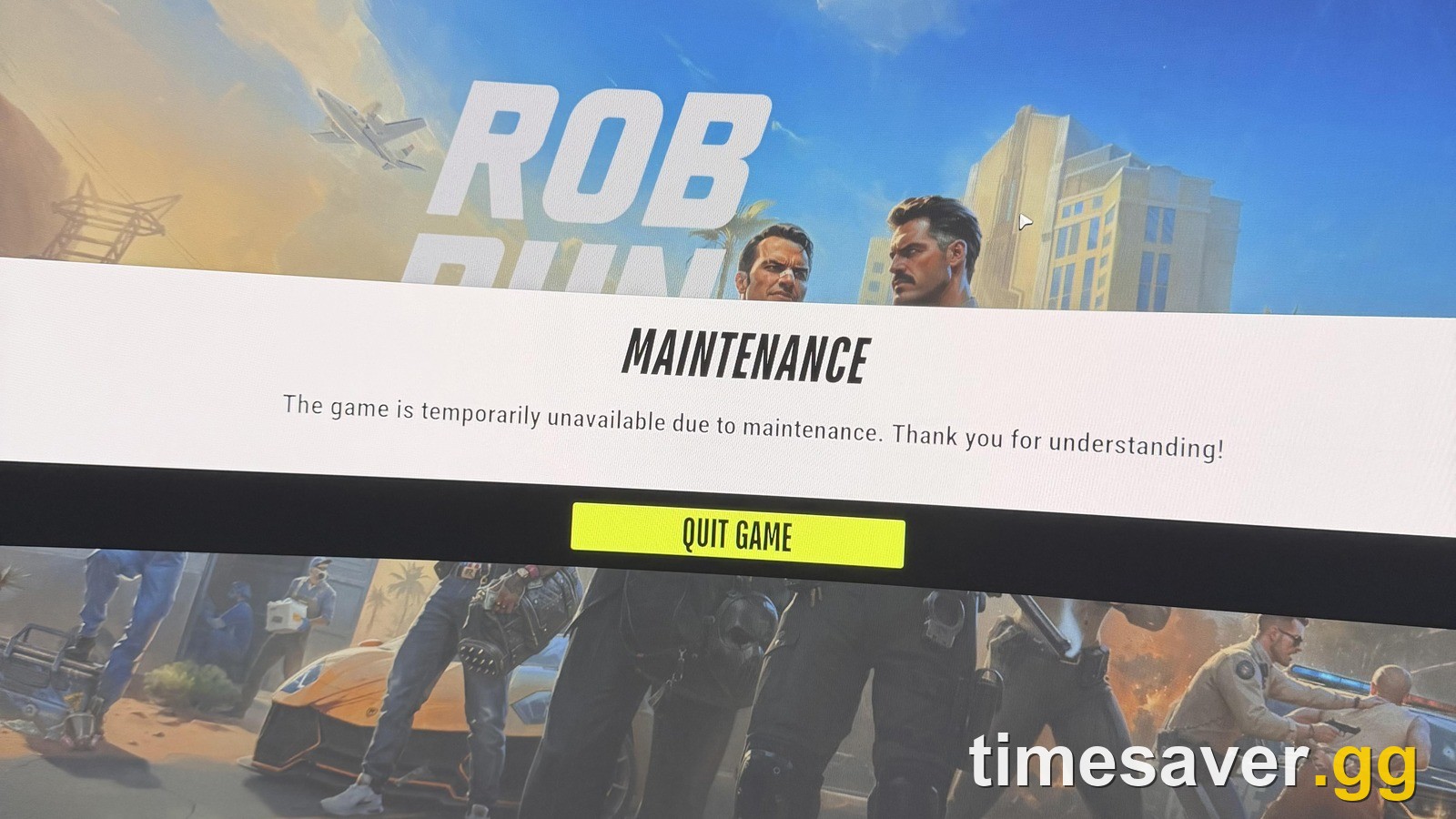
Applies to: ROB RUN Early Access on PC (Steam), launch build from November 4, 2026, checked on November 9, 2026. Kefir has not published an official explanation for the Waiting for Status Information screen, so this guide separates what Kefir says from what players report.
This full loadout costs $47.98 on Timesaver and is delivered within 24 hours — see all ROB RUN prices.
Skip the grind in ROB RUN
| Item | Price | Delivery | Buy |
|---|---|---|---|
| ROB RUN Crew Kit | $32.99 | 24 hours | Buy now |
| ROB RUN Money | $12.50 | 24 hours | Buy now |
| ROB RUN Items | $2.49 | 2 hours | Buy now |
ROB RUN - ROB RUN Crew Kit
Get ROB RUN Crew Kit
Quick Answer
- What it is: Waiting for Status Information is the loading screen ROB RUN shows while it connects you to a location such as your plot, Lenny's or Looty Bay. When it hangs, players report it running for about a minute and then throwing you back to the map.
- Why it happens right now: Kefir confirmed on November 7 that its servers were under repeated DDoS attacks causing "connection errors, lag, and other in-game issues". The game also hit a 140,440 concurrent player peak on November 8 (SteamDB), more than double its 64,828 peak on November 6.
- Where to start: fully quit ROB RUN to the desktop, restart Steam, and launch again from your Steam library. If that fails, verify the game files in Steam and update your graphics driver. The restart, file check and driver update are Kefir's own steps. None of them helps while the servers themselves are struggling.
- Error code on screen? Match it to the table below. E-0101 and E-0110 mean the game can't reach the server, E-0301 and E-0302 mean your version is outdated, and E-0501 or E-0502 is Easy Anti-Cheat.
- Server status: there is no official status page. Check Kefir's Discord and the pinned Steam discussions first. The Steam player count is only a rough hint. ROB RUN only has EU and East US servers.
- The wipe: every server wipes 7 days after it opens. The Federal Raid resets plots, bases, weapons and all cash, banked money included. If your base is gone after a long loading screen, check the wipe first. Servers that opened at launch on November 4 are due around November 11, 2026.
Loading problems are all over r/robrun this week: five separate threads in the last 48 hours. One player described it on r/robrun on November 8: "Just trying to join my plot, or even Lenny's or even Looty bay.. anything but I get this loading screen and it runs for 1 minute and then kicks me back to the map." Another player wrote that "at least half of the time was spent on loading screens" in a 6-hour session. A Steam discussion about the same screen has been running since November 5 with dozens of replies. Here is what is likely behind it, what you can try on your side and what you can't fix yourself.
What does Waiting for Status Information mean in ROB RUN?
ROB RUN splits its world into separate locations. Your base plot, settlements, Lenny's and Looty Bay all load on their own, and the game moves you between them from the global map. Waiting for Status Information is the screen it shows while it asks the server to place you in the next one.
When the server answers, the screen clears. When it doesn't, players land back on the map. Kefir hasn't explained the message, so we can't tell you exactly which server step is failing. What we can say from player reports is when it shows up:
- Travelling between locations. Going from Looty Bay back home, or from the map into a settlement, is where most reports come from.
- After a server restart. One player in the Steam thread says that after each restart they wait 2 to 3 hours before they can play again.
Why is ROB RUN stuck on the loading screen?
There are three likely causes, and only one of them is on your PC.
1. Server load and DDoS attacks (not your fault). Kefir's developer posted a pinned ROB RUN Server Update on Steam on November 7:
"Our servers have been under repeated DDoS attacks since last night, causing connection errors, lag, and other in-game issues. We're aware of the situation, and the team is doing everything possible to keep the servers stable and minimize disruptions."
The same post says: "We know the launch hasn't been as smooth as we'd hoped, and we're working hard to improve things." On top of the attacks, the player count kept climbing. ROB RUN peaked at 140,440 concurrent players on November 8, according to SteamDB, and Steam's player-count API still showed 51,990 players at about 08:30 UTC on November 9, a Monday morning in Europe.
2. A game left open through a server restart. Kefir hasn't described how the client reconnects, but players find that a full relaunch works where retrying from the map doesn't. A player on a US server reported on r/robrun on November 9 that they had to quit to the desktop and relaunch every time to load into a map. That is the pattern to try first: a full relaunch rather than another retry from the map.
3. Your files, driver or network. This is the part you control, and Kefir's Help Center covers it.
How do I fix Waiting for Status Information in ROB RUN?
Work through these in order. Stop as soon as one works.
- Quit to the desktop, not to the map. Close ROB RUN completely. Players who retry from the map report the screen looping.
- Restart Steam. Kefir's loading FAQ says: "Check your internet connection, restart both the game and Steam, and update your graphics driver." A pending ROB RUN update also stops the game from connecting: that's error E-0301 or E-0302, and Kefir's fix is to restart Steam and update.
- Launch from your Steam library. For Easy Anti-Cheat errors E-0501 and E-0502, Kefir's error code list says to launch the game only through Steam.
- Verify the game files. In Steam go to Properties → Installed Files → Verify integrity of game files. This fixes E-0124, E-0303 and E-0304, and it's worth doing once after any patch.
- Update your graphics driver. Kefir lists it in the same loading FAQ.
- Check the server before you keep retrying. If the servers are mid-restart, nothing on your PC will help. See the server status section below.
- Wait 10 to 15 minutes. For corrupted or mismatched data (E-0303, E-0304), Kefir's advice is to wait 10 to 15 minutes, disable any proxy, verify the files and update.
Things not worth your time: reinstalling the whole game before you've verified the files, moving the game folder (the US player above tried it, it didn't help) and third-party "fix" tools, which Kefir doesn't recommend.
What do ROB RUN error codes mean?
Kefir publishes a full error code list. If your loading screen ends in a code, this is what it means and what Kefir tells you to do.
| Error code | What Kefir says it means | Kefir's fix |
|---|---|---|
| E-0101, E-0110 | The game can't connect to the server to download configuration or startup data | Check your internet connection and that websites load |
| E-0102 | Data was blocked or arrived with errors, often on hotel, cafe or public Wi-Fi, or because of antivirus | Use a home network, disable proxy, pause HTTPS scanning in your antivirus |
| E-0124 | Internal asset loading error | Verify game files in Steam |
| E-0201 | You were connected, lost the server and didn't reconnect | Check your connection and restart the game |
| E-0301, E-0302 | Outdated game version | Close the game, restart Steam, update |
| E-0303, E-0304 | Corrupted data or data that doesn't match the current version | Wait 10 to 15 minutes, disable proxy, verify files, update |
| E-0401 | Steam account authentication failed | Make sure Steam is online and on the right account, restart both |
| E-0403, E-0404 | Epic Online Services authorization issue | Verify files, add the game to antivirus exceptions, restart your PC |
| E-0405 | Steam isn't responding, or antivirus blocked a game library | Check antivirus quarantine, verify files, launch from the Steam library |
| E-0501, E-0502 | Easy Anti-Cheat isn't running, is corrupted or is blocked | Launch only through Steam, stop antivirus, verify files, restart your PC |
| E-0601 | No keyboard or mouse detected, common on Remote Desktop or cloud streaming | Plug in a physical keyboard and mouse before launch |
| E-0904 | Unexpected internal error | Restart the game, send the error text to support if it repeats |
If the screen hangs with no code at all, the server side is the more likely cause, so go to the status check below.

How do I check ROB RUN server status?
Kefir doesn't run a public status page. Use these checks:
- Kefir's official channels. Kefir's support page lists the official Discord at discord.gg/robrun, X at @ROBRUNGame and the Steam page.
- The pinned Steam discussions. The November 7 server update is pinned in ROB RUN's Steam General Discussions, and new posts from the developers show a developer tag.
- The Steam player count, as a rough hint only. SteamDB shows how many people have ROB RUN open. That's not the same as servers accepting connections, so a normal number doesn't prove your server is fine, and you should still confirm with Kefir's posts.
Two server facts that cause a lot of "it's down" posts but aren't outages:
- Only two regions exist. ROB RUN has servers in EU and East US only. Players elsewhere connect to one of those, so high ping is expected. One EU player reported on r/robrun that the server list promised 30 ms but they got 200 ms. If your ping is far above what the list shows, try the other region for a session and compare.
- New servers open on a schedule. Kefir's launch-day First Changes and Server Schedule post says at least one fresh server opens each day per region, EU at 5 PM UTC and East US at 8 PM ET, with extra servers opening automatically when needed. A brand-new server can be busy in its first hour.
If your friends are on another server and you can't reach them, that's a server switch, not a connection problem. Our guide on how to play with friends in ROB RUN walks through Kefir's prison route for changing servers.
ROB RUN - ROB RUN Money
Get ROB RUN Money
Do you lose money if ROB RUN disconnects you?
Kefir hasn't published a rule for what happens to carried items or cash when the server drops you. Players in the Steam thread report losing cash they were holding when they were kicked to the map, including one who lost a police salary that hadn't been banked. Treat that as a real risk while the servers are unstable.
What Kefir does say: cash you carry can be stolen, and money in the Looty Bay Bank is protected from theft "until the next wipe" (Kefir FAQ). You get it there by laundering at your base's Laundering Desk. So the practical rule this week is simple: launder big sums before a long trip between locations, not after. Our ROB RUN money guide covers the laundering route step by step.
Is my progress gone after a loading screen?
Probably not, but check two things before you contact support. Kefir's lost progress FAQ says: "First, check if a wipe has occurred and make sure you are logged into the correct Steam account."
Check whether a wipe has happened first. Every ROB RUN server wipes 7 days after it opens. Kefir calls it the Federal Raid, and per its wipe FAQ it resets:
- plots and bases
- weapons
- all cash, including money in the bank, which is converted into jail time and authority
What carries over: cosmetics, your player name, tutorial progress, settings and accumulated jail time. Servers that opened on launch day, November 4 at 5 PM UTC, are due their first Federal Raid around November 11, 2026. Newer servers wipe 7 days after their own opening. The full timing is in our ROB RUN wipe schedule, and how ROB RUN delivery works explains how your server ID ties into the wipe clock.
If no wipe has happened and you're on the right account, contact support with your UID, player name and the rough time you lost the progress. Your UID is in the Esc menu on the right, under your character name, with a Copy UID button (Kefir FAQ). The support address on Kefir's help center is robrun.support@kefircyprus.com.
What if the game loads but runs badly?
Some "loading" complaints are really performance problems. Kefir has answers for the two common ones:
- FPS drops to single digits when you move the mouse. Kefir's FPS FAQ blames an excessively high mouse polling rate. Lower it in your mouse software (Logitech, Razer, Bloody and so on). If that doesn't help, update your GPU driver and BIOS, especially on 13th and 14th gen Intel CPUs, and turn off overlays like Discord or GeForce Experience.
- Crashes. Close unused apps and restart your PC. If crashes continue, send support your PC specs, a description of the crash and the error text (Kefir FAQ).
Also check the system requirements: the minimum is 64-bit Windows 10, an Intel i5-6600K or Ryzen 5 1600, 12 GB of RAM, a GTX 1050 Ti, RX 580 or Arc A380 and 20 GB of free storage.
Will Kefir fix the ROB RUN loading screen?
Kefir says it's working on it, and that's all it has committed to. Its November 7 post ends with "We'll keep you updated as things develop." There is no patch date for the loading screen yet, and ROB RUN is in Early Access, so check the November 9, 2026 date at the top before you follow this guide.
Until a fix lands, the routine that loses you the least time is: full restart instead of map retries, verify files after every update, play in your nearest region, and launder your cash before you travel.
FAQ
Can I buy this loadout instead of farming it? Yes: this loadout costs $47.98 on Timesaver, and a Timesaver pro completes it by hand within 24 hours. How handover works and what happens if something goes wrong: account safety.
What does Waiting for Status Information mean in ROB RUN? It's the loading screen ROB RUN shows while it connects you to a location like your plot, Lenny's or Looty Bay. Players report that when the server doesn't answer, it runs for about a minute and sends them back to the global map. Kefir hasn't published an official explanation of the message.
How do I fix Waiting for Status Information in ROB RUN? Quit to the desktop, restart Steam and launch ROB RUN from your Steam library. If it keeps happening, verify the game files in Steam (Properties, Installed Files, Verify integrity of game files) and update your graphics driver. If the servers are restarting, wait until they're back.
Is ROB RUN down right now? Kefir has no status page, so check its Discord at discord.gg/robrun and the pinned posts in ROB RUN's Steam discussions. The Steam player count shows how many people have the game open, not whether the servers accept connections. Kefir confirmed DDoS attacks on its servers on November 7, 2026.
Why does ROB RUN kick me back to the map? Kefir hasn't explained the timeout, but its November 7 post ties the week's connection errors to DDoS attacks on its servers. Players report it most when travelling between Looty Bay and home and after server restarts.
Do I lose my money if ROB RUN disconnects? Kefir hasn't published a rule for disconnects, but players report losing cash they were carrying. Money in the Looty Bay Bank is protected from theft until the next wipe, so launder big sums before you travel.
Why is my ROB RUN base gone? Check the wipe first. Every server wipes 7 days after it opens, and the Federal Raid resets plots, bases, weapons and all cash. Launch servers are due around November 11, 2026. If no wipe happened, contact support with your UID.