Quick answer: If Black Ops 7 Zombies stutters, freezes every ~30 seconds, or flashes the three-orange-square packet-burst overlay — and it's worse in Zombies than in Multiplayer, or it happens even in a solo game — the cause is almost never your internet. In Zombies it's usually your PC or console being saturated by texture streaming, VRAM load, and CPU thread pressure as the horde and effects pile up. The overlay says "network," but the fault is local. Fastest fixes, in order: set On-Demand Texture Streaming to Minimal (or off), lower your VRAM Scale Target to ~60–70%, turn NVIDIA Reflex to On + Boost, cap your FPS a few frames below your refresh rate, restart shader pre-loading, and switch to a wired connection. Do the first three and most players get clean high rounds in Kowakujō, Eidskallen, and the incoming Rex Infernus in under 15 minutes.
This guide is specifically for stutter, micro-freezes, and packet burst inside Zombies — the mode where a hitch gets you downed and ends a 40-minute run. If your whole game crashes to desktop or won't launch, use the sibling guides linked below instead. Zombies has its own reasons for hitching, and they're fixable without touching your router.

Call of Duty - Bot Lobby
Get bot lobby in 10 minutes
Why is Black Ops 7 Zombies stuttering when Multiplayer runs fine?
This is the single most common question, and the answer explains every fix that follows. Multiplayer maps are small, the player count is capped, and the visual load is fairly constant. Zombies is the opposite: the number of enemies, the particle and gore effects, and the amount of unique geometry you stream all climb every round. By round 25–30 your system is doing far more work per frame than it ever does in a 6v6 — so the first thing to break is whatever's already near its limit.
Three culprits do the damage in Zombies specifically:
- Texture streaming re-caching mid-match. Black Ops 7's On-Demand Texture Streaming pulls high-res textures over the network and to disk while you play. In a long Zombies run it keeps re-fetching as you move through the map, and each fetch is a burst of background traffic and disk I/O. That's the classic "stutter every ~30 seconds" pattern players report in solo — the game re-caches, hitches, and the connection overlay flashes even though your ping is fine.
- VRAM saturation. Late rounds fill your video memory with zombie models, blood decals, and effects. When VRAM tops out, the engine starts swapping, and swapping is the stutter. This is why players on strong GPUs still hitch in Zombies while sailing through Multiplayer.
- CPU thread pressure. Every zombie is an AI actor. A screen full of them plus your gunfire, traps, and elemental effects can spike a CPU thread past its frame budget, and a missed frame reads on screen as a freeze — and to the netcode as a burst.
None of that is your ISP. It's why the fixes below are mostly graphics settings, not network tweaks — though we'll harden the network too, because a bad route on top of a saturated PC is the worst of both worlds.
Is it your PC or the servers? Check this first
Before you change a single setting, rule out an outage or a build-side issue — it takes 30 seconds and saves you an hour of chasing your own tail.
- Open the Activision online-services status page and check Black Ops 7 and your platform. Mid-season updates (Season 5 went live July 23, 2026, with Season 5 Reloaded landing August 20) often bring server-side hiccups in the first days.
- The tell that it's server- or account-side, not your rig: if the stutter, freezing, and dashboarding hit you in every mode, or another Call of Duty title runs perfectly on the same PC while BO7 does not, that points at the servers or your account — not your settings. In that case, log a ticket with Activision Support and wait it out; no local tweak will fix a broken build handshake.
- If status is green and the problem is worse in Zombies than Multiplayer, it's local saturation. Move to the fixes.
Activision's own performance guidance is blunt about the network half of the equation:
"Direct routes will reduce latency and minimize potential instances of packet loss."
— Improving Lag and Performance in Call of Duty: Black Ops 7, Activision Support
Translation: a wired, direct connection matters — but for Zombies-specific stutter, the settings fixes below matter more.
The fixes, in the order that actually works
Work top to bottom and stop as soon as your run is smooth. They're ordered most-impact-first for Zombies.
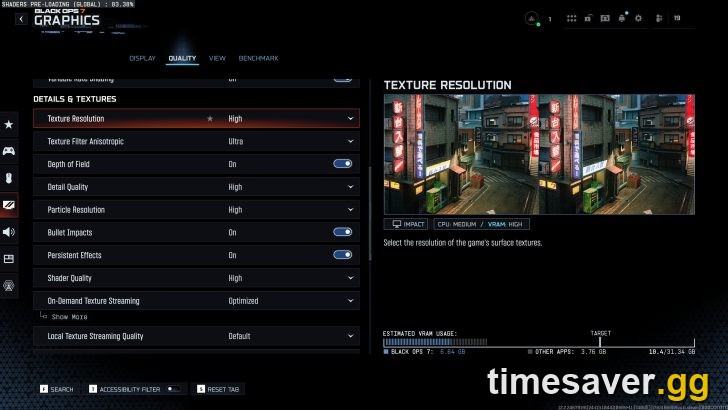
Fix 1 — Set On-Demand Texture Streaming to Minimal (or Off)
This is the biggest single win for Zombies stutter, because it kills the mid-round re-caching that causes the 30-second hitch.
- Go to Settings → Graphics → Quality (or Details & Textures) and find On-Demand Texture Streaming.
- Set it to Minimal, or turn it Off entirely. This stops the game from constantly pulling textures over the network and from disk while you fight.
- If you keep it on for sharper textures in Multiplayer, at minimum cap the streaming/local cache so it reuses textures from disk instead of re-fetching. Lowering streaming cuts background HTTP traffic and disk I/O — exactly what spikes during a long run.
- Restart the game after changing it so the setting fully applies.
Most players who report "stutter every 30 seconds in solo Zombies" are fixed at this step alone.
Fix 2 — Lower VRAM Scale Target and trim heavy effects
If your video memory fills in late rounds, you stutter no matter how good your GPU is. Give the engine headroom.
- In Settings → Graphics → Textures, drop VRAM Scale Target from its default (around 90%) to 60–70%. Leaving overhead prevents the swap-to-stutter cycle when a round floods the screen.
- Lower Texture Resolution one notch if you're on 8 GB of VRAM or less — Zombies is far more texture-hungry than Multiplayer.
- Turn gore/blood effects and particle quality down. Dozens of simultaneous blood decals and death effects are a real frame cost in a horde; cutting them smooths the exact moments you're most likely to get downed.
- Cap high-cost extras like screen-space reflections and volumetric quality to Medium for Zombies sessions.
Fix 3 — Turn on NVIDIA Reflex and cap your FPS
Frame pacing, not raw frame count, is what you feel as stutter. Two settings fix pacing.
- Settings → Graphics → Display: set NVIDIA Reflex Low Latency to On + Boost (GeForce cards). It tightens the render queue and noticeably reduces hitching under load.
- Cap your framerate a few frames below your monitor's refresh rate — for example 138 on a 144 Hz panel, or 117 on 120 Hz. An uncapped framerate that swings wildly between rounds feels far worse than a stable capped one, and a hard cap stops the CPU from over-producing frames during quiet moments and choking during hordes.
- Make sure V-Sync is Off in-game if you're capping in-engine (double-syncing adds latency).
Fix 4 — Rebuild the shader cache
A half-built or stale shader cache after a patch causes exactly the kind of one-second freezes that end Zombies runs.
- On the main menu, look for Restart Shaders Pre-Loading / Restart Shader Installation under Settings → Graphics and run it. Let it finish to 100% before you queue a match — playing while shaders compile is a guaranteed stutter.
- If your platform lets you, clear the shader cache first, then rebuild. On PC you can also clear your GPU driver's shader cache (NVIDIA Control Panel / AMD Adrenalin) and let BO7 recompile clean.
- Big Season 5 updates invalidate old shaders, so re-run this after every major patch — including the August 20 Season 5 Reloaded update.
Fix 5 — Harden your connection (wired, direct route)
Now clean up the network half so a genuine burst doesn't stack on top of a settling PC.
- Go wired. An Ethernet cable removes Wi-Fi interference and packet loss — Activision's own guidance leads with this.
- Restart your router and modem to clear a congested route, and if you can, plug your PC/console directly into the modem to test a direct path.
- Close bandwidth hogs: background downloads, cloud sync, other devices streaming 4K, and launcher updates all steal throughput mid-run.
- On PC, quit overlays (Discord, GeForce Experience / NVIDIA App, Xbox Game Bar) — they can inject their own micro-stutter and occasionally interfere with the game's traffic.
Fix 6 — Console-specific stutter (PS5 / Xbox)
Consoles hit Zombies stutter less often, but when they do it's cache or a half-applied update.
- Rebuild the database (PS5): fully close the game (not Rest Mode), boot into Safe Mode (hold Power to the second beep) → Rebuild Database. It clears the fragmentation that causes hitching without deleting anything.
- Full restart (Xbox): hold the Xbox button → Restart console — a full restart clears the cache; Quick Resume can carry the fault over.
- Confirm the update fully installed under Storage/Updates before launching — starting mid-download causes loading loops and in-match hitches on both consoles.
- Lower the in-game Frame Rate mode to the stable option if your TV supports both; a locked 60 in Zombies beats an unstable "performance" target that dips mid-horde.

Call of Duty - Ranked Boost
Get ranked boost in 10 minutes
Does the map matter? Kowakujō, Eidskallen, and Rex Infernus
Yes — heavier maps stress a marginal setup more. Kowakujō is the round-based main-quest map (its Directed Mode caps runs at round 15, which conveniently also limits how far your system has to hold up if you're only chasing the guided Easter egg). Eidskallen Lighthouse is the Season 5 Survival map, wave-scored, and its open sightlines stream a lot of geometry. Rex Infernus, the final round-based map arriving August 20 with Season 5 Reloaded, is the biggest test yet — if your rig hitches now, apply Fixes 1–3 before launch week so a stutter doesn't cost you the time-limited launch calling card. Older maps like Totenreich and the Rogue Run: Astra Malorum roguelike are lighter, so if you only stutter on the newest maps, it's a saturation problem, not a broken install.
Keep the run going — don't let a fixed game go to waste
Once Zombies runs clean, the grind is the fun part — but it's still a grind. High-round camo challenges, weapon leveling to Mastery, and the Dark Ops / event calling cards eat hours, and a single late hitch can still end a deep run. When you want the reward without the 40-minute risk:
Turn a smooth game into finished goals:
- CoD Account & Weapon Leveling — skip the grind and jump to max weapon levels and prestige, done by real players.
- BO7 Weapon Leveling — level any gun to max in Zombies-optimized runs so your camo grind is smooth from the start.
- BO7 Calling Cards Boost — lock in the time-limited Zombies and Dark Ops cards before the window closes.
- All Call of Duty services — camos, ranked, Easter eggs, and more.
Frequently Asked Questions
Why does Black Ops 7 Zombies stutter every 30 seconds in solo? Because it isn't a network problem — it's On-Demand Texture Streaming re-caching and VRAM filling up as the round load climbs. In solo there are no other players to blame, which is the giveaway that it's local. Set texture streaming to Minimal (Fix 1) and drop your VRAM Scale Target (Fix 2), and the 30-second hitch almost always stops.
Is the packet-burst overlay in Zombies really a connection problem? Usually not. The three-orange-square overlay warns that consecutive packets failed, but in Zombies that's frequently triggered by your PC missing frames under VRAM and CPU load — the client hitches and the netcode reports a burst. Fix the graphics settings first; only harden the network (Fix 5) if the overlay persists after that.
My Multiplayer is smooth but only Zombies lags — why? Zombies pushes far more enemies, effects, and streamed geometry per frame than a 6v6 match, so it saturates whatever's already near its limit — usually VRAM or a CPU thread. Same PC, much heavier load. Lowering texture streaming, VRAM target, and gore/particle quality closes the gap.
Nothing works and it crashes in every mode after the update — what now? If the freezing and dashboarding hit every mode and another Call of Duty runs fine on the same machine, it's most likely server- or account-side, not your settings. Check the Activision status page, file a support ticket, and wait for a fix — reinstalling or a factory reset won't help a build/account issue.
Will capping my FPS make Zombies feel worse? No — a stable capped framerate feels smoother than an uncapped one that swings between rounds. Cap a few frames below your refresh rate (e.g., 138 on 144 Hz) and turn on NVIDIA Reflex; consistent frame pacing is what stops the perceived stutter, even if the peak number is slightly lower.
Do I need to redo these fixes after Season 5 Reloaded? Re-run Restart Shaders Pre-Loading after the August 20 Reloaded update — big patches invalidate the shader cache and reintroduce first-minute stutter. Your texture-streaming and VRAM settings will carry over, so you only need the shader rebuild plus a quick status check for launch-day server load on Rex Infernus.