⚡ TL;DR — Delta Force PC error fixes, August 2026 (Season Meltdown / S10)
- "Login Failed" 4/35 and 5/1200 are the same problem — a corrupt session cache. Delete `session.txt` inside `…\Delta Force\Launcher\Cache\` (on current builds it sits in the `TSF4G2` subfolder), relaunch, then Verify integrity of game files. This is the single highest-hit fix.
- Error 126 / "tdatamaster.dll is missing" is a missing runtime, not a ban. Run `UE4PrereqSetup_x64.exe` from the game's `…\Game\Engine\Extras\Redist\en-us\` folder, verify files, and — on Windows "N" editions — install the Media Feature Pack. Never download a loose DLL from a random site.
- Secure Boot + TPM 2.0 are required, not optional. The ACE anti-cheat checks both the moment you enter the Game Lobby; if either is off you can't play. Enable fTPM/PTT and Secure Boot in BIOS (UEFI + GPT disk).
- Crashing after a GPU driver update? The official August 6, 2026 patch notes list a fix for a "shader-loading break after GPU driver updates." If you still crash (most reports are AMD), clear the shader cache and roll back to a stable driver.
- No global outage right now. Delta Force servers read as operational as of August 15, 2026 — most "server" errors are local (DNS, firewall, region).
Nothing kills a session faster than getting kicked to a red "Login Failed" box before you've fired a shot. Delta Force — Team Jade's free-to-play extraction-and-warfare shooter, currently on Season Meltdown (S10) since June 30, 2026 — ships a no-downtime patch roughly every 7–10 days, and each one has a habit of stale-caching your launcher or tripping the ACE anti-cheat. The good news: almost every error players hit on PC comes down to five root causes, and four of them you can fix yourself in under five minutes. This guide covers the exact codes people are searching — 4/35, 5/1200, error 126, tdatamaster.dll — plus the Secure Boot/TPM requirement and the post-driver-update crash, with the real fix for each and where it's verified.
Every fix below was checked against official Steam discussions for app 2507950, the ACE anti-cheat resource center, and the official Delta Force news feed as of August 15, 2026.
Why does Delta Force keep saying "Login Failed"?
There are only a handful of things that break the login handshake, and knowing which one you're looking at saves you an hour of random reinstalling:
- A corrupt cached session token. This is the big one — it produces both 4/35 and 5/1200. The launcher stores a login token in a cache file; when it goes stale (usually right after a patch or a crash), the server rejects it.
- Anti-cheat can't start. ACE (Anti-Cheat Expert) needs Secure Boot and TPM 2.0 enabled. If they're off, you get bounced at the lobby, not the login screen — but players lump it in with "can't log in."
- A missing runtime file — the `tdatamaster.dll` / error 126 family. The game literally can't finish loading.
- Firewall / antivirus blocking the launcher's connection.
- Actual server maintenance. Rare, dated in the patch notes, and out of your hands.
Work top-down and you'll clear the vast majority of "Login Failed" reports at step one.
How do I fix Delta Force "Login Failed" 4/35 and 5/1200?
These two are the same fix. Both error IDs trace to the same corrupt session-cache file, so don't treat them as separate problems.
The core fix — delete the session file:
- Open Steam → Library, right-click Delta Force → Properties → Installed Files → Browse… (this opens the install folder).
- Go into the `Launcher` folder, then `Cache`. On current builds the file lives one level deeper, in `Launcher\Cache\TSF4G2\`.
- Delete `session.txt`. The game regenerates a clean one on next launch — you're not deleting anything permanent.
- Relaunch Delta Force and log in again.
If it still fails, chain these in order:

- Verify integrity of game files. In the same Properties → Installed Files panel, click Verify integrity of game files. This is the second-highest-hit fix on the whole page and repairs anything the session delete didn't.
- Whitelist Delta Force in your firewall and antivirus. Add the game folder and its executables to the allow-list — over-aggressive AV silently kills the login connection.
- Restart Steam and your router. A stale DNS or Steam session will re-trigger the same error.
- Check for maintenance. If the whole server is down it'll be in the official patch feed; a scheduled window means you wait, not troubleshoot.
Users on the official Steam fix thread for 5/1200 confirm the session-file delete as the working answer — "step 1 fixes this." Start there before you touch anything else.
How do I fix Delta Force Error 126 / "tdatamaster.dll is missing"?
This one looks scary — a missing DLL reads like a corrupted install or a ban — but it's neither. Error 126 (and its cousin error 193, plus the flat "tdatamaster.dll is missing or failed to load" popup) means an Unreal Engine runtime dependency didn't install or can't load. It's especially common on Windows 10/11 "N" editions, which ship without the Media Feature Pack.
Fix it in this order:
- Run the UE prerequisite installer. Browse to the install folder (Steam → Properties → Installed Files → Browse), then go to `…\Delta Force\Game\Engine\Extras\Redist\en-us\` and run `UE4PrereqSetup_x64.exe`. This reinstalls the missing runtime and is the single fix that resolves most 126 reports.
- Verify integrity of game files (same Steam panel as above).
- Windows "N" users: install the Media Feature Pack. Settings → Apps → Optional features → Add a feature → Media Feature Pack.
- Repair the OS runtime. Open an admin terminal and run `sfc /scannow`, then update Windows, install the latest Visual C++ redistributables, and update your GPU driver.
Do not download a loose `tdatamaster.dll` from a DLL-hosting site. Those files are a common malware vector and the official redist installer puts the correct version in place anyway. The DLL belongs to the game's anti-cheat/runtime stack — grab it from Unreal's own installer, never a third party.
Do I really need Secure Boot and TPM 2.0 for Delta Force?
Yes — they are required, not recommended. Delta Force's PC anti-cheat is ACE (Anti-Cheat Expert), part of the same Tencent security stack that runs DMA Shield and kernel-level checks. Per the ACE security brief, the client verifies two switches the moment you enter the Game Lobby: is TPM 2.0 on, and is Secure Boot on? If either is off, you don't get into a match. This is enforcement, not a suggestion — and it's tied to how aggressively Team Jade polices the game (its weekly enforcement bulletin reported 206,578 account bans in the single week of August 10, 2026 alone).
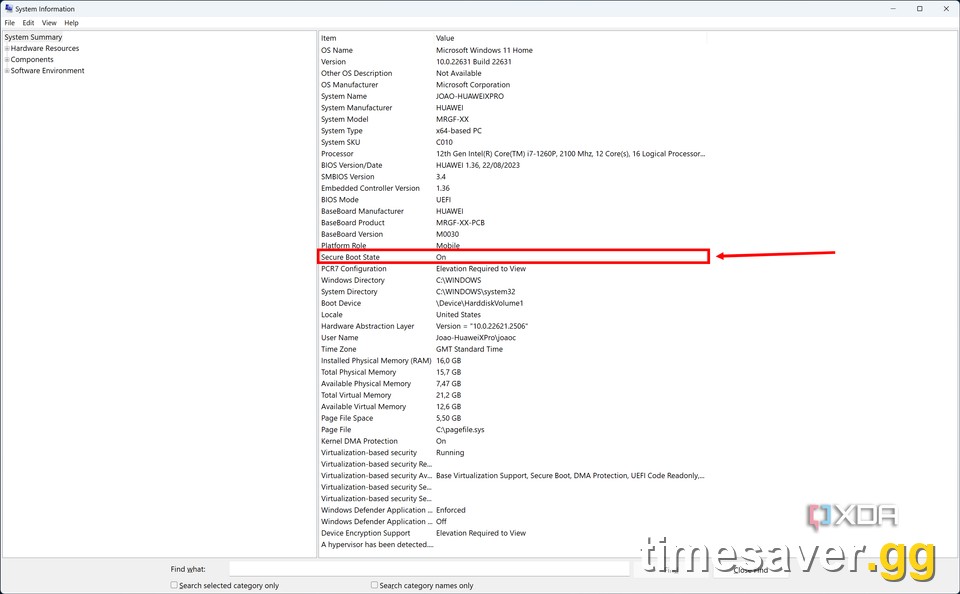
How to enable them (one-time BIOS setup):
- Enter BIOS/UEFI — reboot and tap Del, F2, or F10 during boot (varies by motherboard).
- Enable TPM. On Intel boards this is PTT (Platform Trust Technology); on AMD boards it's fTPM (or "AMD CPU fTPM"). Usually under the Security or Advanced tab.
- Enable Secure Boot. Set Secure Boot → Enabled (Boot or Security tab). It requires UEFI mode (not Legacy/CSM), and your Windows disk must be GPT, not MBR.
- If your disk is MBR, back up first, then in Windows run `mbr2gpt /validate /allowFullOS` followed by `mbr2gpt /convert /allowFullOS`, switch BIOS from Legacy/CSM to UEFI, and only then enable Secure Boot.
- Save & exit. Confirm inside Windows: run `tpm.msc` (should read "TPM 2.0, ready to use") and `msinfo32` (Secure Boot State should read On).
One-time pain, permanent fix. Once both read "on," the lobby check passes silently every launch.
How do I stop Delta Force crashing after a GPU driver update?
If your game started crashing or stuttering right after you updated your graphics driver, you're not imagining it — and Team Jade already addressed the biggest cause. The official August 6, 2026 update patch notes explicitly list a fix for a "shader-loading break after GPU driver updates," alongside fixes for the SVCH Chrome-Plated Burst Bolt fire rate and AZ3 map geometry.
If you're fully updated and still crashing (the majority of these reports are on AMD GPUs), do this:
- Clear the shader cache so the game rebuilds it cleanly. Delete the contents of `%LOCALAPPDATA%\DeltaForce\Saved\ShaderCache`, and on AMD systems also clear `%LOCALAPPDATA%\AMD\DxCache`.
- Roll back to a known-stable driver. Brand-new drivers occasionally regress; a version that was stable last week beats a day-one release.
- Turn off Hardware-Accelerated GPU Scheduling (Windows → Display → Graphics settings).
- Verify integrity of game files to repair any half-written shader data.
What about network errors, stuck matchmaking, and anti-cheat blocks?
The three next-most-common issues after login and DLL errors:
"Network error. Please check your network first." / stuck at Initializing 0%. A connection or DNS handshake failure at startup. Restart the game and PC, switch to a public DNS (Cloudflare 1.1.1.1 or Google 8.8.8.8), flush your DNS with `ipconfig /flushdns`, whitelist the game in your firewall, and relaunch.
Matchmaking stuck (e.g. 47/48 or 63/64, never starts). Back out to the main menu, requeue a few times, and switch to your correct/closest region server — a mismatched region is the usual culprit, and 64-player Warfare lobbies (32v32) can hang waiting on the last slot.
"Anti-cheat access blocked" / ACE won't start. Reinstall the ACE anti-cheat, whitelist Delta Force's executables in your antivirus and firewall, and re-confirm Secure Boot + TPM 2.0 are on (see above). This is the same stack that produces the lobby bounce.
Is Delta Force down right now?
As of August 15, 2026, there is no confirmed global outage — server-status trackers show Delta Force operational, with only scattered individual reports (matchmaking, network error, loading freezes) that read as background noise rather than a system-wide problem. The most recent official update, "Fortune Run Rewards Keep Coming, Sea Gleam Returns" on August 13, 2026, was a no-downtime client update with no server maintenance window. If you're the only one seeing errors, it's local — work the fixes above. If a real maintenance window is scheduled, it will be posted in the official Delta Force news feed with a start and end time.
Frequently Asked Questions
Are Delta Force error 4/35 and 5/1200 the same thing? Effectively yes — both come from a corrupt cached session token, and both are fixed by deleting `session.txt` inside `…\Delta Force\Launcher\Cache\` (check the `TSF4G2` subfolder), relaunching, and verifying game files. Don't waste time treating them as two separate bugs.
Is "tdatamaster.dll is missing" a ban or a virus? Neither. It's a missing Unreal Engine runtime file (error 126/193). Run `UE4PrereqSetup_x64.exe` from the game's `Engine\Extras\Redist\en-us\` folder and verify your files. Never download the DLL from a third-party site — that's the actual malware risk.
Do I have to enable Secure Boot and TPM 2.0 to play Delta Force? Yes. The ACE anti-cheat checks both when you enter the Game Lobby and blocks you from matches if either is off. Enable fTPM/PTT and Secure Boot in your BIOS (UEFI mode, GPT disk), then confirm with `tpm.msc` and `msinfo32` in Windows.
Was the GPU-driver crash fixed? The official August 6, 2026 patch notes list a fix for a "shader-loading break after GPU driver updates." If you're patched and still crashing — most often on AMD cards — clear the shader cache (`%LOCALAPPDATA%\DeltaForce\Saved\ShaderCache`) and roll back to a stable driver.
| Is Delta Force on PS4, Xbox One, or Switch? No. Delta Force runs on PC (Steam and Epic), PS5, **Xbox Series X | S, iOS, and Android** only — there is no PS4, Xbox One, or Nintendo Switch version, so those errors don't apply to last-gen hardware. |
|---|
Will deleting session.txt log me out or wipe my progress? No. `session.txt` only holds a temporary login token; the game rebuilds it on the next launch and your account, stash, and progression are untouched. It's the safest fix on this page.
More Delta Force guides on timesaver.gg:
- Delta Force AZ3 Nuclear Plant Guide: radiation, loot routes & the H1000 boss
- Delta Coins vs Delta Tickets: the difference & how to get Tickets free