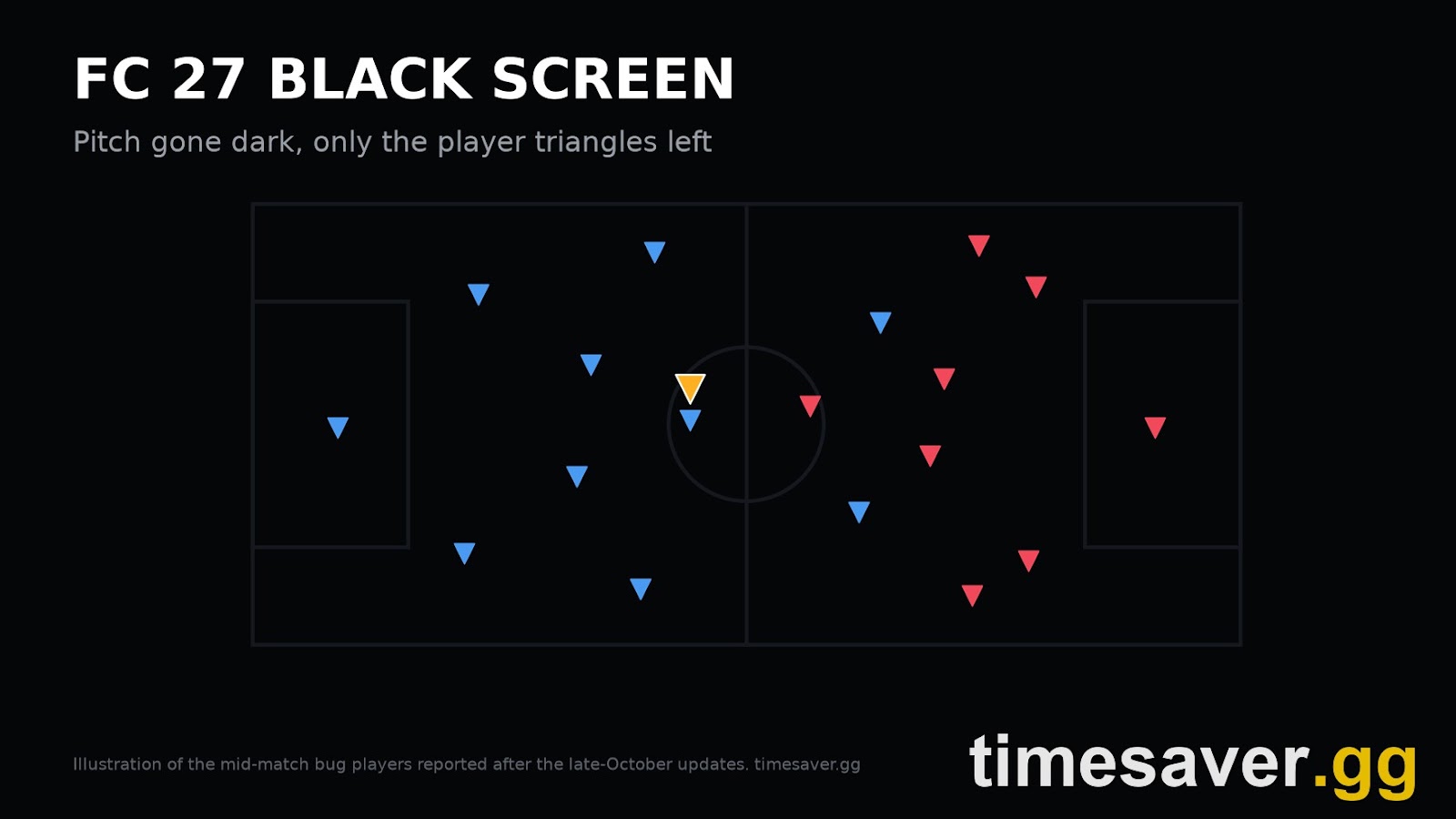
An FC 27 black screen in the middle of a match is a display bug, not a disconnect. Your match is usually still running underneath. The pitch, the players and the ball disappear, but the game keeps going, and in several reports the blue and red indicator triangles above the players are still visible. Players describe five different bugs under the same name, and the fix depends on which one you have. The mid-match one has a workaround that keeps the match alive: pause, open Highlights, let it load, then go back to the game.
This guide covers EA SPORTS FC 27 in Season 2 (22 October to 3 December 2026), with Title Update 1.1.0 live since 27 October and EA's next update, 1.2.0, due in mid-November. It covers the half-time black screen, the dark pitch mid-match, the black screen when a match starts, the PS5 night-match flashes and the PC start-up black screen. For each one it gives the fix to try first, and it explains why quitting is the most expensive option in Rivals.
TLDR: the FC 27 black screen in 30 seconds. Pitch goes dark mid-match, only triangles left: press Pause, open Highlights, wait for the replay to load, then resume. Players on PS5 and in Rush report it brings the picture back. Black after "Continue" at half time: same trick. If it never loads, you have to choose between quitting and letting the clock run. Black screen plus a spinning EA icon when a match starts (PC): repair the game files, switch to windowed or borderless mode at a 16:9 resolution, and turn off overlays. Black flashes in night matches on PS5: try turning HDR off. Black before the menus (PC): update your GPU driver, then follow the FC 27 PC launch fix guide. EA has not listed a black-screen fix in any FC 27 patch notes yet. Quitting an online match costs you the result, and community documentation says it also lowers the DNF value behind your match-coin rewards.
EA Sports FC 27 - Coins
Stock up on Coins
What is the FC 27 black screen bug?
It's a rendering failure. The game stops drawing the pitch, but the match simulation, the clock and the online session keep running. That is probably why the triangle indicators stay on screen: they appear to be drawn separately from the stadium and players.
On 28 October, a PS5 player posted the symptom on r/EASportsFC: the entire pitch and every player went dark, and only the floating triangles were left. The fix they found was to go to Highlights in the pause menu, which redrew the display (r/EASportsFC). The only reply said the same bug had hit them twice in Rush the night before and that the trick worked. The next morning, a player on r/fut described the same thing: no pitch, no players, no ball, "several times now". They said the only options were to wait out the whole match or leave (r/fut).
The EA Forums FC 27 boards show the same pattern over a longer period. A "Black screen after half time" thread in FC 27 Technical Issues describes the screen going black the moment a player presses Continue for the second half. That thread adds that opponents could not pause either, so the bug affects both ends of an online match (EA Forums). A separate "Rush Black screen" report on the FC 27 bug board describes kits and cutscenes loading normally, then the screen going black at kick-off with only the triangles above the players' heads. The poster says the forced quit cost them a 30-minute Rush ban and 3-0 defeats in Squad Battles, and that it started after the latest update (EA Forums).
Which FC 27 black screen do you have?
Five different problems get reported as "the black screen". Before you try anything, work out which one you have. Reinstalling the game won't fix a mid-match rendering bug, and pausing won't fix a PC that can't start the renderer.

| Symptom | Where it's reported | Match still running? | Fix to try first |
|---|---|---|---|
| Pitch dark mid-match, only player triangles visible | PS5 and PC; Rush and Ultimate Team modes | Yes | Fix 1: Pause, Highlights, resume |
| Black screen after pressing Continue at half time | PS5 in most FC 27 reports; online and offline modes | Yes, opponents report the match carrying on | Fix 2: Highlights, then decide whether to quit or wait |
| Black screen with a spinning EA icon as a match starts | PC; also Clubs | Unclear, the match never draws | Fix 3: repair, display mode, overlays |
| Brightness drops or black flashes, mostly in night matches | PS5, PS5 Pro on HDR TVs | Yes | Fix 4: HDR off, recalibrate |
| Black screen before the menus load | PC | No match yet | Fix 5: driver, DirectX setting, admin rights |
The first two rows are what players are hitting right now in Ultimate Team. Both are bugs in the game, so the fixes below are workarounds, not cures.
How do you fix the black screen mid-match? (Fix 1)
Pause, then Highlights, then wait.
- Press Options or Menu as soon as the pitch goes dark. In the reports, the pause menu still draws, like the triangles.
- Open Highlights (the replay viewer).
- Wait. Loading the replay rebuilds the scene, and players say it can take a long time. One earlier r/EASportsFC thread told players to "wait ages" for it to load.
- Close the replay and resume. The pitch should be back.
Why does it work? EA hasn't explained it. One plausible explanation is that opening the replay viewer makes the game redraw the stadium and players, which the bug seems to drop. Either way, players treat it as a refresh button, and it doesn't work for everyone.
In online modes the pause rules still apply. Pauses in online Ultimate Team matches are limited and short, and the exact rules vary by mode. If you have no pause left, or your opponent unpauses before Highlights loads, try again at the next stoppage. Don't quit straight away. The match is still being played while you can't see it, so quitting costs you the result, not just the picture.
What do you do about the half-time black screen? (Fix 2)
The half-time version is the worst one, because the second half never draws at all. FC 27 players have been reporting it on EA Forums for weeks, and players say it has become more frequent since recent updates. An earlier r/EASportsFC thread said it had "increased significantly" after a patch (r/EASportsFC).
Try this order:
- Highlights first. Pause, open Highlights, wait for it to load, then resume. The tip in that earlier thread was posted about the half-time version.
- Return to the half-time menu. When the same bug appeared in FC 26, a player on EA Forums found that pressing Select (the touchpad on PS5) took them back to the half-time screen, where Highlights, player ratings and substitutions still worked. Try it, then press Continue again.
- If nothing draws after both, you have two bad options: quit, or let the clock run. If you wait it out online, keep pressing the odd button: nobody has confirmed whether a long period of no input can still get you removed from the match. In offline modes like Squad Battles, quitting only costs you that match. In online modes it costs more (see the DNF section below).
How do you fix the black screen when a match starts on PC? (Fix 3)
This is a different bug. The screen goes black while the match loads, and on Clubs players report the EA loading icon spinning forever (EA Forums). An FC 27 PC player on EA Forums reported getting no image at all whenever they entered a match (EA Forums).
Work through these in order and relaunch after each one:
- Repair or verify the files. EA app: open FC 27 in your Library, then Manage (the three-dot menu) and Repair. Steam: Properties, Installed Files, then Verify integrity.
- Switch display mode. Set FC 27 to windowed or borderless at a standard 16:9 resolution (1920x1080 or 2560x1440). Ultrawide is a known trouble spot. EA's Title Update 1.1.0 notes include the line: "[PC ONLY] Visual issues could occur when entering matches on ultrawide displays." (EA Pitch Notes, TU 1.1.0). If 1.1.0 didn't fix it for you, 16:9 is the safe test.
- Turn off overlays. That means Discord, Steam, NVIDIA and AMD overlays, plus any FPS counter or recording tool, for one launch.
- Clear the shader cache in your GPU's control panel, or with Windows Disk Cleanup under DirectX Shader Cache. Then let FC 27 rebuild its shaders on the next launch.
Why does FC 27 flash black in night matches on PS5? (Fix 4)
These players don't lose the whole picture. They get black flickers, sudden brightness drops or colour flashes, mostly in night matches and when play moves to the far side of the pitch. Two FC 27 threads on EA Forums describe exactly this on PlayStation. One says it never happens in day matches and survived a full reinstall (EA Forums). The other, from a PS5 Pro owner, asks EA to check FC 27's HDR and VRR handling (EA Forums).
What to test, one change at a time:
- HDR off. On PS5 go to Settings, Screen and Video, Video Output, then set HDR to Off. Play one night match. If the flashes stop, HDR is the likely trigger. You can then try HDR back on after re-running the PS5 HDR calibration (Adjust HDR).
- VRR off on the same screen, or in your TV's game mode, if you use a VRR-capable TV.
EA hasn't confirmed this as a known issue, and these are player workarounds. It's still worth testing, because it's the one black screen you may be able to remove on your side.
EA Sports FC 27 - FUT Champions Boost
Get fut champions boost in 10 minutes
What if FC 27 is black before the menus load? (Fix 5)
If the screen is black from launch and you never reach the main menu, this is a start-up problem, not a match bug. That covers a GPU driver, a DirectX mode or the anti-cheat. Update your GPU driver with a clean install. Run the EA app and FC 27 as administrator. If that doesn't work, look in the FC 27 settings folder under `Documents` or `AppData\Local` for `fcsetup.ini`. Players change the `DIRECTX_SELECT` value there to force the other DirectX mode, and switch fullscreen off. Back up the file first. The full step-by-step is in our FC 27 won't launch on PC fix guide. If the black screen comes with a drop to the menu and a server message instead, see the FC 27 lost connection to EA servers fixes.
What does quitting a black-screened match cost you?
This is why Fix 1 matters. When the screen goes black, quitting feels like the only option. In Ultimate Team it is the expensive one.

Community documentation of FC 27's match coins (fifauteam) describes a DNF (Did Not Finish) value behind your skill rewards. In a normalised example it starts at 1.00, drops 0.25 for every online match you end early, and climbs back only 0.02 per completed match. The multiplier actually applied is that DNF value scaled by a mode-specific coefficient, so starting values and caps differ by mode, and single-player modes work differently. EA has never published the formula, so treat the numbers as community-measured. Using the normalised example:
| Online matches quit | DNF value (normalised) | Completed matches to get back to 1.00 |
|---|---|---|
| 0 | 1.00 | 0 |
| 1 | 0.75 | 13 |
| 2 | 0.50 | 25 |
| 3 | 0.25 | 38 |
On top of that, leaving early can reduce or prevent the Completion Award, depending on how the match ends. It isn't a flat amount: the same community source measured 549 and 595 coins across three completed Squad Battles matches (fifauteam). In Rivals and Champions a quit also goes down as a defeat. In Rush, the EA Forums report above says a quit triggered a 30-minute ban. Our FC 27 match coins and DNF multiplier guide explains the full formula.
So the order is: Highlights trick first, let the clock run second, quit last. One black screen should cost you one bad half, not 13 matches of reduced coins.
Has EA fixed the FC 27 black screen yet?
No fix has been documented in any patch notes so far. EA's FC 27 title update notes on ea.com, including Title Update 1.1.0 on 27 October, list no fix for a black screen at half time or mid-match. The only related line is the PC ultrawide fix quoted above. EA's 28 October Gameplay Developer Notes are about gameplay balance and say: "Our next Title Update in mid-November will introduce our first set of gameplay balance changes for FC 27." (EA Gameplay Developer Notes). They don't mention the black screen either. Our breakdown of what Title Update 1.2.0 changes covers what is planned, and the Title Update 1.1.0 notes cover what has shipped.
What helps get it fixed is a report EA can reproduce. Post it on the FC 27 bug-report board on EA Forums with your platform, the mode, the minute it happened, whether it was a day or night match, and what you pressed just before. A video clip helps most. If your report matches an existing thread, add to it rather than starting a new one. EA hasn't said whether the black screen will be in 1.2.0.
How do you protect your Rivals week while the bug is live?
The black screen isn't predictable. That's what makes it costly in a week where every Rivals win counts towards your rewards and Champions qualification. Some practical steps:
- Test fixes in offline modes like Squad Battles or a friendly, where a quit costs the least, before you take them into Rivals or Champions.
- On PS5, test HDR off before your next Rivals session, not during it.
- Use Highlights before you quit. It's the only reported workaround that can save the match.
- Watch the clock. Weekly Rivals rewards land on Thursdays at 06:59 UTC, according to EA Help. Our FC 27 reset times guide gives the times in every zone.
Black screens costing you your Champions run? timesaver.gg's pro players can handle FUT Champions qualification and Finals wins for you, and coins are delivered with a paced Comfort Trade.
- EA FC 27 FUT Champions Boost: Champions qualification and Finals wins, played by pro players
- EA FC 27 Coins: Comfort Trade, paced delivery
- EA FC 27 Evolutions Boost: Pathways cleared for you
- All EA FC 27 services
FAQ
Why does my FC 27 screen go black at half time? It's a rendering bug. The game fails to draw the second half after you press Continue, even though the match keeps running. FC 27 players have been reporting it on EA Forums for weeks, and EA has not listed a fix in any patch notes yet. Try Pause, Highlights, wait for it to load, then resume.
How do I fix the FC 27 black screen with only triangles showing? Pause, open Highlights, let the replay load fully, then return to the match. Players on PS5 and in Rush report this brings the pitch back. It can take a while to load, so be patient before you quit.
Does the FC 27 black screen count as a loss in Rivals? Not by itself. The match keeps running underneath the black screen, so the result stands as played, but if you leave, it counts as a quit and a defeat. Community documentation says each early exit in an online match also lowers your DNF value by 0.25, which reduces match-coin skill rewards, and can reduce or prevent the Completion Award.
Is the FC 27 black screen a PS5 problem or a PC problem? Both. The mid-match black screen is reported on PS5 and PC, and most half-time reports in FC 27 come from PS5 players. The black screen when a match starts and the start-up black screen are mainly PC. Night-match black flashes are mostly reported on PS5 with HDR TVs.
Did Title Update 1.1.0 fix the FC 27 black screen? Not according to the patch notes, and players are still reporting it since 1.1.0 went live. The 1.1.0 notes from 27 October only fix "visual issues" when entering matches on PC ultrawide displays. Nothing in them covers the half-time or mid-match black screen. EA's next update, 1.2.0, is due in mid-November, and EA hasn't said whether it includes a fix.
Will reinstalling FC 27 fix the black screen? Only for the PC start-up and match-load versions, where corrupted files or shaders can be the cause. Repair or verify the files first, because it's faster. A reinstall is unlikely to help with the mid-match or half-time bug: players report those on fresh installs too, so it isn't a file problem.