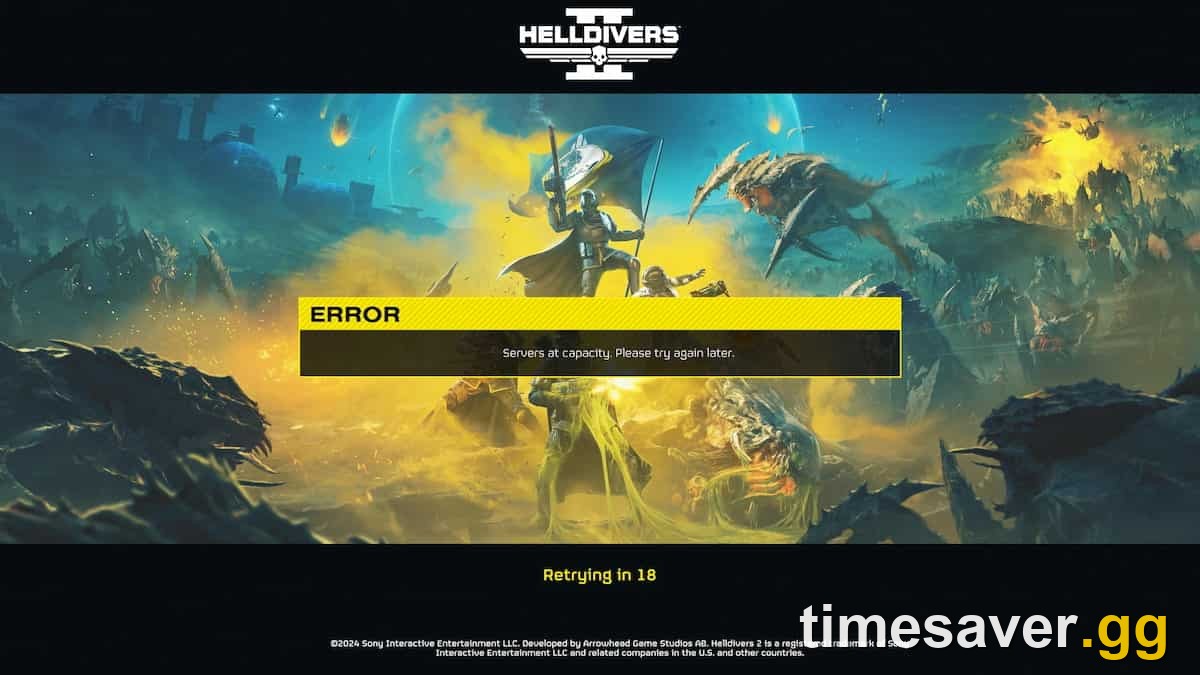
Updated August 22, 2026 — verified for patch 6.3.1. Castellan's Creed Warbond traffic (August 12) has settled but login queues remain elevated. "Helldivers 2 error 6" is community shorthand for the same servers-at-capacity login overflow covered below.
Short on time for the climb to 150? Timesaver offers Helldivers 2 power leveling plus sample and medal farming, all played by hand on your account.
Helldivers 2 - Difficulty Unlock
Get Super Helldive unlocked
Quick answer
TL;DR — If Helldivers 2 shows "Servers at capacity. Please try again later" (error codes 10002038 or 10003001), the fix is counter-intuitive: do nothing and leave the game sitting on the login screen. It auto-retries roughly every 30 seconds and pulls you in as soon as a slot opens — quitting and relaunching just sends you to the back of the queue. The "capacity" error is a login-queue problem on Arrowhead's side, not something broken on your PC or PS5, so no amount of reinstalling fixes it faster than waiting. For other connection problems — Error 35, GameGuard errors 114/360, crash-on-launch, or getting kicked from lobbies — the fixes are local and listed below. Everything here is verified for patch 6.3.1 (the current build as of August 11, 2026), and it matters this week: the Helldivers 2 × Warhammer 40,000 "Castellan's Creed" Warbond dropped August 12, 2026 — post-launch population remains elevated and "servers at capacity" screens are still appearing in the weeks after.
This guide covers every common Helldivers 2 connection and login error in order of how often people hit them: the capacity queue, the Error 55 retry countdown, Steam's Error 35, GameGuard anti-cheat conflicts, crash-on-launch, lobby kicks, and how to actually check server status. Fixes are drawn from the community-run Helldivers Wiki, GamesRadar's error hub, and Arrowhead's own outage communications.
What is Helldivers 2 Error 6?
"Error 6" is the player-community label for the login-queue failure that Arrowhead surfaces as "Servers at capacity. Please try again later" — sometimes paired with codes 10002038 or 10003001. Arrowhead does not use "Error 6" in any official patch notes or support docs; the label originated from community trackers that numbered connection failure types sequentially, and it spread across Reddit, YouTube and TikTok as shorthand. The underlying problem and fix are identical to the standard capacity message: the login servers are temporarily overwhelmed. Leave the game on the login screen and wait. It auto-retries every ~30 seconds and slots you in as capacity frees. Relaunching restarts your queue position from zero.
Error 6 tends to spike:
• During major Warbond launches — Castellan's Creed (August 12, 2026) elevated queues for 48+ hours
• Within 2–4 hours of patch deployments, while Arrowhead's backend rebalances
• Weekend evenings (Friday–Sunday, 6–11 PM Eastern), when peak-concurrent player counts max out login throughput
If auto-retry has run for more than 20 minutes without success, check the @helldivers2 X account and the official Discord — Arrowhead posts acknowledgements there when the issue is infrastructure rather than a traffic spike. A genuine outage will have a pinned thread; a capacity queue will not.
Helldivers 2 has one of the messier connection stacks in modern co-op gaming — a peer-to-peer matchmaking layer bolted onto a login server that has, more than once, been overwhelmed by its own success. The good news: almost every error you will see has a known, repeatable fix, and the single most common one ("Servers at capacity") requires no troubleshooting at all — just patience and the right instinct. Below, each error gets its own section with the exact steps, plus the accuracy notes most guides get wrong.
Why does Helldivers 2 say "Servers at capacity"?
The "Servers at capacity. Please try again later" message is a login-queue overflow. Helldivers 2 caps how many players can be logged into its backend at once, and when that ceiling is hit — usually after a big patch, a Warbond drop, or a weekend surge — new logins are held at the title screen until someone else disconnects and frees a slot.
This is entirely server-side. Your internet connection, your platform, and your hardware are irrelevant to whether you see this error, which is why "reinstall the game" and "reset your router" advice does nothing for it. Arrowhead has acknowledged the pattern directly. During the original launch crush, the official account posted:
"Despite our best efforts to increase server capacity to accommodate all of you who want to dive for Freedom, we are experiencing capacity issues. We are once more working without delay to improve the issue and we hope to have a fix in place as soon as possible." — @helldivers2 (official X account)
You will most often see the two capacity error codes, 10002038 and 10003001. They mean the same thing: the queue is full.
⚠️ Ignore the "450,000 concurrent player cap" figure that still floats around forums. That was an unverified, early-2024 number and Arrowhead has raised backend capacity repeatedly since. Do not treat it as the current ceiling.
How to fix the "Servers at capacity" error (10002038 / 10003001)
- Stay on the login screen and wait. The game auto-retries the connection on a timer (you'll see a "Retrying in…" countdown). When a slot frees up, it logs you in automatically. This is the fastest route in — do not quit.
- Do not spam-relaunch. Closing and reopening the game drops you to the back of the queue and resets your progress toward a slot. Counter-intuitive, but true.
- Disable crossplay only if you're desperate for a solo dive. On PS5: Options → Gameplay → Crossplay Off. This can occasionally get you in faster during a spike, at the cost of only matchmaking with players on your own platform. Turn it back on afterward.
- Turn off any VPN. A VPN can route your login through a busier region and make the queue worse.
- Check server status before assuming it's you (see the section below). If Arrowhead has posted an outage, no local fix exists — it's a wait.
The honest bottom line: the capacity error is a good problem in disguise. It means the game is popular enough to fill its servers, and it clears on its own. Leave it running in the background and dive when it lets you in.
What is Error 55 in Helldivers 2?
Error 55 is not actually an error code — it's a countdown. When Helldivers 2 loses its connection to the login server, it shows a 55-second automatic retry timer before it tries again. Most guides misread this as a distinct fault and send you chasing fixes that don't exist.
If you see "Error 55" or a ticking retry number, the correct move is the same as the capacity error: let it count down and retry itself. If it fails repeatedly for many minutes, then move on to the connection fixes below (Error 35, GameGuard) or check server status — but a single retry countdown is normal behavior, not a broken install.
How to fix connection Error 35 on PC (Steam)
Error 35 (status -1) is a PC/Steam-side connection failure — the game reaches the server but the handshake fails. Work through these in order:
- Delete the game's local data cache. Navigate to `%appdata%\Arrowhead\Helldivers2` and clear the temporary data folder (your unlocks are server-side and won't be lost).
- Verify game files in Steam: right-click Helldivers 2 → Properties → Installed Files → Verify integrity of game files.
- Disable all mods. Modded files are the single most common cause of handshake failures after a patch. Remove them before troubleshooting anything else.
- Flush your DNS: open Command Prompt as admin and run `ipconfig /flushdns`.
- Restart Steam entirely, then relaunch.
Helldivers 2 - Power Leveling
Get leveled to 150 without the grind
GameGuard errors (114, 360) and crash on launch
Helldivers 2 uses nProtect GameGuard anti-cheat, and it is responsible for a large share of PC launch failures. Error 114 and Error 360 are both GameGuard conflicts.
- Run the game as administrator. Right-click `helldivers2.exe` → Run as administrator. GameGuard needs elevated permissions to initialize.
- Add firewall/antivirus exceptions for both `helldivers2.exe` and the GameGuard folder. Overzealous AV quarantining GameGuard is the classic culprit.
- Close overlays. Disable the Discord overlay, and shut down Hamachi, Razer Cortex, MSI Afterburner, or any other injector before launching.
For a hard crash-on-launch or black screen, the canonical community fix is a GameGuard reset:
- Close the game and delete the folder `…\steamapps\common\helldivers2\bin\GameGuard`.
- Run `helldivers2.exe` as administrator so it re-downloads a clean GameGuard.
- Whitelist the newly created GameGuard folder in your antivirus.
- Also delete `user_settings.config` in `%AppData%\Roaming\Arrowhead\Helldivers2` to reset a corrupted config.
- Remove the `--use-d3d11` (DirectX 11) launch option if you added one — community reports since a mid-2026 patch tie it to crashes on modern GPUs. Let the game run DirectX 12.
Other Helldivers 2 error codes at a glance
| Error | Meaning | Fastest fix |
|---|---|---|
| 10002038 / 10003001 | Servers at capacity (login queue full) | Wait on login screen; it auto-retries |
| Error 55 | 55-second auto-retry countdown (not a fault) | Let it count down |
| Error 35 (status -1) | PC connection/handshake failure | Clear cache, disable mods, verify files |
| 114 / 360 | GameGuard anti-cheat conflict | Run as admin, firewall exceptions |
| 0x44415441 | Corrupted data file (the hex spells "DATA") | Verify files, clear shader cache, remove mods |
| 0xc000007B | Missing/broken Visual C++ Redistributable | Reinstall the latest Microsoft Visual C++ Redist |
| Vehicle-pattern crash | Lobbies with 32+ unique vehicle patterns crash | Fixed in patch 6.3.1 — update the game |
That last one is worth flagging: patch 6.3.1 specifically fixed a reliable crash that triggered when a lobby contained more than 32 unique vehicle patterns. If you were crashing in full squads before July 2026, updating resolves it — and if you're still on Xbox and crashing, switching your custom weapon and vehicle skins back to default is a proven community workaround while cosmetic-heavy lobbies remain a stress point.
Why do I keep getting kicked in Helldivers 2?

Getting dropped from a mission usually isn't a server error at all — it's lobby settings or a host kick, and the two feel identical from your seat. Here's how to tell them apart and stop it:
- You keep landing in randoms' games and getting booted: the host almost certainly has their game set to Public and is curating who stays. Higher-level players who join a lower-level host's solo run and immediately sprint to objectives — skipping Points of Interest and samples — get kicked constantly. It's a common friction point on the subreddit, where players describe joiners who "rush all of the objectives and ignore POIs/samples" as a burden even when technically cooperating.
- The fix if you want to be left alone: set your own game to Friends Only or Private in the social/pause menu. A surprising number of divers don't know this setting exists — it's the #1 cause of unwanted drop-ins and the kicks that follow. Note that firing an SOS Beacon can override Friends/Private and reopen your lobby to reinforcements.
- If you're being disconnected, not kicked: that's a connection drop, not a host action — work through the Error 35 and server-status steps instead.
Will the Warhammer 40K update overload the servers on August 12?
| Expect turbulence. The Helldivers 2 × Warhammer 40,000 "Castellan's Creed" Legendary Warbond launches on August 12, 2026 across PS5, PC, and Xbox Series X | S, and crossover Warbonds reliably pull lapsed players back in. (For the record, the Warbond is themed on the Astra Militarum's Cadian Kasrkin — the Imperial Guard — not Space Marines, which is the most common mistake in coverage.) |
|---|
More returning divers means a fuller login queue, so if you hit "Servers at capacity" on launch day, don't panic and don't troubleshoot — it's the capacity queue doing exactly what it does after every major drop. Leave the game on the login screen and let it pull you in. If you'd rather dive the moment it unlocks, log in early, before the evening peak in your region.
How to check Helldivers 2 server status
There is no official first-party server-status webpage for Helldivers 2 — anyone claiming to link one is guessing. The real sources are:
- @helldivers2 on X — Arrowhead posts outages, capacity warnings, and hotfix notices here first.
- The official Helldivers Discord (`discord.gg/helldivers2`) — where the team drops server updates and community managers respond during incidents.
Check both before you spend an hour reinstalling. If Arrowhead has flagged an outage or a capacity spike, the only "fix" is to wait it out.
A final safety note: do not buy Super Credits from third-party sellers, use "free Super Credits" generators, or share your account to get around a queue or a grind. Super Credits are fully earnable in-mission for free, there is no legitimate marketplace for them, and account sharing violates Arrowhead's and the platforms' terms — it's a ban risk, not a shortcut.
For more on the drop that's about to test those servers, see our Castellan's Creed Warbond guide.
FAQ
Is "Servers at capacity" in Helldivers 2 a problem on my end? No. Error codes 10002038 and 10003001 mean Arrowhead's login queue is full. It's entirely server-side — your connection, hardware, and platform don't affect it. Leave the game on the login screen and it auto-retries until a slot opens.
Should I restart Helldivers 2 when I see "Servers at capacity"? No — restarting sends you to the back of the queue. The game retries the connection on its own roughly every 30 seconds, so the fastest way in is to leave it running untouched on the title screen.
What is Error 55 in Helldivers 2? It isn't an error code at all — it's the game's 55-second automatic retry countdown after a connection drop. Let it finish and retry itself. Only start troubleshooting if it fails repeatedly over several minutes.
Do I need a PSN account to play Helldivers 2 on PC? No. Sony briefly required it in May 2024, then reversed the decision within a few days after backlash, and PSN linking has been optional on PC ever since. Crossplay works with or without a linked account.
Why do I keep getting kicked from Helldivers 2 lobbies? Usually it's a host kick or lobby-settings issue, not a bug. If you're joining randoms' public games, hosts may boot high-level players who rush objectives. Set your own game to Friends Only or Private to stop unwanted drop-ins, and remember an SOS Beacon can reopen your lobby.
Did the Warhammer 40K Castellan's Creed Warbond cause server issues? Yes — the August 12, 2026 drop spiked login queues significantly for 24–48 hours. Sustained post-Warbond traffic is keeping queues above baseline through late August. Same fix: wait on the login screen rather than reinstalling.
Is there an official Helldivers 2 server status page? No first-party status page exists. Use the official @helldivers2 account on X and the official Helldivers Discord for outage and capacity updates.