Updated August 17, 2026 — Madden NFL 27 is now fully live worldwide (launched August 13). Guide updated with Title Update 1 patch info, Wear & Tear Franchise bug workaround, and post-launch PS5 error codes.
Madden NFL 27 won't launch, crashes to your dashboard, or hangs on "Preparing game"? You are not alone — the game is fully live as of August 13 and the EA Forums and r/Madden boards are filling with crash, freeze and connection reports from launch week. The good news: almost every one of these is a known EA-app or console fix you can run in a few minutes. This guide covers every common Madden NFL 27 launch, crash and connection problem on PC, PlayStation 5 and Xbox Series X and S, in the order you should try them — updated for the live worldwide release.
Quick answer: If Madden NFL 27 won't launch on PC, the fastest fixes are to update the game, clear the EA app cache, and run "Repair" on the EA app (Settings → Recovery → Repair). If it crashes on console, rebuild the PS5 database in Safe Mode or clear the reserved space / reinstall on Xbox. If you can't connect at all, check help.ea.com/en/server-status/ first — during launch weeks the problem is often EA's servers, not your setup.
Madden NFL 27 - MUT Coins
Get up to 20,000,000 MUT Coins
Key takeaways
- Madden NFL 27 is fully live as of August 13, 2026. The Title Update 1 patch (August 10) fixed a Speed Boost exploit and Franchise presentation bugs — install it first. The heaviest server strain hit launch day (August 13) but has eased; ongoing issues are now platform-level crashes, not pure server outages.
- Check EA's servers before you troubleshoot your own machine — `help.ea.com/en/server-status/` is the source of truth, backed by Downdetector.
- PC launch failures are almost always the EA app: update, clear cache, Repair, or (for `EC: 109`-type corruption errors) reinstall the EA app itself.
- Console crashes (green screen, freezing, overheating) have console-level fixes: rebuild database, disable 120 Hz output, clear reserved space, and give the console airflow.
- Buying Madden 27 "coins" from third parties won't fix anything and can get your account banned — none of the fixes here involve that.
Is Madden NFL 27 actually out?
Yes — Madden NFL 27 is fully live worldwide as of Thursday, August 13, 2026 at 2:00 p.m. ET across PlayStation 5, Xbox Series X and S, Nintendo Switch 2 and PC (EA app, Steam, Epic Games Store).
What shipped before launch day: Early access ran August 6–12 for MVP+ members (Aug 6), Deluxe/MVP Bundle owners (Aug 10) and EA Play Pro (Aug 10). Title Update 1 shipped August 10 — it fixed an unintended Speed Boost exploit during cut moves, stabilized Franchise Draft presentations and fixed the "Perfect Push Punch In" achievement. If you've just installed the game, make sure this update is applied before anything else.
One hard fact: there is no PS4 or Xbox One version. Madden NFL 27 is current-gen only (PS5, Xbox Series X/S, Switch 2, PC). If you're on last-gen hardware, that's the issue — not a crash. With that cleared up, here's how to fix the real launch and crash problems.
Step 1: Rule out EA's servers first
During Madden launch weeks the most common reason the game "won't work" is EA's back end, not your PC or console. This is not hypothetical: at Madden NFL 26's launch on August 7, 2025, EA took all Madden servers down for emergency maintenance after mass connection failures on early-access day. With Madden 27's worldwide launch landing August 13, expect another traffic spike.
Before you reinstall anything, check status in this order:
- EA Server Status — `help.ea.com/en/server-status/`. This is EA's own live board and the first place to look.
- Downdetector — `downdetector.com/status/ea/` for a crowd-sourced spike view.
- The EA Forums Madden NFL 27 "Known Issues" board — `forums.ea.com` — where EA staff post acknowledged outages and fixes.
As EA Help puts it in its own troubleshooting hub, the goal is to "fix common EA app error codes, installation issues, launch problems, and connection errors on PC and Mac" — but if the servers themselves are down, no local fix will help. Wait it out, then continue.
Step 2: Fix Madden NFL 27 not launching on PC (EA app errors)
On PC, a Madden that opens to a splash screen then bounces back to the EA app — or throws an error code — is nearly always an EA app problem. Work down this list:
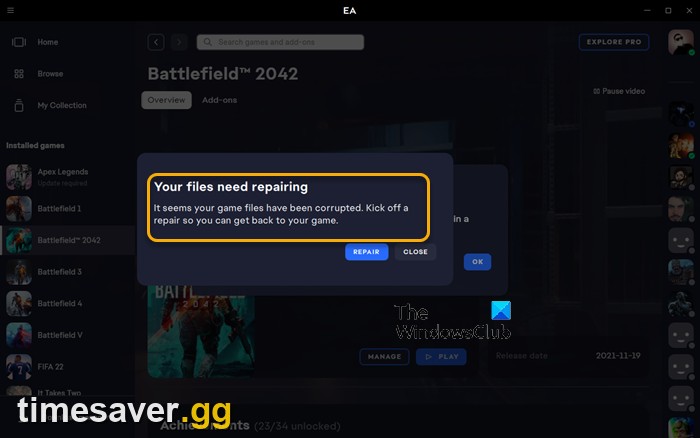
1. Update the game and the EA app. Developers push day-one and launch-week patches to kill crashes; on Steam the update installs automatically when you open the client. Make sure both the EA app and Madden are fully updated before anything else.
2. Clear the EA app cache. In the EA app, open the menu (three lines, top-left) → Help → Recover/App Recovery → Clear Cache. This resolves a huge share of "won't launch" and login errors without touching your install.
3. Repair the game and the app. In your Game Library, click the three dots on Madden NFL 27 → Repair. Then repair the EA app itself via Settings → Recovery → Repair (Windows only). Repair re-validates files without a full re-download.
4. Handle specific error codes:
- `EC: 10000` / `EC: 10500` — account/login errors ("Something went wrong — there is a problem with your account"). Fix: update the client, clear cache, repair the app, then fully log out and back in.
- `EC: 109` — an app-file corruption error. Clearing cache usually isn't enough; reinstall the EA app (you don't need to reinstall Madden itself).
- Stuck on "Preparing game" or a download that won't finish — pause and resume the download, clear cache, then Repair. If it persists, delete the partial install and re-download.
5. Whitelist EA's anti-cheat in your antivirus. A recurring PC cause is antivirus or Windows Defender quarantining EA's anti-cheat component as a false-positive "trojan," which stops the game booting. Add Madden NFL 27 and the EA app to your antivirus exclusions and reinstall if the anti-cheat was already removed.
6. Steam → EA app handoff failure. If you launch from Steam and get bounced to the EA app with "Failed to launch game," verify the Steam files (right-click Madden → Properties → Installed Files → Verify integrity), make sure the EA app is installed and updated, then launch again and let the EA app take over.
7. The nuclear option. Update Windows and your GPU drivers, then reinstall the EA app and, if needed, the game. Slow, but it clears the stubborn cases.
Step 3: Fix Madden NFL 27 crashing on console (PS5 & Xbox)
Console players are reporting crashes, freezes and a green-screen crash — several tied to Franchise mode on PS5 and PS5 Pro. Run these:
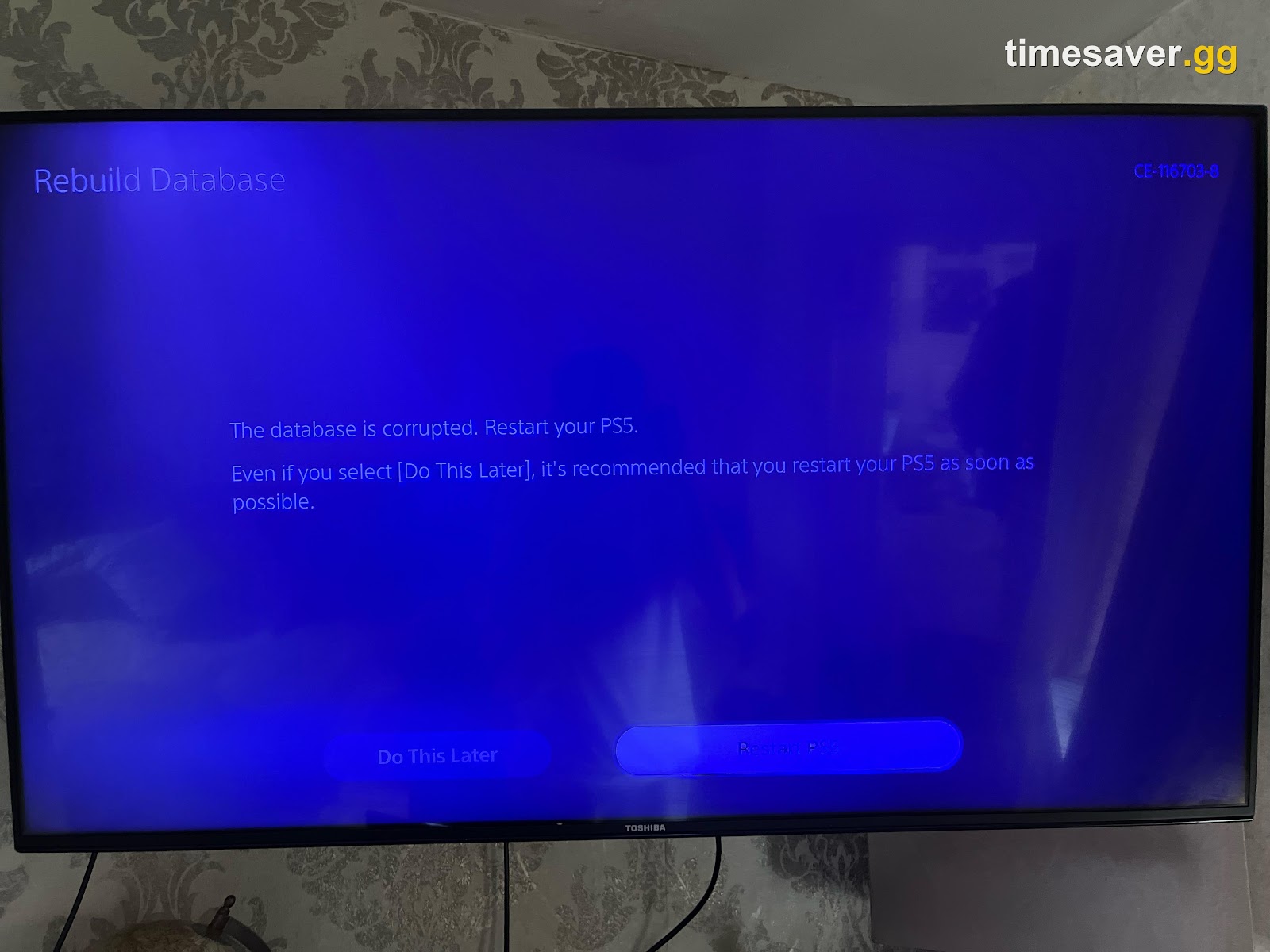
Rebuild the PS5 database (Safe Mode). Hold the power button until the second beep to enter Safe Mode, then choose Rebuild Database. This is the single most effective fix for random Madden crashes and read errors on PlayStation and doesn't delete your saves.
Disable 120 Hz output if you get a green screen. Players who hit the green-screen crash — the same one that plagued College Football 27 and NCAA titles — trace it to an HDR/120 Hz handshake that "gets confused when the menus lag." Community fix: turn off 120 Hz mode in PS5 system settings (Settings → Screen and Video → Video Output → 120 Hz Output → Off). Several players confirm it stops the crash.
Clear reserved space / reinstall on Xbox. On Xbox Series X and S, go to Madden NFL 27 → Manage game → Saved data / reserved space → Clear reserved space, then relaunch. If crashes continue, delete and reinstall the game (your cloud saves are safe).
Delete and reinstall on PS5. If you see a CE-100096-6-style read error at boot, the install is corrupt. Delete the game and reinstall from your library — again, saves are stored separately.
Give the console airflow (overheating/shutdowns). Some players report their PS5 or Series X ramping to "jet engine" fan speeds or shutting off during Madden 27. Move the console to open air, and if you haven't cleaned it in a year, a dust-out of the vents does more than any in-game setting. Newer Madden titles are demanding, and heat causes both crashes and freezes.
Step 4: Fix "can't connect to EA servers" and random disconnects
If Madden launches but drops you mid-game or won't reach online modes (MUT, Head-to-Head, online Franchise):
- Confirm servers are up (Step 1) — during launch week this is genuinely the likely culprit.
- Wire your connection. A wired Ethernet connection beats Wi-Fi for stability; disconnects in online modes are frequently a flaky wireless link.
- Set an Open NAT. Restart your router, and if your NAT type is Strict/Moderate, enable UPnP or port-forward on your router. Note: EA has not published Madden 27-specific port numbers yet, so don't copy a random port list — use UPnP unless EA lists ports on help.ea.com.
- Disable any VPN. VPNs routinely break EA's server authentication and cause connection errors.
- Power-cycle everything. Fully close the game, restart the console/PC and the router, and try again.
Madden NFL 27 - Head-to-Head Wins
Get your Head-to-Head wins banked
Step 5: When it's genuinely EA's problem
Some launch-window issues are on EA's side and no amount of local troubleshooting will help — a real day-one/known-issues situation. If you've worked through the steps above and still can't get in:
- Watch the EA Forums Madden NFL 27 technical-issues board for an official acknowledgement.
- Keep an eye on the EA Server Status page for maintenance windows.
- Expect the heaviest turbulence on and around August 13, when Standard-edition players flood in worldwide.
Once you're actually in the game, the fun part starts — and if you're chasing Ultimate Team, we've got the coin, market and upgrade side covered, and our guide to the best playbooks in Madden NFL 27 covers offense and defense.
Known Madden NFL 27 bugs (August 2026) and workarounds
Beyond the common crash and launch fixes above, two Franchise bugs are affecting players post-launch and have no official patch yet.
Wear and Tear — CPU mismanagement bug (unfixed, EA priority). The headline Franchise feature for Madden 27 has a critical problem: CPU-controlled teams are not managing the Wear and Tear system correctly, resulting in most CPU starters being injured by the second half of games. NFL streamer @MillsTwitch (August 13): "Turn off Wear and Tear in Madden 27 franchise until it's fixed. Currently the CPU doesn't manage it well and will have MOST of their starters out in the second half." EA has acknowledged this as a priority fix but has not released a patch date as of August 17. Workaround: disable Wear and Tear via Franchise Gameplay Sliders until the fix lands.
Draft class editing bug (unfixed). Editing players within a generated draft class produces corrupted data or visual glitches. Per Forbes (August 13), this was not resolved in Title Update 1 and persists in the live game. Workaround: avoid editing draft class players until a fix ships.
Title Update 1 — what it fixed (August 10, 2026). Speed Boost exploit during specific cut moves (was affecting competitive play), Franchise Draft cinematics and presentation stability, the "Perfect Push Punch In" achievement unlock. Source: OperationSports. Next expected patch window: approximately August 20 and September 9 (Forbes tracker).
Quick-fix cheat sheet
| Symptom | First fix | If that fails |
|---|---|---|
| PC won't launch / bounces to EA app | Clear EA app cache | Repair game, then Repair EA app |
| Error `EC: 10000` / `EC: 10500` | Clear cache + log out/in | Repair EA app (Windows) |
| Error `EC: 109` | Reinstall the EA app | Reinstall game |
| Stuck on "Preparing game" | Pause/resume download | Delete partial install, re-download |
| PS5 crash (CE-108255-1) | Rebuild Database (Safe Mode) | Delete + reinstall |
| PS5 green screen (CE-34878-0) | Disable 120 Hz output in PS5 settings | Switch to Fidelity / 60fps mode |
| Xbox crashing | Clear reserved space | Delete + reinstall |
| Overheating / shutdowns | Move to open air | Clean dust from vents |
| Can't connect to EA servers | Check help.ea.com/server-status | Wired connection + Open NAT |
Frequently Asked Questions
Is Madden NFL 27 actually out? Yes — fully live worldwide since August 13, 2026 at 2:00 p.m. ET on all platforms. Early access ran August 6–12 for MVP+, Deluxe/MVP Bundle and EA Play Pro owners. If you are reading this after August 13 and the game won't launch, it's a genuine crash or install issue — not a release timing problem.
Why does Madden NFL 27 keep crashing on my PS5? The most reliable fix is to rebuild the PS5 database in Safe Mode, which clears the corrupted data behind most random crashes without deleting saves. If you specifically get a green screen, disable 120 Hz output in PS5 video settings — it's an HDR/refresh-rate handshake bug carried over from College Football 27 and NCAA titles. If it still crashes, delete and reinstall the game.
How do I fix EA app error EC: 109 for Madden 27? `EC: 109` is a corrupted-app-file error, so clearing the cache usually isn't enough. Reinstall the EA app itself (Settings and stored games can be re-downloaded) — you generally don't need to reinstall Madden to clear it.
Are the Madden 27 servers down? Check `help.ea.com/en/server-status/` first, then `downdetector.com/status/ea/`. Launch weeks strain EA's back end — at Madden NFL 26's launch on August 7, 2025, EA took all Madden servers offline for emergency maintenance — so during the August 13 window a connection failure is often EA's servers, not your setup.
My game won't launch on PC and I've tried everything — what's left? Whitelist Madden and the EA app in your antivirus (EA's anti-cheat is a common false-positive), then update Windows and your GPU drivers, clear the EA app cache, and reinstall the EA app. If you launch through Steam, verify the game files and let the EA app hand off. If all of that fails and others report the same, it's likely a server-side or known-issue problem — watch the EA Forums.
What is the Madden 27 Wear and Tear bug and how do I fix it? The Wear and Tear system (Madden 27's headline Franchise feature) is being mismanaged by CPU teams — most CPU starters are injured by the second half of games. EA has acknowledged this and flagged it as a priority fix, but no patch has shipped as of August 17. Workaround: go to Franchise → Settings → Gameplay Sliders and disable Wear and Tear until EA releases the fix. Draft class editing is also producing visual glitches; avoid editing generated draft class players for now.
Will buying Madden coins fix my launch or connection problems? No — and don't. Buying MUT coins from third-party sites does nothing for technical issues and violates EA's rules, risking Auction House restrictions and account bans. Every fix in this guide is free and account-safe.
More Madden NFL 27 guides
Once you're in and running, keep building your Ultimate Team:
- How to Get MUT Coins Fast in Madden NFL 27
- How to Get Gridiron Tokens in Madden NFL 27 (Twitch Drops Guide)
- Madden NFL 27 Auction House Guide: How to Make Coins Flipping Cards
- Madden NFL 27 Evos Explained: The New Upgrade System and Skill Points
Updated August 17, 2026. Applies to Madden NFL 27 on PC, PlayStation 5 and Xbox Series X and S. Title Update 1 info via OperationSports (Aug 10, 2026). Wear and Tear bug status via nerdschalk.com and Forbes (Aug 13, 2026). Error-code steps follow EA's official EA app troubleshooting; console fixes reflect post-launch community reports. Verify live server status at help.ea.com/en/server-status/ before deep troubleshooting.