Quick answer
Madden 27 Wear and Tear is a Franchise and Superstar system that tracks every hit a player takes and carries that damage from game to game, so a back who never rests can be listed as banged up after only a few carries. It is partly working as designed: EA says workload, rest and usage now carry "more authentic consequences across a full season." It was also partly bugged. EA's September 16, 2026 title update fixed Wear and Tear building up "much faster than intended", and the October 21, 2026 update fixed CPU players still showing Wear and Tear effects after you switched the setting off. If it still feels broken, you have three fixes: manage practice and rest, tune the 14 Wear and Tear sliders, or switch it off under Options → Gameplay Sliders → Wear and Tear.
Key takeaways
- Wear and Tear arrived in Madden NFL 26 and was made "smarter and more impactful" in Madden NFL 27, according to EA's Franchise Deep Dive.
- Two fixes have shipped so far: Sept 16 (too-fast buildup, including high Toughness and Stamina players hitting severe "after only a handful of plays") and Oct 21 (CPU players showing Wear and Tear with the setting off).
- The Wear and Tear tab has one on/off toggle and 14 sliders: eight impact sliders and six recovery sliders, each scored out of 100.
- The usual player fix is impact sliders down to around 25–35 and recovery sliders up to around 60–80. Players also stop running Full Pads practice in game weeks.
- CPU teams don't manage it well. Community reports say AI opponents end up starting backups, which is why many players turn it off.
This guide applies to Madden NFL 27 after the October 21, 2026 title update (build 1.008) and the minor 1.009 patch (November 4). EA has announced All '97 content and a title update for November 18. Check EA's Madden NFL 27 news page for any Wear and Tear changes in it before you re-tune.

Madden NFL 27 - Superstar Leveling
Get your Superstar to the OVR you want
What is Wear and Tear in Madden 27?
Wear and Tear is the season-long health layer on top of the normal injury system. EA introduced it in Madden NFL 26 as a system that "tracks every hit a player takes in a game and accumulates those impacts across the season." After each game, players recover some health, but not always all of it, especially after a heavy workload the week before. EA's own Madden 26 example was blunt: "Don't expect to win back-to-back Super Bowls with Saquon Barkley at 60% health."
For Madden NFL 27, EA's Franchise Deep Dive describes it this way:
"The Wear and Tear system introduced last year was a big step forward. This year, we are making it smarter and more impactful. The decisions you make about workload, rest, and usage now carry more authentic consequences across a full season. A workhorse running back who never gets a breather is going to feel it down the stretch." — EA SPORTS, Madden NFL 27 Franchise Deep Dive
The pieces that feed it, as EA described them when the system launched:
| Piece | What it does |
|---|---|
| In-game hits | Every tackle, sack and block adds Wear and Tear. Hit Stick and Cut Stick tackles have their own impact sliders. |
| Weekly recovery | Players heal part of the damage between games, not all of it. |
| Practice | Full Pads practice adds wear. Resting a player lets him recover. You can rest players one by one, not just by position group. |
| Weekly status | Wear and Tear feeds the Questionable / Doubtful / Out tags. A Questionable or Doubtful player can be ruled Out after practice if you don't rest him. |
| Trainer Abilities | Your Trainer's abilities, set in Weekly Strategy, can boost weekly recovery, lower in-game injury chance and raise the odds an injured player is cleared. |
In Superstar mode, Wear and Tear applies to your own created player. That's the version EA fixed in September.
Why is my HB severe after one snap?
This week's most-discussed r/Madden thread is a player whose halfback was listed as severe Wear and Tear after one carry and pulled for the rest of the game. A second thread from a realistic-rebuild group asks the same thing. There are four usual causes, roughly in order of how often they show up:
- He started the game already worn down. Wear and Tear carries over from previous weeks, so a starter who has carried the load all season can begin a game in the yellow and one big hit pushes him to severe.
- Full Pads practice. One r/Madden player said leaving the weekly practice on Full Pads left "half your team" taking a huge hit, with "everyone yellow and some red." Practice wear stacks on top of game wear.
- Auto-subs. With the auto-sub setting players call "Keep Fresh", one player reported their starting RB only stayed in for "about 5 carries", and another had a backup QB at halfback. The sub logic pulls tired players early. That keeps them healthy but looks like a bug.
- An actual bug. If a player with high Toughness and Stamina hits severe after a handful of plays on a fresh week, that's the exact bug EA fixed on September 16. If it still happens on the current build, report it on the EA Forums Madden NFL 27 bug reports board with a clip.
Not everyone thinks it's broken. One of the top replies in this week's thread says Wear and Tear "works just fine. What doesn't work is thinking you can run full pad practice all season long". Several players say it's built for Half Pads during game weeks, Rest for hurt players, and Full Pads only on bye weeks.
What did EA fix in Wear and Tear?
Two Madden 27 title updates have touched Wear and Tear directly.
September 16, 2026 title update (Superstar section), from EA's patch notes:
"Fixed an issue where Wear and Tear could accumulate much faster than intended, including instances where players with high Toughness and Stamina could reach severe levels after only a handful of plays."
October 21, 2026 title update (1.008, Franchise section), from EA's Gridiron Notes:
"Fixed an issue where CPU players could still show Wear and Tear effects when the setting was turned off."
The same October update also "addressed excessive player progression during multi-season simulation" and fixed recovered players getting stuck on a CPU team's injured reserve. Our September 16 patch notes breakdown has the full list from that update.
What EA hasn't changed is how the CPU manages practice. Players report that CPU teams don't use Half Pads, so their starters wear down and opponents field backups by the second half. As of November 17, 2026, no EA patch note has addressed this.
How do you turn off Wear and Tear in Madden 27?
In Franchise, the switch sits at the top of the Wear and Tear slider tab:
- Open your Franchise and go to the Options tab (L1/R1 or LB/RB to cycle tabs).
- Select Gameplay Sliders.
- Tab across to Wear and Tear. The other tabs are Player Skills, CPU Skills, Special Teams, Game Options and Penalties.
- Set the top Wear and Tear toggle to OFF.

Franchise Options tab: Gameplay Sliders is where the Wear and Tear tab lives. Source: Sportskeeda via EA.
The in-game description reads: "This setting determines if your players will accumulate Wear and Tear over the course of the season." With the toggle off, the 14 sliders below it grey out.
In an online league, sliders are league settings, so the commissioner usually has to change them. Turning Wear and Tear off doesn't turn regular injuries off. Those have their own settings, and one player this week said they had Wear and Tear, pre-existing injuries and injuries all off and still saw effects. That's the CPU bug EA fixed on October 21, so update first.
The workaround if it won't stay off. Before the October 21 fix, one r/Madden player found practice wear still built up with the toggle off. They turned it on, left the Gameplay Sliders screen, then turned it off again after each practice, and the wear from that practice was cleared. They called it "extremely cumbersome, but it works." On the current build you shouldn't need it. If CPU players still show Wear and Tear with the setting off, make sure your game is updated.
Madden NFL 27 - MUT Coins
Get up to 20,000,000 MUT Coins
What are the best Wear and Tear sliders in Madden 27?
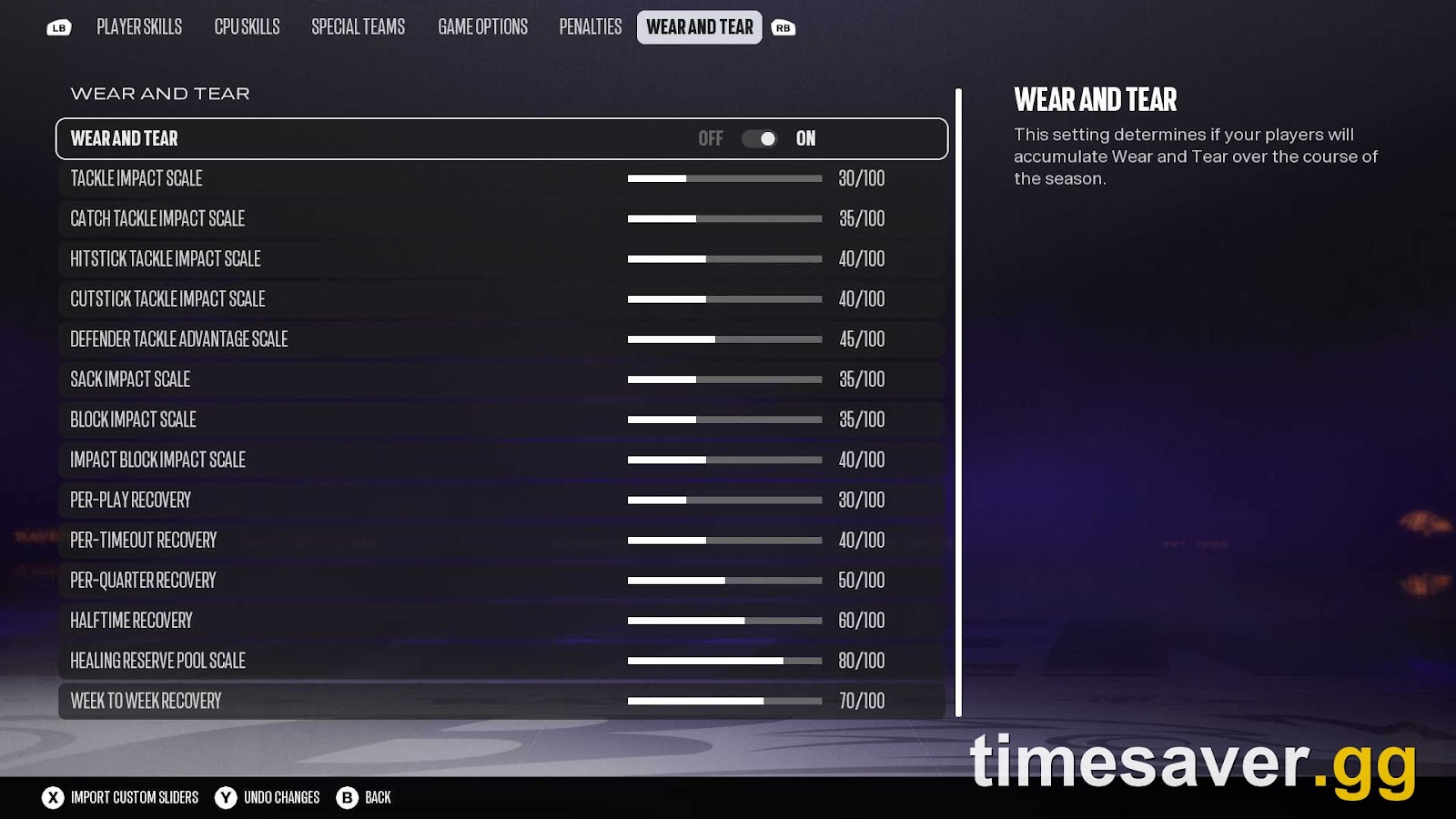
If you want to keep Wear and Tear but stop the three-carry exits, tune it instead of switching it off. The tab has 14 sliders in two groups:
| Group | Sliders | What raising it does |
|---|---|---|
| Impact (8) | Tackle Impact Scale, Catch Tackle Impact Scale, Hitstick Tackle Impact Scale, Cutstick Tackle Impact Scale, Defender Tackle Advantage Scale, Sack Impact Scale, Block Impact Scale, Impact Block Impact Scale | More Wear and Tear per hit |
| Recovery (6) | Per-Play Recovery, Per-Timeout Recovery, Per-Quarter Recovery, Halftime Recovery, Healing Reserve Pool Scale, Week-to-Week Recovery | Players recover faster |
In Sportskeeda's screenshot of a fresh league below, every slider sits at 50/100.

Wear and Tear tab with the toggle off: the sliders grey out. Source: Sportskeeda via EA.
Three tested sets, from lightest change to heaviest:
| Slider | Default | Game Rant "realistic" set | Simple community set |
|---|---|---|---|
| Tackle Impact Scale | 50 | 30 | 25 |
| Catch Tackle Impact Scale | 50 | 35 | 25 |
| Hitstick Tackle Impact Scale | 50 | 40 | 25 |
| Cutstick Tackle Impact Scale | 50 | 40 | 25 |
| Defender Tackle Advantage Scale | 50 | 45 | 25 |
| Sack Impact Scale | 50 | 35 | 25 |
| Block Impact Scale | 50 | 35 | 25 |
| Impact Block Impact Scale | 50 | 40 | 25 |
| Per-Play Recovery | 50 | 30 | 75 |
| Per-Timeout Recovery | 50 | 40 | 75 |
| Per-Quarter Recovery | 50 | 50 | 75 |
| Halftime Recovery | 50 | 60 | 75 |
| Healing Reserve Pool Scale | 50 | 80 | 75 |
| Week-to-Week Recovery | 50 | 70 | 75 |
The middle column is Game Rant's realistic slider set, shown in the screenshot at the top of this page. It also lowers the Fatigue slider in Game Options to 40. The right column comes from an r/Madden player who put the impact sliders "down to 25 and recovery sliders to 75". A reply in that thread said injuries still happen with those settings "but rarely".
Two other changes help:
- Injury slider (Game Options). On Operation Sports' slider forum, the author of a popular Madden 27 slider set said that dropping injuries from 40 to 30 "seemed to have help reduce the consistent injuries." One r/Madden player this week went as low as 12.
- Fatigue. Wear and Tear is the season-long meter. Fatigue is the in-game stamina drain. A lower Fatigue slider means fewer auto-subs on drives, which also means fewer hits on your backups.
Change one group at a time and sim or play two weeks before judging it. Wear and Tear is cumulative, so one game tells you very little. The same slider screen controls pass blocking too. Our pass blocking fix guide covers the Player Skills and CPU Skills values.
How do you manage Wear and Tear without turning it off?
This is the system as EA built it. Here's what experienced Franchise players do:
- Practice: Half Pads in normal game weeks, Rest for anyone Questionable or Doubtful, and Full Pads only on bye weeks or for young players who don't get game snaps.
- Rest players one at a time. Since Madden 26, you can rest a single star instead of a whole position group. Do it the week before a big game, not after the injury.
- Equip Trainer Abilities every week. Weekly Strategy is where you pick recovery and injury-prevention abilities. A higher-level Trainer gives better options.
- Split the carries. EA's own example is a back who "never gets a breather." Build a two-back depth chart and give your RB2 the early-down work in blowouts.
- Watch the status tags. Questionable and Doubtful players can be ruled Out after practice. Read the tags before you pick the practice plan, not after.
If you're starting a new save, this matters more on teams built around one workhorse. Our best teams to rebuild in Franchise guide covers which rosters have the depth to rotate.
Why do CPU teams play their backups?
This is the main reason players switch Wear and Tear off rather than tune it. Several r/Madden players report that AI teams don't manage practice reps, so their starters wear down and opponents start backups by the second half. One player said the result is "random whether the opposing team is at full strength". Another this week said CPU teams "end up playing backups more than their starters by the end of the season."
On the current build, you can:
- Raise the recovery sliders, which apply to every team in the league, not just yours.
- Turn Wear and Tear off and keep normal injuries on with a lower Injury slider. You lose the workload layer, but CPU rosters stay intact.
- In a 32-team-control league, set practice for CPU teams yourself. It takes time, but it's the only way to give the AI Half Pads weeks.
If your league also has freezing or menu problems in the weekly hub, see our Franchise freezing and controls fix.
Playing Ultimate Team between Franchise weeks? MUT runs on coins, not slider settings. EA's Madden rules don't allow buying coins from third parties, and EA can penalise accounts that do. Read EA's Madden rules before you decide.
- Madden NFL 27 Coins — MUT coin packages.
- All Madden NFL 27 services — every Madden 27 service in one place.
FAQ
Is Wear and Tear broken in Madden 27? Partly. EA fixed Wear and Tear building up much faster than intended on September 16, 2026, and fixed CPU players showing it with the setting off on October 21. What's left is mostly design: Full Pads practice and heavy workloads wear players down quickly, and CPU teams don't manage practice well, so they often play backups.
How do I turn off Wear and Tear in Madden 27? In Franchise, go to Options, then Gameplay Sliders, tab across to Wear and Tear, and set the top toggle to Off. In online leagues the commissioner controls sliders. Regular injuries are separate toggles in League Settings.
What are the best Wear and Tear sliders in Madden 27? The simplest community set is all eight impact sliders at 25 and all six recovery sliders at 75. Game Rant's realistic set is gentler: impact sliders between 30 and 45, recovery between 30 and 80, with Healing Reserve Pool Scale at 80 and Week-to-Week Recovery at 70.
Why is my running back always tired in Madden 27? Wear and Tear carries over between weeks, and Full Pads practice adds more. Auto-subs then pull the back early to protect him. Use Half Pads in game weeks, rest him when he's Questionable, split carries with your RB2 and lower the Fatigue slider if subs are too frequent.
Does Wear and Tear affect Superstar mode? Yes. It applies to your created player. The September 16 update's Wear and Tear fix was listed in the Superstar section of EA's patch notes.
Will the All '97 Title Update change Wear and Tear? EA has announced the All '97 Title Update for November 18, 2026, but its full patch notes weren't out when this guide was published. Check EA's Madden NFL 27 news page for any Wear and Tear lines before re-tuning your sliders.