Quick answer (16 November 2026, Patch 2.2.23 Original Server, Season 42 "Starward Decade"): To recover a hacked or lost Mobile Legends account, first take back the email or Google/Facebook login tied to it. Then open Customer Service inside MLBB and pick Account Recovery. You can do this from any account, including a brand-new one. Fill in the account retrieval form with your lost account's ID and Server ID, the approximate creation date, the first device you played on, and receipts for your diamond top-ups. If Moonton approves it, you get a recovery link that, in the approval emails players have posted, expires in 48 hours. Use it to set a new email. Recovery disconnects every third-party login and turns off the device lock, so re-bind and re-lock right after.
Account theft is the most common help request on r/MobileLegendsGame right now. In the last 72 hours alone the subreddit had a player whose three-year-old account was taken after their device was compromised, and another watching unknown login attempts hit their account (r/MobileLegendsGame, 15-16 November 2026). The pinned recovery guide keeps filling with the same complaint: the form comes back "insufficient" even though the player really owns the account.
This guide is built around that problem. It covers what to lock down before you file, what proof actually moves a ticket, how Security Lock and New Device Verification work, and what happens after you're approved. One caveat up front: Moonton's support pages are app-only and don't load as normal web pages. Everything below comes from Moonton's own in-game screens, system emails and Customer Service replies as players have posted them in 2026, and each one is cited. Menu names can shift between patches, so treat your own client as the final word.
Mobile Legends: Bang Bang - Account
Get Account
Can you recover a Mobile Legends account?
Yes, in most cases, if you can prove it's yours. Moonton has a dedicated recovery flow, and players regularly post approvals. Which path you take depends on what went wrong:
| Situation | What still works | Recovery path |
|---|---|---|
| New phone, account "gone" | Your Moonton, Google, Facebook or other bound login | Just log in with that bound account on the new device. No ticket needed |
| Forgot the Moonton password | Access to the bound email | Reset the password from the Moonton login screen with an email code |
| Lost access to the bound email | Nothing on the email side | Account retrieval form through Customer Service, with ownership proof |
| Hacked, and the email or bindings were changed | Nothing, the thief controls the logins | Secure your own email or Google first, then the retrieval form |
| Recovered, but the hacker got it banned | Access, but the account is restricted | A separate ban appeal through Customer Service |
| Guest account never bound to anything | Only the original device, if you still have it | Retrieval form only, and the hardest case to win |
The table hides one hard rule. If your account was never bound to a Moonton account, an email or a third-party login, there's no login to recover. The only route is persuading Customer Service with proof, and that's exactly the case where players report the most rejections.
What should you do first if your MLBB account was hacked?
Secure the email before you touch the game. Changes made through Moonton Account Center are confirmed by a code sent to the bound email. Moonton's own security email spells it out: "No one can complete the process without this mail." So if the thief is inside your Gmail, any recovery you start can simply be undone. Change that email's password, turn on two-step verification, and remove recovery phone numbers or backup emails you don't recognise. Do the same for the Google or Facebook login you used for MLBB.

That email above was sent on 13 November 2026. It's the warning you get when someone tries to change your account settings: "Someone tried to use Moonton Account Center to modify your account settings… The verification code is valid for 10 minutes." If you didn't request it, Moonton's own instruction is to "reset your password of your Moonton Account and your email to secure your account." Never give that code to anyone, including people in DMs claiming to be Moonton staff. It's the one thing a thief needs.
If you can still get into the game on your usual phone, act right away:
- Open Profile → Account, then Account Center, and change your Moonton password.
- In Account Center, use Disconnect 3rd Party Account to remove any Google, Facebook, TikTok or other login you don't recognise. Unknown third-party links are how thieves get back in after you change the password. The subreddit's recovery guide says to check for exactly this (r/MobileLegendsGame recovery guide).
- Open Login History, tap Log Out All ("Log out all devices from the game except the current one"), and switch Security Lock on (next section).
Only once you're fully locked out does the retrieval form come into play.
How does Security Lock protect your MLBB account?
Security Lock is MLBB's trusted-device system. You'll find it in the Login History window, under the Account tab of your profile. The in-game text says: "Once enabled, only trusted devices may access Account/Gifting/Squad operations on this account." That means a thief who logs in from another phone can't change your email, gift away your skins or move your squad.
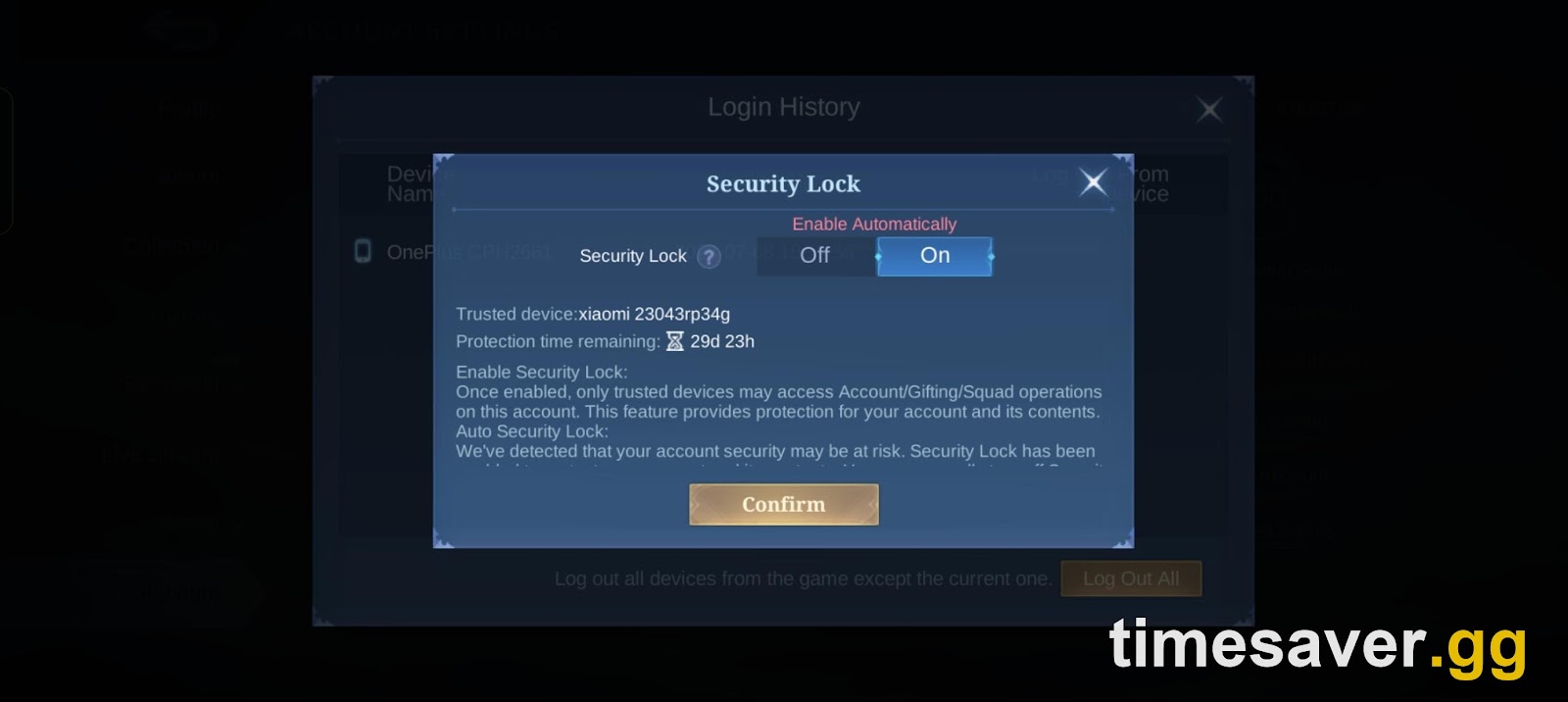
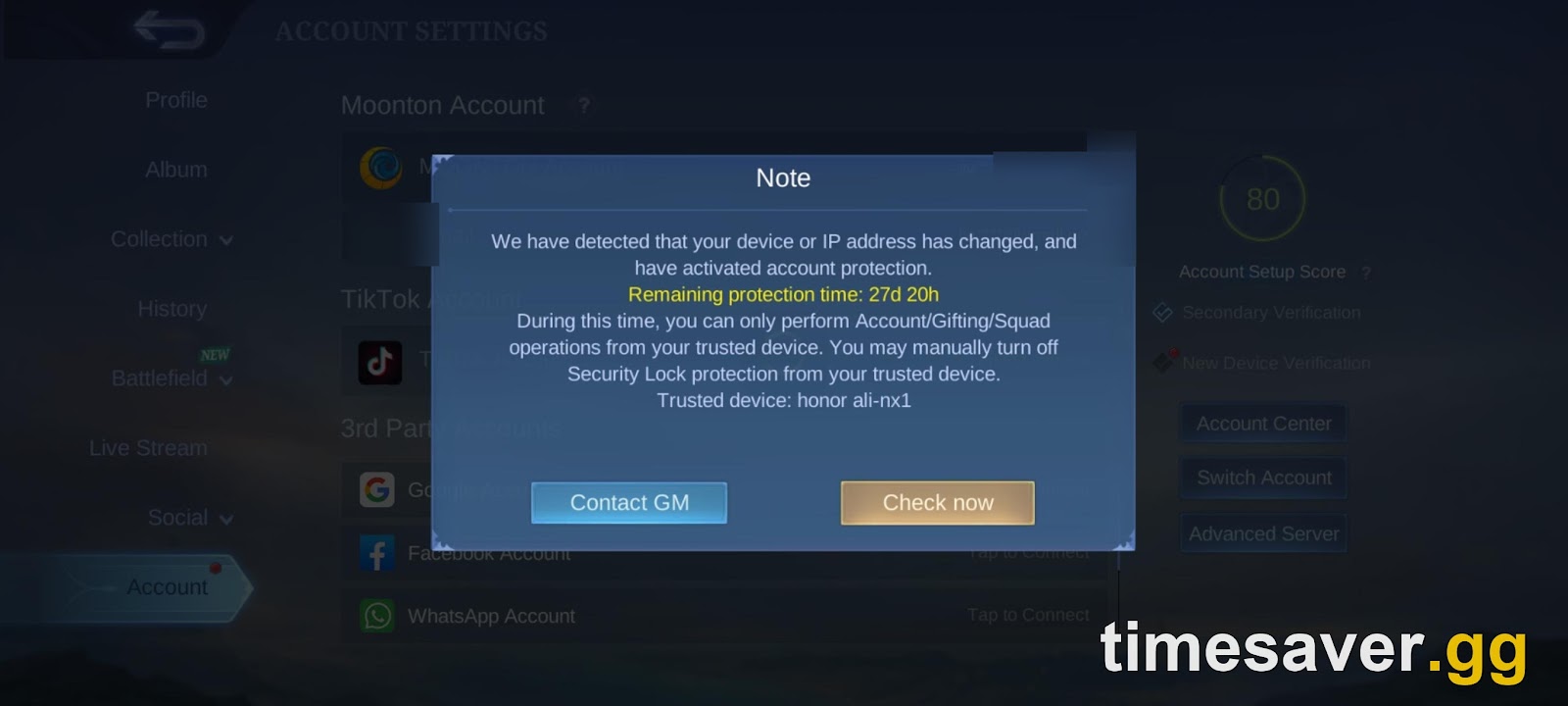
There's also an automatic version. When MLBB detects a risky login, it shows a notice: "We have detected that your device or IP address has changed, and have activated account protection." The featured screenshot at the top of this guide shows that notice with 27 days 20 hours of protection left. The Security Lock screen above shows 29 days 23 hours. In practice that's about 30 days of trusted-device-only protection.
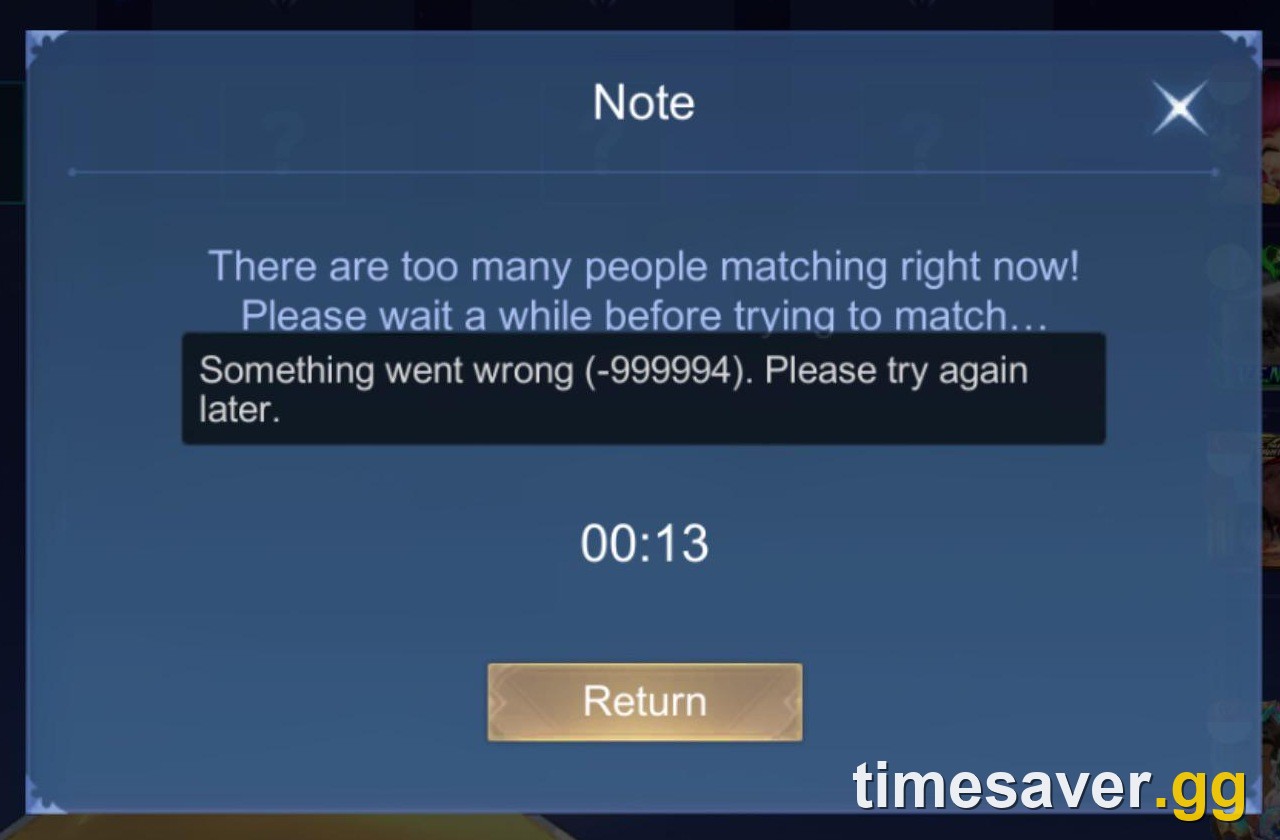
That cuts both ways. If you're the one on a new phone, you'll see "Your device has changed. Due to security reasons, you're temporarily unable to switch accounts. Please perform the action on your trusted device." One player who recovered a hacked account reported that the back-and-forth logins between them and the thief tripped exactly this kind of 30-day security lock (r/MobileLegendsGame). If you've lost the trusted device itself, the notice's Contact GM button sends you to the same Customer Service flow covered below.
The Account Settings screen also shows an Account Setup Score next to two toggles, Secondary Verification and New Device Verification. New Device Verification sends an email code whenever someone logs in from a phone your account hasn't seen before. Players complained about the extra code after the 11 March 2026 update (r/MobileLegendsGame). It's still the single best defence against a stolen password, as long as the email it sends to is secure.
How do you fill out the MLBB account retrieval form?
You file from inside the game, and you don't need the lost account to do it. Log in on any account, even a fresh one, open the Customer Service chat (headset icon in Settings, or the Contact GM button on a security notice), and choose Account Recovery. Then open the Account Retrieval form. A recurring support reply on the subreddit gives the path as "Customer Support > Account Recovery > Form_Account Retrieval" (r/MobileLegendsGame).
The bot replies: "Please fill out and submit the form below. We will verify the information as soon as possible." Before you open it, collect everything below. A half-empty form is the main reason tickets bounce.
Identity of the lost account
- Account ID and Server ID of the lost account. The ID is the number under your avatar on the Profile screen. If you never wrote it down, search old screenshots, squad chats or friends' friend lists for it.
- The Account ID and Server of the account you're filing from, plus a short, plain account of how you lost access (r/MobileLegendsGame).
- Your nickname, your rough level, and your current or last rank.
History only the real owner knows
- The approximate creation date. Search your email for the oldest message from Moonton. One player in the recovery thread dated their account from "the first email i got from moonton."
- The brand and model of the first phone you played on, and any others you've used.
- Heroes and rare or limited skins you own, plus squad and friend names.
Payment proof (the strongest evidence)
- Receipts for diamond top-ups: order IDs, dates, amounts and the payment channel (Google Play, App Store, e-wallet or a top-up site). The first top-up carries the most weight, but recent receipts help too. Pull them from your email, Google Play order history, Apple purchase history or your e-wallet app. Our MLBB diamond recharge guide shows where each channel keeps its records.
Submit one complete ticket and reply in the same thread. A support reply in the subreddit's recovery threads says Customer Support "may take 1-10 days to review and respond" (r/MobileLegendsGame). Opening a new chat every day doesn't speed that up.
Mobile Legends: Bang Bang - MLBB Mythic Calibration
Get MLBB Mythic Calibration
Why does MLBB reject account recovery requests?
The most common reply players post is a flat rejection. This one is from MLBB's Customer Service chat:

"After careful verification, we regret to inform you that the information you provided is insufficient to prove your ownership of this account." The same message adds that Moonton has "a stringent policy strictly forbidding any form of sharing or trading of game accounts" and that this violates its terms of service. That line is the whole review in a nutshell. Customer Service is checking whether you are the original owner, not just whether someone stole the account.
Rejections in the recovery thread usually come down to one of four gaps:
- No payment history. The form is weakest for accounts that never had a top-up. Even one old receipt changes the picture.
- A wrong or guessed creation date. Several players admit they "didn't know the exact date and month." Find the first Moonton email rather than guessing.
- The email is gone for good. Deleted Gmail, a school address, or an email the thief now controls. You can still win, but only on device and payment evidence.
- A shared or bought account. If several people have logged in over the years, or you got it second-hand, the history won't point clearly at you. The policy line above is why those cases rarely end well.
If you're rejected, don't refile the same form. Find the piece you were missing (usually a receipt or the first-device model), then reopen Customer Service and add it to the same case. And don't pay anyone who promises to "unlock" or "bypass" Moonton's checks. Those offers are scams aimed at people who just lost an account. One player in a hacked-account thread put it best: "Short guide: Dont click links."
What happens after your recovery request is approved?
Approval comes in one of two forms in the screenshots players have posted. Either Customer Service drops a link straight into the chat ("Your account recovery request has been verified… The link is valid for 30 minutes"), or Moonton emails you a recovery page:

That page reads: "Your request to recover the lost/stolen account… has been approved… This link is set to expire in 48 hours." You enter a new email address, confirm it with a code, and log back in with your Moonton account using that email. Two lines on that page matter more than anything else: "Once the recovery is complete, all the third-party accounts connected to your Moonton account will be disconnected, and the device lock, if enabled, will be disabled. You can reconfigure the accounts and device lock in the game."
So, right after you get back in:
- Re-bind a Google or Facebook login you control, so you're never one email away from losing it again.
- Turn Security Lock back on and check that New Device Verification is enabled.
- Open Login History, tap Log Out All, and remove any device you don't recognise.
- Check your Credit Score and match history. If the thief played Ranked, you might find AFK or report penalties. Our Credit Score guide explains how to win those points back.
- If the account was banned for something the thief did (cheating plugins are a common story in the subreddit), that's a separate ban appeal through Customer Service, not part of the recovery ticket.
How do you stop your MLBB account getting stolen again?
Almost every theft story in the subreddit starts the same way: a "free diamonds" or "free skin" link, a fake event page, or a stranger offering to help with something in DMs. Moonton never needs your password or a verification code to give you a reward. Real codes are redeemed only through the official route covered in our guide to redeeming MLBB codes, and our diamonds guide explains why free-diamond generators are always fake.
The short checklist:
- Bind at least two logins: your Moonton account plus Google, Facebook or Apple. Losing one is then an inconvenience, not a lost account.
- Use a unique password for the email that's bound to MLBB, and turn on two-step verification there. That email is your master key.
- Keep Security Lock and New Device Verification on.
- Save your receipts. Make a folder or email label for top-up confirmations. If anything ever goes wrong, those are your proof of ownership.
- Write down your Account ID, Server ID and creation month somewhere outside the game.
- Never share the account, even with a duo partner. Shared logins weaken your recovery case and break the policy Customer Service quotes.
If the account truly can't be recovered, you don't have to restart from a level-1 account and grind solo queue all over again.
Locked out for good, or starting over? timesaver.gg can get you back to your old rank faster.
- Mobile Legends Accounts — ranked-ready MLBB accounts · hero and skin collections · instant handover
- Mobile Legends Rank Boost — Warrior to Mythical Immortal · piloted or self-play · pick your target
- All Mobile Legends services
FAQ
How do I recover my Mobile Legends account without the email? Use the account retrieval form in Customer Service (Account Recovery). Without the email, your case rests on the account ID and Server ID, the creation date, the first device you played on and diamond top-up receipts. If you're approved, the recovery page lets you enter a brand-new email address.
Can I recover a hacked MLBB account if the hacker changed the bound email? Yes. That's exactly what the "lost/stolen account" recovery is for. Secure your own email and Google account first, then file the retrieval form with as much payment and device history as you can. Approval replaces the email and disconnects every third-party login the hacker added.
How long does Mobile Legends account recovery take? Support replies on the subreddit put the review at 1 to 10 days. Once you're approved, act fast: the emailed recovery link players have posted expires in 48 hours, and links sent inside the chat have shown a 30-minute limit.
Can I recover an MLBB guest account? Only through the retrieval form, and it's the hardest case. A guest account has no bound login to fall back on. If you still have the original phone, try that first. Otherwise you'll need receipts and device details to prove ownership.
Why was my account recovery request rejected? Usually because the evidence didn't prove ownership. Common gaps are no top-up receipts, a guessed creation date or a shared account. Add the missing proof to your case instead of refiling the same form.
What is Security Lock in Mobile Legends? It's a trusted-device lock, found in Login History. While it's on, only your trusted device can do account, gifting and squad actions. MLBB can also switch it on automatically after a suspicious login, for about 30 days.