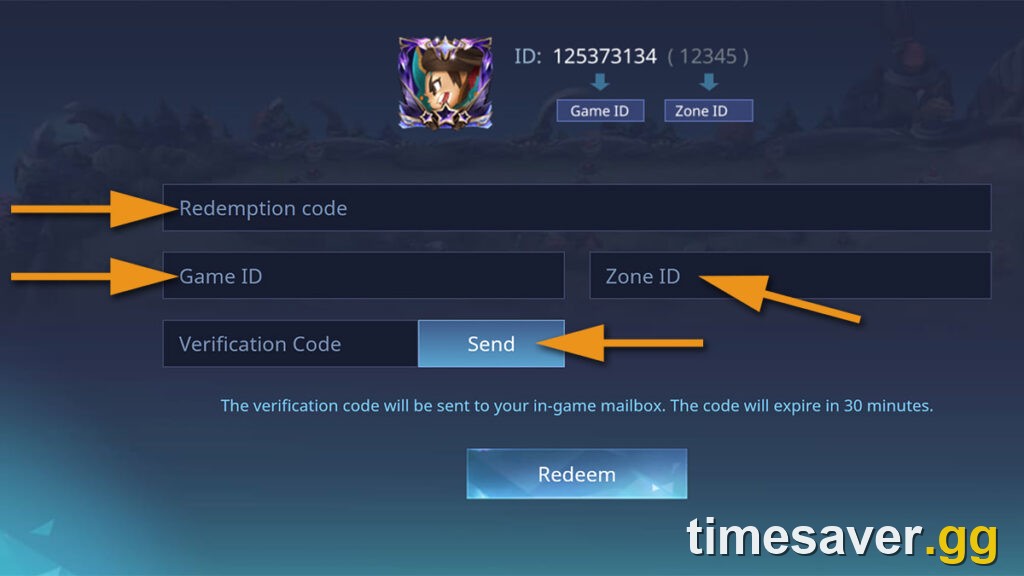
You redeem Mobile Legends codes on the official Code Exchange at m.mobilelegends.com/en/codexchange — you enter your Game ID, request a one-time verification code that arrives in your in-game mailbox, paste it back, then type the redeem code. There is no in-app text box that takes a code directly without that mailbox step, which is exactly why most "it won't work" problems come down to the verification handshake, an expired code, or a redeem limit that has already been hit.
This guide is written for Patch 2.1.95a / Season 42 "Starward Decade" (season started 16 September 2026), during the live 10th Anniversary campaign when Moonton is handing out more codes than usual. The method below is evergreen — it has not changed in years — but any specific code you find anywhere expires fast, so we deliberately do not paste a stale list you'll be angry about tomorrow. We show you how to redeem correctly and where to get codes that are actually current.
Quick answer: Open m.mobilelegends.com/en/codexchange → enter the bold number from your in-game profile (that's your Game ID) → tap Send → open your in-game mail for a verification code (valid ~30 minutes) → paste it into the Verification Code box → type the redeem code → tap Redeem → collect rewards from your in-game mailbox. If it fails, the code is almost always expired, region-locked, or over its redeem limit — not your account.
Mobile Legends: Bang Bang - Account
Get Account
What are Mobile Legends codes?
Redeem codes in Mobile Legends: Bang Bang are short alphanumeric strings that Moonton releases through official channels — livestreams, the in-game news feed, event pages, and the official @MobileLegendsOL account — as maintenance compensation or event rewards. Redeeming one drops rewards straight into your in-game mailbox.
Typical rewards are modest and cosmetic-or-currency adjacent: Magic Dust, Rare Skin Fragments, Hero Fragments, trial cards, small amounts of diamonds, and occasionally a battle emote or a limited skin trial. They are a nice bonus, not a shortcut to a full skin collection. Anyone promising "1000 free diamonds" from a code is selling you something else — see the safety section below.
Three facts about MLBB codes shape everything else in this guide, and they are the source of nearly every complaint:
- They expire quickly. Most codes are live for days, not weeks. A list published last month is dead.
- Many have a redeem limit. A code capped at, say, 300 redemptions works for the first 300 players and returns an error for everyone after. "It worked for my friend but not me" is usually this.
- Some are region- or account-restricted. A code tied to an SEA event or a specific server may reject an account outside that scope.
How do you redeem Mobile Legends codes? The step-by-step
The only official redemption path is the web Code Exchange. Do not trust any third-party site that asks you to "log in" to redeem — Moonton never asks for your password to redeem a code.
- Find your Game ID. In the app, tap your profile avatar (top-left). Your ID appears in the format 123456789 (1234). The first, longer number is your Game ID; the number in brackets is your Zone/Server ID. You will usually only need the Game ID for the Code Exchange, but keep both handy — top-ups and some flows use the pair.
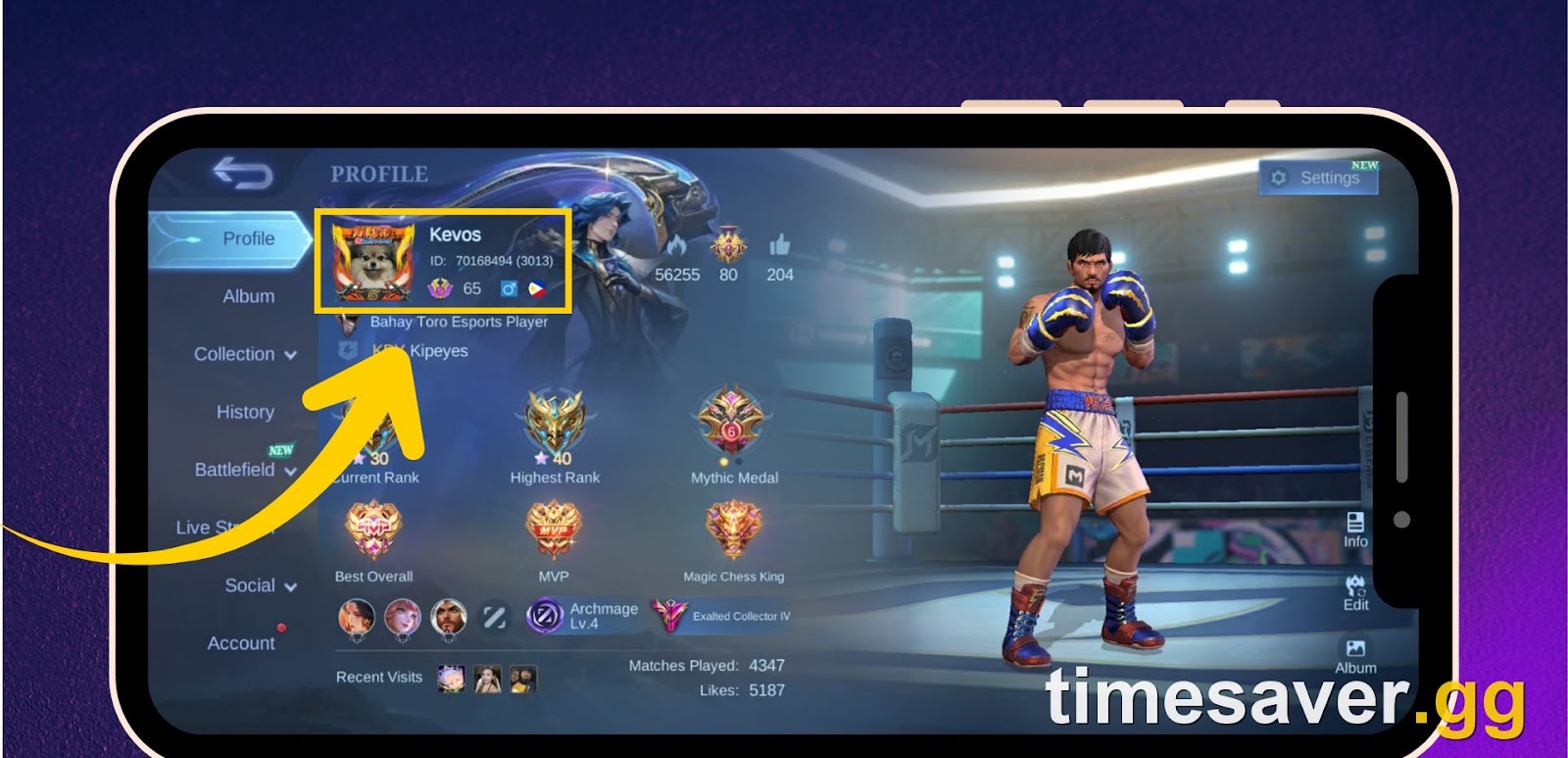
- Open the official Code Exchange: m.mobilelegends.com/en/codexchange (also reachable as www.mobilelegends.com/en/codexchange). This page returns a live redemption form.
- Enter your Game ID in the Game ID box and tap Send.
- Check your in-game mailbox. Moonton sends a verification code to your in-game mail (the envelope icon), not to your email inbox. Copy that verification code.
- Paste the verification code into the Verification Code box on the website. The official Code Exchange states it plainly on the form: "The verification code will be sent to your in-game mailbox. The code will expire in 30 minutes." Here is the time-saver most people miss: within that same ~30-minute window you can redeem multiple codes without requesting a new verification code each time.
- Type the redeem code exactly — codes are case-sensitive — and tap Redeem.
- Collect your rewards from your in-game mailbox. They land there, not automatically in your inventory.
There is also an in-game path on some client versions — Profile → Settings → Redemption Code — but the web Code Exchange is the canonical route and the one Moonton documents.
Why your Mobile Legends code isn't working
This is where the real search demand lives, so let's be specific. Sort your problem into one of these buckets:
"I never get the verification code in my mailbox." The verification code goes to your in-game mail (the envelope), not your linked email account — that trips up a lot of first-timers. If it genuinely isn't arriving, Moonton's own support line is that your mail provider may have flagged it as spam and rejected it in cases where verification is sent to email; check spam and, if you have a Moonton account bound, that the bound email is correct. Requesting again after a minute usually resolves a one-off delivery miss.
"It says 'Please check the information entered and try again.'" This near-universally means the code itself is no longer valid — expired, at its redeem cap, or region-locked — rather than a typo on your end, provided you entered the code exactly (case-sensitive, no trailing spaces). Because so many circulating codes are dead, this error is the norm for old lists, not the exception.
"It worked for my friend but not for me." Redeem limit reached, or the code is scoped to a region/server your friend is on and you aren't.
"The code is for diamonds / summon scrolls but I play Bang Bang." You may have grabbed a Mobile Legends: Adventure code. Adventure is a completely separate idle RPG from Moonton that shares characters, and its codes (which give "Summon Scrolls" and the like) do not work in Bang Bang. Make sure the source is talking about MLBB / Bang Bang, not Adventure.
Mobile Legends: Bang Bang - Achievement Badges
Get Achievement Badges
Where do you find current Mobile Legends codes?
Because codes rot in days, the source matters more than any list:
- Official first. The in-game news feed and event pages, official livestreams (the 10th Anniversary and Season 42 broadcasts have been dropping event rewards), and the @MobileLegendsOL X account are where codes appear first and where they are guaranteed real.
- Reputable trackers second, and only as a pointer. Established gaming outlets maintain "today's codes" pages, but even the good ones lag reality and occasionally mix in Adventure codes by mistake — treat any list as "codes to try," not "codes that will work," and verify the reward type matches Bang Bang.
- During events, watch the calendar. The 10th Anniversary "A Decade of Legends" campaign runs through 1 November 2026 and the Anniversary Battle Pass window is live, so this is an unusually code-rich stretch — check the in-game events tab daily rather than hunting external lists.
If a code fails, don't keep hammering it. Move to the next one, or wait for the next official drop. There is no penalty for a failed attempt, but there is also no trick that revives a dead code.
A note on "free diamonds," generators, and rank-booster apps
Search "Mobile Legends codes" and you will trip over sites promising unlimited free diamonds, "diamond generators," injectors, or rank-booster APKs. Every one of these is a scam or a malware vector. Moonton distributes diamonds through paid top-up only (in-game, Codashop, UniPin and other authorised sellers), keyed to your Game ID + Zone ID; there is no legitimate code that grants thousands of diamonds, and no generator that produces them. Installing a modded APK or handing over your login to a "booster" site is how accounts get compromised.
Diamonds themselves are publisher-fixed RRP — the first-recharge bonus packs (like 100 Diamonds at $0.99) are one-time only, and the standing rate works out to roughly $0.0167 per diamond at the top of the ladder. A "cheaper diamonds" pitch attached to a "code" is a red flag, not a deal.
If what you actually want is a head start — a ranked-ready account or a climb up the ladder — that's a service, not a code. On timesaver.gg you can pick up a hero-and-skin-loaded Mobile Legends account, or a rank boost toward your target tier, without touching a sketchy generator:
Want to skip the grind the safe way? These are real MLBB services, not code tricks:
- Mobile Legends Accounts — ranked-ready MLBB accounts, hero and skin collections, instant handover.
- Mobile Legends Rank Boost — Warrior to Mythical Immortal, piloted or self-play, pick your target.
- All Mobile Legends services — the full MLBB catalogue in one place.
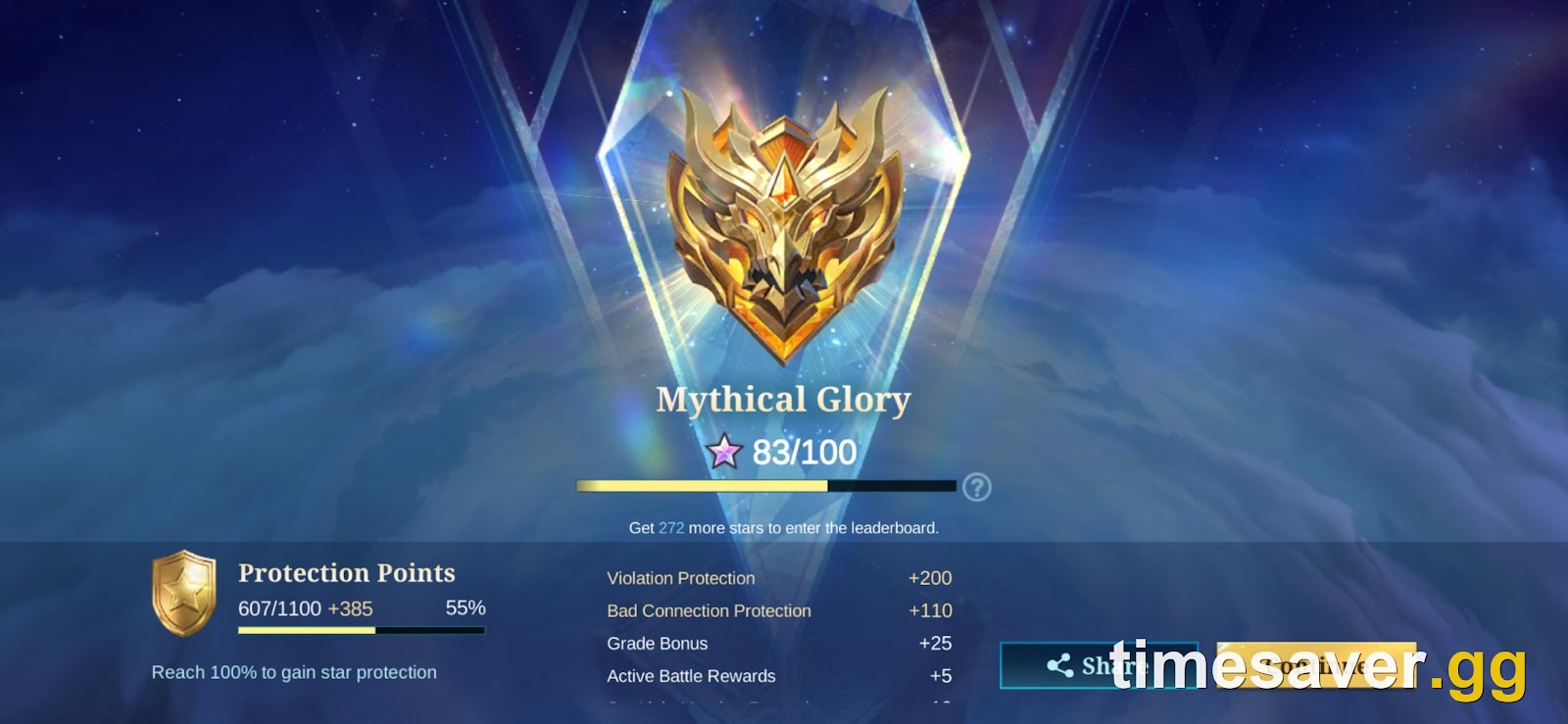
For more on the ranked side, see our guides on the Season 42 rank reset, how to reach Mythical Glory, and everything new in Season 42 "Starward Decade".
FAQ
Where do I redeem Mobile Legends codes? On the official Code Exchange at m.mobilelegends.com/en/codexchange. Enter your Game ID, request the verification code that lands in your in-game mailbox, paste it back, then type the redeem code and tap Redeem. Some client versions also expose Profile → Settings → Redemption Code, but the web page is the canonical route.
Why does my code say "please check the information entered"? Almost always because the code is dead — expired, over its redeem limit, or restricted to a region or server you're not on — not because you mistyped, as long as you entered it exactly (codes are case-sensitive). Old code lists produce this error constantly, so try a fresher code rather than re-entering the same one.
I'm not getting the verification code — what do I do? The verification code is sent to your in-game mailbox (the envelope icon), not your email inbox, which is where most people look by mistake. If a version of the flow sends it to email and nothing arrives, check your spam folder; Moonton support notes that mail providers sometimes flag and reject the message. Request it again after a minute if the first send is missed.
Do Mobile Legends codes give free skins or lots of diamonds? Rarely and never in bulk. Real codes hand out Magic Dust, fragments, trial cards, small diamond amounts, and occasional emotes or skin trials. Any "code" promising thousands of free diamonds is a scam — diamonds come only from paid, authorised top-up.
My friend redeemed a code but it won't work for me. Why? Two usual causes: the code hit its redemption limit before you got to it, or it's scoped to a region or server your friend is on and your account isn't.
Are the codes I found for the right game? Check that the source says Mobile Legends: Bang Bang (MLBB). Mobile Legends: Adventure is a separate idle RPG whose codes (Summon Scrolls, etc.) do not work in Bang Bang, and lists sometimes mix the two up.
Accurate as of 18 September 2026, Patch 2.1.95a, Season 42 "Starward Decade." Redemption mechanics via the official Mobile Legends Code Exchange; specific active codes change frequently — always confirm against official Moonton channels.