Quick answer (TL;DR): Call of Duty: Modern Warfare 4 launches October 23, 2026, with an Open Beta running August 21–25 (Early Access) and August 28–September 1 (open to all) (callofduty.com). You can't change in-game settings until the beta client goes live on August 21 — but you can prep everything else now. To hit high, stable FPS: install MW4 on an SSD with 120 GB+ free, update to the latest GPU driver, enable TPM 2.0 + Secure Boot on Windows 10 22H2 or Windows 11 (RICOCHET requires it), turn on your GPU's low-latency mode, and cap your frame rate a few frames below your monitor's refresh. In-game, prioritize render resolution, texture streaming and shadow/particle quality — the three settings that historically cost the most FPS on the Infinity Ward engine. Below: the full pre-beta checklist and the exact settings order to tune the moment the beta drops.
Infinity Ward rebuilt MW4's gunplay around a system it calls "Ballistic Authority," stripping out weapon bloom entirely — Activision's framing is "no bloom, no guesswork, and no doubt" (callofduty.com). Deterministic gunplay rewards a high, stable frame rate: the smoother and more consistent your FPS, the more your aim translates 1:1 to what the game registers. That's why settings tuning matters more this year, not less. On the controller side, the other major gunplay variable is aim assist — see our MW4 aim assist explained for every type and the best setting.
This guide separates CONFIRMED facts (dates, platforms, engine, anti-cheat policy) from EXPECTED in-game menu behavior (based on how the Infinity Ward engine ran in Modern Warfare III, Black Ops 6 and Black Ops 7). Nothing here assumes MW4 is playable before August 21.
Call of Duty: Modern Warfare 4 - Bot Lobbies
Get bot lobby in 10 minutes
Why does MW4 punish a slow PC harder than older CoDs?
| MW4 skips PlayStation 4 and Xbox One entirely — it's a current-gen-only title on PS5, Xbox Series X | S, PC and Nintendo Switch 2 (callofduty.com announcement). Dropping last-gen means the PC performance floor sits at or above the most recent Call of Duty games. For reference, the last two titles kept climbing: Black Ops 6 shipped at a 102 GB install; Black Ops 7 at roughly 116 GB (Activision). Expect MW4 to land in the same range or larger. |
|---|
Three hard PC requirements are already franchise-wide policy, so plan around them now:
- An SSD, not an HDD — the engine streams textures constantly; a hard drive causes the stutter you can't fix in the menu.
- DirectX 12 and a 64-bit Windows 10 (version 22H2) or Windows 11 install.
- TPM 2.0 + Secure Boot enabled in BIOS. Activision's RICOCHET anti-cheat made these mandatory on PC for Black Ops 7 and, via Season 4, for Warzone. The support article states these features "are required for anti-cheat enforcement" (support.activision.com). If they're off, you won't even reach the settings menu — so check first.
For the full expected minimum/recommended spec sheet, see our Modern Warfare 4 system requirements breakdown. This page is about squeezing the most frames out of whatever rig clears that bar.
What should I do before the beta to boost FPS? (pre-August 21 checklist)
You can knock out ~80% of your performance gains before the beta client even downloads. Do these now:
- Install on your fastest SSD, with headroom. Budget at least 120–150 GB of free space on an NVMe or SATA SSD. A drive that's nearly full throttles write speed and worsens texture-streaming hitches. See our MW4 preload, file size & unlock times guide for exact download timing.
- Update your GPU driver. Nvidia and AMD both ship "Game Ready" / "optimized" drivers around major CoD launches and betas. Install the latest before August 21 so day-one performance isn't bottlenecked by a stale driver.
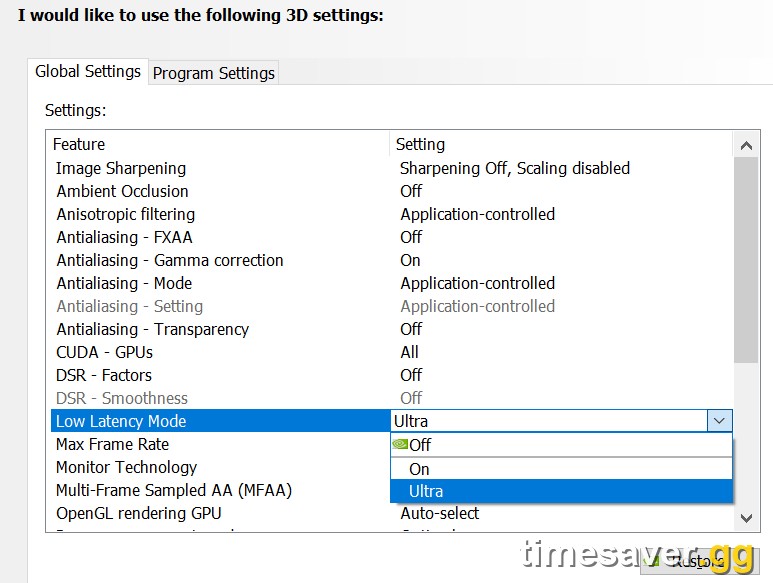
- Enable low-latency at the driver level. In the NVIDIA App / Control Panel, set Low Latency Mode → Ultra (or enable Reflex in-game once available). On AMD, enable Anti-Lag. This shaves input latency independent of your in-game settings.
- Turn on Windows Game Mode and Hardware-Accelerated GPU Scheduling (HAGS). Both live in Windows Settings → Gaming / Display → Graphics. HAGS can smooth frame pacing on modern GPUs.
- Close overlays and background capture. Discord overlay, browser tabs, and always-on recording (Instant Replay, Xbox Game Bar capture) all steal frames. Kill what you don't need before you queue.
- Set your power plan to High Performance (desktop) and plug in / disable battery savers (laptop). Cap background apps that spike your CPU.
- Verify TPM 2.0 + Secure Boot are ON now, not at launch. Enabling them can require a BIOS change and, on some systems, converting your disk to GPT — not something you want to discover at 9 a.m. on beta day.
Which in-game settings cost the most FPS in MW4? (tune these first on beta day)
The Infinity Ward engine exposes dozens of options, but a handful drive nearly all of your frame rate. When the beta goes live on August 21, tune them in this order. (These are expected based on MW3/BO6/BO7 behavior — exact menu labels may shift; we'll update this page once the beta build is live.)
The high-impact settings — adjust these first:
- Render Resolution / Resolution Scale. The single biggest FPS lever. If you're below your target frame rate, drop this before touching anything else. Pair it with upscaling (below) rather than lowering it blindly.
- Upscaling: DLSS / FSR / XeSS. Recent CoD titles supported DLSS (Nvidia), FSR (AMD/any GPU) and XeSS (Intel). MW4 is expected to include the current versions. Set it to Quality at 1080p/1440p or Balanced at 4K for a large, near-free FPS gain. Enable Frame Generation only if your base FPS is already 60+ (it adds latency below that).
- Texture Streaming / VRAM Scale / Texture Resolution. The classic CoD stutter culprit. If you have 8 GB of VRAM or less, keep the streaming/VRAM budget conservative to avoid hitches — high-res textures are the first thing to blow past your VRAM.
- Shadow Quality. Consistently one of the most expensive settings for the least competitive benefit. Medium or Low frees real frames.
- Particle Quality / Particle Resolution. Explosions and smoke tank FPS in busy fights. Lower this for stable frames during the moments that matter.
The clarity/visibility settings — set these for competitive advantage, not just FPS:
- Field of View (FOV). Push it up (100–120) so you spot flankers wider. It costs a little FPS but the visibility is worth it.
- Anti-Aliasing. Use the cheapest option that removes shimmer (typically SMAA T2X / the filmic AA). Avoid the most expensive AA modes.
- Motion Blur (World + Weapon): OFF. Zero competitive upside, small FPS cost, and it hides moving enemies.
- Depth of Field / Film Grain / Bloom effects: OFF. Purely cosmetic; turning them off cleans up the image and reclaims a few frames.
How do I get smooth, consistent frames instead of just a high number?
A high average FPS with big dips feels worse than a slightly lower, rock-steady frame rate — and on a no-bloom engine that rewards consistency, stability wins gunfights. Do this:
- Cap your FPS a few frames below your monitor's refresh (e.g. 141 on a 144 Hz panel). An uncapped frame rate that swings wildly causes frame-time spikes; a stable cap smooths pacing.
- Enable your GPU's low-latency/Reflex option to keep input lag low at that cap.
- If you have G-Sync or FreeSync, enable it and keep the in-game frame cap just under the refresh ceiling for tear-free, low-latency play.
- Watch your VRAM headroom. If texture settings push you over your card's VRAM, you'll get periodic stutter no frame cap can fix — dial textures down until it fits.
MW4's deterministic gunplay is the reason to chase stability. As Activision put it, the goal is "no bloom, no guesswork, and no doubt" (callofduty.com) — and that promise only pays off when your frame rate isn't fighting you.
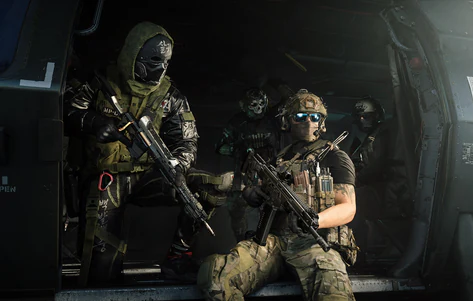
Call of Duty: Modern Warfare 4 - Mastery Camo Bundle
Get mastery camos in 10 minutes
What FPS should I target on my hardware?
Rough, realistic targets based on recent CoD PC performance (expect MW4 to behave similarly on the same engine):
- 60 FPS at 1080p: a GTX 1060 / RX 580-class GPU with settings on Low–Medium and upscaling on Quality.
- 120+ FPS at 1080p/1440p: an RTX 3060 / RX 6600 XT or better, Medium settings, upscaling on Quality/Balanced.
- Competitive high-refresh (165+): a current RTX 40/50-class card, low settings on the expensive options, FOV maxed, Reflex on.
If your rig is on the edge, the single best value upgrade for any CoD PC remains a larger, faster NVMe SSD — it satisfies the storage requirement and cuts the texture-streaming hitches an older drive introduces.
Get set up now — MW4 isn't out yet, but Warzone and BO7 are
MW4 doesn't launch until October 23, and there's no MW4 product to buy yet. But if you want to walk into the beta and launch already sharp — leveled up, camos in progress, and warmed up in low-pressure lobbies — get set up in the current Call of Duty ecosystem now:
Skip the grind and hit the ground running:
- CoD Bot Lobbies — easy lobbies to warm up and level fast
- CoD Account & Weapon Leveling — skip the grind, done by pro players
- CoD Camo Unlocks — mastery camos, fast and secure
- All Call of Duty services — everything in one place
Everything ports forward into the same account you'll carry into MW4 — see what carries over to MW4 for the details.
FAQ
Can I change MW4 settings before the beta? No. The in-game graphics menu only exists once the beta client is live, which is August 21, 2026 for Early Access (pre-order) and August 28 for everyone (callofduty.com). Everything else — SSD install, driver updates, low-latency mode, TPM 2.0/Secure Boot, Windows optimizations — you can and should do beforehand.
What's the single best setting to boost FPS in MW4? Render resolution paired with upscaling. Lowering render/resolution scale and enabling DLSS/FSR/XeSS on Quality gives the biggest, most reliable FPS gain with the least visual loss. After that, drop Shadow Quality and Particle Quality.
Should I turn on Frame Generation? Only if your base frame rate is already 60+. Frame Generation multiplies frames but adds input latency, so below 60 FPS it can feel worse — exactly what you don't want on a no-bloom, aim-punishing engine. Above 60, it's a solid smoothness boost on supported GPUs.
Why does my CoD stutter even with a good GPU? Almost always storage or VRAM. Install on an SSD with 120 GB+ free (never an HDD), and if your texture/VRAM settings exceed your card's memory you'll get periodic hitches no frame cap can fix. Recent CoD installs ran 102 GB (Black Ops 6) and about 116 GB (Black Ops 7), so budget headroom. If it is worse than stutter — crashes, hangs, install errors — see the MW4 beta not working fixes.
Do I need TPM 2.0 and Secure Boot just to play MW4? Yes, on PC. RICOCHET anti-cheat has required TPM 2.0 + Secure Boot on Windows 10 22H2 or Windows 11 since Black Ops 7, and it's now franchise-wide policy (support.activision.com). Enable them in BIOS before beta day.
Will MW4 run on the Nintendo Switch 2? Yes — MW4 is confirmed for Switch 2, the first Call of Duty on a Nintendo platform in over a decade (callofduty.com). This PC settings guide applies to Battle.net, Steam and Xbox on PC; console and Switch 2 have their own, more limited option sets.