Modern Warfare 4 servers can go down like any live Call of Duty, and the fastest way to know whether the problem is Activision's side or yours is to check one official page before you touch a single setting. This guide shows you exactly where to look, how to read the status, and what to do when you see "Servers are not available" or a failed connection.
Call of Duty: Modern Warfare 4 - Bot Lobbies
Get bot lobby in 10 minutes
Key Takeaways (TL;DR)
- Official server status lives at support.activision.com/onlineservices (the "Call of Duty: Modern Warfare 4 Server Status" page). If your platform's indicator is not green, or there is an alert, the outage is on Activision's end and you wait it out.
| - MW4 launches October 23, 2026 across Xbox Series X | S, PS5, PC (Steam and Battle.net), and Nintendo Switch 2. Campaign Early Access starts October 16. Outside the beta and launch windows, there is no live multiplayer to be "down." |
|---|
- If status is green but you still can't connect, the issue is local: check your platform network (Xbox / PSN / Nintendo / Steam / Battle.net), then your own connection.
- Wired beats Wi-Fi. Activision officially recommends a wired Ethernet connection for online play, and the fix that clears most PC launch failures is a full file scan or reinstall.
- Bookmark this page. "Is MW4 down" spikes hardest at launch on October 23 and after every major update.
Is Modern Warfare 4 Down Right Now?
Short answer: check the official status page first, because it is the only source that tells you whether the servers are the problem or your setup is.
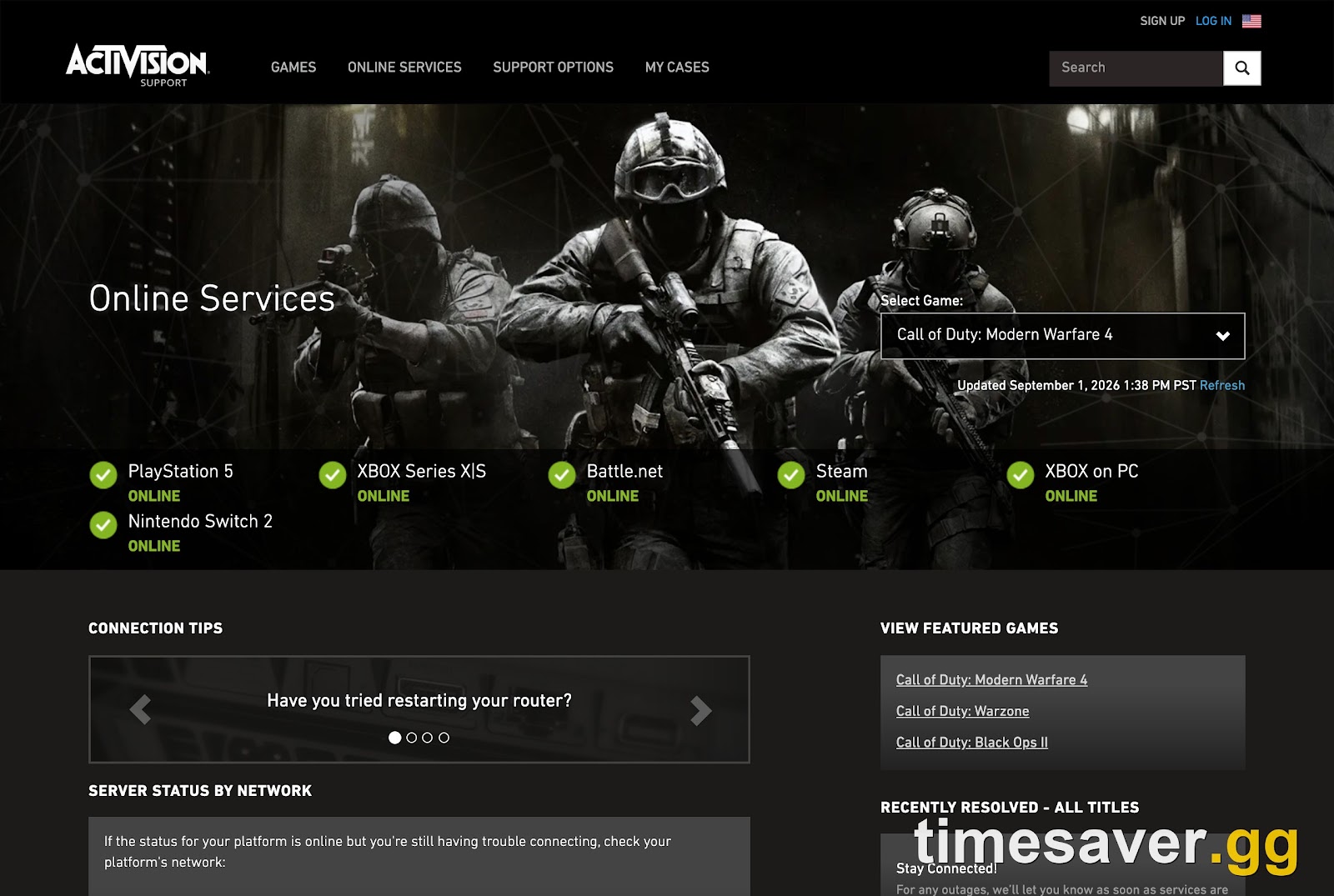
Go to support.activision.com/onlineservices and select Call of Duty: Modern Warfare 4 plus your platform. This is the page Activision itself points you to. In its official "Connecting to Modern Warfare 4" support article, the studio writes:
"If you're having trouble connecting to Call of Duty: Modern Warfare 4, you should first check Call of Duty: Modern Warfare 4 Server Status. If the status indicator for your platform is not green or an alert is present, you might encounter connectivity issues until service is restored and fully operational."
— Activision Support, Connecting to Modern Warfare 4
That single line is the whole decision tree:
- Indicator not green, or an alert posted → the outage is server-side. Nothing you change locally will fix it. Wait for Activision to restore service.
- Indicator green, no alerts → the servers are fine and the fault is on your end. Move to the local fixes below.
A quick reality check on timing, because it matters right now. MW4 is not fully released yet: the game launches October 23, 2026, with Campaign Early Access on October 16. The only time servers have been live so far was the Open Beta, which ran August 28 to September 1 (Activision extended the final day by 12 hours to 10:00 PM PT). So if you are reading this outside a beta or the live game, there is simply no multiplayer server to be "down." Once launch day hits, this same status page becomes your go-to.
How Do You Check MW4 Server Status Officially?
There are three official checkpoints. Use them in order.
1. Activision Online Services (the master page). support.activision.com/onlineservices lists every current Call of Duty title with a live status indicator and any "known events" (maintenance, outages) filtered by game and platform. Refresh the page rather than trusting a stale tab.
2. The @ATVIAssist Twitter/X feed. Activision's support account posts confirmed outages and maintenance windows before the status page always catches up. When servers drop for everyone at once, this is usually the first official word.
3. Your platform's own network status. If Activision shows green but you still can't get online, the break may be on your console or launcher network, not the game. Check the source that matches your platform:
- Xbox: support.xbox.com/xbox-live-status
- PlayStation 5: status.playstation.com
- Nintendo Switch 2: Nintendo Online Service Status
- PC (Steam): the Steam status via Steamstat or Valve's store status page
- PC (Battle.net): Blizzard's Battle.net service status page
Third-party trackers like Downdetector's Call of Duty page are useful for spotting a spike in player reports, but they measure complaints, not Activision's actual server state. Treat them as an early smoke signal, not the source of truth.
Why Does MW4 Say "Servers Are Not Available"?
The "Servers are not available" message (and its cousins, "Connection Failed" and being stuck on the connecting screen) means your client reached out and did not get a clean handshake back. During the Open Beta, players hit exactly this, alongside the well-documented "Networking Failed to Start" error tied to the Hueneme Negev code. There are three common causes:
- Real server outage or maintenance. Confirmed on the status page. You wait.
- A platform network problem (Xbox Live, PSN, Steam, or Battle.net having issues), which blocks the game even when Activision is healthy.
- A local fault: corrupted game files, a bad NAT/router state, a launcher hiccup, or DNS trouble.
If the status page is green and your platform network is green too, you are firmly in category three, which is the good news, because that is the category you can actually fix.

Call of Duty: Modern Warfare 4 - Mastery Camo Bundle
Get mastery camos in 10 minutes
How Do You Fix MW4 Connection Errors on Your End?
Work through these in order and stop the moment you reconnect.
Restart the full stack. Close the game, then power-cycle your router or modem (unplug for 60 seconds) and restart your console or PC. This clears the majority of "can't connect" states and is the single highest-hit-rate fix.
Run your platform's connection test. This is Activision's own recommended step and it pinpoints where the break is:
- Xbox: press the Xbox button → Profile & system → Settings → General → Network settings → Test network connection (and "Test multiplayer connection" for lag/disconnects).
- PlayStation 5: Settings → Network → Test Internet Connection.
- Switch 2: System Settings → Internet → Test Internet Connection.
Switch to a wired connection. Activision explicitly recommends Ethernet over Wi-Fi. In the studio's words, "Wi-Fi connections have a wide variance in reliability and bandwidth, and can dramatically affect the quality of online gameplay." Experienced players in the community echo this constantly: a stable, wired connection almost always beats a faster wireless one, because bandwidth and stability are not the same thing.
Scan and repair, or reinstall, the game files. On PC especially, a corrupt install throws connection and launch errors that look like a server problem but are not. Use "Scan and Repair" in Battle.net or "Verify integrity of game files" on Steam. If that fails, the community's blunt-but-effective move is to delete the Call of Duty install folder and reinstall clean.
Check for a PC security-boot block. MW4's anti-cheat requires Secure Boot and TPM 2.0 on PC. If you are bounced before you even reach the menu with a "BIOS Update Required" or attestation error, that is a separate boot-level fix, not a server issue. We break it down in our Secure Boot & TPM 2.0 error fix guide.
Flush DNS or try a different DNS. On PC, `ipconfig /flushdns` in Command Prompt clears stale routing. Some players see steadier connections on Google DNS (8.8.8.8 / 8.8.4.4) or Cloudflare (1.1.1.1).
For the wider list of crash, launch, and stutter errors that showed up in the beta, see our MW4 not working: every crash and won't-launch fix, the dedicated Networking Failed to Start (Hueneme Negev) fix, and the stuttering and FPS-drop fixes.
When Are MW4 Servers Most Likely to Go Down?
Expect the heaviest strain, and the most "is MW4 down" searches, at these moments:
- Launch day, October 23, 2026. Millions log in within the same hour. Even a flawless rollout produces queues and intermittent "servers not available" messages under peak load. This is normal launch congestion, not a permanent outage.
- Campaign Early Access, October 16. A smaller but real spike as early buyers pile in.
- Season and mid-season updates. Every major patch takes servers offline for scheduled maintenance and often causes post-update instability for a few hours.
- Weekend prime time. Concurrency peaks Friday and Saturday evenings across regions.
If you want to play through a rocky launch window without fighting matchmaking, private lobbies are the workaround: they keep you in a controlled server environment for grinding levels and camos while public playlists settle down.
Get ready before October 23 and skip the launch-week grind:
- MW4 Bot Lobbies — private, low-stress lobbies from $5.90 to level and grind camos on easy mode from day one.
- MW4 Weapon Leveling — max any gun and unlock every attachment fast.
- MW4 Account Leveling — skip the rank grind with pro players.
- MW4 Mastery Camo Bundle — every mastery camo, done for you.
- All MW4 services — the full Modern Warfare 4 hub.
For everything arriving with the full game beyond the beta build, see our breakdown of what's in the full MW4 launch that the beta didn't have, and time your install with the MW4 preload, file size and unlock-time guide.
Does a Green Status Mean My Connection Is Perfect?
No. A green indicator only means Activision's servers are online and accepting connections. It says nothing about the quality of the route between you and the data center. You can still get lag, packet loss, or high ping with a green status if your local network, ISP routing, or Wi-Fi is the weak link. That is exactly why the connection tests and the wired-Ethernet recommendation matter even when everything shows green.
FAQ
Where do I check the official Modern Warfare 4 server status? Go to support.activision.com/onlineservices and select Modern Warfare 4 and your platform. This is the official "Call of Duty: Modern Warfare 4 Server Status" page Activision points players to. If the indicator is not green or there's an alert, the servers are the problem and you wait for a fix.
Why does MW4 say "Servers are not available"? It means your game reached out to Activision's servers but didn't complete the handshake. First check the status page. If it's green, the cause is local: restart your router and console, run your platform's connection test, switch to wired Ethernet, and scan or repair the game files. On PC, a corrupt install or a Secure Boot/TPM block is a frequent culprit.
Is Modern Warfare 4 out yet, so can the servers even be down? MW4 launches October 23, 2026, with Campaign Early Access on October 16. The only earlier time servers were live was the Open Beta (August 28 to September 1). Outside those windows there is no live multiplayer to go down, so a "connection" problem you see now is almost always local or beta-specific.
Downdetector shows MW4 is down but the Activision page is green. Which is right? The official Activision status page is the source of truth for whether servers are actually offline. Downdetector only counts user reports, so a spike there can mean a regional issue, a platform-network problem, or many people with the same local error. Trust the official page first, then check your own platform's network status.
Will bot lobbies still work if the public servers are unstable at launch? Private and bot lobbies run in a more controlled environment, which is why players use them to keep grinding levels and camos during a chaotic launch week when public matchmaking is congested. You can line up MW4 bot lobbies ahead of October 23 so you're ready on day one.
Does a wired connection really help with MW4 connection errors? Yes. Activision officially recommends wired Ethernet over Wi-Fi because wireless has "a wide variance in reliability and bandwidth." A stable wired line reduces disconnects and "servers not available" retries far more than chasing a higher Wi-Fi speed number.