Quick answer: "All graphics adapters failed to initialize" means the modern Call of Duty engine tried to start on your GPU through DirectX 12 and the handshake failed — it is almost never a dead graphics card. It spikes right after big updates, and the Season 5 update (live since July 23, 2026) is the current trigger. Fastest fixes, in order: force DirectX 11 by adding the launch argument `-D3D11`, clean-install your GPU driver, run Scan & Repair / Verify game files, rebuild the shader cache, and on a laptop, force the game onto your dedicated GPU. Do the first three and most players are back in the lobby within 10–15 minutes. For more detail, see our failed attestation status guide. For more context, check out the HUENEME-NEGEV networking failed to start guide.
If your game boots but crashes mid-match, or you're stuck on a different error, use the sibling guides linked below — if the game launches but immediately drops you, first rule out a network issue by checking warzone server status. This guide is specifically for the graphics-adapter initialization error that stops the game from launching.

Call of Duty - Bot Lobby
Get bot lobby in 10 minutes
What does "All graphics adapters failed to initialize" actually mean?
When you launch Warzone or Black Ops 7, the game enumerates every graphics adapter Windows reports — your dedicated GPU, and on laptops or some desktops an integrated GPU too — and tries to initialize a DirectX 12 rendering device on one of them. If none of them respond correctly, the engine gives up before it ever reaches the menu and throws this error. For more, see our guide on Warzone & Black Ops 7 enrollaik.exe Error Fix.
That "failed to initialize" wording scares people into thinking their card is dead. It usually isn't. The real causes, in the order they actually occur:
- A GPU driver that's out of date, broken by a Windows update, or corrupted after the big Season 5 patch. This is the #1 cause.
- A DirectX 12 / adapter mismatch — the game can't build a DX12 device (older driver branch, a bad shader cache, or DX12 instability on your card), so forcing DirectX 11 gets you running.
- The wrong GPU being selected — extremely common on gaming laptops, where Windows tries to launch the game on the weak integrated GPU instead of the dedicated NVIDIA/AMD one.
- Corrupted or mismatched game files after an interrupted update.
- Unstable overclocks/undervolts or XMP/EXPO memory profiles that only fall over under a heavy DX12 load.
Activision's own stance on the whole family of DirectX launch errors is blunt. Per the official DirectX Errors support article: "Make sure you have the latest version of DirectX installed" — and their graphics-troubleshooting guidance leans on updating your video card drivers and keeping Windows fully updated before anything else. Those two things clear a large share of these cases on their own.
Why is it happening right after Season 5?
Season 5 went live on Thursday, July 23, 2026, and mid-season content has been landing since. Every large Call of Duty download does two things that break graphics initialization: it replaces shader and rendering files (so your old shader cache no longer matches the game), and it often ships alongside a new studio-recommended GPU driver. If your driver is behind, or the patch downloaded while your PC also grabbed a Windows update, the DX12 device can fail to build on the next launch.
The tell is timing: the game worked yesterday, you patched, and now it won't start. That points squarely at driver + shader cache + game files, which is exactly where the fixes below start.
Fix 1 — Force DirectX 11 with the `-D3D11` launch argument (fastest)
This is the single highest-hit-rate fix and takes 30 seconds. It tells the game to render on DirectX 11 instead of trying to build a DX12 device that's failing.
On Battle.net:
- Open the Battle.net launcher and select Call of Duty (Warzone / Black Ops 7).
- Click the gear / Options icon next to the Play button → Game Settings.
- Tick Additional command line arguments.
- Type `-D3D11` into the box (exactly, with the leading dash) and click Done.
- Launch the game.
On Steam:
- Right-click Call of Duty in your Library → Properties.
- Under General → Launch Options, enter `-D3D11`.
- Close and launch.
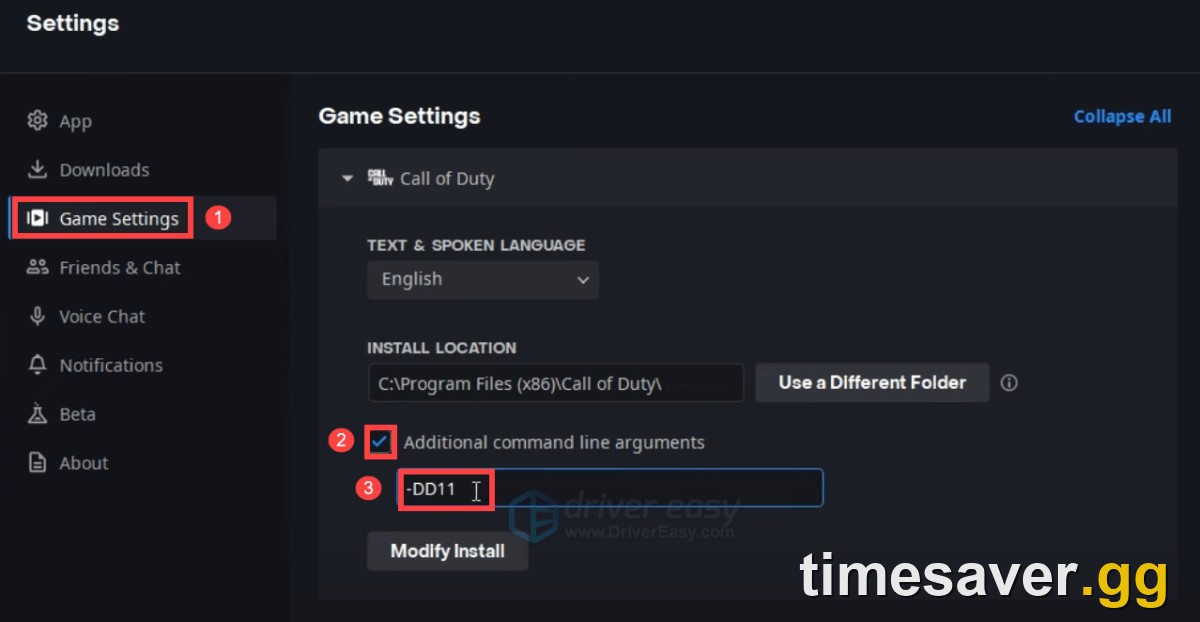
If the game boots, you've confirmed it was a DirectX 12 device problem. You can leave DX11 on, or remove the argument later once you've done the driver clean-install in Fix 2.
Fix 2 — Clean-install your GPU driver (fixes the root cause)
A "Search automatically for drivers" update is not enough when a driver is corrupted — you need a clean install that wipes the old files.
- Download the latest driver for your exact card from NVIDIA, AMD, or Intel (use their official app or website — never a third-party driver site).
- During NVIDIA/AMD setup, choose Custom (Advanced) → Perform a clean installation. (For a stubborn case, use DDU – Display Driver Uninstaller in Windows Safe Mode first, then install fresh.)
- Reboot and relaunch the game.
If the error started immediately after a driver update, do the opposite — roll back to the previous stable driver, or install the version the studio currently recommends for Call of Duty. New "day-one" drivers occasionally ship with a regression that breaks DX12 init.
Fix 3 — Scan & Repair / Verify game files
An interrupted or partial Season 5 download leaves mismatched rendering files that fail to initialize.
- Battle.net: select Call of Duty → Options → Scan and Repair → Begin Scan. Let it finish completely.
- Steam: right-click the game → Properties → Installed Files → Verify integrity of game files.
This is safe — it only re-downloads broken files, never your progress — and it's the fix Activision points to for most post-patch launch problems.

Call of Duty - Ranked Boost
Get ranked boost in 10 minutes
Fix 4 — Rebuild the shader cache
A stale shader cache from the pre–Season 5 build is a classic cause. Two ways to clear it:
- In-game (if it launches at all): Settings → Graphics → Restart Shaders Installation (or "Reset shaders"), then let the full recompile finish before playing.
- Driver-level (if it won't launch): clear your GPU's shader cache — NVIDIA: NVIDIA Control Panel → Manage 3D Settings → Shader Cache Size → Off, apply, launch once, then set it back to Driver Default. AMD: Adrenalin → Graphics → Reset Shader Cache. Reboot and let the game rebuild.
Expect the first launch after clearing to take longer while shaders recompile — that's normal, not a new hang.
Fix 5 — Make sure the game is using the right GPU (laptops especially)
If Windows launches the game on your integrated GPU, initialization can fail outright. Force the dedicated card:
- Windows Settings → System → Display → Graphics.
- Add the Call of Duty executable (`cod.exe`) if it isn't listed → set it to High performance.
- Back it up in the NVIDIA Control Panel (Manage 3D Settings → Program Settings → select Call of Duty → High-performance NVIDIA processor) or AMD Adrenalin equivalent.
Also confirm your GPU is actually detected: Win + R → `devmgmt.msc` → Display adapters. If your dedicated card shows a warning triangle, that's a driver problem — go back to Fix 2.
Fix 6 — DirectX, Windows, overclocks and overlays (the cleanup pass)
If you're still stuck, clear the remaining causes:
- Install the latest DirectX runtime. This is Activision's one explicit recommendation for DirectX errors. Run Microsoft's DirectX End-User Runtime installer, then reboot.
- Update Windows fully. Support guidance is to stay on the latest Windows 10/11 build.
- Remove any GPU overclock/undervolt. Set MSI Afterburner (or your tuning tool) Core Clock, Memory Clock and Voltage back to 0/default. An OC that's fine on the desktop can fail under a DX12 game load.
- Disable XMP/EXPO in BIOS if your RAM tuning is aggressive and the error is intermittent.
- Turn off overlays — Discord, GeForce Experience/NVIDIA App, Steam, MSI Afterburner OSD — which can interfere with device initialization. Close them fully, don't just minimize.
Work top to bottom and re-test after each; you rarely need all of them.
| Symptom | Most likely cause | First fix to try |
|---|---|---|
| Error on every launch, worked before the patch | Corrupted GPU driver / stale shader cache | Fix 2 (clean-install driver), Fix 4 (shader cache) |
| Error started right after a driver update | Bad new driver branch | Roll back / install the CoD-recommended driver (Fix 2) |
| Won't launch at all, DX12 device fails | DirectX 12 init failure | Fix 1 (`-D3D11` DirectX 11 mode) |
| Laptop with NVIDIA/AMD + integrated GPU | Game launched on the iGPU | Fix 5 (force the dedicated GPU) |
| Intermittent, only sometimes | Unstable OC / XMP / overlay conflict | Fix 6 (reset OC, disable XMP, kill overlays) |
Back in the game — now don't lose your Season 5 progress
Once you're launching again, the clock's ticking on Season 5 — the battle pass, the new mastery camo grind, and ranked all reset with the season. If a launch bug cost you days and you don't feel like re-grinding levels and unlocks from scratch, our verified pros can catch you back up while you actually play:
Skip the re-grind after a fix — get back to where you should be:
- CoD Account & Weapon Leveling (BO7) — level weapons and your account fast, pro players, secure.
- CoD Bot Lobbies — easy lobbies to grind camos, XP and challenges without the sweat.
- BO7 Mastery Camo Unlocks — Dark Spine and mastery camos done for you.
- All Call of Duty services — everything in one place.
Frequently Asked Questions
Does "All graphics adapters failed to initialize" mean my graphics card is dead? Almost never. It means the game couldn't build a DirectX rendering device on your GPU on launch — usually a driver, DirectX 12, shader-cache or wrong-GPU problem, all of which are software fixes. If your card still displays your desktop and shows up cleanly in Device Manager, it's working; start with the `-D3D11` argument and a clean driver install before you assume hardware.
What does the `-D3D11` launch argument do, and is it safe? It forces Call of Duty to render on DirectX 11 instead of DirectX 12. It's completely safe — it's an official-style launch flag you add in Battle.net's "Additional command line arguments" or Steam's Launch Options. If the game boots with it, your DX12 device was the problem. You can leave it on or remove it after a clean driver install.
Why did this start right after the Season 5 update? Big Call of Duty patches replace shader and rendering files and often arrive with a new recommended GPU driver. If your driver is behind or your old shader cache no longer matches the patched build, the DX12 device fails to initialize on the next launch. That's why "clean-install driver + verify files + rebuild shaders" clears most post-patch cases.
I updated my driver and it got worse — what now? Roll it back. New "Game Ready"/day-one drivers occasionally ship a regression that breaks DirectX initialization. Install the previous stable driver (or the version the studio currently recommends for Call of Duty) using a clean install, then re-test.
It only happens on my laptop — any special fix? Yes. Laptops with both an integrated and a dedicated GPU frequently try to launch the game on the weak integrated chip, which fails. Force Call of Duty onto the dedicated card in Windows Graphics settings (High performance) and in the NVIDIA/AMD control panel, then relaunch.
Will any of these fixes wipe my account, camos or progress? No. Scan & Repair only re-downloads broken game files, driver installs don't touch your account, and clearing the shader cache just rebuilds render data. Your progress lives on Activision's servers, tied to your account — none of these steps put it at risk.