For more than ten years the answer to "can I talk to my team mid-match in Dead by Daylight?" was no. Emotes, pointing, crouch-spam, and a lot of hoping the random on the other side of the map could read a crouch. As of today that is over.
Patch 10.2.0 went live on 6 October 2026, and buried at the very top of the notes — above the general perk pass that everyone is arguing about — is a feature list headed Survivor Intent System. Survivors can now send text messages to each other during a trial.
It is a small system with a surprising number of edges: a naming inconsistency between the patch notes and the menu you have to use to configure it, an escalating spam penalty, a mute that the muted player never finds out about, and a change made between the Public Test Build and live that quietly turned the feature into a bot-command system. Here is all of it, with nothing guessed.
Quick answer
- The Survivor Intent System is live now, shipped in patch 10.2.0 on 6 October 2026. It is Survivor-side: the patch notes say Survivors send and receive the messages and that sent messages "are shown to all Survivors".
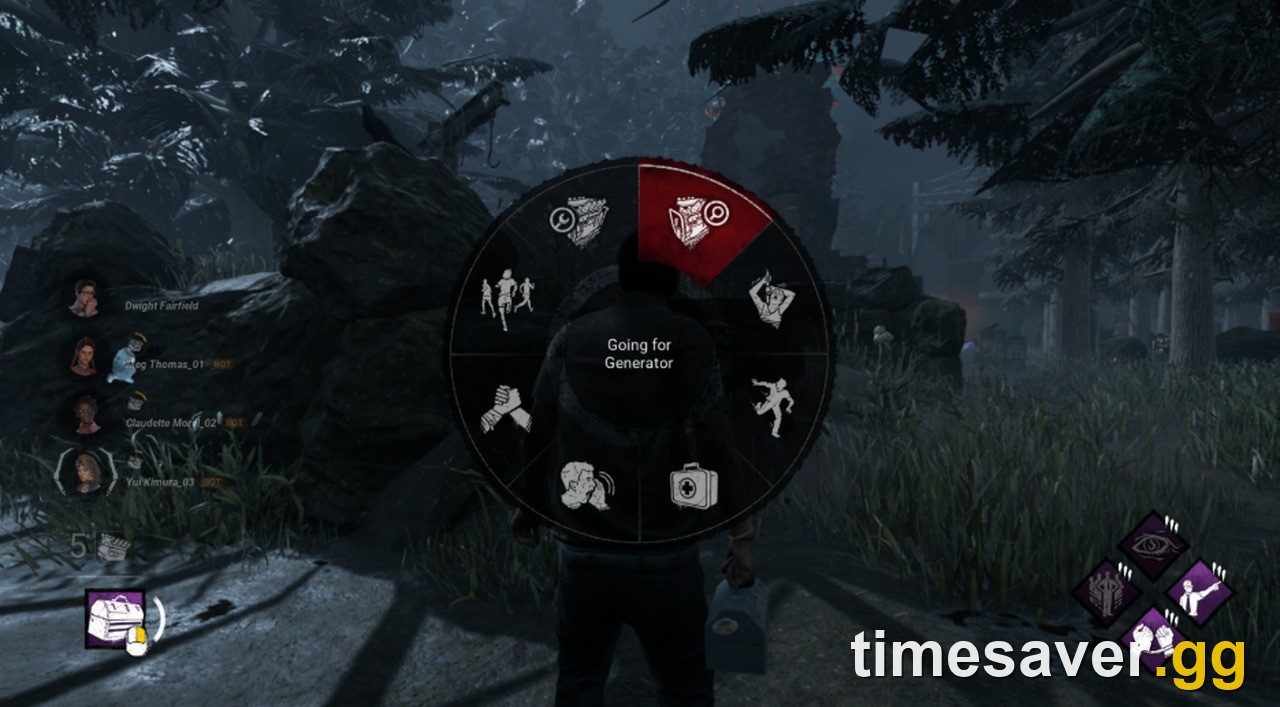
- To send one: press and hold the scroll button on mouse, or the right d-pad input on controller, hover the message you want, then release. Both inputs are rebindable.
- There are 8 message slots. They are predefined phrases, not free text, and you choose which eight are on your wheel in Settings.
- Settings has a brand-new Gameplay tab. The options live there, under Messages. That is also where the master off switch is.
- Anti-spam is escalating: sending too quickly applies a 1-second cooldown, and continued spam pushes that up to 5 seconds. Waiting resets it to the shortest duration.
- You can mute a single player mid-match from Match Details, and the patch notes are explicit that "Muting is not communicated to the muted player."
- Opting out is all-or-nothing. Disable it and, per the in-game tooltip, incoming messages are muted and you cannot send. Other players see a "no" icon beside you in Match Details.
- The sleeper change: in the Changes from PTB section, under Bot Improvements, Behaviour added that "Bots now listen to Intent messages sent by players, and will change their goals accordingly."
Verified against the live 10.2.0 patch notes in Behaviour's knowledge base and the 6 October 2026 Steam announcement. Live build at the time of writing: 10.2.0.
What is the Survivor Intent System in Dead by Daylight?
It is a message wheel. You open it with a held input, pick one of eight predefined phrases, and release to broadcast it to the other Survivors in your trial. There is no typing, no free text, and no voice.
If the name sounds unfamiliar it is because Behaviour has used two. The live patch notes call it the Survivor Intent System. The developer blog that announced it, and the toggle in your settings menu, both call it Player Intent. From the 14 August 2026 developer update, written by Behaviour community manager ThatRyanB:
"The system in question is – aptly – called Player Intent."
Both names are first-party, so expect to see them used interchangeably for a while. The in-game string you will actually be hunting for in the menus is Player Intent.
The design goal is stated plainly in the same post:
"When a message is chosen using the Player Intent wheel, other Survivors will see it next to your name in the game HUD, keeping your general view clear of distractions while you're in the middle of looping or hunting for an objective."
That is the whole philosophy. No chat log, no popup, no sound cue described in the notes — the message attaches to your name in the Survivor list and that is it. The patch notes put it in the same terms: sent messages appear "next to their information on the left side of the screen".

How do you send an Intent message?
Press and hold, hover, release. Specifically, per the live notes:
- Mouse and keyboard: press and hold the scroll button (middle mouse).
- Controller: the right d-pad input.
- Hovering a message and releasing the input sends it.
- Both inputs are customisable, so if middle-mouse is already doing something in your layout you can move it.
The hold-to-open, release-to-send pattern is the same grammar most hero shooters use for their comms wheels, which means muscle memory transfers. The important practical note is that it is a hold, not a toggle — you cannot open the wheel, let go, and browse at leisure. You are committing to a single release while something is probably chasing you.
One known interaction was patched before launch and is worth knowing if you are the kind of player who mashes: the 10.2.0 bug fixes include "Fixed an issue where held interactions with mouse inputs were prevented if cancelled while the Communication Wheel was opened." Translation — opening the wheel mid-interaction used to be able to eat your next held input. That specific case is fixed.
What are the 8 default messages?
This is the part the patch notes do not answer. They confirm there are eight slots, that the messages are predefined, and that you pick your selection in Settings — but they never print the phrases.
Behaviour did publish them, in a screenshot of its own Settings menu attached to the August developer update. Read off that capture, the eight default slots were:
| Slot | Default message |
|---|---|
| Option 1 | Going for Generator |
| Option 2 | Going for unhook |
| Option 3 | Chasing Me |
| Option 4 | Healing |
| Option 5 | Help! |
| Option 6 | Thanks |
| Option 7 | Split up! |
| Option 8 | Repair |
Treat that table as the announced defaults, not a guarantee of the live build. The capture is from an August 2026 pre-release build — it still has untranslated localisation placeholders visible in the interface — and Behaviour had seven weeks of PTB feedback between then and launch. If your wheel differs, your wheel is right and this table is the historical record.
The more useful detail from that same screenshot is structural: every one of the eight options is a dropdown. That means the pool of available phrases is larger than eight, and the wheel is a loadout you build rather than a fixed menu. There is also a Restore Defaults button, so experimenting carries no cost.

Do the bots actually react to your messages?
Yes, and this is the single most under-reported line in the patch. It is not in the Features section where the Intent System is described. It is further down, in Changes from PTB, under a heading called Bot Improvements:
"Bots now listen to Intent messages sent by players, and will change their goals accordingly."
Behaviour added that between the Public Test Build and live. The mechanics of the Intent System itself went from PTB to live untouched — there is not one entry adjusting the wheel, the cooldown or the message set in the entire Changes from PTB section. The only thing that changed is who is listening.
That turns a social feature into a mechanical one. In any trial that has filled with bots — which is exactly the scenario the Abandon and Surrender options in this same patch exist to handle — your message wheel is now a command interface. Telling bots to split up or go for the unhook is a real input with a real outcome, not etiquette.
Behaviour has not published how strongly bots weight each message, how far away they will respond from, or which of the eight phrases they understand. Do not trust any page that tells you those numbers; nobody has them yet.
How do you turn the Intent System off?
Settings, the new Gameplay tab, then Messages. Patch 10.2.0 added the Gameplay section to the settings menu specifically to house this.
The toggle is called Enable Player Intent, and its in-game tooltip spells out exactly what switching it off does:
"When player intent is disabled, all incoming messages are muted and you cannot send messages"
So it is symmetric, and Behaviour said the same thing in the announcement: "Once disabled, you will not be able to send messages to players and will not see the messages they send." There is no read-only mode where you receive messages but stay silent. Off means off in both directions.
Opting out is not invisible to your team, though. Per the notes, players who have deactivated the system "are marked with a 'no' icon to surface that they have opted out" on Match Details. The intent there is obviously to stop people spamming requests at someone who will never see them.
This opt-out exists because of community feedback. In the August developer update Behaviour wrote that "one piece of feedback we've seen is that a system like this isn't for everyone. We've already discussed this as a team and have a solution for that." The solution is this toggle.
How do you mute one specific player mid-match?
Open Match Details during the trial and mute or unmute any other player from there. It is per-player and it is reversible within the same match.
The line that matters:
"Muting is not communicated to the muted player."

That is a deliberate and correct design choice. A mute that announces itself is an invitation to retaliate, and in a four-player co-op game where you are stuck together for another eight minutes, that matters. Note the asymmetry with the master off switch: the global opt-out is flagged publicly in Match Details, the individual mute is silent.
How does the anti-spam cooldown work?
In three steps, per the notes:
- Send messages too quickly and a 1-second cooldown is applied.
- Keep spamming and that cooldown increases up to 5 seconds.
- Wait before sending again and it resets to its shortest duration.
Five seconds is a long time in a chase, which is the point — the penalty escalates precisely when the feature is being misused, and decays on its own if you behave. There is no published strike count, no reporting hook described in the notes, and no permanent penalty. It is purely a rate limiter.
What this changes about solo queue
Dead by Daylight's enduring structural problem is that solo Survivors have been playing a co-op game with no co-op channel while a four-stack plays the same game on voice. Eight predefined phrases do not close that gap. They do close the most expensive part of it: the duplicated action.
Two Survivors walking to the same hook, two Survivors on the same generator while three sit untouched, nobody going for the unhook because everyone assumed someone else was. Those are the losses a wheel fixes, and they are the ones that make games unwinnable before the first chase ends.
What it will not fix is information you cannot express. "Killer is running Nowhere to Hide" and "this is a basement Bubba, do not come" are not on the wheel. And the predefined format is the tradeoff Behaviour chose knowingly — free text invites exactly the abuse that kept this feature out of the game for a decade.
The other thing to watch is the bot interaction, because it is the first time a social system in this game has had a measurable, mechanical payoff. If bots respond well, the Abandon and Surrender rework shipped in the same patch becomes much less necessary, since a bot-filled trial becomes playable instead of just escapable.
FAQ
Can the Killer see Intent messages? The patch notes say Survivors send and receive the messages, and that sent messages are shown to all Survivors. Behaviour has not published anything about the Killer receiving them, so assume they are Survivor-only until it says otherwise.
Can you type your own message? No. The patch notes state the messages are predefined. What you customise is which eight predefined phrases sit on your wheel, not their wording.
Is the Intent System in a Killer's settings too? The toggle is named Enable Player Intent, and Match Details mute controls apply to any player, so there is menu presence on both sides. The messaging itself is described as Survivor-to-Survivor.
What patch added the Intent System? Patch 10.2.0, the 10.2.0 Mid-Chapter, published 6 October 2026. It was announced on 14 August 2026 in a developer update that promised it "ahead of its release this Fall".
Did the Intent System change between the PTB and live? Not mechanically. The Changes from PTB section contains no adjustments to the wheel, the message set or the cooldown. The only related entry is the bot change, plus a separate UI fix for "scaling and overlapping issues in the Survivor Intent menu when playing with UI scale values smaller than 100%".
Where exactly are the settings? Settings, Gameplay tab, Messages section. The Gameplay tab is new in 10.2.0 — if you are looking in the old tabs you will not find it.
Does muting someone block them permanently? The notes describe mute and unmute as in-match actions available during a trial. Nothing in them describes a persistent cross-match block list.
Where is the official source? The live notes are in Behaviour's knowledge base as 10.2.0 Mid-Chapter and on the Steam news feed, published 6 October 2026. The announcement is the Developer Update on the Player Intent System post from 14 August 2026.
Keep reading
Patch week moves fast and most pages covering 10.2.0 are still quoting PTB numbers that no longer exist. These are the Dead by Daylight guides we keep current:
- DBD 10.2.0 PTB to Live Changes: Every Perk BHVR Changed, Kept and Reverted
- DBD Perk Changes: All 58 Killer and Survivor Perks in 10.2.0
- DBD Patch Notes 10.2.0: Date and What BHVR Confirmed
- DBD Survivor Tier List: Every Survivor Ranked
- DBD Codes: Every Working Code This Month
Last verified 6 October 2026 against the live 10.2.0 Mid-Chapter patch notes and Behaviour Interactive's 14 August 2026 Player Intent developer update. Live build at the time of writing: 10.2.0. The eight default message strings are read from Behaviour's own August 2026 pre-release settings capture and may differ in the shipped build.