Quick answer (updated 25 October 2026, Chapter 7 Season 4 "Override"): To get Fortnite Twitch Drops, connect your Twitch account to the Epic account you actually play on. Then watch a live, Drops Enabled Fortnite stream until the progress bar fills and press Claim in your Twitch Drops inventory. The drop available during today's broadcast, Sunday 25 October, is the Midnight Batwings Pickaxe. Epic's Mobile Series page says you need to watch the Mobile Championship for 30 minutes on 25 October. The broadcast starts at 11 AM EDT (15:00 UTC). Yesterday's reward, the Midnight Gourdy Back Bling, was tied to the 24 October broadcast. If you claimed a drop and it isn't in your Locker, Epic says it can take up to 14 days in specific cases. A common cause is a Twitch account linked to the wrong Epic account.
Key takeaways
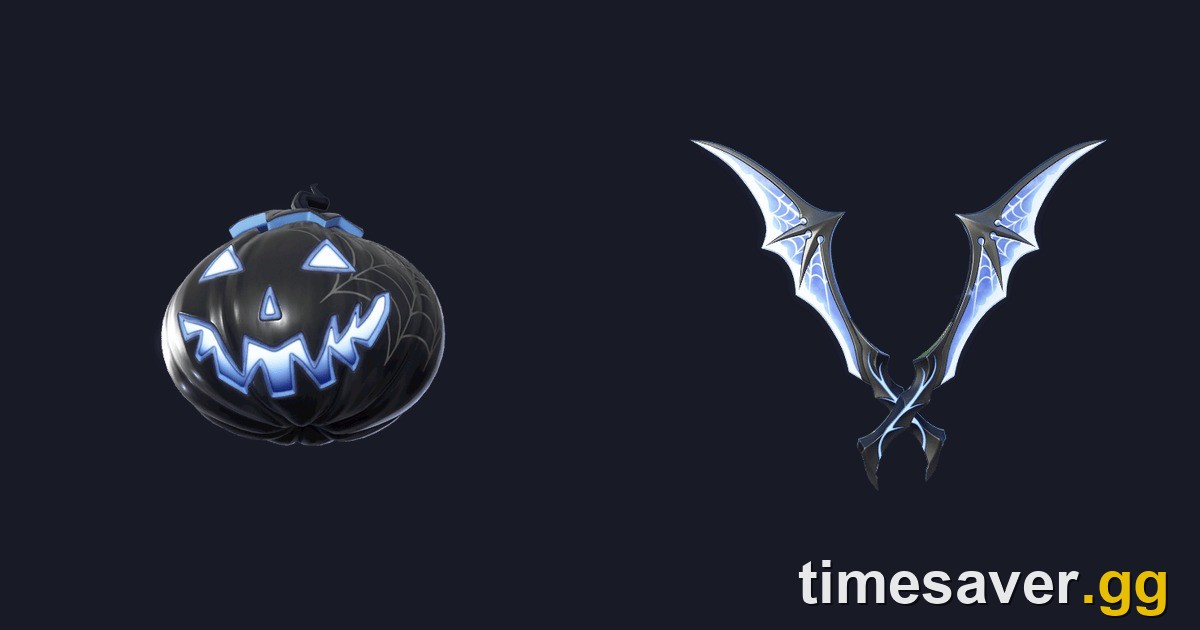
- Available during today's broadcast: Midnight Batwings Pickaxe (Rare). Watch 30 minutes of the Fortnite Mobile Championship on 25 October 2026. Most guides got this number right, but at least one big outlet printed 60 minutes. Epic's own page says 30.
- Already finished: Midnight Gourdy Back Bling (Rare). It needed 30 minutes on 24 October 2026. If you filled the bar on Saturday, claim it in your Twitch inventory now; Sunday's watch time doesn't count toward it.
- Earlier this month: the Fortnitemares horror-creator drops, Nitemare Grin Spray (30 min) and Window Lurker Emoticon (60 min). They ended 19 October 2026 at 2:58 AM ET.
- Two-step claim: filling the bar isn't enough. You also have to press Claim at twitch.tv/drops/inventory.
- Under 13 or on a restricted account? Epic says Cabined Accounts can't earn Twitch Drops until a parent or guardian finishes account setup (Epic Player Support). Twitch itself also requires users to be at least 13.
- Twitch Drops never give V-Bucks. They're cosmetics only: back blings, pickaxes, sprays, emoticons, wraps.

What are the current Fortnite Twitch Drops (October 2026)?
Epic runs Fortnite Twitch Drops in short campaigns, usually tied to a competitive broadcast (FNCS, the Global Championship, the Mobile Series) or to a group of partner creators during an event like Fortnitemares. Every campaign has a fixed window. Once it closes, the reward can't be earned that way anymore. Here's everything that ran in October 2026:
| Reward | Type / rarity | How to earn | Window | Status (25 Oct) |
|---|---|---|---|---|
| Nitemare Grin | Spray (Uncommon) | Watch participating Fortnitemares creators, 30 min | 16–19 Oct, ended 19 Oct 2:58 AM ET | Ended |
| Window Lurker | Emoticon (Uncommon) | Same campaign, 60 min total | 16–19 Oct, ended 19 Oct 2:58 AM ET | Ended |
| Midnight Gourdy | Back Bling (Rare) | Watch the Mobile Championship, 30 min | Saturday 24 Oct 2026 | Ended |
| Midnight Batwings | Pickaxe (Rare) | Watch the Mobile Championship, 30 min | Sunday 25 Oct 2026 | Today's broadcast |
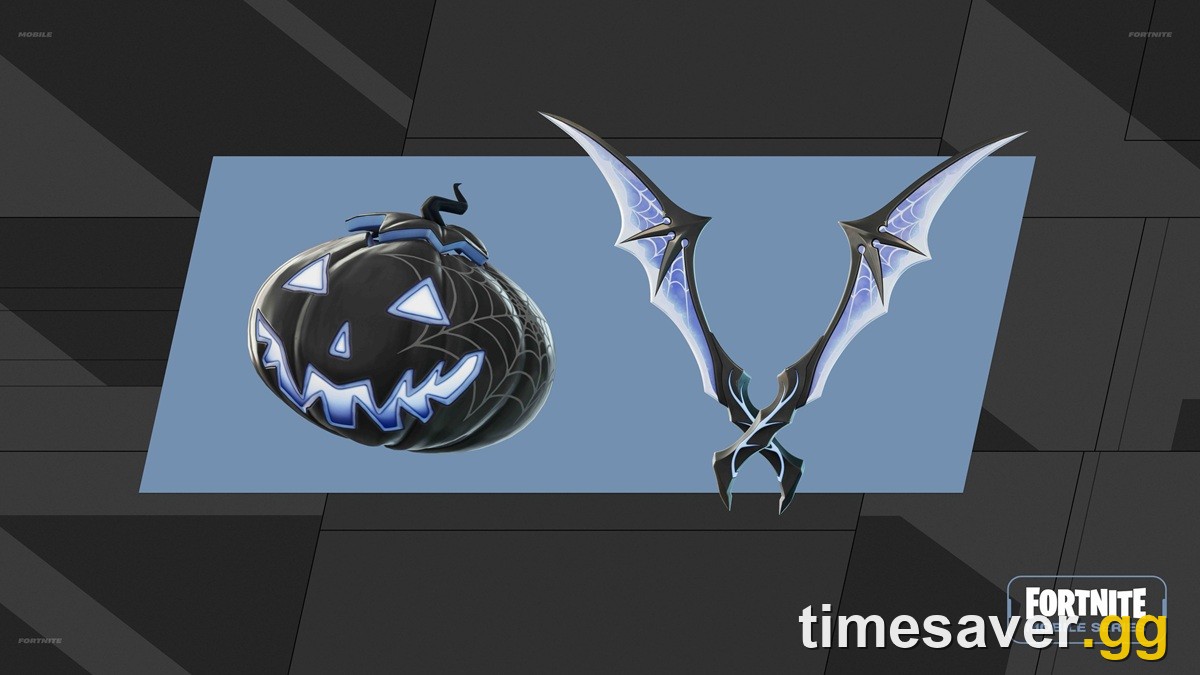
The two Midnight items are Fortnitemares-themed: a black jack-o'-lantern with cobweb detailing and a pair of bat-wing blades. Their in-game descriptions read "Carve out some time for your lil' friend Gourdy!" (back bling) and "Fly under cover of darkness." (pickaxe). Both were added to the game files on 1 October 2026 and are tagged as introduced in Chapter 7, Season 4. In other words, they're Override-season items handed out in the season's final week.
The wording on Epic's own Mobile Series page is short and clear:
"Watch the Mobile Championship for 30 minutes on October 25th to earn the Midnight Batwings Pickaxe." (Epic Games, fortnite.com/competitive/mobile-series)
Epic's Saturday line is the same, but for 24 October and the Midnight Gourdy Back Bling. Each day is its own drop. If you watch an hour on Saturday, that doesn't carry over to Sunday's pickaxe.
When is the Fortnite Mobile Championship stream? (25 October times)
The Fortnite Mobile Series 2026 Championship is a LAN final. Sixteen of the world's best mobile players compete at BLAST Studios in Copenhagen on 24–25 October 2026, for a $200,000 prize pool (per Liquipedia). Both days' broadcasts start at 11 AM EDT.
Sunday is also the day Europe changes its clocks, which trips people up. The UK and EU fell back an hour overnight, but the US doesn't until 1 November. So the start times for today, 25 October, are:
| Region | Start time, Sunday 25 Oct |
|---|---|
| US Eastern (EDT) | 11:00 AM |
| US Pacific (PDT) | 8:00 AM |
| UTC | 15:00 |
| UK (GMT) | 3:00 PM |
| Central Europe (CET) | 4:00 PM |
You don't have to catch the opening minutes. You just need 30 minutes of watch time on an eligible stream while the broadcast is live on 25 October. That can be the official twitch.tv/fortnite channel or a co-streamer showing the Drops Enabled tag. Tune in early so a bad connection or a late account link doesn't cost you the window.
How do I link Twitch to my Fortnite account?
This is where most failed drops start. Twitch credits the reward to whichever Epic account is connected. If your Twitch is connected to an old account or a sibling's account, the pickaxe goes there, not to the account you play on.
- Sign in at epicgames.com with the exact account you play Fortnite on. On console, that's the Epic account linked to your PlayStation, Xbox or Nintendo profile.
- Open Account → Linked Accounts (the page at epicgames.com/account/connections).
- Find the Twitch tile and press Link. If it already says Unlink, check which Twitch name is shown underneath.
- Sign in to Twitch when asked and authorize the connection.
- Back on Twitch, open a Drops Enabled Fortnite stream. Once the link works, a drops notification appears confirming you're earning. If it says you're not linked, click it and it takes you straight to the linking page.
Do this before the broadcast, not halfway through. Twitch can track your watch time, and even let you press Claim, before the accounts are linked. But the reward is only delivered to Fortnite once the link is in place, and linking late is where most "I claimed it but it never arrived" cases start. If an old link seems stuck, unlink and link again before the campaign begins.
How do I claim Fortnite Twitch Drops after watching?
Filling the bar and owning the item are two separate steps. Here's the whole flow:
- Watch a live stream in the Fortnite category that shows the Drops Enabled tag (or the official broadcast). Stay signed in to Twitch the whole time.
- Track progress at twitch.tv/drops/inventory. Each active Fortnite campaign shows a bar for each reward.
- When the bar is full, press Claim. Until you do, the reward sits in your Twitch inventory and never reaches Epic.
- Launch Fortnite and check your Locker under Back Bling or Pickaxe. Drops are sometimes added without any in-game notification, so look in the Locker itself.
A tip players share: keep the stream running in the background while you play, then claim when the bar fills and check your Locker back in the lobby. Epic hasn't published a separate claim cutoff for the Mobile Championship drops, so claim each one as soon as the bar fills.
What doesn't count:
- VODs and replays. Only live broadcasts earn watch time.
- Creators who aren't playing Fortnite at that moment. Progress is tied to Fortnite streams with drops switched on. Players regularly report watching a partner creator for hours with no progress because the creator had switched to another game.
- Streams without the Drops Enabled tag, even if they're Fortnite.
- Being signed out of Twitch in the tab you're watching.
Why haven't I received my Fortnite Twitch Drop? (fix checklist)
Work through this list in order. The steps come from Epic's Twitch Drops support article and its stuck-at-99% guide:
- Check that you pressed Claim. At twitch.tv/drops/inventory, a full bar with the button still showing means the reward never left Twitch.
- Check your Locker directly. Epic notes that drops are sometimes added to your Locker without a notification.
- Make sure you're linked to the right Epic account. On the Epic Linked Accounts page, look at the Twitch name under the Twitch tile. Then check that the Epic display name matches the one you see in Fortnite. If they're different, your Twitch is linked to another Epic account, and the reward went there.
- Re-link if your bar is stuck at 99%. Epic says the Twitch–Epic link can expire, especially after a password change. Unlink Twitch, link it again, and reload the stream.
- Claim anything already finished. In a multi-reward campaign, each reward has its own watch-time threshold. Make sure an earlier reward isn't sitting unclaimed in your inventory.
- Check for a Cabined Account. Players under the age of digital consent in their country get a Cabined Account. Epic states these can't earn Twitch Drop rewards until a parent or guardian completes account setup. Some linked-service features may still be blocked by age.
- Wait before you panic. Epic says delivery can take up to 14 days in specific cases (quoted below).
- Contact Epic Player Support if the reward still hasn't arrived after that window and steps 1–6 check out. A screenshot of the Claimed status in your Twitch inventory helps.
"Each Drop should be in your Fortnite Locker right after claiming it, though it may take up to 14 days in specific cases." (Epic Games, fortnite.com Twitch Drops news post; Epic Player Support says the same)
If Fortnite itself won't load, or matchmaking fails while you're trying to check your Locker, that's a separate problem. Start with our Fortnite server status and downtime guide or the Fortnite not working / crashing fix guide.
Do Fortnite Twitch Drops work on console and mobile?
Yes. Drops are granted to your Epic account, not to a device. That's why linking the right account matters more than anything else. A drop claimed while you watch in a browser shows up in your Locker on PlayStation, Xbox, Switch, PC, Android or iOS, as long as each platform signs in with that same Epic account.
The Mobile Championship drops are a good example. You don't need to play on mobile, or enter the tournament at all, to get the Midnight Batwings Pickaxe. Watching is enough. Competing is a separate track: some events hand out cosmetics for tournament placement instead of watch time. This season's Kingdom Hearts Cup, for example, awarded Sora for a high enough finish.
Are Fortnite Twitch Drops free? (and the V-Bucks scam warning)
Yes. Twitch Drops cost nothing and don't need a Battle Pass, a Fortnite Crew subscription or a Twitch Turbo/Prime subscription. What they never include is V-Bucks. Epic has never given out V-Bucks through Twitch Drops, and it has never issued "free V-Bucks codes".
That matters because the end of a season is exactly when "free V-Bucks drop" and "V-Bucks generator" pages come out. If a site asks for your Epic login or a "verification" step to unlock a drop, it's a phishing page. Real drops only ever ask you to authorize the link on Epic's own Linked Accounts page and press Claim on Twitch's own inventory page. Our Fortnite codes and Creator Codes explainer covers which codes are real.
When are the next Fortnite Twitch Drops?
Epic hasn't announced the next campaign yet (checked 25 October 2026). Past campaigns follow a pattern, though, and you can use it to plan:
- Competitive broadcasts (FNCS finals, the Global Championship, the Mobile Series) almost always come with watch-time drops, usually 30 minutes per item.
- Big seasonal events sometimes bring creator campaigns, like the Fortnitemares drops that ended on 19 October.
- Season changes mean new content but don't guarantee drops. Chapter 7 Season 4 "Override" officially ends on 1 November 2026 (ET) per Epic's Battle Pass page, the same day the Treasure Hunters mini-season starts with v43.00. Epic hasn't announced Twitch Drops for that launch, so treat any "Treasure Hunters drops" claim as unconfirmed until Epic posts it.
Before the season ends, it's worth finishing everything else Override has to offer. Our what to do before Chapter 7 Season 4 ends checklist and the Treasure Hunters mini-season guide cover what's next. The Fortnite sprite events schedule tracks the free in-game events running this final week.
More Fortnite help? Every season-change guide, fix and quest walkthrough we publish lives on the timesaver.gg blog.
FAQ
How long do you have to watch for the Midnight Batwings Pickaxe? 30 minutes of the Fortnite Mobile Championship broadcast on Sunday 25 October 2026, per Epic's Mobile Series page. Some guides say 60 minutes. Epic's own page says 30.
Can I still get the Midnight Gourdy Back Bling? Not through Twitch. It was tied to the 24 October broadcast, and Sunday's watch time only counts toward the Batwings Pickaxe. Epic hasn't said whether Gourdy will come back another way, such as the Item Shop.
Why does Twitch say I'm not linked when I already linked my Epic account? The link has probably expired (Epic says this often happens after a password change), or it's connected to a different Epic account. Unlink Twitch on the Epic Linked Accounts page, link it again, and reload the stream.
I pressed Claim but the item isn't in my Locker. Is it lost? Usually not. Epic says drops normally arrive right after claiming but can take up to 14 days in specific cases. Check that your Twitch is linked to the same Epic display name you use in-game before you contact support.
Can kids get Fortnite Twitch Drops? Only once the Epic account isn't restricted, and only if they meet Twitch's own minimum age of 13. Epic states that Cabined Accounts can't earn Twitch Drop rewards until a parent or guardian completes account setup.
Do Fortnite Twitch Drops ever give free V-Bucks? No. Twitch Drops are cosmetics only, and Epic has never issued free V-Bucks codes. Any site promising V-Bucks for watching or "verifying" your account is a scam.