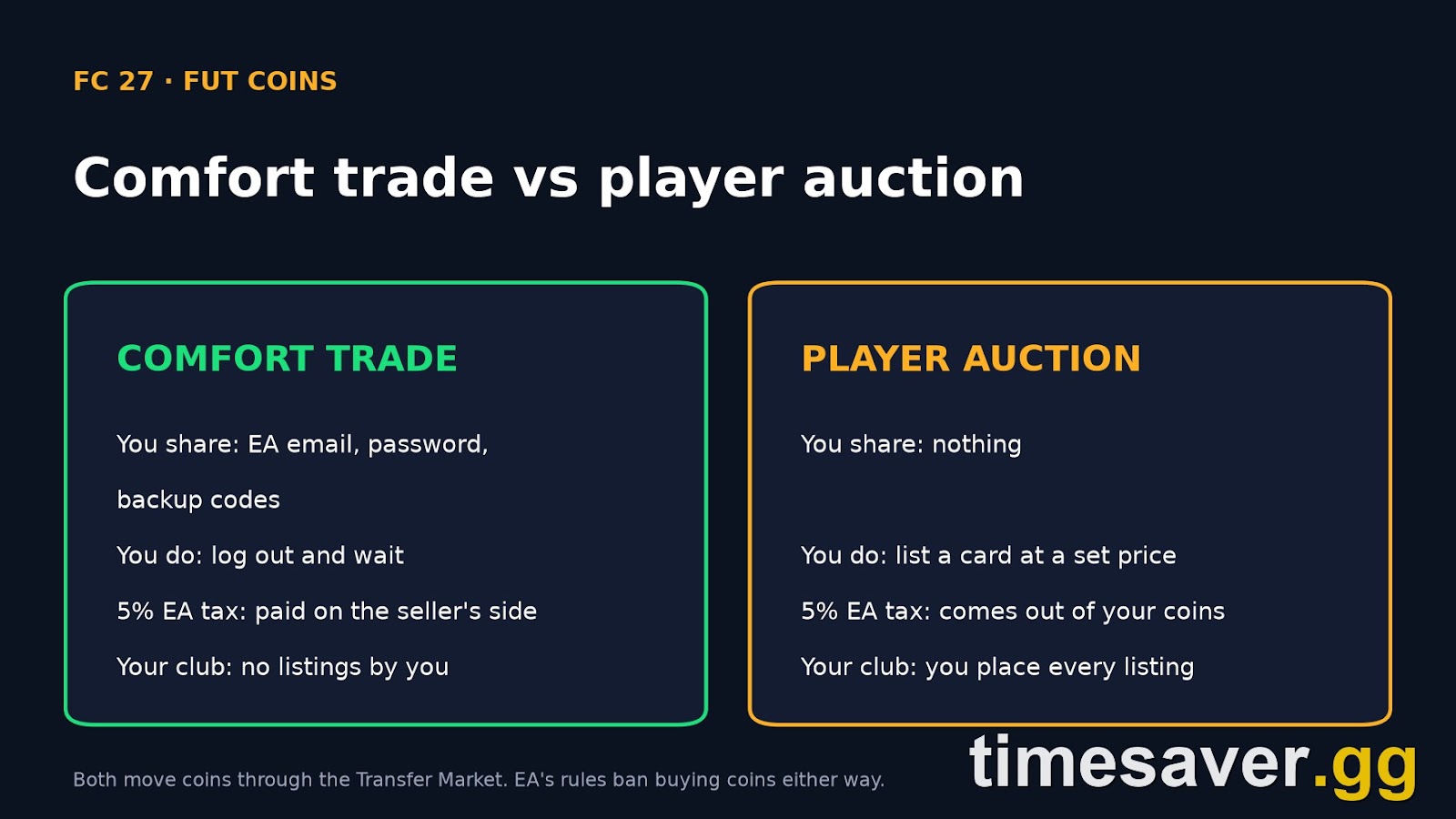
A FUT coins comfort trade is the delivery method where the coin seller signs in to your EA account and moves the coins into your Ultimate Team club for you. You don't list a card, wait for a bid or lose the 5% EA tax yourself. You share your EA login and a set of backup codes, log out, and wait. This guide covers how it works in EA SPORTS FC 27, what you need ready before you order, how it compares with player auction, and what EA's own rules say about the risk.
timesaver.gg sells FC 27 coins by comfort trade, so we'll be straight with you: EA does not allow coin buying, and its rules page names comfort trades directly. You should know that before you pick any seller, including us.
Quick answer: A comfort trade means a seller logs in to your FC 27 club, usually through the Web App, and moves coins in through the Transfer Market. You give your EA email, password and backup codes, then stay logged out until delivery is confirmed. It is the easiest delivery method because you do nothing, and most comfort trade sellers absorb the 5% EA tax so the amount you ordered is what lands. The trade-off is that you share your login, and EA's rules ban both coin buying and account sharing. Possible penalties run from coin removal to a ban. EA's coins safety page says the same: "you can't purchase Coins."
EA Sports FC 27 - Coins
Stock up on Coins
What is a comfort trade in FUT?
The name says it: the buyer does nothing. In the other common method, player auction, you list a card on the Transfer Market and the seller buys it at an agreed price. In a comfort trade, the seller takes over that work.
Coins can't be sent straight from one club to another in Ultimate Team. Every transfer still runs through the Transfer Market, as buy and sell trades between your club and the seller's accounts. EA caps each trade: per EA's rules page, "Each Ultimate Team™ Item has a minimum and maximum Coin price that can be listed on the Transfer Market." That cap is why a big order is often split across several trades and can land in parts.
Here is the method at a glance, with how timesaver.gg runs it today (17 November 2026):
| Comfort trade fact | Detail |
|---|---|
| What you share | EA account email, password, backup codes |
| What you do during delivery | Stay logged out on every device |
| EA Transfer Market tax | 5% of each sale, absorbed by the seller in our orders |
| timesaver.gg order size | 50,000 to 3,000,000 coins, in 50,000 steps |
| timesaver.gg pricing | Set per platform at checkout, PC 20% higher than console |
| Markets | PlayStation and Xbox share one market, PC has its own |
How does an FC 27 comfort trade work, step by step?

- Pick the amount and your platform. Since cross-play arrived in FIFA 23, PlayStation and Xbox have shared one Transfer Market while PC runs its own, per EA's cross-play deep dive. Your club and coins still sit on the platform you play on, so choose that platform at checkout.
- Make sure your Web App Transfer Market is unlocked. The trader works through EA's browser Web App, so it has to have market access, not just your console. More on this below.
- Turn on two-factor authentication and copy fresh backup codes. EA's 2FA help page says: "After you set up 2FA, select View backup codes and write down the codes in a safe place." Those codes are how a trader gets past the login check from a new device.
- Log out of Ultimate Team everywhere and stay out. That means console, PC, Web App and Companion App. A club can only be signed in on one device at a time, so in practice opening the game mid-delivery kicks the trader out and the delivery stalls.
- The trader signs in and moves the coins. They complete the trades on your behalf and then sign out. Large orders can arrive in several parts because of the per-item price caps.
- Check your balance, then lock the account down. Log back in, confirm the coins landed, change your EA password, generate a new set of backup codes so the old set stops working, and review the devices signed in to your EA account.
What do you need before a comfort trade?
Most failed or delayed deliveries come down to one of these five things. Check them before you pay anyone.
| Requirement | Why it matters | How to check |
|---|---|---|
| Web App Transfer Market access | The trader works through the Web App | Log in to the FC 27 Web App and open the Transfer Market |
| A small coin balance | The first trades need coins to move | Look at your club balance |
| Free transfer list slots | Cards have to be listed to move coins | Clear sold and expired items |
| An empty unassigned pile | Bought cards need somewhere to go | Send items to club or quick sell them |
| Two-factor authentication on | Backup codes only exist with 2FA turned on | EA account, Security, Two-factor authentication |
Web App market access is the one that catches people out. EA splits access into two gates: an in-game unlock, and a separate Web and Companion App unlock. In EA's words, "Completing Graduated Access doesn't automatically unlock access on the Web and Companion apps." EA's Web and Companion App access page covers FC 27 directly: "If you played FC 24, FC 25, or FC 26, you might qualify based on your previous activity. If you don’t qualify for access as a returning player, you can earn access by playing Ultimate Team™ in FC 27." Earning it depends on active days, which EA defines as three full Ultimate Team matches plus a Web or Companion App login in the same UTC day. EA's examples are 2 active days for a good-standing account that is the only one used on its device, and at least 4 if other Ultimate Team accounts have used that device. Those are examples, not guarantees. If your Web App market is still locked, our FC 27 Transfer Market locked guide walks through the fix, and the FC 27 Web App errors guide covers login problems.
Comfort trade vs player auction: which is better?
Player auction is the main alternative. You list a specific card at a price the seller gives you, and the seller's account buys it. You never share your login, but you do the listing yourself and the 5% EA tax comes out of what you receive.
| Comfort trade | Player auction | |
|---|---|---|
| Login shared | Yes: email, password, backup codes | No |
| Your effort | None, stay logged out | List cards exactly as instructed |
| 5% EA tax | Usually absorbed by the seller | Taken from your sale unless the seller overpays |
| Speed | Depends on the seller's queue | Depends on your listings and price caps |
| Listings visible in your club | None placed by you | Every listing is yours |
| Main risk | Sharing access, plus EA penalties | EA penalties for coin transfers |
The tax gap is real money. On a 1,000,000 coin player auction, the 5% tax is 50,000 coins, so you either receive 950,000 or the seller has to overpay by about 52,632 coins to land a clean million (1,000,000 divided by 0.95). In a comfort trade, sellers usually build that cost into the trades so the balance you ordered is what lands. That is seller policy, not an EA rule, so check it before you pay.
Our take: comfort trade suits most buyers better. You do nothing, you can't make a listing mistake that sends coins to a sniper, and you never place an odd listing yourself. Player auction only wins if keeping your password private matters more to you than effort and tax. If you go with player auction, never list above the price the seller confirmed, and never list a card you need.
EA Sports FC 27 - FUT Champions Boost
Get fut champions boost in 10 minutes
Is a comfort trade safe? What EA's rules actually say
No one can honestly promise you zero risk, and you should walk away from any seller who does. Here is what EA's FC rules page says, word for word:
- On buying: "Buying Coins from a third party is against our rules."
- On comfort trades by name: "Buying “mule” accounts or performing comfort trades harms the game economy."
- On sharing logins: "Accessing another player’s account, including account sharing, is against the rules."
- On the market: using it for coin buying or distribution "may result in us limiting or revoking your access to the Ultimate Team™ Transfer Market both via the Companion App and from your console or PC."

EA also lists what it can do "as a first-time action". The list includes removing your Ultimate Team coins, deleting your Ultimate Team club, restricting your Transfer Market access, a temporary or permanent ban from FC online play, and bans from your current FC game, all FC games, or some or all EA games. EA can also suspend your console from FC online modes for a period of time.
The second risk is the seller. The same rules page warns that coin sellers "often require login details, which can lead to stolen Coins, Items, players, or even your entire account." That is the real reason to pick a seller with a long public track record, not the cheapest rate you can find.
What lowers your exposure, in practice:
- Order in sensible amounts. EA doesn't publish how it detects coin transfers, so nobody can prove pacing makes a delivery safe. Still, a club that jumps by millions overnight is the obvious pattern, so timesaver.gg delivers large orders in increments rather than all at once.
- No bots, no injectors, no third-party software. EA's rules forbid auto-buyers, bots and modified platforms. A comfort trade should be a person using EA's own Web App, nothing else.
- Keep 2FA on. Never turn it off for a seller. Backup codes exist so you don't have to.
- Change your password and backup codes after delivery. Backup codes let someone past 2FA, which is exactly why you share them for a comfort trade and why you replace them straight after. Then check where your account is signed in: EA's account security page notes that with trusted devices "you’ll know where and when you’ve accessed your account."
How do you protect your account during a comfort trade?
Only your EA account is needed. Never hand over the password to the email inbox behind it, and never share your PlayStation, Xbox, Steam or EA app payment details. A seller asking for any of those is a red flag.
Before you order, write down your current coin balance and take a quick look at your best cards. After delivery, compare both. A real comfort trade adds coins and leaves your squad alone. If anything you didn't expect is missing, contact the seller straight away, then change your password.
Finally, buy only what you will spend soon. Coins sitting in a club do nothing, and the market moves fast. Our FC 27 market crash guide covers what is falling before Black Friday, which is a good time to buy cards rather than hold coins.
How do comfort trade coins compare with earning them?
EA's rules page gives its own numbers for match rewards. In EA SPORTS FC 24, players got "about 500 Coins per match in Champions and Rivals, and around 700 Coins per match in Squad Battles" on average. At 500 coins a match, 1,000,000 coins is about 2,000 matches. Even with weekly rewards on top, that is the gap a comfort trade closes.
If you'd rather earn them, our FC 27 coins without playing matches guide ranks six Web App methods and does the 5% tax math for each.
Want the coins without the grind? timesaver.gg delivers FC 27 coins by comfort trade on PlayStation, Xbox and PC, from 50,000 up to 3,000,000, with 24/7 support.
- EA FC 27 Coins: comfort trade, paced delivery, PS, Xbox and PC
- EA FC 27 FUT Champions Boost: pro players
- All EA FC 27 services
FAQ
What is a comfort trade for FUT coins? It is a coin delivery method where the seller signs in to your EA account, usually through the FC 27 Web App, and moves coins into your Ultimate Team club through the Transfer Market. You share your login and backup codes and stay logged out until it's done.
Is a comfort trade safe in FC 27? No method is risk-free. EA's rules say buying coins and sharing your account both break its rules, and it names comfort trades directly. Penalties can include coin removal, Transfer Market restrictions, club deletion or a ban. A careful seller lowers the risk with paced delivery and no bots, but cannot remove it.
Do I need backup codes for a comfort trade? Yes, in almost every case. With 2FA on, EA asks for a code whenever a new device signs in. Backup codes let the trader pass that check without you turning 2FA off. Generate a new set after delivery.
Can I play FC 27 during a comfort trade? No. Stay out of Ultimate Team on your console, PC, Web App and Companion App until the seller confirms delivery. Logging in ends the trader's session and stalls the order.
Comfort trade or player auction, which is better? Comfort trade for most people: no effort, no listing mistakes, and sellers usually absorb the 5% EA tax. Player auction only makes sense if you won't share your login under any circumstances.
Why did my comfort trade arrive in parts? EA sets a minimum and maximum coin price for every item on the Transfer Market, so a large order has to be split across several trades. Some sellers, timesaver.gg included, also deliver big orders in increments on purpose.