Updated November 4, 2026. Applies to vanilla Valheim 1.0, patch 1.0.21. Tool recipes and controls below are documented by the community Valheim Wiki; patch-specific fixes are checked against Iron Gate's official announcements. Keyboard instructions refer to default PC controls, not console button mappings.
Learning how to level ground in Valheim means separating three jobs: smoothing a surface with the Hoe, cutting a high spot with a pickaxe, and filling a low spot with Raise Ground. Repeatedly using the same action cannot solve all three. Choosing an unreachable foundation height is a fourth problem, and no amount of Stone fixes it.
This guide explains the controls, exact tool requirements, a repeatable leveling workflow, and a troubleshooting table for the corner that refuses to come up.
Quick answer: Stand on ground at your desired height, select Level Ground with the Hoe, and work outward without changing your standing height. Use a pickaxe on stubborn high spots, then smooth again. Use Raise Ground, costing 2 Stone per operation with a nearby Workbench, on deeper low spots. If raising stops at the terrain's height limit, lower the planned floor, terrace the site, or support the floor above the slope.
How do you level ground in Valheim with the Hoe?
Craft a Hoe at a level-1 Workbench using 5 Wood and 2 Stone. Equip it, open its action menu with the default right mouse button, and select Level Ground. The important reference is normally the ground beneath your character, not the place you are pointing at.
The Valheim Wiki's Hoe documentation distinguishes two modes:
- Normal use: the tool compares the selected ground with the height where you stand. This is the useful mode for a flat platform.
- Hold Shift while using it: the reference changes to the ground you point at. This helps work with a local slope rather than pulling every patch toward your standing height.
Start from one reference position and level the reachable area. Step onto a patch you have already flattened before continuing. Walking onto every bump as you work keeps changing the reference, so you can end up following the original slope while believing you are making a single level surface.
Treat Level Ground as a finishing tool with limited reach in height. A hill may need excavation first. A hollow may need added earth first. If several clicks stop changing the surface, identify which operation is missing instead of continuing until the Hoe breaks.

Older gameplay image from the community Valheim Wiki, illustrating the Hoe in use rather than a patch-1.0.21 interface demonstration.
What do you need for leveling, digging and raising ground?
Bring the simplest tools that do the job. A late-game pickaxe is not necessary just to prepare an ordinary early base.
| Task | Tool or action | Requirement | Important distinction |
|---|---|---|---|
| Smooth small height differences | Hoe: Level Ground | Hoe; normal tool use consumes stamina | Standing height sets the normal reference |
| Add earth to a low area | Hoe: Raise Ground | 2 Stone per operation and a nearby Workbench | Does not remove the terrain height limit |
| Remove a stubborn hump | Pickaxe | Antler Pickaxe is sufficient for earth | Dig first, then smooth with the Hoe |
| Change the surface into a path | Hoe: Pathen | Hoe | Surface appearance is not a structural foundation |
| Apply a paved surface | Hoe: Paved Road | 1 Stone per operation and a nearby Stonecutter | Cosmetic; no running-speed or stamina bonus |
The Antler Pickaxe recipe is 10 Wood and 1 Hard Antler, crafted and repaired at a level-1 Workbench. For a first character, the ordinary progression route is Eikthyr's antler reward; our Valheim boss progression guide covers where that fits.
A basic Hoe has 200 durability. Its normal quality-2 upgrade costs 1 Wood and 1 Stone, requires Workbench level 2, and increases durability to 400. Quality 3 costs 2 Wood and 2 Stone, needs Workbench level 3, and reaches 600 durability. These are durability upgrades, not a documented way to remove the terrain ceiling.
As a materials check, 50 Raise Ground operations cost 100 Stone under the documented normal cost. That is arithmetic, not a prediction of how many operations your base needs: footprint, slope and chosen height all change the job. Test the difficult corners before gathering a whole storage room of Stone.
What is the best order for flattening a base site?
The expensive mistake is building the entire perimeter before testing whether the downhill corner can reach it. Use this order instead.
1. Choose the footprint before the finished height
Walk the proposed building outline. Find the highest and lowest ground, and check whether the slope continues beyond the immediate clearing. A small flat patch can hide a large drop at the far end of a long hall.
Sketch a modest first footprint with temporary building pieces if that helps you judge distances. Do not commit your permanent floor to the highest point simply because that point looks convenient.
2. Test the difficult edge
Try the lowest corner before filling the middle. If reaching your intended surface requires a tall earth wall, test whether Raise Ground can actually get there. A height that works near the uphill side may be impossible downhill.
You do not have to choose the absolute lowest point on the site. Choose a height that every part of the intended foundation can reasonably reach, or plan a supported floor or terrace where it cannot.
3. Establish a reference patch
Create a small patch at the chosen height. Stand there for your first leveling passes. This is your repeatable reference whenever the surface becomes confusing.
The goal is one deliberate floor plane. Running around and clicking every visible irregularity creates several local planes instead, especially when you change your footing between clicks.
4. Cut high spots and fill low ones
If the Hoe stops lowering a lump, switch to the pickaxe for a controlled cut, then return to Level Ground. Avoid excavating an entire trench when a small correction will do.
If the Hoe cannot bring up a depression, use Raise Ground with Stone and a Workbench available, then smooth it. Recheck your standing height before deciding the result is wrong.
5. Expand in strips, then place the final floor
Work from finished ground toward unfinished ground, keeping the reference consistent. Check the edges again before extending the footprint. A nearly flat floor does not require every square of dirt underneath it to look identical; sound supports matter more than cosmetic soil coverage.
For beams, stonework and the difference between a supported floor and an unsupported span, continue with our Valheim building guide.
Why will one corner not rise to the same height?
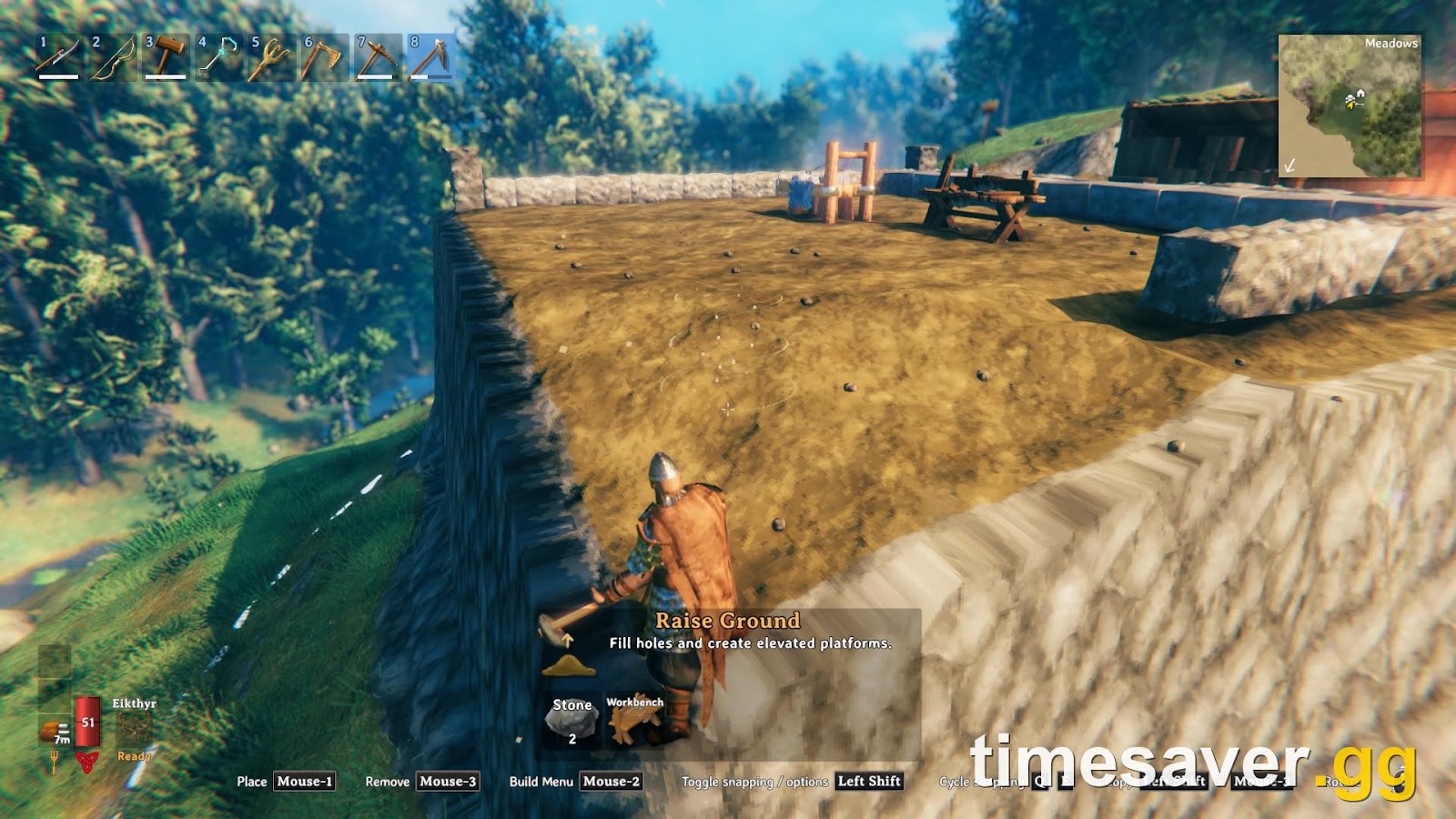
A November 3 player discussion shows the classic case: a broad raised platform is nearly finished, but its downhill corner remains below the rest. The screenshot at the top of this guide comes from that discussion. Replies suggest lowering the platform or extending the foundation downward instead of spending more Stone.
Those are plausible diagnoses, not proof of that player's original terrain height. A screenshot cannot establish exactly how much the land has already been raised.
Vanilla terrain has a limit relative to its original generated height. Community measurements commonly describe approximately 8 metres upward and 8 metres downward, but this is not an official patch-note specification. The wiki's Hoe page describes the range less precisely, so use the figure as planning guidance rather than an exact measuring instrument. Community explanations of the limit also emphasize its relationship to the original terrain.
The practical consequence is more important than the number: different parts of a natural slope have different reachable final heights. Raising the uphill section does not give the downhill section a new starting height.
Pick one of three fixes
- Lower the main platform. Use the highest reachable point at the stubborn corner as a reference, then cut and level the other sections toward it. Check the rest of the footprint before committing.
- Use terraces. Split the site into two or more levels linked by steps. This suits a hillside settlement and reduces the amount of earth you must move.
- Keep the floor above the terrain. Extend appropriate foundations or supports down to the ground rather than requiring the entire hillside to become a solid earth block.
Do not upgrade the Hoe solely to fix this. More durability means longer working sessions; it does not establish that the original-height restriction has changed.
Why is Level Ground not working? Troubleshooting table
| What you see | First thing to check | What to try next |
|---|---|---|
| Surface keeps following the hillside | You are changing standing height between clicks | Return to one reference patch; extend from finished ground |
| One small hump will not flatten | Level Ground cannot lower it enough | Pickaxe the high spot, then smooth it |
| A hole stays below the floor | Level Ground cannot fill it enough | Raise Ground, then smooth from the correct reference |
| Raise Ground is unavailable | Stone supply and Workbench proximity | Bring Stone or reposition the Workbench |
| Raising works elsewhere but not at one high edge | Possible original-terrain height limit | Lower the plan, terrace it or support the floor |
| Path looks tidier but remains sloped | Surface treatment is not the same job as flattening | Fix the height separately |
| Floor pieces break despite flat-looking soil | Building support, not just terrain appearance | Inspect supports with the Hammer |
| Deep North terrain changes disappear after leaving | Version and a possible terrain-save problem | Update, back up saves and check the official fix history |
Use the first matching row as a test, not a verdict. A low corner can be a missing Workbench problem, a mode-selection problem or a height-limit problem. Checking the cheap causes first prevents unnecessary rebuilding.
Does paving make leveling easier or travel faster?
Paved Road costs 1 Stone per use and requires you to be within a Stonecutter's radius. The wiki explicitly describes it as cosmetic: it gives no speed boost or stamina reduction while running.
That makes it a finishing choice, not a substitute for deciding the correct ground height. Flatten the courtyard, test the floor and access route, then choose how you want the surface to look. Spending Stone on appearance before sorting the slope only makes revisions more annoying.

Community wiki comparison of the Hoe's effect on ground cover. Remaining plants illustrate why a cleaner-looking surface should not be confused with a completely cleared building site.
For longer trips between bases, our Valheim portals guide explains the travel system that actually changes your logistics. A paved road is still useful for navigation and organizing a settlement; it just should not be sold as a movement buff.
Did recent patches fix terrain problems?
Some terrain issues are real bugs rather than incorrect Hoe use. Iron Gate's patch 1.0.16 notes state: “Fixed a bug that caused terrain modifications to revert in Deep North after unloading the area in some cases.”
The same announcement warns that players may need to fix terrain seams manually by pickaxing, using the Hoe or walking over snow. That is a specific Deep North correction, not a promise that ordinary ground can now be raised indefinitely.
As checked on November 4, the newest official patch announcement is 1.0.21. It includes indoor snowstorm and ash-storm fixes, but does not announce a removal of the normal terrain-height limit. Keep these issues separate: a stubborn corner during construction is not automatically the same problem as edited terrain reverting after an area unloads.
If your edits genuinely disappear, back up the affected save before experimenting. Record your platform, version and whether you use mods, then report reproducible behavior through Valheim's official support page.
Planning the rest of your base? Browse more Valheim guides on timesaver.gg for the next step after preparing the ground.
- Valheim comfort and Rested guide — furnish the finished building with a purpose.
FAQ
How do you make perfectly flat ground in Valheim? Establish a reachable reference height, stand on it and use Level Ground outward. Cut stubborn high spots with a pickaxe and fill deeper low spots with Raise Ground. A large slope may need terraces or supported floors instead of one earth platform.
What does Shift do with the Hoe? On default PC controls, holding Shift while leveling changes the reference from the ground where you stand to the ground you point at. It is useful for local shaping, but it is not an unlimited flattening mode.
Why can I not raise one corner any higher? First check that you selected Raise Ground and have Stone plus a nearby Workbench. If those are correct, the corner may have reached its limit relative to the original generated terrain. Lower the rest, terrace the base or extend supports down to the ground.
Does a better Hoe raise ground higher? The documented normal upgrades increase durability from 200 to 400 to 600. They are not documented as increasing the terrain-height limit, so do not upgrade expecting that fix.
Do I need a Stonecutter to level ground? No. A Hoe handles Level Ground, while Raise Ground requires a Workbench and Stone. A Stonecutter is required for the Hoe's Paved Road action, which costs 1 Stone per operation.
Do roads make you run faster in Valheim? No. The community wiki documents Paved Road as cosmetic, with no running-speed increase or stamina reduction. Build it for appearance and readable routes, not a travel-speed bonus.
Sources checked November 4, 2026: Iron Gate patch announcements, the community Valheim Wiki and the linked player discussion. Gameplay imagery: community discussion and Valheim Wiki; older wiki captures are illustrative. No mods are required for this workflow.