To peek in Arena Breakout: Infinite, lean with Q and E, and peek with your right shoulder whenever the cover allows it. Change lean from Press to Hold in the control settings so a tap gives you a fast quick peek. Stand back from the corner instead of hugging it. Season 7 also fixed an old trick: Morefun patched reverse leaning that hid the head hitbox, so peeking now works the way it looks.
This guide covers the controls, the four peeks worth learning (slow pie, quick peek, jiggle peek and the wide swing), why the right side usually wins, and what the Season 6 and Season 7 patches changed. Most of it comes straight from the patch notes. Where a tip only comes from players, we say so.
Verified on November 27, 2026, during Season 7: Utopia (live since September 16, 2026) against Morefun's official Steam announcements for app 2073620. The default key list comes from the community controls table, because Morefun has not published one. Check Settings in your own client. The Season 8 Closed Beta starts December 4, 2026; we will re-check this page when Season 8 goes live.
⚡ TL;DR: how to peek in Arena Breakout: Infinite (Season 7)
Lean keys: Q (left) and E (right) by default. The Default and Tactical presets use Press (toggle); the Survival preset uses Hold. Free look is hold Middle Mouse, Creep (slow walk) is Caps Lock.
Best setting: set lean to Hold. A tap becomes a quick peek and you can't get stuck leaned out.
Right vs left: your rifle sits on the right shoulder, so a right-side peek shows less of you before you see the enemy. Peeking left round a corner usually loses the first shot.
Distance: stand back from the corner. The player further from the edge sees the other one first.
Season 7 fix: Morefun "fixed an issue where reverse leaning could be used to obscure the head hit area" (Season 7 patch notes, September 2026).
What are the lean and peek keys in Arena Breakout: Infinite?
ABI has three control presets: Default, Survival and Tactical. The keys that matter for peeking, per the community controls table:
| Action | Default | Survival | Tactical | Can you change it? |
|---|---|---|---|---|
| Lean left | Q (Press) | Q (Hold) | Q (Press) | Key and input type |
| Lean right | E (Press) | E (Hold) | E (Press) | Key and input type |
| Free look ("Free Camera") | Hold Middle Mouse | Hold Middle Mouse | Hold Middle Mouse | No |
| Creep (slow walk) | Caps Lock (Press) | Caps Lock (Hold) | Caps Lock (Press) | Key and input type |
| Crouch | C | C | Left Ctrl | Key and input type |
| Hold breath | Left Alt | Left Alt | Left Alt | Key only |
The wiki labels the two lean actions "Turn Left" and "Turn Right". It is the same Q/E lean. Whatever your preset, the setting to change is the input type:
- Press (toggle): one tap leans you out and you stay out until you tap again. It's easy to forget you are still leaned when you start to move.
- Hold: you lean only while the key is down. Let go and you are back in cover.
Players on the subreddit keep giving the same advice: "Change lean to hold instead of press, press will mess you up bad with leaning." We agree. Hold makes the quick peek a single tap, and it makes it much harder to walk out still leaned into a doorway. If you play with a multi-button mouse, binding the leans to the two side buttons frees your left hand for movement. Players report doing this a lot, but it is a preference, not a rule.
For the rest of your control and audio setup, see our Arena Breakout: Infinite best settings guide. Peeking depends on hearing the other player first, so read the footsteps and audio settings guide as well.
Is it better to peek right or left in ABI?
Right, when the corner allows it. Your operator holds the rifle on the right shoulder, and the camera sits on the right side of the head. Lean right round a corner on your right and your weapon and eye come out together. Lean left round a corner on your left and part of your head shows before your sightline clears the wall. The player waiting on the other side can shoot that head before you can see them.
Players explain it this way. One commenter on the subreddit said it in two lines: "It's basic geometry and camera position. Camera is your right eye" A second rule matters as much: the player further from the corner wins the angle. If you are holding a corner, step back from it. If you are pushing one, don't hug it. A step or two off the wall shows you more of the room for less of your body.
How to use that:
- Pushing a corner on your left? Swing wide in one quick movement instead of a slow left lean. Or cross to the other side of the hallway first so the corner is on your right.
- Holding an angle? Pick a spot where an enemy would have to peek you with their left shoulder. That gives you the head-first advantage.
- Doorways: stand back and to one side and clear the room a slice at a time (see "slow pie" below). Don't stand in the frame.
What did Season 6 and Season 7 change about leaning?
Morefun changed how leaning and aiming work in three patches between June and September 2026. If you learned to peek before summer 2026, some of your habits are out of date.
| Patch | Date | What changed (official wording) |
|---|---|---|
| Season 6 Update Announcement | June 30, 2026 | "Optimized and reduced the FOV difference when leaning left or right." ADS rebuilt so "the FOV seen by the character in ADS will align better with the third-person presentation." "Sway penalties while moving are significantly reduced." Vaulting now works in mid-air. |
| July 30 Live Update | July 30, 2026 | "Fixed an issue where an AI enemy's on-screen appearance might not align with their actual position when right-peeking from behind cover." |
| Season 7 UTOPIA | September 16, 2026 | "Optimized the Operator's leaning posture and fixed an issue where reverse leaning could be used to obscure the head hit area." First- and third-person views made more consistent "to prevent exploiting specific cover and leaning to block the head hitbox." |
What this means in a raid:
- Left and right leans now give a closer field of view. Season 6 reduced the FOV difference between the two sides. The shoulder geometry above is not a bug and did not change.
- What you see in ADS is closer to what the enemy sees of you. Morefun said the Season 6 rebuild was "massively reducing combat issues caused by FOV differences."
- Reverse leaning is dead. Before Season 7, players could lean the "wrong" way behind certain cover to tuck the head hitbox out of reach. Morefun called it an exploit and fixed it. When a Season 7 player says "rightside peak got patched this season", this is almost certainly the change they mean. Right-side peeks still work. The head-hiding trick doesn't.
- Season 7 also made heads easier to kill. The same patch "removed ricochet mechanics from all helmets and masks" "to ensure more consistent rewards for headshots." A peek that shows your head is more dangerous than it was in Season 6. Our headshot and helmet penetration guide has the numbers.
The November 24 Live Update also "improved the protection provided by Level 5 body armor and armored rigs against ammo with the same penetration level". Morefun gave no numbers, and the note does not mention helmets. Chest hits on Level 5 armor last a little longer, so the head matters even more in a peek fight.
How do you quick peek in Arena Breakout: Infinite?
A quick peek is a short lean out and straight back, to get information rather than a kill. You see where the enemy is and pull back before they can react.
- Set lean to Hold (see the controls section).
- Stand a step back from the edge of cover.
- Tap E (or Q) for a fraction of a second, and keep your crosshair at head height on the angle you expect.
- Let go. You are back behind cover. Now decide: re-peek, reposition or throw a grenade.
Why it works: the enemy has to react to a body that is on screen for a moment. If they shoot, you know where they are. If they don't, you have cleared the angle without fully committing. One player's six rules from this week's subreddit thread include "in CQB quick peak everything before full swinging". That is the right order.
Don't make every peek the same length or rhythm. A player holding the angle learns your timing on the second peek and will be pre-aiming the third.
What is a jiggle peek in ABI?
A jiggle peek moves your whole body out of cover and back (strafe out, strafe in) instead of only leaning. It is a bait: you show yourself for a moment so the enemy wastes shots, reloads or gives away their position.
A player in the current subreddit thread describes the close-range version: in 10-metre fights, sprint toward the corner so your gun and hands stick out, then pull back sharply into cover. That baits the enemy into shooting, and they have to reload while you swing.
Use jiggle peeks to:
- Bait shots from someone holding a long angle, then swing while they reload.
- Check whether an angle is held without leaning your head out.
- Bait a grenade onto a spot you have already left.
Don't use them against a shotgun or anyone close enough to kill you in one burst. A jiggle peek shows your body, and a quick peek shows less.
When should you slow pie or wide swing instead?
Slow pie (slicing the pie): use Creep (Caps Lock) and edge away from the corner a few degrees at a time, so each step shows you one more slice of the room. It is quiet and you only ever face part of the room. Use it when you have time and the enemy probably doesn't know you are there.
Wide swing: step fully out in one fast movement, already aimed. Use it on a left-hand corner you can't swap sides on, or when you know the enemy is reloading, healing or looking elsewhere. Players add one more trick for doors: jump as you full-swing a door in close quarters, because "their crosshair will be aimed at where you head would be if you were on the ground". That is a player tip, not a game mechanic. It works until people expect it.
How do you know your peek is the problem?
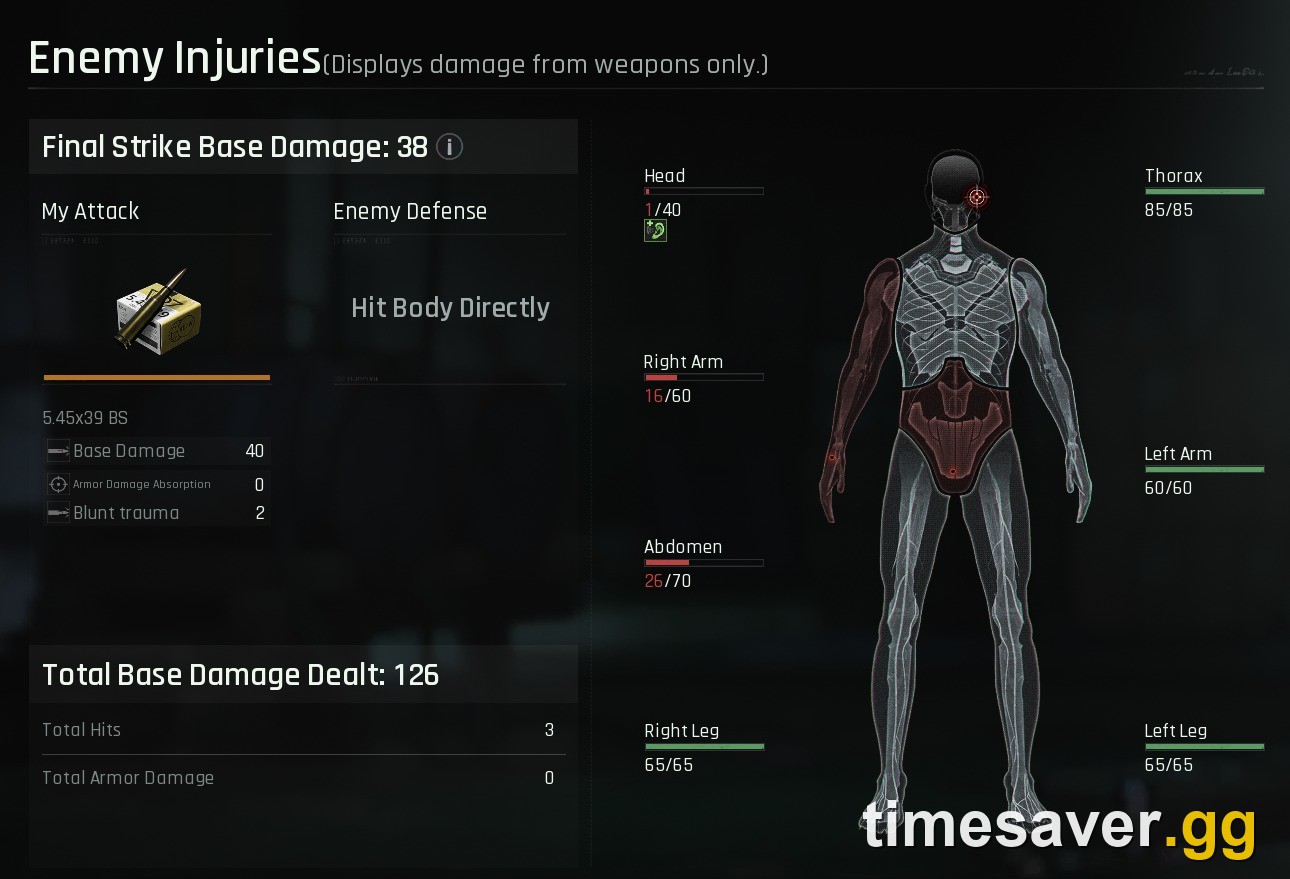
Check the death screen. ABI's post-raid combat details show which body parts were hit, and Season 6 "further improved the display for head and face hits". If you keep dying to head and face hits round the same kind of corner, your peek is showing your head first. Look at:
- Which side you peeked. Left-shoulder deaths at corners are the classic case.
- How close you were to the edge. Hugging the wall gives the angle to the other player.
- Whether you peeked the same angle twice. The second peek is the one that gets pre-aimed.
Before blaming the game: in every online shooter, the player who moves first gets a small timing advantage, because the other player's screen shows the movement a moment late. That is the peeker's advantage. Morefun has not published a tick rate and we have not measured one, so treat claims you see on Reddit as unverified. You can't fix netcode. You can fix which shoulder you peek with and how far you stand from the wall.
Peeking tips for solo players
Solo players feel bad peeks most, because nobody trades for you. Three habits help most:
- Hold angles you chose, not angles you ended up in. Pick spots where an enemy has to come at you from your right side.
- Walk more than you sprint near contact. Another of the six rules from this week's thread: "walk whenever you can, everyone else running means you hear them first." If you hear them first, you choose the peek.
- Peek when they are busy. The same rules say "push when they reload/heal or throw a grenade." That's when a wide swing beats a held angle.
For the full solo picture (maps, gear and when to extract), see our Arena Breakout: Infinite solo guide. If your fights end in leg damage rather than headshots, the leg meta guide explains how limb damage works.
FAQ
What is the lean key in Arena Breakout: Infinite? Q leans left and E leans right in all three presets (Default, Survival, Tactical). Default and Tactical use Press (toggle) and Survival uses Hold. You can change both the key and the input type in the control settings.
Should lean be toggle or hold in ABI? Hold. You only lean while the key is down, so a tap is a quick peek and you can't walk out still leaned into a doorway. Most experienced players recommend it.
Is right peek better than left peek in Arena Breakout: Infinite? Usually, yes. The rifle sits on your right shoulder, so a right-side peek shows less of your head before you can see the enemy. A left-side peek at a corner tends to show your head first. Swap sides or swing wide instead.
Did Season 7 patch right peeking? No. Season 7 fixed reverse leaning: leaning the "wrong" way behind some cover hid your head hitbox, and Morefun called that an exploit. Normal right-side peeks still work. The patch also made first- and third-person views more consistent.
How do I free look in ABI? Hold the Middle Mouse Button (Free Camera). The community controls table lists it as a fixed key you can't rebind.
Does Arena Breakout: Infinite have peeker's advantage? Like every online shooter, the player who moves first gets a small timing edge. Morefun has not published server tick rates, so treat any specific number you see as unverified.
More Arena Breakout: Infinite guides
More Arena Breakout: Infinite guides: maps, ammo, economy and season explainers, checked against Morefun's own patch notes.